What Is an Application Acceleration Manager? How It Works, and How to Choose One
practical user manual guide: what to include, a copy-paste template, tools, compliance dates, and how to test whether your manual actually works.

toc Table of Contents Click to expand (24 sections) expand_more
Search “application acceleration manager” and you get two different answers wearing the same name. One is a specific product that F5 shipped in 2013. The other is a loose label the industry now pins on almost any box or service that makes applications load faster. Most of the pages ranking for this term pick one meaning, ignore the other, and never tell you which one you are reading about.
That confusion matters, because it changes what you buy. If you think an application acceleration manager is a modern, must-have layer, you may spend money reproducing capabilities your CDN and your load balancer already give you for free. If you think it is only the old F5 module, you miss that the function has quietly moved into ADCs, CDNs, and SASE platforms.
This article separates the product from the category, corrects a few things the top results get wrong (including the current status of F5’s own module), and gives you a way to decide whether you need a dedicated acceleration layer at all.
What an application acceleration manager actually is
An application acceleration manager is software, an appliance, or a cloud service that sits between users and application servers and reduces the delay between a request and a usable response. It does this by combining several optimization techniques (caching, compression, transport tuning, connection reuse, TLS offload, and traffic steering) instead of relying on any single one. The goal is application responsiveness, not raw bandwidth.
That is the honest generic definition. The catch is that “application acceleration manager” started life as a brand name, not a category, and the two have been tangled together ever since.
Application acceleration manager vs application accelerator
Here is a distinction some pages get backwards. You will see it claimed that an “accelerator” is a single trick like a caching plugin, while a “manager” is a command center that bundles many tricks. That is a tidy story, and it is invented. Neither term has a fixed technical meaning that separates them that cleanly.
In practice, “application accelerator” is used two ways: for a hardware or software component that speeds up one workload (a TLS accelerator card, a compression engine), and as a plain synonym for the whole acceleration function. “Application acceleration manager” is used mostly because F5 named a product that way. When a vendor sells you an “acceleration manager” today, look past the noun and read the feature list. What matters is which optimizations it performs and at which layer, not whether the label says manager, accelerator, optimizer, or controller.
F5 BIG-IP AAM: the product behind the phrase, and its status now
The reason this exact phrase exists is F5. BIG-IP Application Acceleration Manager (AAM) reached general availability in June 2013, according to F5’s own launch announcement, and it was not a new invention so much as a merger: AAM combined the older BIG-IP WebAccelerator and the BIG-IP WAN Optimization Manager into one module. F5’s launch materials claimed first-visit page load reductions of up to 50 percent for SaaS applications and throughput gains of up to 75 percent in high-packet-loss conditions such as satellite and some mobile links. Treat those as vendor figures from a product launch, not independent benchmarks.
The more useful fact is what happened next. In the same release, F5 moved core acceleration features (TCP optimization, compression, bandwidth control, iSession, and SPDY support) into the base BIG-IP Local Traffic Manager, its ADC module. From there, AAM steadily lost ground inside F5’s own stack. Its release notes across BIG-IP versions 11 through 15 show it could only ever be provisioned standalone, never alongside other modules on a shared device, and SPDY support inside it was deprecated in version 13. F5’s current direction (BIG-IP Next, F5 Distributed Cloud, and NGINX) is built around ADC, CDN, and SaaS delivery rather than a dedicated AAM module.
So is F5 BIG-IP AAM still supported? The short answer: it exists on legacy TMOS branches that are late in their lifecycle, and F5 is not steering new deployments toward it. Support depends entirely on the specific BIG-IP version you run, and those dates move, so check F5’s current software lifecycle and end-of-life pages for your exact version rather than trusting any blog’s snapshot. The practical takeaway is that a lot of “application acceleration manager” content describes a product framing from over a decade ago without ever mentioning that the framing aged.
A few terms you will meet repeatedly, in one place: an ADC (application delivery controller) is the load-balancing device that most acceleration now lives inside; WAN optimization is the older discipline of squeezing more out of the link between two fixed sites; a CDN (content delivery network) caches content close to users; and SASE (secure access service edge) folds networking and security into one cloud-delivered layer.

Why application acceleration matters now
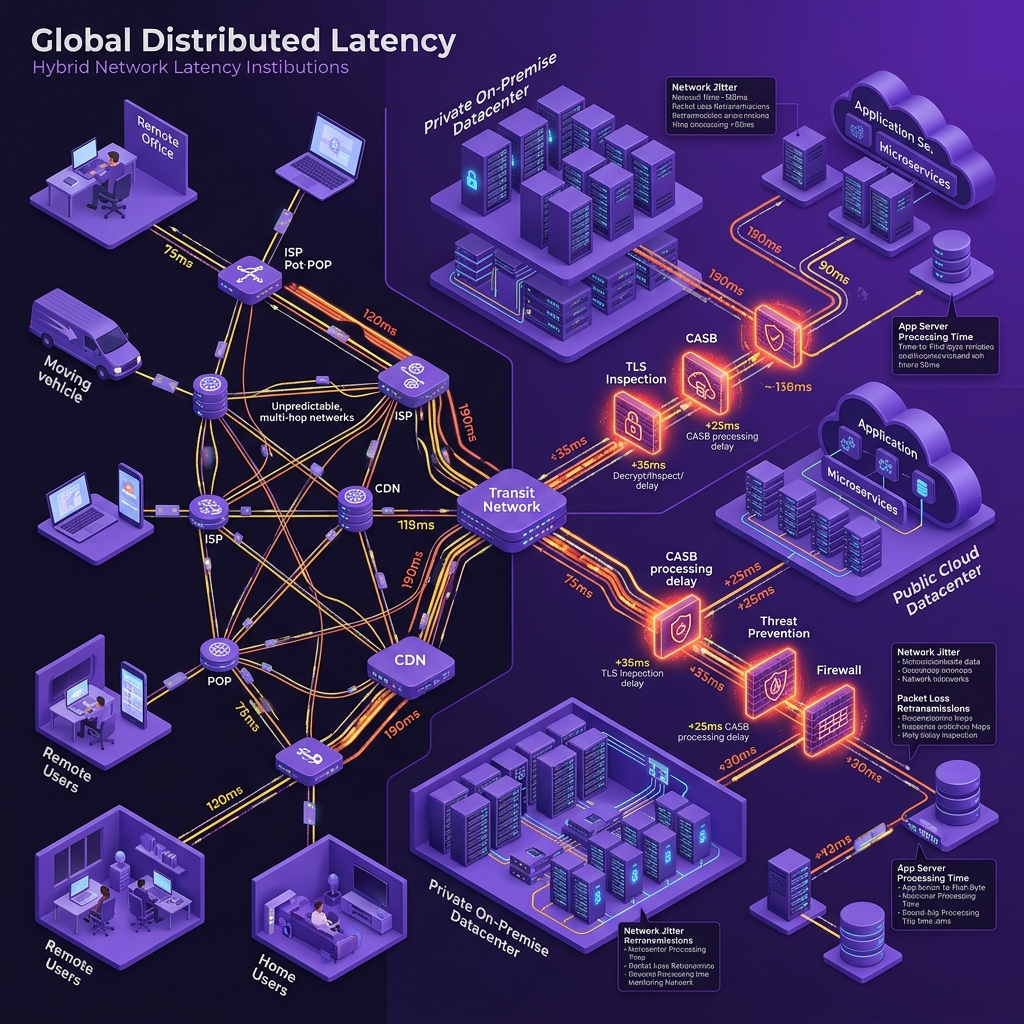
Applications stopped living in one place, and that single shift is why acceleration became a live problem again rather than a solved one. Your users sit at home, in branches, and on phones. Your services sit across public clouds, SaaS vendors, and a shrinking set of your own data centers. Between them runs a long, unpredictable path where every hop adds latency and every wireless link adds jitter.
Encryption made the delay harder to hide. When traffic is encrypted end to end, the network in the middle cannot read the payload, so the old trick of inspecting and optimizing content on the wire mostly stops working. As Palo Alto Networks points out in its own explainer, security overlays like TLS inspection, CASB, and DLP each add processing time on top of that, because they handle sessions independently and add round trips and CPU load.
The cost of the resulting slowness is measurable, not vague. Google’s Core Web Vitals tie real user experience to specific timings, and slow responses map directly to abandoned carts, lost form completions, and staff waiting on frozen internal tools. Those business effects (higher productivity when tools respond, lower churn when pages load, less strain on origin servers) are the real benefits of acceleration. They are worth naming where they occur rather than collecting into a list of interchangeable promises, because each one traces back to a different mechanism further down this page.
How application acceleration evolved, and why that changes what you buy
The dedicated acceleration appliance had its decade. That decade is over, and knowing how it ended tells you what to shop for now.
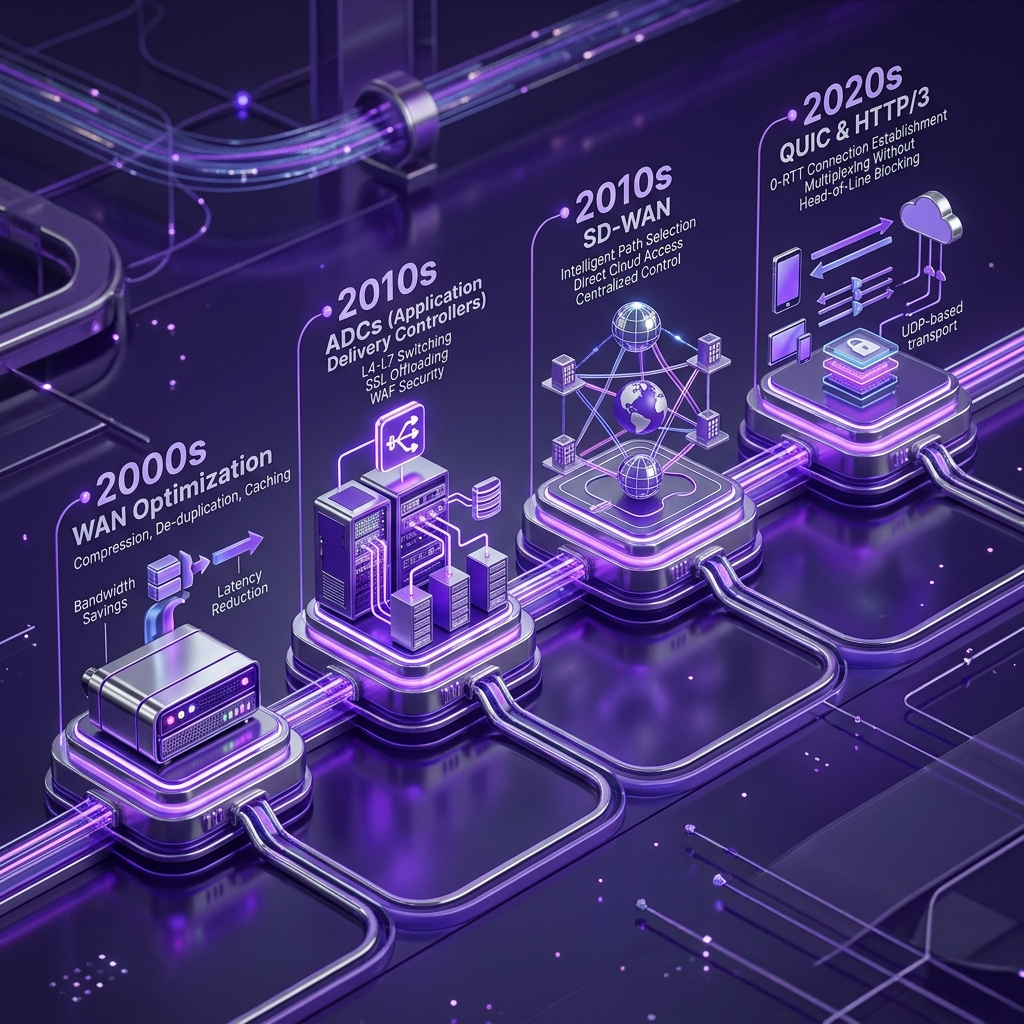
Four phases got us here. In the early 2000s, WAN optimization appliances sat in pairs between fixed sites and used TCP proxies, caching, compression, and protocol spoofing to beat distance and scarce bandwidth. Through the mid-2000s and 2010s, as companies put more services in the data center, application delivery controllers took over, adding load balancing, SSL offload, and HTTP compression, but staying bolted to fixed infrastructure. The 2010s brought SD-WAN overlays that used forward error correction, packet duplication, and dynamic path selection to hold throughput steady over messy broadband and mobile links. And in the 2020s, acceleration moved into the protocols themselves: QUIC and HTTP/3 build congestion control, loss recovery, and stream multiplexing directly into transport, so you get much of the benefit without any dedicated box.
The verdict that follows from this history: the thing you would once have bought as a standalone “manager” is now a feature of your ADC, a default of your CDN, and a property of the protocol your servers already speak. That is the single most important input to a sensible buying decision, and it is the part the vendor explainers skip.
How an application acceleration manager works
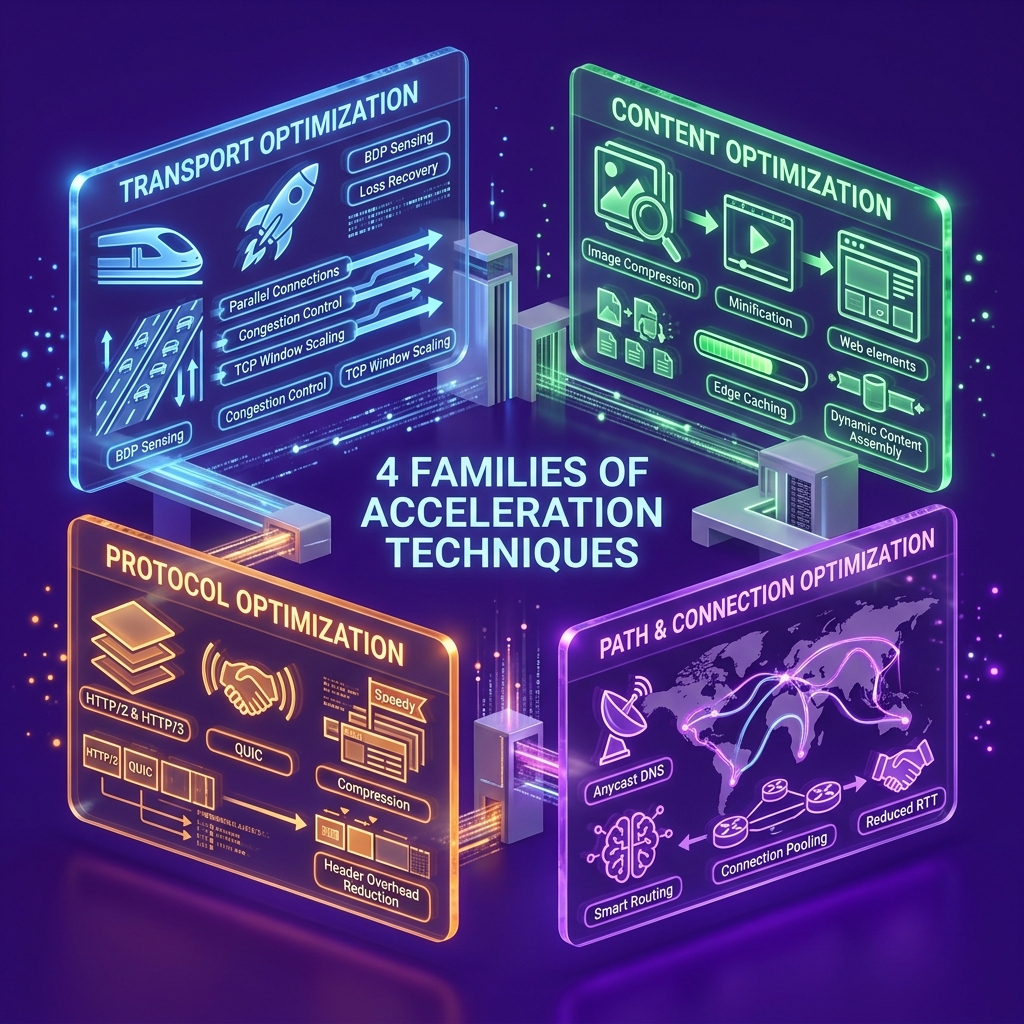
Group everything a manager does by the problem it targets, and four families of technique fall out, each aimed at a different source of delay. A real product draws from all four.
Transport optimization works on the connection itself. Classic TCP is conservative: it ramps up slowly and pauses to confirm delivery, which hurts over long or lossy paths. Tuning the TCP stack (larger initial windows, smarter congestion control, fewer needless round trips) helps, and QUIC goes further by replacing TCP’s handshake with a faster one and supporting 0-RTT resumption so a returning session can send data almost immediately.
Protocol optimization improves how the application chatter is carried once the connection is up. HTTP/3, which runs on QUIC, removes the head-of-line blocking that could stall HTTP/2, and it reuses encrypted sessions instead of renegotiating TLS on every request. TLS 1.3 itself cut handshake round trips, so the protocol layer is where a lot of modern gains actually come from.
Content optimization shrinks or eliminates what has to travel. This is the familiar cluster: caching frequently requested objects near the user, compressing responses, and deduplicating repeated byte patterns. It pays off handsomely for static content and barely at all for dynamic, personalized, encrypted responses, which is the limitation the older appliance era kept running into. Much like automated warmup cache requests keep edge nodes fresh for incoming users, smart content optimization ensures low TTFB at scale.
Path and connection optimization manages how data moves and how sessions are reused. Forward error correction and packet duplication recover from loss without waiting for retransmits. Dynamic path selection routes around a degraded link. Connection reuse and multiplexing keep a single pathway open across many small requests so each click does not pay a fresh setup cost. On top sits load balancing, and global server load balancing (GSLB) to steer users to the nearest healthy data center. SSL offload moves the cost of encryption and decryption off the application servers, and real-time analytics feed a control loop that adjusts all of the above as conditions change.
Put those together for a concrete case. During a high-traffic sale, load balancing spreads the flood across servers, caching serves the shared pages without rebuilding them, compression shrinks the product images, connection reuse keeps each shopper’s clicks instant, and TLS offload keeps the checkout database free to confirm stock rather than burning cycles on encryption. No single mechanism carries the load. The coordination is the product.
Where acceleration lives in a modern network
There is no single box you can point to and call “the accelerator” anymore, which is exactly why the “manager” framing feels dated. The function is spread across the path, and it shows up in four places.
At the data center or ADC layer, the load balancer handles offload, caching, and connection management for services you host. At the branch and SD-WAN edge, overlays apply FEC and path selection to keep site-to-cloud traffic stable. Across CDN and edge POPs, content is cached and requests are shortened by serving from a nearby node instead of the origin. And inside SASE and cloud gateways, acceleration rides in the same pass as security inspection, so traffic is optimized and policy-checked together instead of in separate hops that each add latency.
One distinction under all of this decides whether you need extra hardware: symmetric versus asymmetric acceleration. Symmetric acceleration needs a device or agent at both ends of a link, which is how classic WAN optimization worked and why it meant buying boxes in pairs. Asymmetric acceleration lives on one side, usually near the server or in the cloud, and needs nothing installed at the user end. Almost everything modern (CDN caching, protocol upgrades, ADC offload) is asymmetric, which is the real reason the “does it need extra hardware” question usually answers itself with a no.

Application acceleration manager vs the alternatives
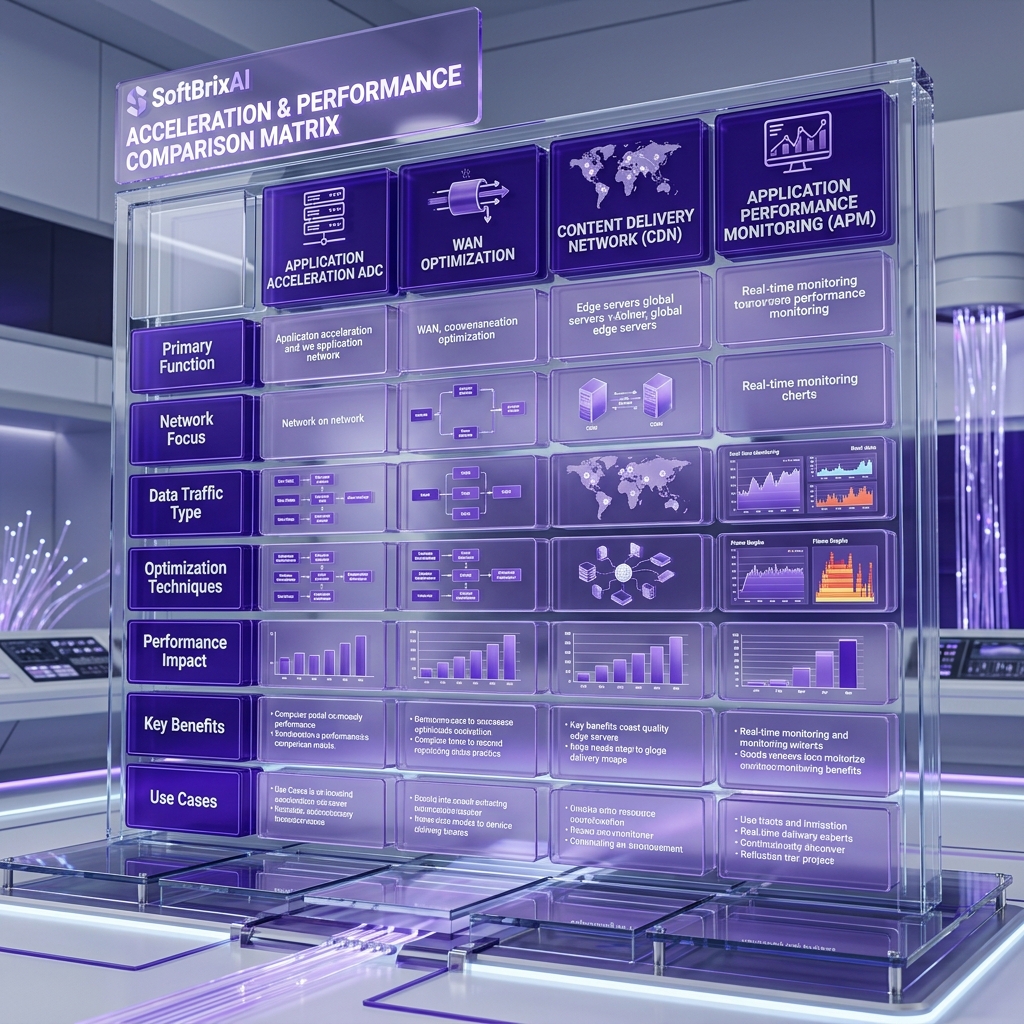
Four technologies get shelved next to application acceleration and treated as interchangeable. They are not, and confusing them is how teams end up paying twice for the same benefit.
| Technology | What it optimizes | Where it sits | Symmetric? | Blind spot |
|---|---|---|---|---|
| Application acceleration / ADC | Application responsiveness for a service you deliver | Near the server, data center or cloud | No | Does little for a link you do not terminate |
| WAN optimization | Throughput between two fixed sites | Appliance pairs at each site | Yes | Weak on encrypted, dynamic, cloud-bound traffic |
| CDN | Delivery of cacheable content to distant users | Distributed edge POPs | No | Limited value for uncacheable, personalized data |
| APM (application performance monitoring) | Visibility into where time goes | Agents and instrumentation | N/A | Measures and diagnoses, does not speed anything up |
The one-line reads: WAN optimization makes a link faster, an ADC makes a service faster, a CDN makes content closer, and APM tells you why something is slow without fixing it. A dedicated application acceleration manager overlaps most with the ADC, which is precisely why the standalone version faded.
Two related phrases cause their own confusion. WAN acceleration targets the long-distance link between sites or to remote users, so it is a specific case aimed at distance and bandwidth. Network acceleration is the broader, fuzzier umbrella for speeding up data anywhere, including inside a single building. WAN acceleration is a subset of network acceleration, not a separate rival to it.
How is performance measured and tuned?
You measure it the same way you measure any latency problem: at named points, before and after a change, so you can prove the change did something. Guesswork and vendor dashboards are not a baseline. Testing methodology should be rigorous, mirroring established principles from software testing basics to ensure repeatable benchmark results.
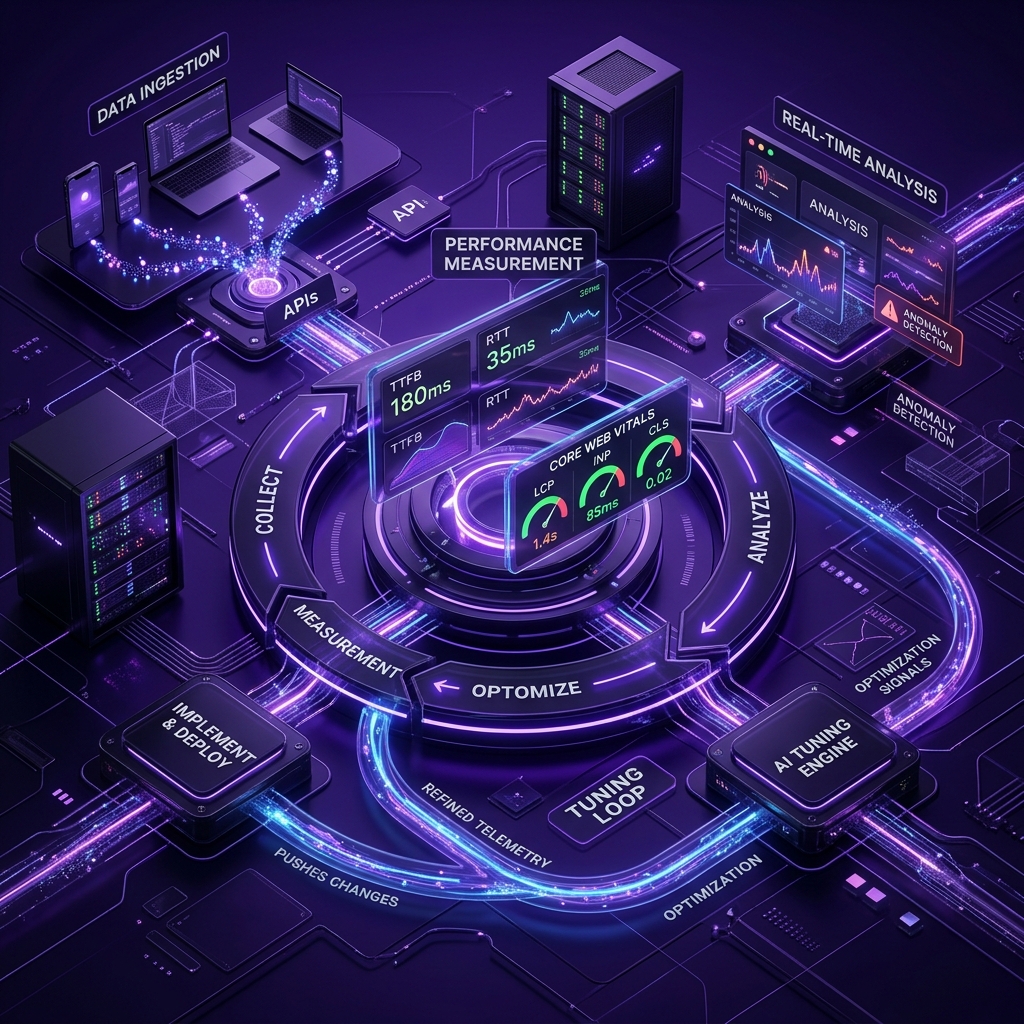
The metrics that matter, and what each tells you: TTFB (time to first byte) captures server and first-hop delay; RTT (round-trip time) captures path distance and congestion; throughput and retransmission rate capture how well the link is actually being used; and on the front end, the Core Web Vitals (LCP for load, INP for responsiveness, which replaced FID in March 2024, and CLS for visual stability) capture what the user feels. Application response time ties it back to the transaction the business cares about.
A workable baseline procedure looks like this:
- Pick two or three representative user journeys, not just the homepage.
- Capture TTFB, RTT, throughput, and the Core Web Vitals for each, from a few real locations, before touching anything.
- Record the current retransmission rate and the share of traffic on HTTP/2 versus HTTP/3.
- Make one change at a time (enable HTTP/3, turn on compression, add caching rules), then re-measure the same journeys from the same locations.
- Keep the measurement running afterward, because acceleration is a control loop, not a one-time switch. Building that kind of continuous telemetry well is its own discipline, the same one behind production monitoring and drift-detection pipelines in any data-heavy system.
The common misconfigurations are worth knowing before you tune. Compressing already-compressed assets (images, video) wastes CPU for no gain. Caching dynamic or personalized responses serves the wrong data to the wrong user. Enabling 0-RTT resumption on non-idempotent requests such as POST opens a replay-attack window unless your backend guards it. And QUIC quietly fails when a middlebox or firewall blocks UDP, silently falling back to TCP and hiding the fact that your HTTP/3 rollout is not actually happening.
Current adoption: what the numbers actually say
Depending on who you ask, HTTP/3 is on 21 percent of the web or on nearly 40 percent of it. Both figures are real, and the gap between them is the whole story, so any page quoting a single number is hiding the interesting part.
W3Techs, which counts whether a site advertises HTTP/3 through alt-svc headers or DNS HTTPS records, put support near 39 percent of the sites it tracks in its 2026 data. Cloudflare Radar and other wire-level measurements, which count actual requests served, land closer to 21 percent, and that request-level share has effectively plateaued, rising only about half a percentage point across a full year. At the CDN edge, where the big providers have enabled it by default, the share sits around 35 percent. And among the top 1,000 sites by traffic, HTTP/3 is already past 50 percent, because Google, Meta, Netflix, Amazon, and Cloudflare adopted it years ago.
The reason those numbers diverge is measurement method, not error. Site-level “support” counts intent to serve HTTP/3. Request-level share counts what clients actually negotiated, which is lower because a site can advertise HTTP/3 while most of its traffic still rides HTTP/2, and because middleboxes block QUIC’s UDP. Adoption also skews toward mobile-first markets, where W3Techs and Cloudflare data show countries like Italy, Brazil, and India near or above 29 to 30 percent, since QUIC’s loss recovery helps most on shaky mobile networks. Browser support is essentially universal, above 95 percent.
The honest conclusion cuts against the usual narrative. Acceleration protocols are mainstream at the edge and among large sites, but the “HTTP/3 is rapidly taking over everything” line does not match what is on the wire, where request share has stalled near a fifth. That plateau is a better guide to reality than any single headline percentage.
The real trade-offs and limits
Acceleration is not free, and the bill is not only the license. Before you deploy anything, weigh five costs the vendor decks tend to underplay.
Deployment can get complicated, because inserting an acceleration layer means touching your traffic path, and a wrong setting can make applications slower rather than faster. There is a recurring cost too: licenses, and for appliance-based approaches, hardware and maintenance, which is why a dedicated manager rarely pencils out for a small business. Monitoring never ends, since the thing is a control loop that needs watching and tuning, not a set-and-forget install. Legacy applications with unusual protocols may need extra configuration or simply resist modern optimization.
The trade-off that deserves the most attention is encryption and compliance. Symmetric optimization and deep content tricks need to see the payload, and end-to-end encryption is designed to stop exactly that. Terminating TLS to inspect and optimize traffic can conflict with privacy requirements and regulated-data rules, and security overlays like DLP and CASB add their own latency. In regulated settings (healthcare, finance, anything under HIPAA, PCI DSS, or SOC 2), the right design keeps optimization on the server side of the encryption boundary and treats auditability as a first-class requirement. Detailed operational procedures for regulatory compliance can also be documented using a structured user manual guide. Getting that boundary right is closer to a governance problem than a performance one, and it is the same discipline as engineering auditability and policy controls into regulated data flows. The blunt version: if speeding something up requires breaking your encryption model, the speed is not worth it.
How to choose one, and who genuinely does not need one
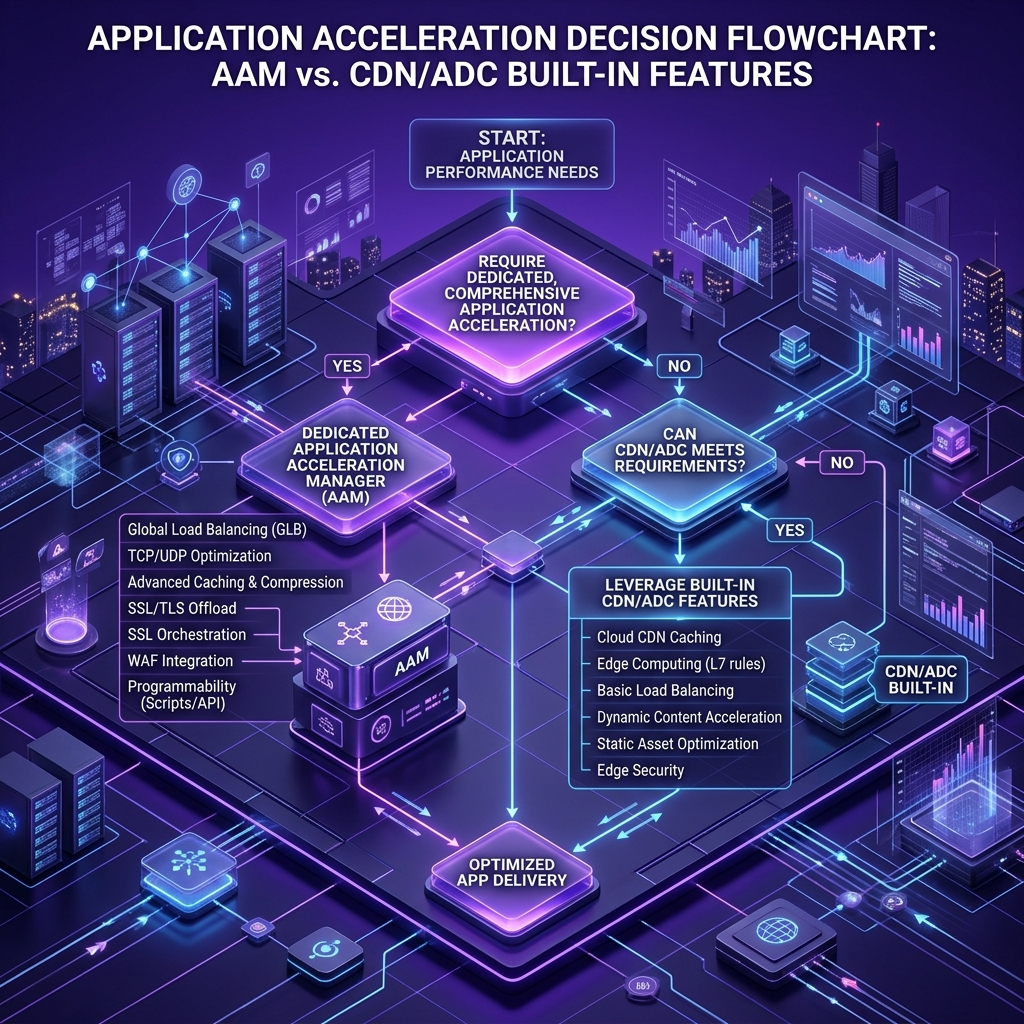
Start with the least popular question: do you need one at all? If you already run a modern ADC or sit behind a capable CDN, you are almost certainly getting caching, compression, TLS offload, connection reuse, and HTTP/3 without buying a separate product. A greenfield cloud application usually gets acceleration by default. The teams that still benefit from a dedicated acceleration layer are narrower than the marketing suggests: those moving large volumes of data between data centers for replication or disaster recovery, those supporting genuinely constrained links, and those stuck with legacy applications that a general-purpose ADC handles poorly.
If you do need one, six criteria decide the fit. Match the deployment model (appliance, virtual, or cloud) to where your traffic and your team actually operate. Confirm it scales the way you grow, ideally elastically rather than by forklift upgrade. Check that its security and compliance posture fits your regulatory boundary, since this is where most acceleration projects run aground. Verify real cloud compatibility across the public clouds and SaaS you use. Demand analytics that show where time is lost, not static reports. And read the licensing and support terms closely, because ongoing cost and access to real engineers matter more than the spec sheet.
The vendor field, described plainly rather than sold:
| Vendor / service | What it actually is | Form factor | Best fit |
|---|---|---|---|
| F5 (BIG-IP, Distributed Cloud) | ADC platform; the historical home of “AAM” | Appliance, virtual, SaaS | Existing F5 shops, complex data center delivery |
| A10 Thunder ADC | ADC with acceleration and GSLB | Appliance, virtual | High-throughput enterprise traffic |
| Citrix NetScaler | Long-standing ADC | Appliance, virtual, cloud | Citrix-centric estates |
| Cloudflare | CDN plus edge and security | SaaS / edge | Web and API delivery, fast HTTP/3 |
| Akamai | Large CDN and edge platform | SaaS / edge | Global media and high-scale content |
| Fortinet | Security-led, with delivery features | Appliance, virtual | Security-first networks |
| AWS Global Accelerator / Azure Front Door | Cloud-native acceleration and routing | Managed cloud service | Workloads already on that cloud |
If your instinct is to buy a box labeled “acceleration manager,” pause and check whether the capability is already sitting unused in the ADC or CDN you pay for. That check saves more money than any feature comparison.
Implementation checklist
Assume nothing about where the delay is. Measure first, then work through the sequence:
- Baseline the key user journeys (TTFB, RTT, throughput, Core Web Vitals) from real locations.
- Identify which layer the delay lives in: transport, protocol, content, or path.
- Decide symmetric versus asymmetric, which tells you whether any user-side hardware is even needed (usually it is not).
- Turn on protocol wins first, since they are cheap: HTTP/3 and TLS 1.3 where your stack supports them.
- Add caching and compression rules, carefully excluding dynamic and already-compressed content.
- Offload TLS to the delivery layer to free the application servers.
- Configure load balancing and GSLB with real health checks.
- Confirm QUIC is actually negotiated and not silently falling back because UDP is blocked.
- Re-baseline against step 1, change by change, and keep the telemetry running.
Where this is heading
Expect fewer boxes and more protocol. The direction of travel is clear from the last few years: acceleration keeps dissolving into the CDN, the ADC, the SASE fabric, and the transport layer, and the standalone “manager” keeps looking more like a historical category than a growth one. Multipath QUIC and further HTTP/3 refinements will add headroom for the sites that already run them, while the request-level plateau suggests the long tail of the web will take years to follow. The safe bet is to treat acceleration as a property of the platform you already buy, not a separate purchase. For complex projects operating under uncertainty, using adaptive software development helps engineering teams iteratively evaluate modern protocol shifts without rigid upfront locks.
The bottom line
If your applications respond quickly and your servers stay calm under load, you do not need to buy anything with “acceleration manager” on the label. If they do not, the fix is rarely a single dedicated product and usually a matter of turning on the acceleration your ADC, CDN, or protocol stack already offers, then measuring whether it helped. Baseline your real user journeys this week. That one habit will tell you more than any vendor demo.
Frequently Asked Questions
What does application acceleration mean?
It means improving how quickly an application responds for the user, by reducing latency, packet loss, and wasted round trips rather than just adding bandwidth. It works across the transport, protocol, content, and path layers at once. The point is a faster experience, measured in response time, not a bigger pipe.
Is F5 BIG-IP AAM still supported?
It survives only on older BIG-IP (TMOS) versions that are late in their lifecycle, and F5 has moved its core acceleration features into the base ADC and steered new deployments elsewhere. Whether your specific version is still under support depends on its lifecycle date, which changes over time. Check F5’s current end-of-life and software lifecycle pages for your exact version.
How does WAN acceleration differ from network acceleration?
WAN acceleration targets the long-distance link between sites or to remote users, so it is aimed at distance and limited bandwidth. Network acceleration is the broader umbrella for speeding up traffic anywhere, including inside one building. WAN acceleration is one specific case within network acceleration, not a competing idea.
Is application acceleration the same as WAN optimization?
No. WAN optimization maximizes throughput on a fixed link using compression, deduplication, and TCP tuning, and it was built for a predictable, often unencrypted world. Application acceleration is broader and application-aware, aimed at responsiveness across cloud, SaaS, and mobile. One makes a link efficient; the other makes an application feel fast.
How is application acceleration implemented in SD-WAN or SASE?
It is built into the platform rather than bolted on. SD-WAN and SASE use live telemetry to pick paths, apply forward error correction, and optimize sessions in the same pass as routing and security. Because it runs in software using the protocols that already carry your traffic, it needs no separate acceleration appliance.
Does application acceleration require additional hardware?
Usually not. Legacy WAN optimization needed matched appliances at both ends because it was symmetric. Modern acceleration is mostly asymmetric and software-defined, living in the ADC, CDN, or SASE layer and using QUIC, HTTP/3, and adaptive overlays already in the path. You add hardware only for specific symmetric or very high-throughput cases.
Which applications benefit most from acceleration?
Latency-sensitive and cloud-delivered workloads see the biggest gains: SaaS tools, collaboration and real-time services, e-commerce checkouts, and mobile apps on shaky networks. Static, cacheable content accelerates easily. Fully dynamic, personalized, encrypted responses benefit least from content tricks and most from protocol and transport improvements.
How does application acceleration improve reliability for critical operations?
By cutting retransmissions, smoothing jitter, and holding throughput steady when conditions vary, it keeps sessions stable for remote users and time-sensitive transactions. For data replication and disaster recovery, that consistency is what helps hit recovery point and recovery time objectives (RPO and RTO), where a stalled transfer is the real risk.
Last updated: July 2026
Umar Abbas is the Principal AI Architect and Operator of SoftBrixAI. With years of experience in distributed systems, security-first architectures, and high-performance computing, Umar leads the engineering team in designing production-ready, security-hardened AI solutions.
Umar Abbas
Umar Abbas is the Principal AI Architect and Operator of SoftBrixAI. With years of experience in distributed systems, security-first architectures, and high-performance computing, Umar leads the engineering team in designing production-ready, security-hardened AI solutions.