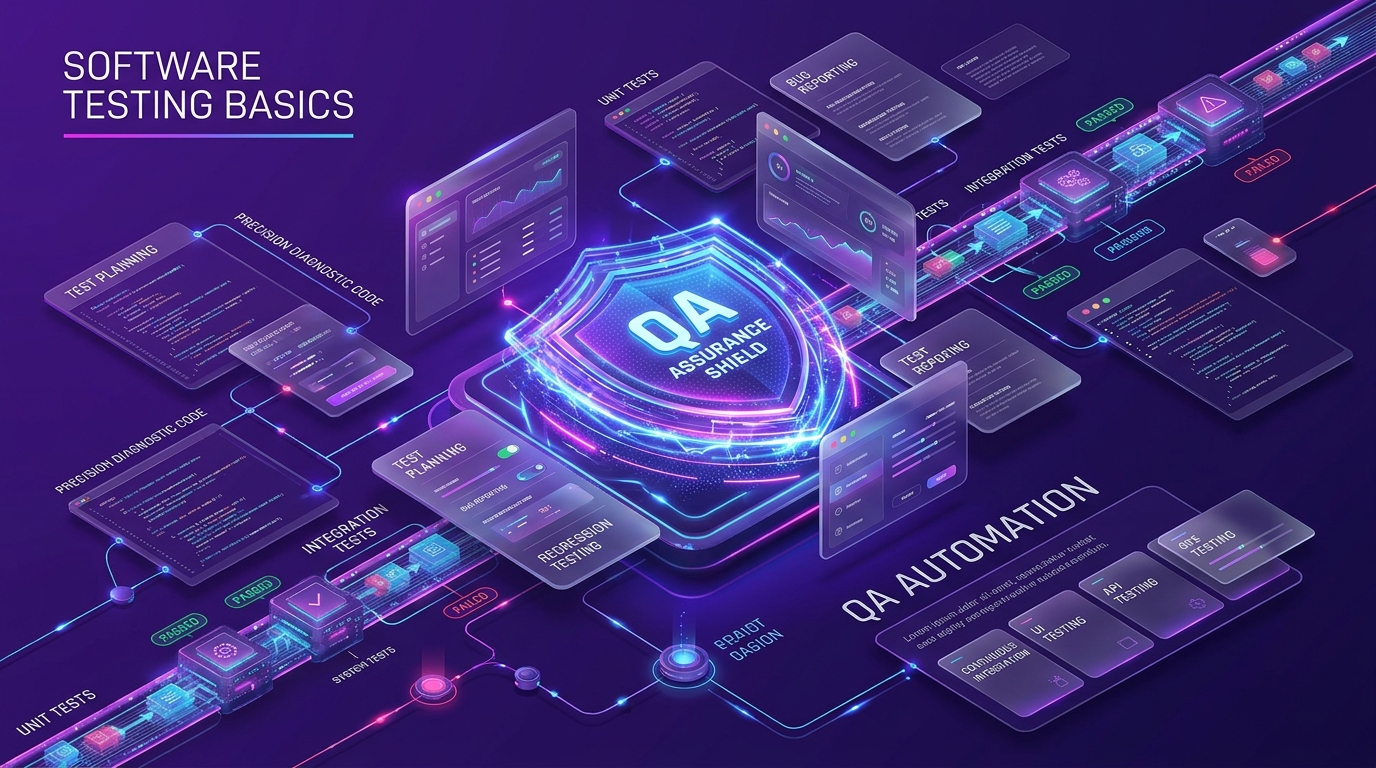
Software testing basics are the core concepts, levels, types, and processes used to check that software works as expected before users touch it. The practice runs on a simple loop: define what correct behavior looks like, run the software against that definition, compare actual results with expected results, and log any defect that appears. Software testing basics deliver three main benefits: higher software quality, lower defect cost, and faster, safer releases. Teams apply these fundamentals across web apps, mobile apps, APIs, and enterprise systems, from a single unit test up to full end-to-end testing in CI/CD pipelines. The main parts include core terminology, testing principles, the four levels of testing, functional and non-functional types, the Software Testing Life Cycle (STLC), testing models, tools, and best practices. This guide covers each part in order, from first definitions to the future of AI-driven testing.
Introduction to Software Testing
What is Software Testing?
Software testing is the process of evaluating a software application to verify it works as expected and meets its requirements. Testers run the software, compare actual output against expected output, and report defects. The goal is reliable, secure, and correct software.
Software testing sits inside the Software Development Life Cycle (SDLC). It starts at the design and planning phase and continues after deployment. Early testing finds problems while they are cheap to fix.
Consider an online banking application where users transfer money between accounts. A single untested defect can post an incorrect transaction, cause financial loss, and break customer trust. Testing catches that defect before release.
History of Software Testing
Software testing began with software engineering, just after World War II. Computer scientist Tom Kilburn wrote the first piece of software, which ran on 21 June 1948 at the University of Manchester in England. It performed math through basic machine code.
Debugging was the main testing method for the next two decades. By the 1980s, teams tested applications in real-world settings, not just to fix bugs but to confirm broader reliability. Quality assurance (QA) became a core focus of the SDLC.
The 1990s and early 2000s brought automated testing and test-driven development (TDD). Object-oriented programming (OOP) split code into modules, which made small, focused unit tests practical. Mobile and web growth then forced new performance, usability, and security testing.
In the last decade, Agile and DevOps made testing continuous. Testing now runs in every phase, automated and integrated. Teams use tools like Selenium, Playwright, and Cypress to reach quality at speed (including performance automation validation like warmup cache requests in release suites).
Why is Software Testing Important?
Software testing is important because defects cause financial loss, system failure, and reputational damage. In connected systems, one bug can degrade many services at once.
In July 2024, a flawed software update from cybersecurity firm CrowdStrike crashed Microsoft Windows systems worldwide. Delta Air Lines took the worst hit among US airlines, with thousands of cancelled flights and estimated losses above USD 500 million. Third-party code in mission-critical systems needs thorough testing.
Early testing pays back fast. Development teams that get test feedback early can fix five high-cost problem types before release:
- Architectural flaws
- Poor design decisions
- Invalid functionality
- Security vulnerabilities
- Scalability limits
Fewer errors mean higher reliability, better user experience, and more sales.
The Impact of Defects: Why Testing Fundamentals Are Critical
Real incidents show what untested defects cost. There are 8 well-known failures that prove the point:
- 1985: The Therac-25 radiation machine malfunctioned and caused deaths and injuries.
- 1994: A software bug contributed to a China Airlines crash that killed 264 people.
- 1996: A US bank error credited USD 920 million to 823 customers.
- 1999: A software bug caused the loss of a USD 1.2 billion military satellite launch.
- 2015: An F-35 fighter jet bug affected target detection.
- 2015: A Bloomberg terminal crash disrupted 300,000 traders.
- Starbucks: A point-of-sale (POS) failure shut down 60% of outlets across the US and Canada.
- Nissan: An airbag software issue forced a recall of 1 million cars.
These cases confirm one fact: testing protects reliability, safety, and performance.
Core Concepts and Terminology
Software testing uses a shared vocabulary. Clear terms keep QA, developers, and product teams aligned.
Verification vs. Validation
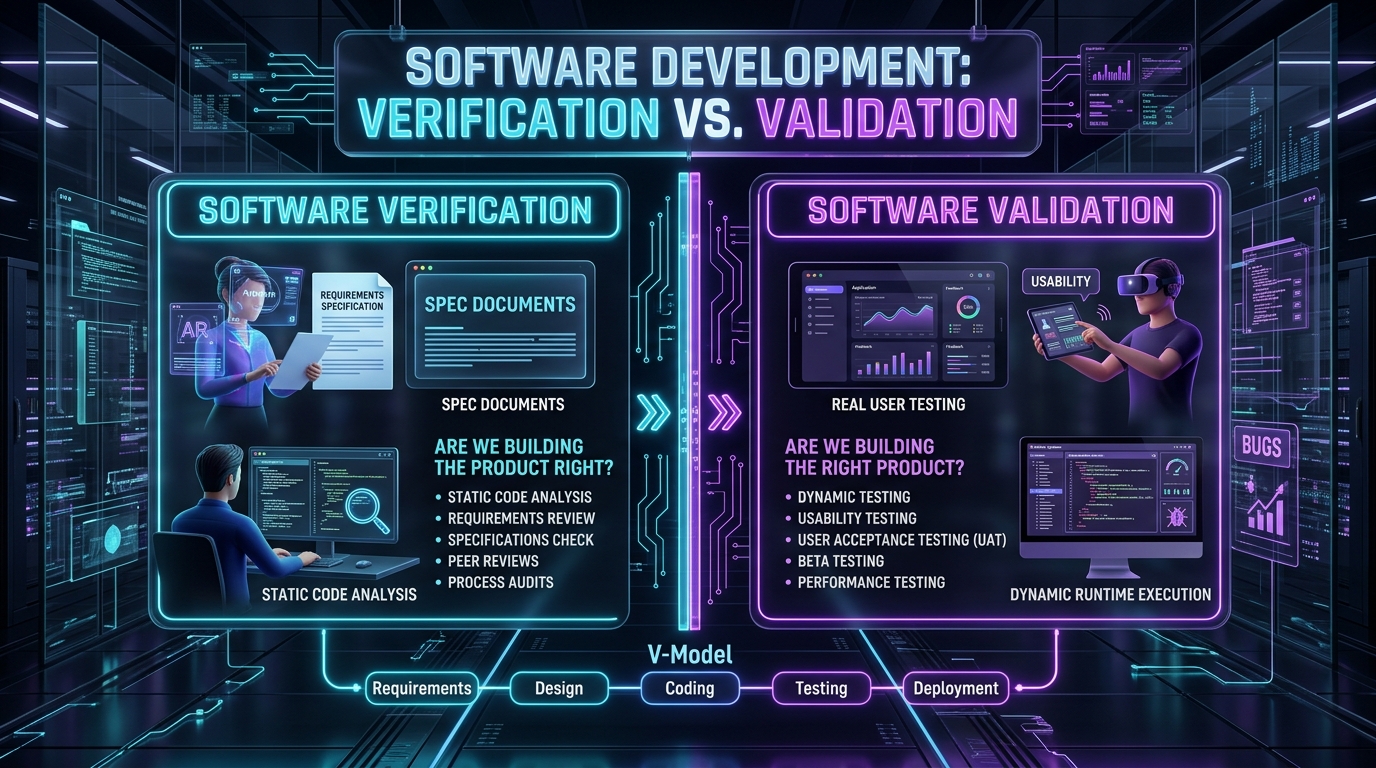
Verification and validation answer two different questions. Verification checks whether you built the product right; validation checks whether you built the right product.
Verification reviews documents, design, and code against requirements. It uses reviews, walkthroughs, and static checks. Validation runs the working software to confirm it meets user needs.
Error, Defect, Bug, and Failure
These four terms describe one problem at different stages. An error is a human mistake, a defect (or bug) is the flaw in the code, and a failure is the wrong behavior a user sees.
- Error: a developer writes incorrect logic.
- Defect: the mistake becomes a fault in the code.
- Bug: another word for a defect.
- Failure: the software produces a wrong result at runtime.
Test Case, Test Scenario, and Test Suite
These three terms scale from small to large. A test case is one set of inputs and expected results, a test scenario is a high-level feature to check, and a test suite is a group of related test cases.
A test case verifies one specific behavior, such as login with valid credentials. A test scenario covers a broader flow, such as user account access. A test suite bundles many cases to test a feature set together.
Test Plan and Test Environment
A test plan and a test environment set the scope and the setup. A test plan is a document that defines scope, objectives, resources, schedule, and approach; a test environment is the hardware and software setup where tests run.
The test plan tells the team what to test and how. The test environment matches production as closely as possible, so results stay realistic.
Defect Life Cycle
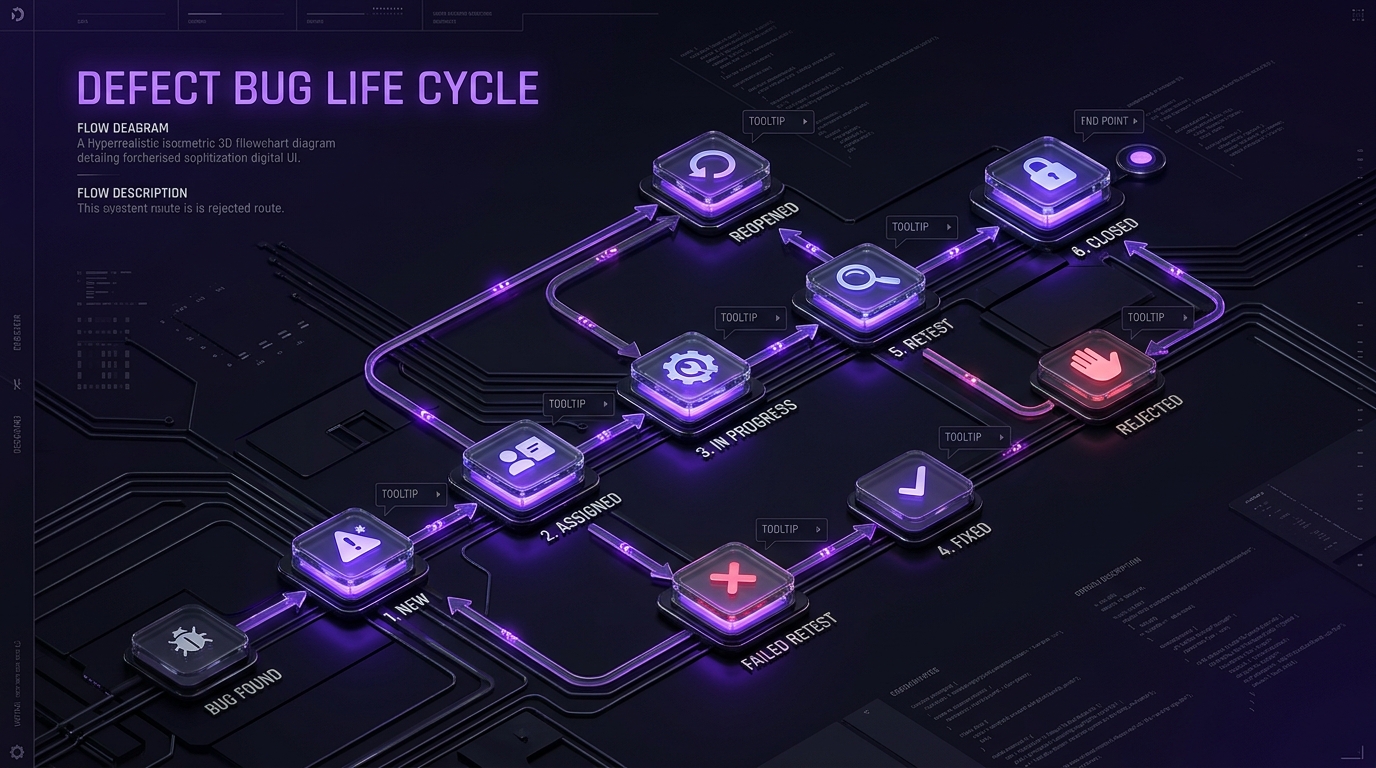
The defect life cycle tracks a bug from discovery to closure. It moves a defect through set states: New, Assigned, Open, Fixed, Retest, and Closed.
A tester logs a New defect. A lead assigns it. A developer fixes it. A tester retests and closes it, or reopens it if the fix fails. This cycle keeps defect tracking clear and auditable.
Traceability Matrix (RTM)
A Requirements Traceability Matrix (RTM) links requirements to tests. It maps each requirement to the test cases that verify it, so no requirement ships untested.
The RTM shows coverage gaps at a glance. If a requirement has no linked test case, the matrix flags it.
Test Data
Test data is the input a test uses. It includes valid, invalid, and boundary values that drive a test case to a known result.
Good test data covers normal use, edge cases, and error paths. Poor test data hides defects and produces false confidence.
Principles of Software Testing
Software testing follows 7 core principles that guide every strategy:
- Testing shows the presence of defects, not their absence.
- Exhaustive testing is impossible, so prioritize by risk.
- Early testing saves time and money.
- Defects cluster, so a few modules hold most bugs (the Pareto principle).
- Repeating the same tests stops finding new bugs (the pesticide paradox).
- Testing depends on context, so a bank app and a game need different approaches.
- The absence-of-errors fallacy means bug-free software still fails if it solves the wrong problem.
These principles keep test coverage focused and honest. They tell teams where to spend limited testing time.
Levels of Software Testing
Software testing runs at 4 levels inside the SDLC. Each level checks a different scope, from the smallest unit to the full system.
Unit Testing
Unit testing validates the smallest testable part of an application. It checks that a single function, method, or class runs as expected. Developers write unit tests with frameworks like JUnit, pytest, and unittest.
Integration Testing
Integration testing checks that units work together. It verifies that combined components and functions pass data correctly across boundaries. This level catches interface defects that unit testing misses.
System Testing
System testing evaluates the complete application end to end. It tests the whole integrated system against requirements. This phase includes functional testing, non-functional testing, interface testing, and recovery testing.
Acceptance Testing
Acceptance testing confirms the system meets business needs. It verifies the whole system works as intended for real users. User acceptance testing (UAT) puts the software in front of end users before release.
Types of Software Testing
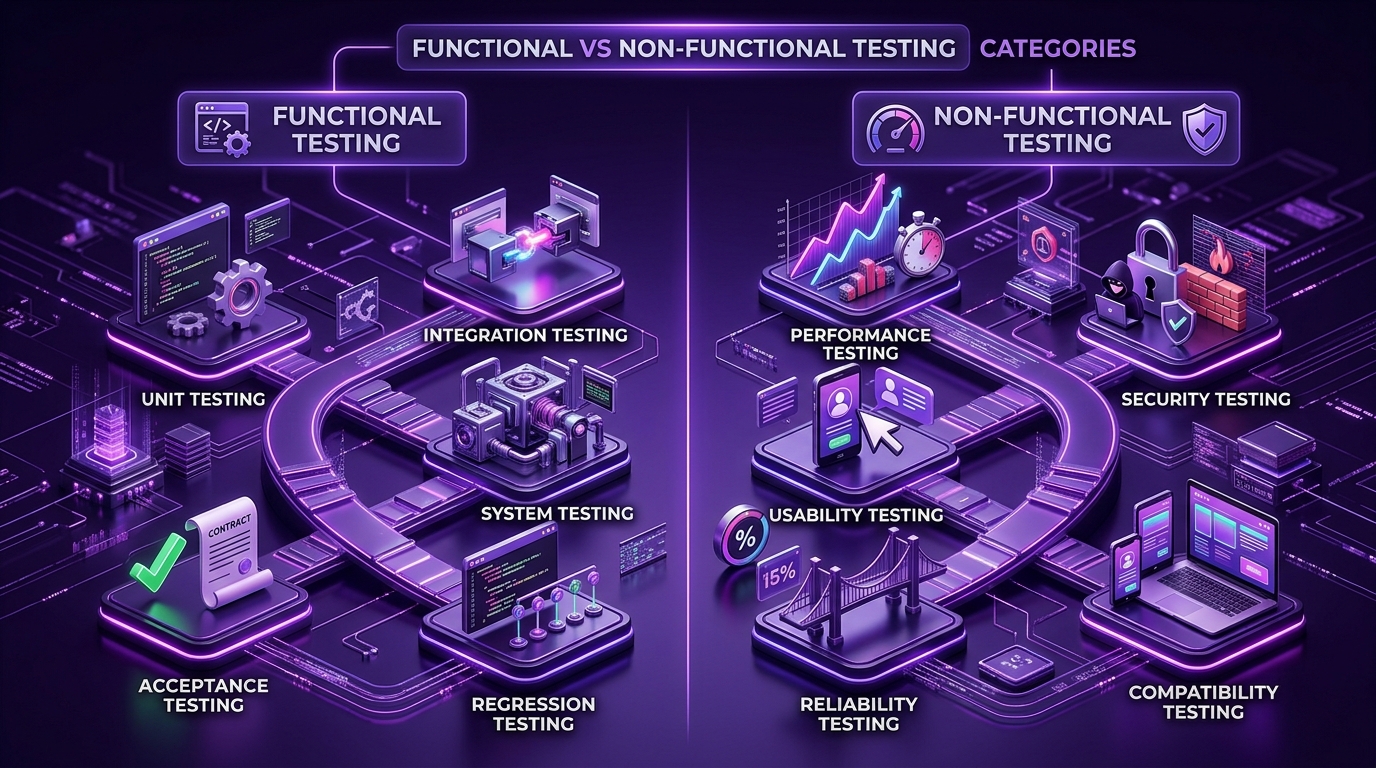
Software testing types fall into two domains: functional testing and non-functional testing. Functional testing checks what the software does. Non-functional testing checks how well it does it.
Functional Testing
Functional testing verifies behavior against requirements. It confirms each feature returns the correct output for a given input. The types below sit under this category.
Unit Testing
Unit testing checks one isolated component. It confirms a single unit of code returns the expected result. Developers run it first and run it often.
Integration Testing
Integration testing checks combined modules. It confirms data flows correctly between connected components. It sits above unit testing in the testing pyramid.
System Testing
System testing checks the full application. It confirms the complete system meets functional requirements end to end.
Acceptance Testing
Acceptance testing checks business fit. It confirms the system satisfies acceptance criteria and real user needs.
Regression Testing
Regression testing checks for broken features after a change. It confirms new code has not damaged existing functionality. Automated regression testing runs on every build.
Smoke Testing
Smoke testing checks basic stability. It confirms the core functions of a new build work before deeper testing starts. A failed smoke test blocks further work.
Sanity Testing
Sanity testing checks a specific fix. It confirms a narrow function works after a small change, when there is no time for full regression.
Non-Functional Testing
Non-functional testing measures quality attributes. It checks how the software performs under load, stress, and different conditions. The types below sit under this category.
Performance Testing
Performance testing measures speed and stability under workload. It checks response time, throughput, and latency at expected traffic. Load testing and stress testing are subtypes.
Security Testing
Security testing finds vulnerabilities. It checks whether attackers can exploit the software. Teams use OWASP guidance and tools like OWASP ZAP and Burp Suite.
Usability Testing
Usability testing measures ease of use. It checks whether a user can finish a task through the user interface (UI) quickly and intuitively.
Compatibility Testing
Compatibility testing checks behavior across environments. It confirms the application works on different devices, operating systems, browsers, and networks.
Reliability Testing
Reliability testing measures consistency over time. It confirms the software keeps working correctly across long runs and repeated use. Uptime and mean time between failures are common metrics.
Testing by Visibility: Black-Box, White-Box, and Gray-Box
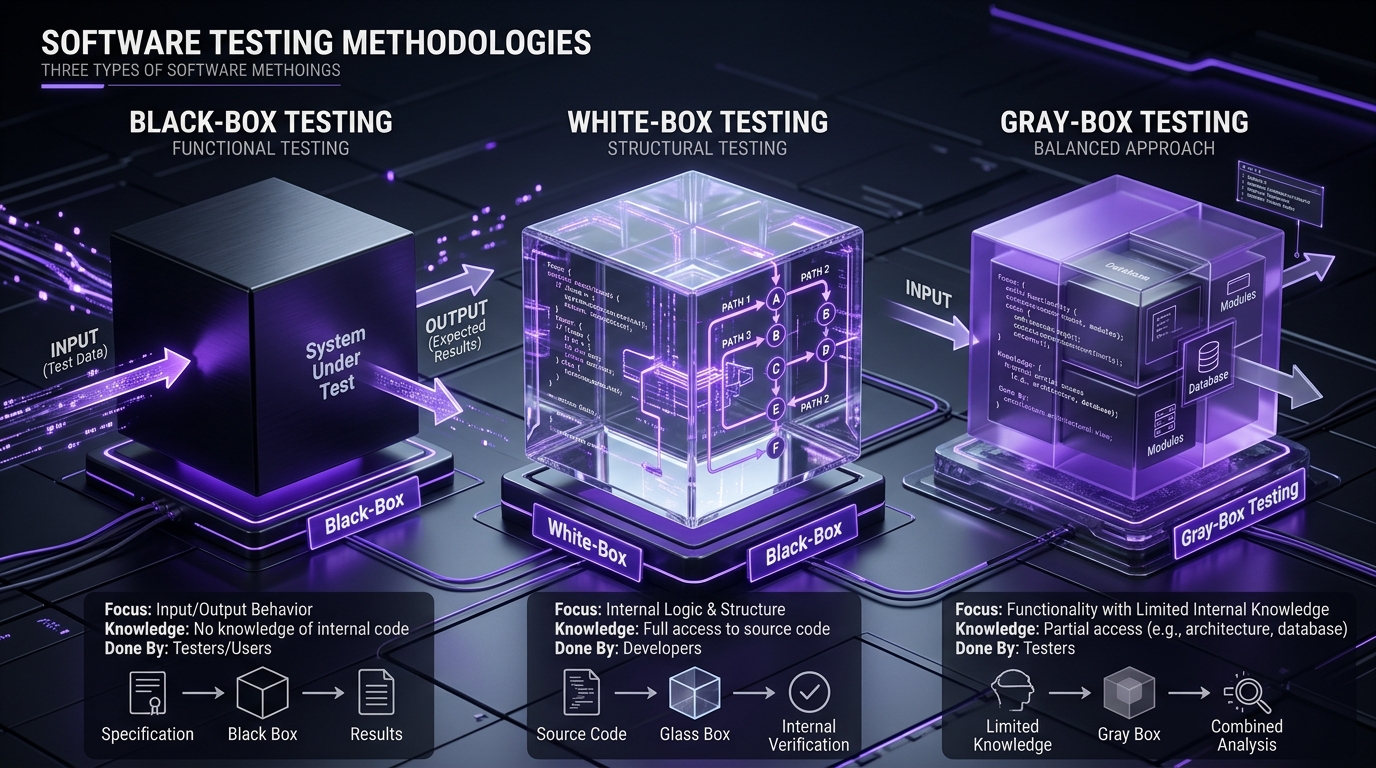
Visibility describes how much of the code a tester sees. There are 3 visibility approaches:
- Black-box testing: The tester checks inputs and outputs without seeing internal code.
- White-box testing: The tester uses knowledge of internal logic, structure, and code paths.
- Gray-box testing: The tester combines both, using partial knowledge of internals to design better cases.
Black-box testing suits functional checks. White-box testing suits unit and code coverage work. Gray-box testing suits integration and security checks.
Manual Testing
Manual testing runs test cases by hand. A tester executes each step without automation tools and compares actual results with expected results. It fits exploratory testing, usability testing, and small applications.
A tester manually checks whether a login page accepts valid credentials. Human testers spot nuances that scripts miss.
Automation Testing
Automation testing runs test cases with scripts and tools. Software executes the tests, which speeds up repetitive work and reduces human error. It fits regression testing and large systems.
A Selenium script tests login functionality and verifies the result on its own. Automation improves testing speed, accuracy, and consistency.
End-to-End Testing
End-to-end testing checks a full user journey. It confirms an entire workflow runs correctly across the UI, APIs, and database. Playwright and Cypress are common tools for this.
Exploratory and Ad-Hoc Testing
Exploratory and ad-hoc testing find defects without fixed scripts. Exploratory testing uses structured investigation to uncover hard-to-predict scenarios; ad-hoc testing probes freely to break the application. Both rely on tester skill and product knowledge.
Alpha and Beta Testing
Alpha and beta testing are two acceptance stages. Alpha testing happens in-house before release; beta testing happens with real users in real conditions. Alpha testing catches internal issues. Beta testing surfaces real-world usage problems.
Maintenance Testing
Maintenance testing runs after release. It confirms fixes, updates, and migrations do not break live functionality. It uses regression testing to protect existing features during legacy migrations.
Manual vs. Automated Testing: Key Differences
Software testing falls into two broad categories: manual testing and automated testing. The right mix depends on the flow, its risk, and how often it changes.
Manual Testing
Manual testing needs a person to run each step. It suits exploratory testing, usability testing, and short-lived flows where automation costs more than it returns. Manual testing catches visual and nuanced issues, but it is slower, costs more per run, and can introduce human error.
Automated Testing
Automated testing needs scripts and tools. It suits regression testing, repeated runs, and large systems where speed and consistency matter. Automated testing runs faster and repeats reliably, but it needs setup time and ongoing maintenance to stay accurate.
Software Testing Life Cycle (STLC)
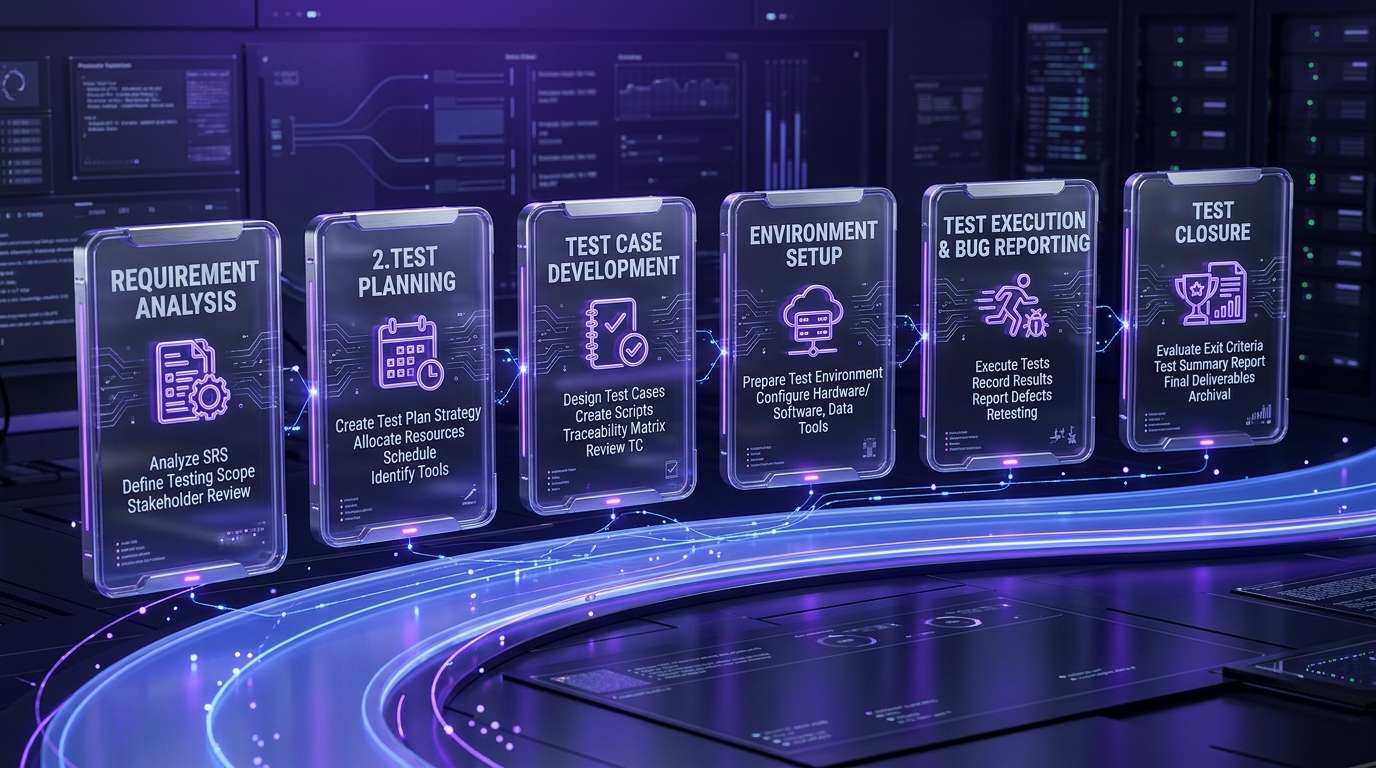
The Software Testing Life Cycle (STLC) is the structured set of phases that testing follows. There are 5 phases, run in order.
Planning
Planning defines scope and strategy. The team sets objectives, resources, schedule, and risk priorities in a test plan. This phase decides what to test and what to skip.
Test Design and Preparation
Test design creates the test cases. The team writes test cases, prepares test data, and builds the traceability matrix. Clear design here reduces rework later.
Setup
Setup builds the test environment. The team configures hardware, software, and test data to match production. A stable environment produces trustworthy results.
Execution and Reporting
Execution runs the tests and logs results. The team runs test cases, records pass or fail, and reports defects with clear steps to reproduce. Reporting turns raw results into decisions.
Closure
Closure ends the testing cycle. The team reviews coverage, records lessons, and archives results for future reference. Metrics from closure feed the next planning phase.
How to Write Effective Test Cases
An effective test case is clear, specific, and repeatable. To write one, define 6 parts:
- State a unique ID so the case is easy to track.
- Write a clear title that names the function under test.
- List preconditions the system needs before the test runs.
- Give exact test data and steps a new tester can follow without guessing.
- Define the expected result in one measurable statement.
- Leave space for the actual result and pass or fail status.
Keep one test case to one behavior. Small, focused cases isolate defects and simplify debugging.
Defect Report: What to Include
A defect report tells developers how to reproduce and fix a bug. Include 7 fields:
- Defect ID for tracking.
- Title that summarizes the issue in one line.
- Steps to reproduce in exact order.
- Expected result the software should have shown.
- Actual result the software did show.
- Severity and priority to rank the fix.
- Environment details such as browser, device, and build number.
Attach a screenshot or log where it helps. A clear report shortens the fix cycle and cuts back-and-forth.
Software Testing Models
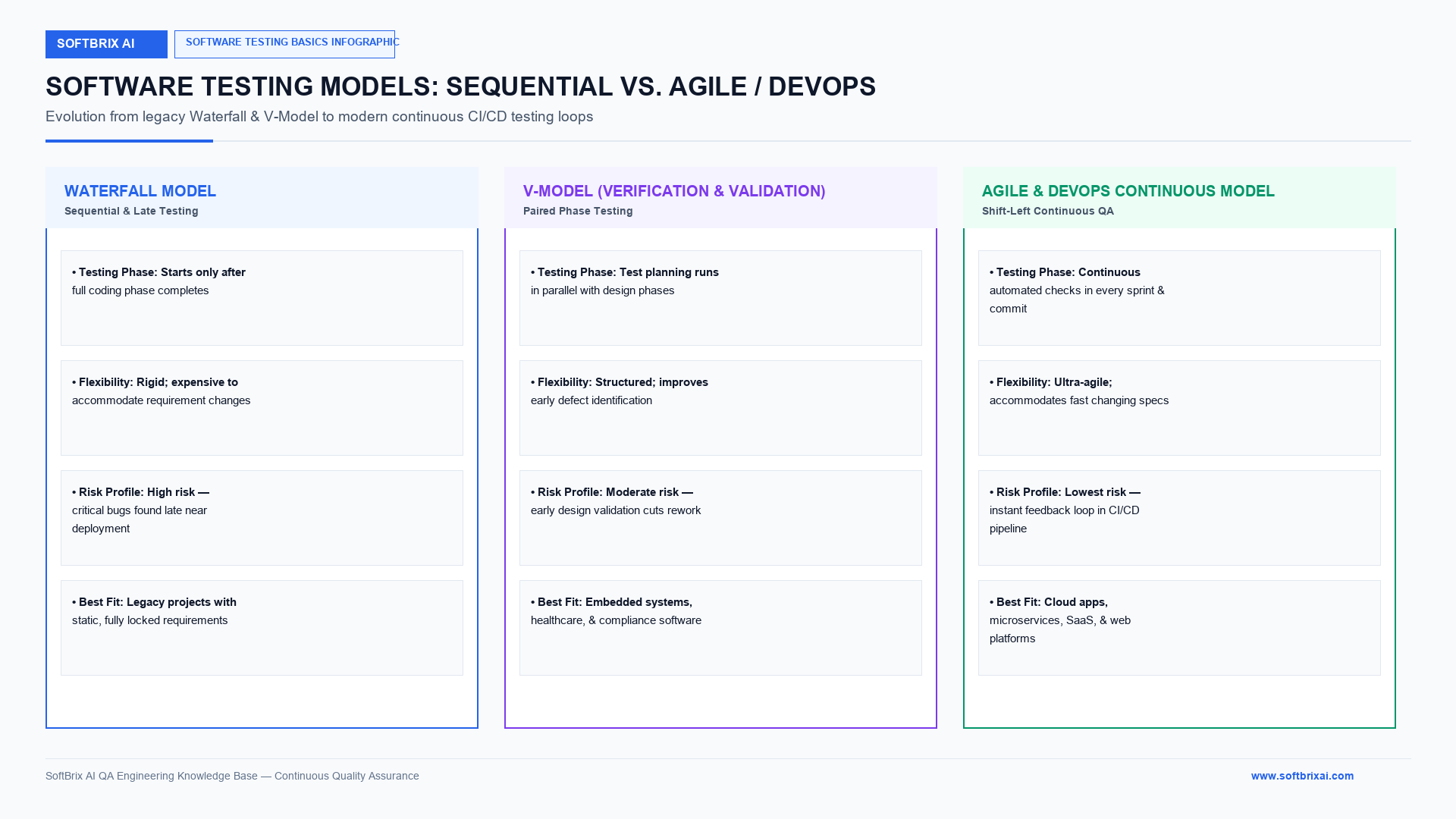
Software testing models define how testing fits the development process. There are 7 common models, each with a different rhythm.
Waterfall Model
The Waterfall model runs phases in sequence. Testing starts only after development finishes. It suits fixed requirements but reacts slowly to change.
V-Model
The V-Model pairs each development phase with a test phase. Testing planning starts alongside design, not after coding. It improves early defect detection over Waterfall.
Agile & Adaptive Testing Models
Agile testing and adaptive software development run testing inside short iterations.
The Agile testing model runs testing inside short sprints. Testers work with developers every iteration, so feedback arrives fast. It suits changing requirements and frequent releases.
Spiral Model
The Spiral model repeats development and testing in risk-driven loops. Each loop assesses risk, builds, and tests before the next loop. It suits large, high-risk projects.
Iterative and Incremental Model
This model builds and tests the product in parts. Each increment adds a working, tested slice of functionality. Users see progress early and often.
Big Bang Testing Model
The Big Bang model integrates everything, then tests once. All components come together before any integration testing runs. It suits small projects but makes defect isolation hard.
RAD (Rapid Application Development) Model
The Rapid Application Development (RAD) model builds fast prototypes. Testing runs continuously against quick iterations with heavy user feedback. It suits projects with tight timelines and active users.
Common Tools Used in Software Testing
Software testing tools cover the full workflow, from planning to reporting. The categories below group the most-used options.
Test Management and Tracking Tools
These tools organize test cases and runs. TestRail, Zephyr, and Jira track test cases, plans, and execution status. They connect requirements to results.
Automation Testing Tools
These tools run scripted UI and browser tests. Selenium, Playwright, and Cypress automate web application testing across browsers. They form the base of most regression suites.
Performance Testing Tools
These tools simulate load. JMeter, k6, and LoadRunner generate virtual users to measure latency, throughput, and stability under stress.
Security Testing Tools
These tools scan for vulnerabilities. OWASP ZAP and Burp Suite run dynamic scans and support penetration testing. They flag common attack vectors early.
API Testing Tools
These tools verify service interfaces. Postman tests API requests, responses, and contracts without a UI. API testing runs faster and breaks less than UI testing.
Bug Tracking Tools
These tools manage defects. Jira records, assigns, and tracks defects through the defect life cycle. They keep the team aligned on open issues.
Continuous Testing Tools
These tools run tests inside pipelines. CI/CD platforms trigger automated tests on every code change. They give fast feedback before merge.
UI Testing Tools
These tools check the interface. Selenium, Cypress, and Playwright drive the UI and confirm elements render and respond correctly. Visual regression checks catch layout breaks.
Dependency Control and Mocking Tools
These tools isolate the code under test. WireMock and Pact mock services and verify contracts; Testcontainers spins up real dependencies in containers. Mocks and stubs remove flaky external calls.
Reporting and Analytics Tools
These tools turn results into insight. Allure builds clear test reports with pass rates, flake rates, and trends. Good reporting speeds root cause analysis.
Testing in Agile and DevOps Environments
Agile and DevOps make testing continuous. Testing moves out of a final gate and into every phase. Shift-left testing starts checks early. Shift-right testing monitors real usage in production.
Continuous Testing in CI/CD Pipelines
Continuous testing runs automated checks on every commit. A CI/CD pipeline builds the code, runs tests, and blocks any merge that fails. Fast feedback keeps defects from reaching production.
The pipeline runs tests in layers. Unit tests run first and finish in seconds. Integration and API tests run next. End-to-end tests run last, since they take longest.
How to Keep Tests Reliable in CI/CD
Reliable pipelines need stable tests. Apply 5 practices to cut flakiness:
- Isolate each test so one test does not depend on another’s state.
- Control test data with fresh, seeded data per run.
- Use smart waits instead of fixed sleeps for dynamic pages.
- Run tests in parallel with proper containerization to save time.
- Track flake rates and quarantine unstable tests until fixed.
Stable tests build trust. When a red build always means a real defect, teams act on it fast.
Building Your First Test Suite
A first test suite should be small and high value. Build it in 5 steps.
Step 1: Pick One High-Impact Flow
Start with one flow that matters most. Choose the path where a failure costs the most, such as checkout or login. One protected flow beats ten shallow ones.
Step 2: Write 8–12 Test Cases
Cover the flow with a focused set. Write 8 to 12 test cases across the happy path, edge cases, and error paths. Include boundary values and one invalid input per field.
Step 3: Run It Manually First
Run the cases by hand before you automate. Manual runs confirm the flow behaves as expected and expose unclear steps. This step saves wasted automation effort.
Step 4: Automate What Pays Back Weekly
Automate the cases you run often. Script the checks that repeat every build, since they return the most ROI. Leave rare, one-off checks manual.
Step 5: Make It CI-Ready
Wire the suite into the pipeline. Run the automated suite on every commit with clear pass or fail reporting. A CI-ready suite catches regressions the moment they appear.
Test Design and Strategy Fundamentals
Test design chooses the right cases with the least effort. Three techniques cover the most ground:
- Equivalence partitioning groups inputs that behave the same, so one value tests the whole group.
- Boundary value analysis tests the edges of each range, where defects cluster.
- Pairwise testing covers combinations of inputs with far fewer cases than testing every mix.
A test strategy ranks these by risk. Risk-based testing spends effort where failure hurts most. High-severity, high-priority areas get deep coverage. Low-risk areas get light coverage.
Building Scalable Test Automation Frameworks
A scalable automation framework keeps tests maintainable as the suite grows. It separates test logic from page detail.
The Page Object Model (POM) is the common pattern. It stores selectors and page actions in one place per screen. When the UI changes, you update one object, not fifty tests.
Add 4 layers to keep the framework clean:
- A locator layer that holds selectors, so UI changes touch one file.
- An action layer that wraps reusable steps like login or search.
- A data layer that feeds test data from files, not hardcoded values.
- A reporting layer that logs results and failures for analysis.
Parallel execution and containerization let the framework scale. Tests run across many browsers and devices at once, which cuts total run time.
Test Data Management and Generation
Test data management controls the inputs tests rely on. Poor test data hides defects and creates flaky results.
Three sources supply test data:
- Production-like data that is masked to protect private information under GDPR constraints.
- Synthetic data generated to cover edge cases that real data rarely hits.
- Seeded data created fresh per run, so tests never depend on stale state.
Reset data between runs. A test that starts from a known state gives a repeatable result. Data leakage between tests is a top cause of flaky failures.
Testing for Accessibility and Compliance
Accessibility testing confirms people with disabilities can use the software. It checks against the Web Content Accessibility Guidelines (WCAG).
There are 4 WCAG principles to verify. Content must be perceivable, operable, understandable, and robust. Testers check keyboard navigation, screen reader labels, color contrast, and focus order.
Compliance testing checks legal and industry rules. It verifies handling of protected data under standards such as the Health Insurance Portability and Accountability Act (HIPAA), the General Data Protection Regulation (GDPR), and the Payment Card Industry Data Security Standard (PCI-DSS). These checks matter most before regulatory audits.
Testing Enterprise Business Applications
Enterprise applications carry complex logic and heavy integration. Testing them needs extra planning around data, workflows, and connected systems.
Enterprise systems such as SAP and Salesforce run core business processes. A defect in an order, invoice, or payroll flow reaches real money. Testers map end-to-end business flows across microservice boundaries, not single screens.
Three factors raise the stakes here. Enterprise apps hold sensitive data, connect to many third-party services, and support thousands of users. Test coverage must span roles, permissions, and integrations, not just the UI.
Cross-Browser and Cross-Device Testing
Cross-browser and cross-device testing confirm the software works everywhere users run it. The same page can break on a different browser or screen size.
A device lab or a cloud platform like BrowserStack provides real browsers and devices. Real-device testing catches issues that emulators miss, such as touch behavior and hardware limits.
Prioritize by usage data. Test first on the browsers, operating systems, and devices your analytics show most users on. This focuses effort where failures reach the most people.
Test Reporting, Analytics, and Root Cause Analysis
Test reporting turns results into action. Clear reports show pass rates, failures, flake rates, and trends over time.
Analytics find patterns across many runs. Defect clustering shows which modules hold the most bugs, which matches the Pareto principle. Flake rate shows which tests need repair.
Root cause analysis (RCA) finds the true source of a failure, not the symptom. Ask why the defect appeared, why testing missed it, and why the process allowed it. A good RCA prevents the same class of defect from returning.
Common Testing Challenges and Solutions
Software testing faces recurring problems. There are 10 common challenges, each with a practical fix.
Incomplete or Changing Requirements
Unclear requirements produce weak test cases. Fix it with a traceability matrix and early collaboration under ambiguous requirements, so tests map to agreed behavior.
Lack of Test Coverage
Untested flows create hidden risk. Fix it by measuring code coverage and adding cases for high-risk paths first.
Tight Deadlines and Limited Resources
Short timelines squeeze testing. Fix it with risk-based testing that spends limited time on the highest-impact flows.
Unstable Test Environments
Broken environments cause false failures. Fix it with containerization and infrastructure as code for repeatable, ephemeral environments.
Lack of Real Devices or Browsers
Missing devices hide compatibility bugs. Fix it with a cloud device lab that supplies real browsers and devices on demand.
Poor Quality Test Data
Bad data hides defects. Fix it with synthetic data and seeded, reset-per-run datasets that cover edge cases.
Flaky or Unreliable Automated Tests
Flaky tests erode trust. Fix it with test isolation, smart waits, and flake detection with safe retry logic.
Communication Gaps Between QA, Dev, and Product Teams
Silos let defects slip through. Fix it with shared acceptance criteria and daily collaboration across QA, dev, and product.
Increasing Complexity of Modern Applications
Microservices and dependencies grow test scope. Fix it with contract testing and service virtualization to test across microservice boundaries.
Difficulty Maintaining Test Documentation
Stale docs mislead the team. Fix it by treating documentation as code, versioned and updated with each change.
Software Testing Best Practices
Software testing best practices keep quality high as systems scale. Apply the 10 practices below.
Shift-Left and Shift-Right Testing for Continuous Quality
Test early and monitor late. Shift-left testing embeds checks in unit, integration, and system tests; shift-right testing validates behavior in production. Together they cover the full lifecycle.
Adopt AI-Powered Test Automation
Use AI to write and maintain tests. AI-powered testing generates cases, detects flakes, and suggests fixes, which cuts maintenance time. Review every AI-suggested change before merge.
Prioritize API Testing Over UI Testing
Test the API layer first. API testing runs faster, breaks less, and catches logic defects earlier than UI testing. Keep UI tests for true end-to-end journeys.
Build a Strong Test Automation Framework
Invest in framework structure. A framework with the Page Object Model, a data layer, and reporting keeps tests maintainable at scale. Clean structure lowers long-term cost.
Test on Real Devices, Browsers and Environments
Use real conditions, not only emulators. Real-device testing catches hardware, touch, and network issues that simulators miss. Cloud device labs make this practical.
Use Risk-Based Testing to Focus on What Matters
Rank tests by risk. Risk-based testing spends effort on flows where failure costs the most. This focuses limited time and budget.
Strengthen Security Testing with DevSecOps
Build security into the pipeline. DevSecOps runs dependency scans, static analysis, and configuration checks in CI on every change. Security testing moves from periodic scans to continuous validation.
Leverage Observability for Production-Level Testing
Watch the live system. Observability with logging, tracing, and telemetry surfaces defects that only appear in production. Synthetic monitoring and canary deployment reduce blast radius.
Keep Testing Documentation Updated
Maintain living docs. Version test plans and cases with the code, so documentation stays accurate. Current docs speed onboarding.
Encourage Collaboration Across QA, Dev and DevOps
Break down silos. Shared ownership between QA, dev, and DevOps catches defects earlier and speeds fixes. Quality becomes a team responsibility.
The Future of Software Testing
Software testing keeps evolving with development speed and system complexity. In a Fortune Business Insights report cited by IBM, the AI-enabled testing market was valued at USD 856.7 million in 2024 and is projected to reach USD 3,824.0 million by 2032, at a compound annual growth rate (CAGR) of 20.9%. Six trends shape the years ahead.
Low-Code and No-Code Testing
Low-code and no-code testing open testing to non-technical users. Business users create and run tests through visual tools, with no code needed. This speeds time to market.
IoT and Edge Testing
Internet of Things (IoT) and edge testing check connected devices. Tests simulate varied networks and conditions for embedded devices at the edge. Connectivity, security, and performance all need coverage.
5G and Ultralow Latency Testing
5G testing validates ultralow latency apps. Autonomous vehicles and remote healthcare need tests that confirm performance under high-speed, low-latency conditions.
AI-Driven Predictive and Self-Healing Systems
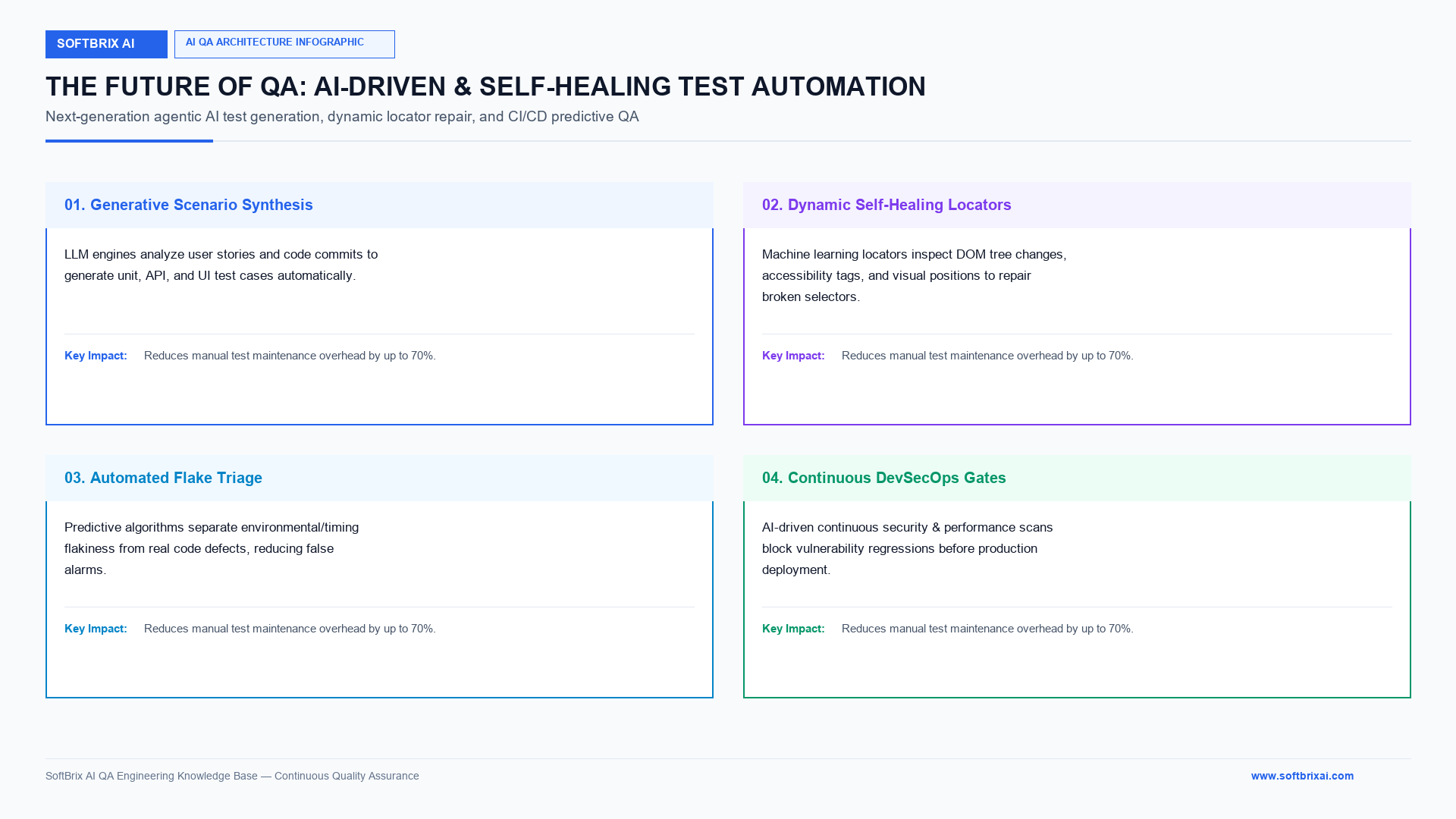
AI systems predict and repair issues. Self-healing tests detect UI changes and update selectors automatically; predictive testing uses machine learning (ML) to flag likely failures before they hit production. These features cut downtime and manual maintenance.
Modern self-healing works because of smarter locators. Dynamic locator strategies read DOM structure, text, and accessibility attributes to find a robust replacement when a CSS selector or XPath changes. Flake detection separates timing and environment flakes from real failures and applies safe retry logic. Automated patch suggestions propose changes for human review, which preserves audit trails.
Generative AI in Testing
Generative AI writes new test cases. AI models study software behavior and create scenarios human testers might miss, which improves coverage. Momentic is one agentic AI testing tool that uses natural language selectors, so testers write checks in plain English.
AI-Native vs AI-Added Approaches
Two AI approaches now compete. AI-native tools build intelligence into the core engine; AI-added tools bolt AI onto legacy platforms. AI-native tools tend to handle dynamic pages and self-healing better, since the design assumes AI from the start.
Set governance before you scale agentic AI. Start with cost-benefit analysis, cost control, and audit trails for agent decisions. Start small on low-risk flows, measure ROI, then widen scope. Watch regulation too, since major provisions of the EU AI Act come into force in 2026 and add compliance burden, requiring enterprise alignment with AI contextual governance.
Conclusion
Software testing basics give teams a clear path from first concept to reliable release. The fundamentals cover core terminology, testing principles, the four levels of testing, functional and non-functional types, the Software Testing Life Cycle (STLC), testing models, tools, and best practices. Together they deliver higher software quality, lower defect cost, and faster, safer releases. Manual testing and automated testing work side by side, one for exploratory and usability work, the other for regression and scale. In 2026, agentic AI, self-healing tests, and continuous security testing in CI/CD pipelines are moving from optional extras to software testing basics that mainstream teams rely on. Start small, protect your highest-impact flows, and expand test coverage as your framework matures.
Frequently Asked Questions (FAQs)
How Do I Choose Between Manual Testing and Automated Testing?
Choose based on how often the test runs and how much it changes. Use manual testing for exploratory, usability, and short-lived flows; use automated testing for regression, repeated runs, and large systems. A flow you run every build is worth automating. A one-off check is faster by hand.
Do Software Testers Need Programming Knowledge?
No, not every testing role needs programming, but coding basics help. Manual and exploratory testing can start without code, while automation testing needs scripting skills. Knowing a language like Python or Java lets testers write automation and collaborate with developers.
What Should I Learn to Start with Software Testing?
Start with 5 fundamentals: testing concepts, test case writing, the STLC, one bug tracking tool like Jira, and one automation tool like Selenium or Playwright. Learn manual testing first, then add automation. Hands-on practice on a real app teaches more than theory alone.
Do I Need End-To-End Tests for Everything?
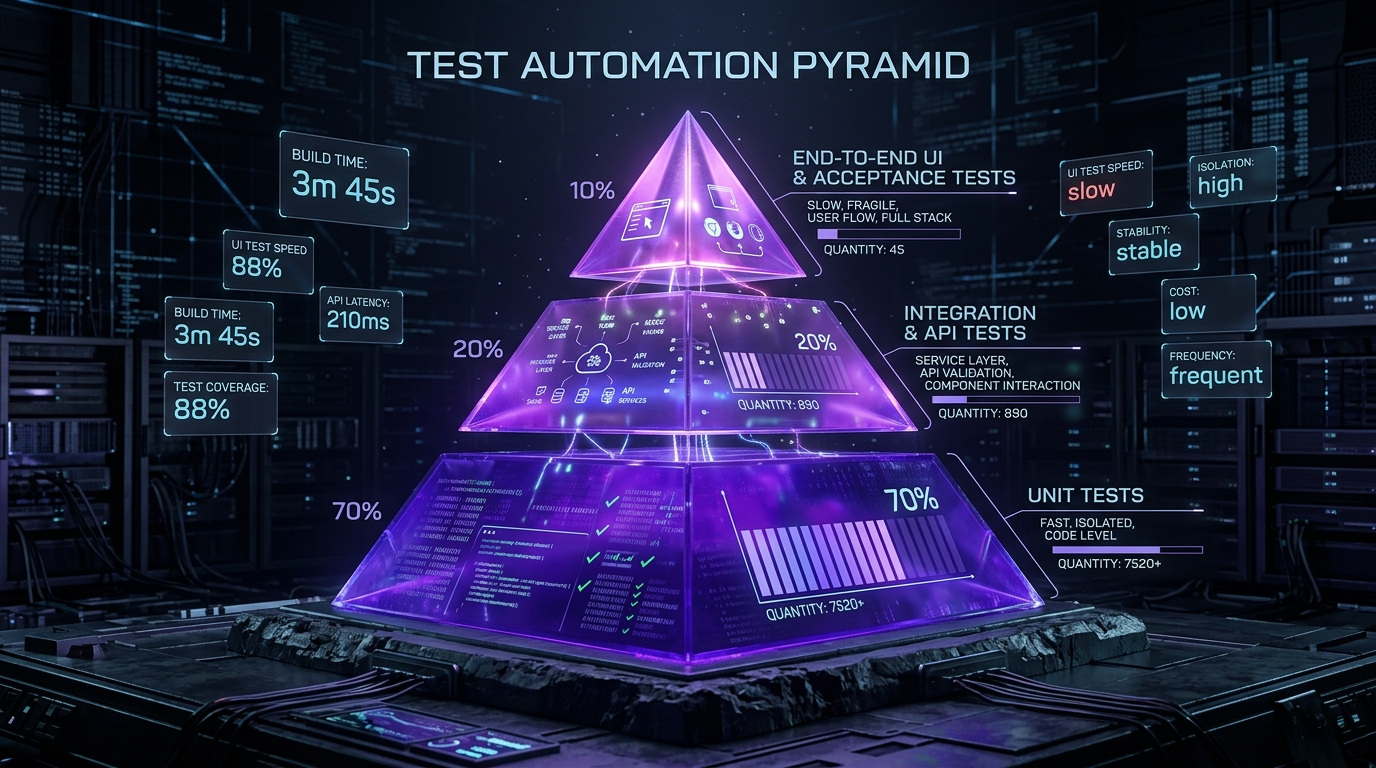
No, you do not need end-to-end tests for everything. Cover critical user journeys with end-to-end tests, and cover logic with faster unit and API tests. The testing pyramid puts many unit tests at the base and few end-to-end tests at the top, since end-to-end tests run slow and break more.
Why Do Tests Pass Locally But Fail in CI?
Tests pass locally but fail in CI because of environment and timing differences. Common causes are unstable test data, missing dependencies, and fixed sleeps that break on slower CI machines. Fix it with isolated tests, seeded data, smart waits, and containerized environments that match production.
How Many Test Cases Are Enough?
Enough test cases cover the critical paths, the boundaries, and the main error cases, not every possible input. Use risk-based testing to focus on high-impact flows, and use code coverage to find untested gaps. Exhaustive testing is impossible, so prioritize by risk and severity.
What is the role of AI in modern software testing?
AI generates test cases, detects flakes, and repairs tests automatically. Agentic AI explores user journeys, triages failures, and suggests patches, which reduces manual maintenance. Human review of AI-suggested changes stays necessary for logic changes and safety.
What are the basics of software testing?
The basics of software testing are the core concepts and processes used to check software quality. They include terminology, testing principles, the four levels of testing, functional and non-functional types, the STLC, and common tools. Testers run software, compare actual results with expected results, and report defects.
What is the software testing life cycle (STLC)?
The software testing life cycle (STLC) is the structured set of phases testing follows. There are 5 phases: planning, test design and preparation, setup, execution and reporting, and closure. Each phase feeds the next, and closure metrics inform future planning.
What are the different types of software testing?
The types of software testing split into functional testing and non-functional testing. Functional types include unit, integration, system, acceptance, regression, smoke, and sanity testing; non-functional types include performance, security, usability, compatibility, and reliability testing. Testers pick types based on product needs.
What are the key software testing models?
The key software testing models are Waterfall, V-Model, Agile, Spiral, Iterative and Incremental, Big Bang, and RAD. Each model sets a different point and rhythm for when testing runs. Agile and V-Model start testing earliest, which improves defect detection.
What are the main challenges in software testing?
The main challenges are changing requirements, low test coverage, tight deadlines, unstable environments, poor test data, flaky automated tests, and team communication gaps. Risk-based testing, containerized environments, and shared acceptance criteria solve most of them.
Why is software testing important for businesses?
Software testing is important for businesses because defects cause financial loss, downtime, and reputational damage. Early testing catches architectural flaws, security vulnerabilities, and scalability issues before release, which saves money and protects customers. The Delta and CrowdStrike incident in 2024 showed losses above USD 500 million from one flawed update.
References and Further Reading
- IBM, “What is software testing?” for definitions, history, levels, types, and future trends.
- GeeksforGeeks, “Software Testing Basics,” for core terminology, tools, and real-world defect examples.
- Momentic, “Software Testing Basics,” for agentic AI, self-healing tests, and continuous security testing.
- DeVry University, “Software Testing Basics,” for careers, skills, and the role of AI.
- OWASP, for security testing guidance and vulnerability references.
- W3C Web Content Accessibility Guidelines (WCAG), for accessibility testing standards.