Warmup Cache Requests: The 2026 Playbook for Faster First Loads
practical user manual guide: what to include, a copy-paste template, tools, compliance dates, and how to test whether your manual actually works.

toc Table of Contents Click to expand (86 sections) expand_more
The first visitor after a deploy pays for everyone else. That’s the whole problem in one sentence.
A warmup cache request is a request you send to your own site on purpose, before a real user does, so the expensive work (the database query, the template render, the origin round trip) happens on a machine’s time instead of a human’s. The response lands in cache. The next person gets a warm hit. Nothing about the page changes; only who absorbs the cost of building it changes.
I’ve spent years running caches in front of applications that were never fast enough to survive without one, and I want to be honest up front: cache warming is not a performance strategy. It’s a smoothing layer over a gap you already have. When it works, you get lower TTFB on first loads, a higher cache hit ratio, less origin load during deploy windows, steadier Largest Contentful Paint in the field, and fewer of those “the site was slow for exactly two minutes” reports you can never reproduce. When it doesn’t work, you’ve built a cron job that hammers your own origin server and hides a slow query from you until it becomes a real outage.
This walks through what a warmup cache request touches on its way through the stack, from the warmup job to the CDN edge, the reverse proxy, the origin, and the response headers that decide whether any of it sticks. Then how to build a URL list that’s worth warming, which methods pay off, what CDN-native features already do this for you, how to wire warmup into CI/CD, and how to tell whether it worked. There’s a section on where this breaks in production, because that’s where most of the useful knowledge lives.
What a Warmup Cache Request Actually Is
A warmup cache request is an ordinary HTTP request, sent by automation rather than a person, whose only job is to populate a cache entry before real traffic arrives. There’s no special protocol and no special HTTP method. It’s a GET to a URL you expect users to hit, issued from a script, a cron job, a deploy pipeline, or the CDN itself.
The request looks identical to a real one from the server’s perspective. That’s the point, and it’s also the source of nearly every warmup bug I’ve had to debug. If your warmup request differs from a real user’s request in any way the cache key notices, you warm one entry and users read another.
Cold Cache vs Warm Cache, in Real Numbers
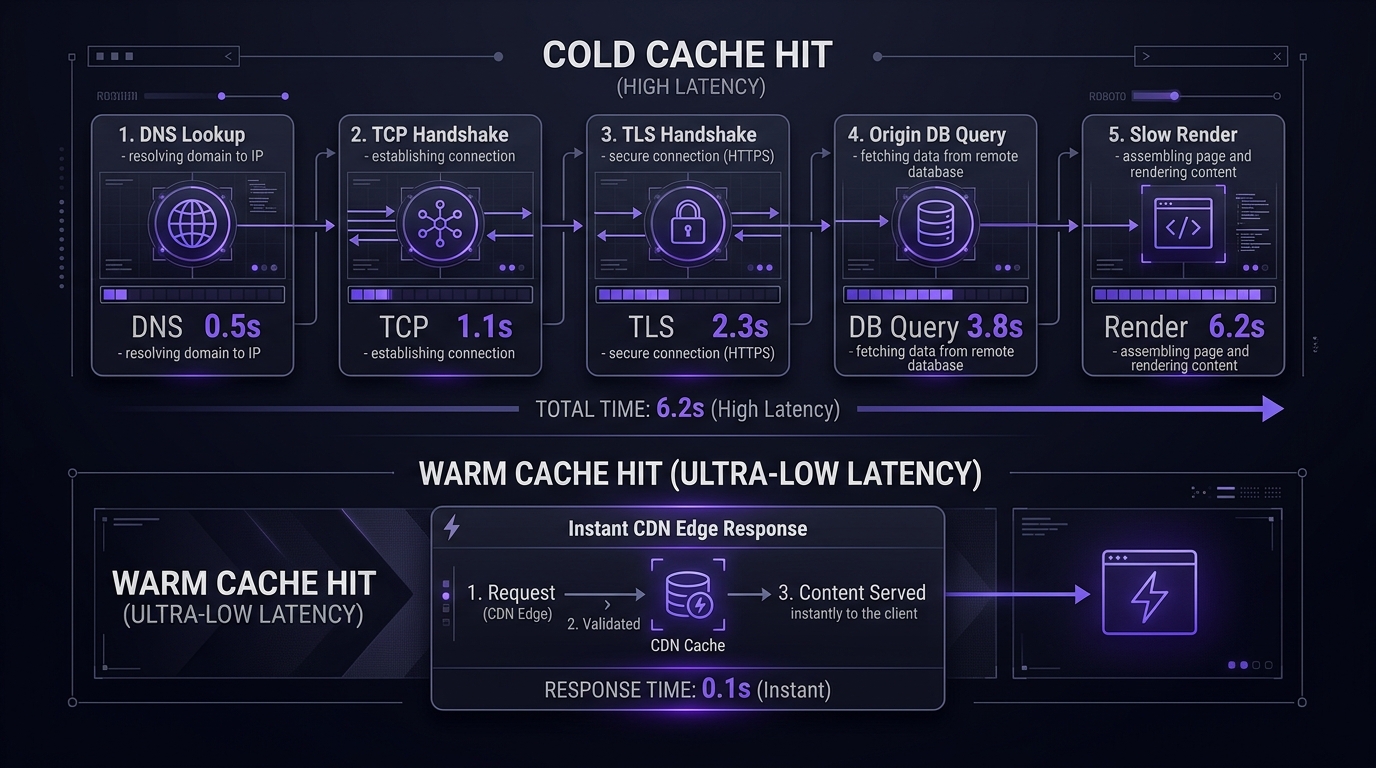
A cold hit and a warm hit differ by the work you removed. On a cold request the client waits through DNS, TCP, TLS, the edge deciding it has nothing, a round trip to origin, the application building the page, and then transfer. On a warm request the edge answers from local storage and the origin never sees it.
I’m not going to hand you a benchmark number here, and I’d be careful with anyone who does. “Cache warming cut TTFB by 80%” means nothing without knowing whose origin, which region, and what the page does. A WordPress product page with twelve uncached database queries and a US-East origin serving a visitor in Frankfurt has an enormous cold-warm gap. A static marketing page behind an edge cache has almost none.
Measure your own gap. This is the command I run before I decide whether warming is worth building:
curl -o /dev/null -s -w \
  "dns:%{time_namelookup} tcp:%{time_connect} tls:%{time_appconnect} ttfb:%{time_starttransfer} total:%{time_total}\n" \
  https://example.com/some-page
Run it once against a URL you’ve just purged, then again immediately. The difference between the two ttfb values is your real cold-start penalty on that page, on that stack, from that location. If it’s small, stop reading and go optimize something else. If it’s several hundred milliseconds or more, you have a warming case, or an origin problem, which I’ll come back to.
Warming vs Prefetching vs Preloading vs Stale-While-Revalidate
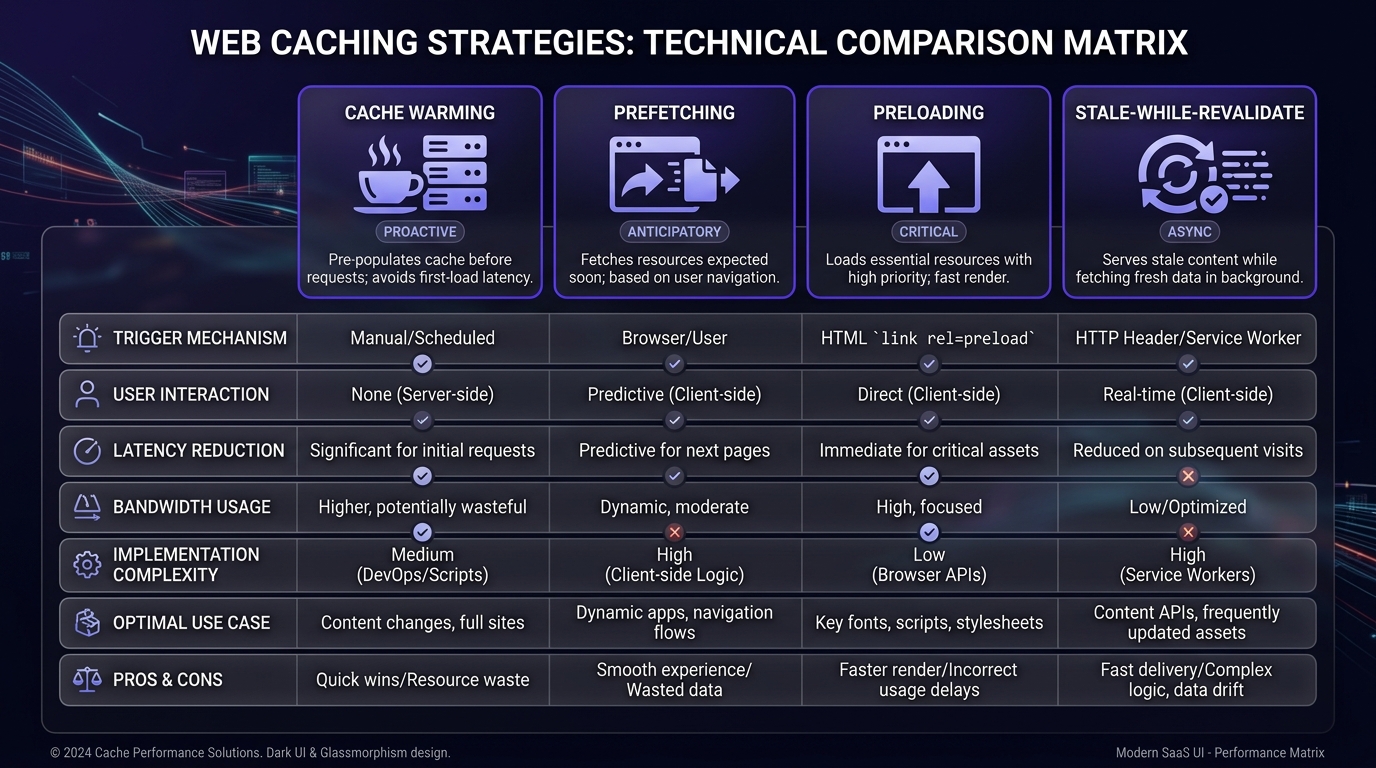
These four get used interchangeably and they aren’t the same thing. The difference is who triggers the fetch and where the result lands.
| Technique | Triggered by | Cache filled | Helps |
|---|---|---|---|
| Cache warming | Your automation, before traffic | Server-side: CDN edge, reverse proxy, object cache | The first visitor to a URL |
| Prefetching | The user’s browser, based on likely next navigation | That one browser’s cache | That one user’s next click |
| Preloading | <link rel="preload"> in a page the user already loaded | That one browser’s cache | Resources inside the current page |
| Stale-while-revalidate | A real request arriving on expired content | Server-side, refreshed in background | Everyone after the first post-expiry hit |
Warming is the only one of the four that helps a visitor who has never been to your site. Prefetching and preloading are browser-side and per-user. Stale-while-revalidate is the closest cousin and often the better answer. I’d reach for it before writing a warmup script, and I’ll explain why later.
Why Your Cache Goes Cold More Often Than You Think
Most teams assume their cache is warm because their hit ratio looks fine. Hit ratio is an average, and averages hide exactly the requests warming is meant to fix.
Deployments, Purges, and Config Pushes
Every deploy that changes a static asset hash, a template, or a cache-busting query parameter invalidates entries wholesale. A full purge, the button everyone reaches for when something looks stale, empties the cache globally in milliseconds and sends every subsequent request to origin at once.
The pattern I see most: team deploys at 2pm, purges everything to be safe, then watches origin CPU spike for ninety seconds while real users eat cold responses. Warming is a legitimate fix here. Purging selectively instead of globally is a better one.
TTL Expiry on Low-Traffic URLs
A URL with a one-hour TTL and one visitor every three hours is cold for every single visitor. Forever. Raising the TTL helps only if the content tolerates it.
This is the case for warming that I find genuinely persuasive, and it’s the one most articles skip. High-traffic pages warm themselves, since real users keep them hot. It’s the long tail that never gets a warm hit, and the long tail is usually where your deep content, technical documentation, and comprehensive user manual guide resources live.
Worth knowing: Akamai’s Cache Prefresh refreshes an object asynchronously once a configured share of its TTL has elapsed, by default at 90% of the TTL, so a request arriving after that point is served immediately from cache while triggering a background check with the origin. Powerful feature. It does nothing for your long tail, though, since it only fires when a request arrives during that window. No traffic, no prefresh.
Edge Eviction and Regional Cold Spots
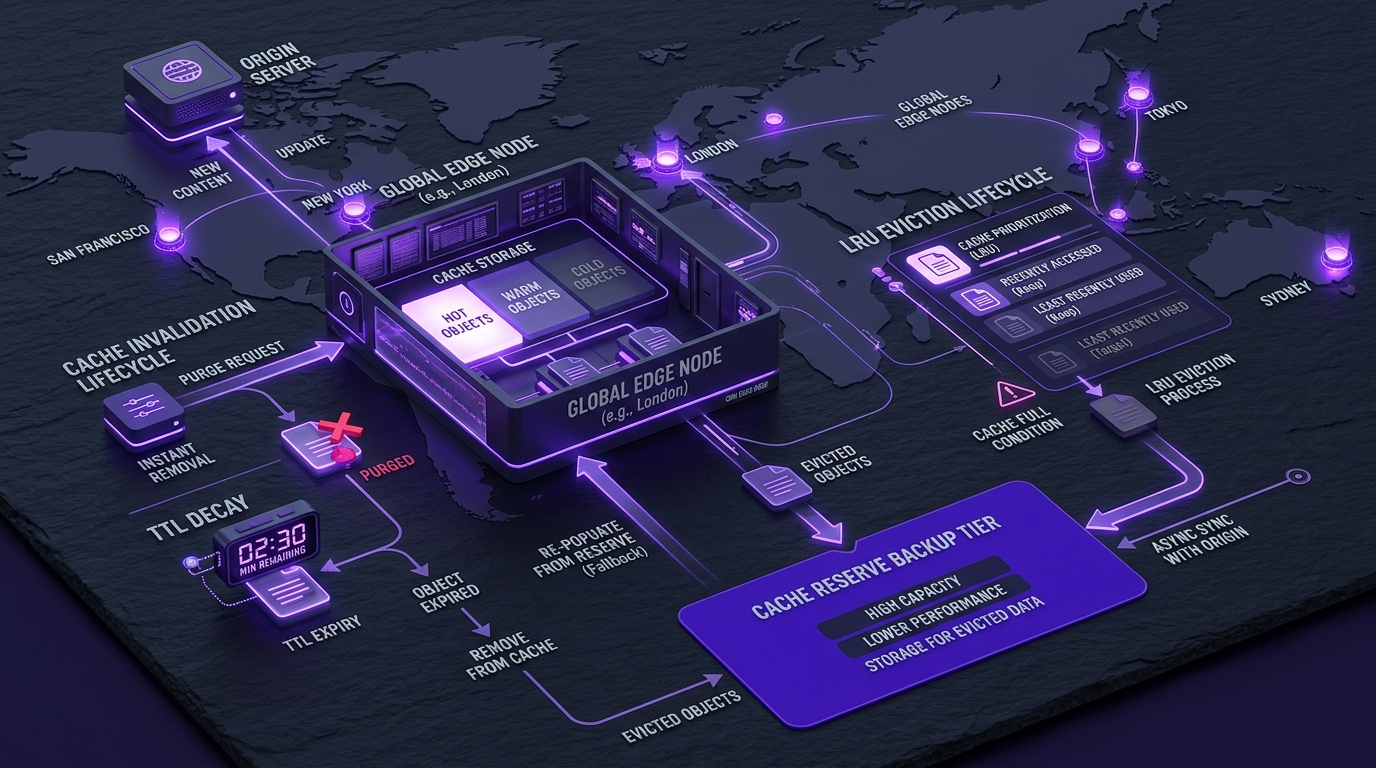
CDN edge caches are LRU-ish. Objects that aren’t requested get evicted to make room, regardless of remaining TTL. A page can be well within its TTL and still be a miss in Sydney while it’s a hit in Virginia.
That’s why “our cache hit ratio is 94%” tells you very little about the experience of a user in a region you don’t have much traffic from. Persistent tiers exist to fix this: Cloudflare’s Cache Reserve sits above the tiered cache hierarchy on R2 storage, so content evicted from the edge can be restored from the reserve rather than fetched from origin, with a default 30-day retention that extends on each access. Note the 2026 packaging change: Cache Reserve is now offered as part of Cloudflare’s Smart Shield product, available with Smart Shield Advanced. If you evaluated it a year ago under the old name, look again.
Should You Warm Your Cache at All? A 60-Second Check
Short answer: probably not yet. Most sites that ask about warmup have a caching configuration problem wearing a warmup costume.
Signals That Say Yes
- You have thousands of low-traffic URLs with meaningful cold-start cost: documentation, archives, catalog pages
- Your deploys require broad purges you can’t make more surgical
- Your origin does real work per page render and you can’t make it stateless
- You serve globally and see regional TTFB spread that tracks with cache misses
- Your business has scheduled traffic spikes you know about in advance: campaign launches, product drops, a webinar going live
Signals That Say Fix Your Caching Config First
- Your hit ratio is low across the board, not just on the long tail
Set-Cookieappears on responses you expected to cache- Your
Cache-Controlsaysprivate,no-store, or a max-age measured in seconds - Query parameters like
utm_sourceare part of your cache key, fragmenting every URL into dozens of entries - Your TTLs are short because you don’t trust your invalidation
Every one of these is cheaper to fix than a warming pipeline, and fixing them raises your hit ratio for traffic you actually get instead of traffic you’re simulating. I’ve watched teams build elaborate warmup jobs to compensate for a Vary: Cookie header nobody noticed. When we’re doing an AI consulting engagement on someone’s serving stack, this is the first thing I check, and it’s resolved the “we need cache warming” request outright more than once.
How a Warmup Request Travels Through Your Stack
Understanding the path matters, since a warmup that stops one layer short of where users read from is worse than useless. It looks like it’s working.

The Warmup Job Fires the Request
Something initiates: a cron entry, a CI/CD step, a queue worker, a serverless function on a schedule. It reads a URL list and issues HTTP requests, usually with limited concurrency. The choices that matter here are which URLs, how many at once, from where, and with which headers.
CDN Edge and Tiered Cache
The request lands at whichever edge location is closest to the machine sending it. That’s the first trap: your CI runner in us-east-1 warms the Virginia POP and nothing else. Users in Tokyo still get a cold hit.
Tiered cache changes the math in your favor. Cloudflare’s Tiered Cache divides data centers into lower tiers and upper tiers, so a lower tier that lacks content asks an upper tier before going to origin. Warm the upper tier once and every lower tier’s miss becomes a fast internal fetch instead of an origin round trip. Fastly’s shielding does the same job by designating a POP as an origin shield, so requests to origin funnel through a single POP, raising the chance that an end user request results in a hit. With either in place, a single-region warmup buys you far more than it looks like it should.
Reverse Proxy, Origin, and the Application
Past the CDN sits your own stack: Varnish, nginx with proxy_cache, LiteSpeed, or the platform’s built-in page cache. Then the application, then the object cache (Redis, Memcached, ElastiCache), then the database.
Warming a page URL fills every layer it passes through on the way back: page cache, object cache entries touched during render, query cache. That’s the underrated benefit. One HTTP request to a category page can populate dozens of Redis keys the next twenty pages will reuse.
The Response Headers That Decide Whether It Sticks
This is where warmup silently fails. The request succeeded, you got a 200, and nothing was cached.
Check for: Cache-Control with private, no-store, no-cache, or max-age=0; a Set-Cookie header on the response, which most caches treat as a signal not to store; a Vary header on something high-cardinality like User-Agent or Cookie; and Age, which tells you whether you’re looking at a fresh store or an existing entry.
curl -sSI https://example.com/page | \
  grep -iE 'cache-control|set-cookie|vary|age|cf-cache-status|x-cache'
If that output doesn’t show a cacheable response, your warmup job is generating load and nothing else.
What to Warm, and What to Never Touch
Cache Layers Worth Warming
- CDN edge cache: biggest latency win, especially for distant users
- Reverse proxy / page cache: removes application render cost entirely
- Object cache (Redis, Memcached, Aerospike): fragments, query results, session-independent data
- Rendered HTML for JS-heavy pages: matters more than it used to, for reasons I’ll get to in the crawler section
- Image variants: resized, WebP, and AVIF derivatives generated on first request
Skip the browser cache. You can’t warm it, and anyone claiming otherwise is describing prefetching.
Building Your High-Value URL List From Access Logs
Don’t warm your sitemap. Warm what people ask for.
awk '$9 == 200 {print $7}' /var/log/nginx/access.log \
  | sort | uniq -c | sort -rn | head -300
That gives you your top 300 successfully-served paths by request count. Now subtract the ones that are already hot, since high-frequency URLs warm themselves, and you’re left with the mid-tail: pages requested often enough to matter, rarely enough to go cold. That’s your list.
Better still, weight by business value rather than raw hits. A pricing page or a competitive analysis of best API search company homepage requested 40 times a day deserves warming more than a tag archive requested 400 times by bots. Pulling this from logs at scale is a data pipeline problem more than a caching one, and it’s the same shape of work as any AI data engineering job: ingest, filter, rank, and materialize a list something downstream consumes.
Pages You Should Always Exclude
- Carts, checkouts, and order confirmation
- Account, dashboard, and any authenticated view
- Search results with unbounded query strings
- Anything personalized by user, currency, or location
- Admin, preview, and staging routes
- URLs with session tokens or one-time parameters
Warming a personalized page does one of two things: nothing, or it caches one user’s data and serves it to another. The second one is a security incident, not a performance regression.
Preventing Abuse of Warmup Endpoints
If your warmup is triggered by an HTTP endpoint (a webhook from your CMS, a deploy hook), that endpoint is a public button that makes your origin do expensive work. Treat it accordingly.
Require a shared secret or signed request. Rate limit it. Cap the number of URLs a single call can queue. Reject URL lists that include hosts you don’t own, or you’ve built an open proxy for someone else’s traffic. Log every invocation with its source.
Securing Warmup Automation and Firewall Rules
Your warmup traffic will look like a bot to your WAF, and it should be allowed deliberately rather than accidentally.
Give warmup requests a distinct user agent (YourSite-Warmup/1.0) and a custom header like X-Warmup: 1. Allowlist that user agent in your firewall rules and rate limiting. If warming runs from fixed infrastructure, allowlist the source IPs too. Then add a rule that blocks that user agent from any path in your exclusion list, so a bug in the URL list can’t warm /admin.
The header does double duty: it lets you filter warmup traffic out of analytics, and it gives you a way to prove, in logs, which requests were synthetic. On regulated systems, that provenance question, which traffic was real and which was machine-generated, comes up in audits, and it’s the same class of control we build into AI governance work.
Warmup Methods Ranked by Effort vs Payoff
| Method | Setup effort | Payoff | Best for |
|---|---|---|---|
| Sitemap-driven crawl | Low | Low to Medium | Small sites, blogs |
| Prioritized URL script | Low | High | Most sites |
| Headless browser | High | Medium | Client-rendered pages |
| Log-driven intelligent | Medium | High | Large catalogs, publishers |
| Event-driven on publish/purge | Medium | Very High | Anything with a CMS |
Sitemap-Driven Crawl Warmup
Read sitemap.xml, request every URL. Simple, and it’s what most WordPress plugins do. WP Rocket, for instance, scans sitemaps to detect URLs to preload and runs after settings changes, after a manual clear, and on published or updated URLs.
The weakness is that a sitemap treats every URL as equal. On a 50,000-URL site you’ll spend an hour warming pages nobody visits while your cache evicts the ones they do. Fine under a few thousand URLs. Wasteful above that.
Prioritized URL Scripts
A ranked list plus controlled concurrency. This is what I’d build first for almost anyone:
#!/usr/bin/env bash
# warm.sh: warm URLs from a prioritized list, 4 at a time
xargs -P 4 -n 1 -a urls.txt \
  curl -s -o /dev/null -L \
    -A 'YourSite-Warmup/1.0' \
    -H 'X-Warmup: 1' \
    -w '%{http_code} %{time_starttransfer}s %{url_effective}\n'
Note the -L. Without it, a URL that 301s to its canonical form warms the redirect and leaves the real page cold, a mistake that cost me an embarrassing amount of time once, since every response was a clean 301 and the job reported total success.
The -P 4 matters more than it looks. Concurrency is the single knob that turns a warmup into a self-inflicted denial of service.
Headless Browser Warmup for JS-Heavy Pages
If your page assembles itself client-side, a curl request warms the HTML shell and none of the API responses the page actually needs. Playwright or Puppeteer fixes that by executing the page the way a browser would, triggering the XHR calls that fill your API caches.
It’s ten to fifty times more expensive per URL than curl, so reserve it for a small set of high-value pages. And honestly? If you need headless warmup, the real fix is server-side rendering. You’re paying compute to work around an architecture decision.
Log-Driven Intelligent Warmup
Feed access logs into a ranking job, produce a warm list on a schedule, and let the list change as traffic changes. This is the version that keeps earning its keep six months in, since the URL set follows demand instead of drifting out of date.
The pipeline is unglamorous: rotate logs, parse, aggregate by path over a rolling window, drop excluded patterns, join against a cache-status probe so you only warm what’s actually cold, emit the list.
Event-Driven Warming on Publish or Purge
Best payoff-to-effort ratio in the table, and the one I’d implement before any scheduled job. When content changes, warm exactly what changed.
CMS publish → webhook → purge the affected URLs → immediately re-request them. The gap between purge and warm is the only window where a user can hit a cold page, and you’ve narrowed it from “until someone visits” to “a few hundred milliseconds.”
Wire this to the same events that trigger your invalidation, not to a separate schedule. If purge and warm can drift apart, they will. When these flows get complicated (multiple content types, dependent pages, fan-out to related URLs), modeling them as small autonomous handlers rather than one monolithic script keeps them debuggable, which is the same design argument behind most AI agent development architectures.
Warmup on Your Platform
WordPress
WordPress has the most mature warmup tooling of any platform, mostly by necessity. WP Rocket preloads from your sitemap after a purge. LiteSpeed Cache ships a server-level crawler you enable under Cache → Crawler that walks the site refreshing expired pages. W3 Total Cache has page cache preload.
Three gotchas that eat hours:
WP-Cron only fires when someone visits your site. On a low-traffic site, the warmup job scheduled for 3am runs at 9:15am when the first visitor shows up. Replace it with a real system cron hitting wp-cron.php and set DISABLE_WP_CRON to true.
Plugin preload silently does nothing if your host runs its own page cache. WP Rocket’s own documentation is direct about this: preload won’t work if your hosting provider uses its own page caching option, and the plugin’s cache folder stays empty on those hosts. Kinsta, WP Engine, and SiteGround all fall into this category. Warm at the host’s cache layer instead.
And preload needs your sitemaps publicly reachable with the SimpleXML PHP extension available. Sites behind maintenance mode or basic auth quietly preload nothing.
Next.js and ISR
This is the platform where the warmup question is most misunderstood, and the docs are clearer than most people realize.
On-demand revalidation marks content stale; it does not rebuild it. Next.js states it plainly: revalidatePath invalidates the cache entries but regeneration happens on the next request, and eager regeneration on the App Router isn’t available yet, and the Pages Router res.revalidate method is the way to regenerate immediately. So on the App Router, “revalidate then wait for a user” is your default. A warmup request after revalidatePath is what converts that into “revalidate then rebuild now.”
The second trap is bigger. Your CDN doesn’t know you revalidated anything. Per the Next.js CDN caching guide, revalidateTag() and revalidatePath() invalidate the Next.js server cache, but a CDN keeps serving its cached copy until s-maxage expires, so you need to trigger CDN purges alongside your revalidation call, covering both HTML and RSC variants. Miss the RSC variant and client-side navigations serve stale content while hard refreshes look correct. That bug is miserable to reproduce.
Worth knowing that ISR already emits stale-while-revalidate behavior: ISR pages are served with s-maxage={revalidate} and stale-while-revalidate={expire - revalidate}, with a default expire of one year. Which means for most Next.js sites, the first-load problem is already solved and warmup only matters right after a purge or deploy.
Shopify
You don’t control Shopify’s CDN. No purge API, no cache configuration, no TTL control. Warming a storefront page does close to nothing, and I’d tell you not to bother.
What you can warm is anything upstream: your own app proxy endpoints, third-party APIs your theme calls, and any middleware you run. On Hydrogen and Oxygen you get an actual cache API with stale-while-revalidate strategies, and there the normal rules apply.
If your Shopify store is slow, the cause is almost always apps injecting scripts, oversized images, or a theme doing too much on the client. Cache warming addresses none of those.
Serverless and Edge Functions
Two separate cold starts get conflated here: the cache being cold, and the runtime being cold.
Warming the runtime by pinging a Lambda every five minutes is a hack that mostly worked in 2018 and works poorly now. It warms one container while a traffic spike needs fifty. Use provisioned concurrency if the latency matters enough to pay for it. Cloudflare Workers avoid the problem structurally with V8 isolates.
Warming the cache in front of serverless is worth doing and much cheaper. A request that hits the CDN never invokes the function at all, which cuts both your latency and your invocation bill.
CDN-Native Warmup Features You May Already Be Paying For
Before writing a warmup script, check what your CDN already does. There’s a decent chance you’re paying for a better version of the thing you’re about to build.
Cloudflare Tiered Cache and Cache Reserve
Tiered Cache is free on every plan and I’d turn it on before considering anything else. It builds a hierarchy where lower-tier data centers ask an upper tier before contacting your origin, so your one-region warmup effectively serves the whole network.
If your origin sits on a public cloud, set a region hint. Smart Tiered Cache can then select the optimal upper tier for your cloud region, and hints are available on all plans at no extra cost for AWS, GCP, Azure, and Oracle Cloud.
Cache Reserve solves eviction rather than TTL: on a cache miss, content is written to Cache Reserve and edge caches simultaneously, and when an edge entry is evicted, a later miss restores it from the reserve instead of the origin. It costs storage and operations money, so it earns its place on large long-tail libraries and not much else. One limitation to check before you rely on it: Vary for images is not currently compatible with Cache Reserve, and origin range requests aren’t supported.
Akamai Prefresh
Cache Prefreshing refreshes content before its TTL expires so users don’t wait for the origin, starting asynchronously at a percentage of remaining TTL you configure. Akamai’s own guidance recommends turning it on with Percentage of TTL at 90%, and warns that setting the percentage too high leaves too little time to retrieve the object, so with a 10-minute TTL and a 30-second origin response you want 95% or lower.
The catch, again: prefresh needs a request to trigger it. It keeps hot content hot. It will never touch a URL nobody visits.
Fastly Request Collapsing
Request collapsing combines multiple requests for the same object into a single origin request, preventing the expiry of a highly demanded object from flooding the origin. It’s on by default, and combined with shielding, clustering and shielding create up to four opportunities to collapse requests.
Read the warning in Fastly’s docs carefully, since it’s the failure mode nobody expects: if a collapsed request’s origin response turns out to be non-cacheable, the response can’t satisfy the queued requests and no hit-for-pass marker gets created, so the next queued request goes to origin and the rest serialize behind it. A page that accidentally returns Set-Cookie under load can convert a collapsing benefit into a queue. I’ve seen this present as “the site gets slower the more traffic it gets,” which sounds impossible until you know this mechanism.
When Native Features Beat a Custom Script
Native features win when your content has steady traffic, since they’re demand-driven and cost you nothing to maintain. Custom warmup wins for the long tail and for the deterministic moment after a deploy or purge.
Use both. Native for hot content, scripts for cold content and post-deploy. Teams that pick one and build around it end up rebuilding a worse version of the other.
Advanced Warmup Techniques
Geo-Aware Edge Warmup
A warmup request only warms the POP it lands on. If you serve users on three continents and warm from one CI runner, two continents stay cold.
Your options, roughly in order of practicality: run the warmup job as a matrix across multi-region CI runners; deploy a small function per region and trigger them in parallel; use a synthetic monitoring service with multi-region checks and let the checks double as warmup; or rely on tiered cache and shielding so a single-region warm still shields the origin globally.
That last one is what I’d do first. It’s one setting, and it turns a geographic problem into a topology one.
Image Variant and Format Pre-Caching
Modern image pipelines generate derivatives on first request (resize, WebP, AVIF), and that first request is expensive. Content negotiation means the variant depends on the Accept header the client sends, so warming with a default curl request warms the JPEG nobody gets.
curl -s -o /dev/null \
  -H 'Accept: image/avif,image/webp,image/*,*/*;q=0.8' \
  https://example.com/img/hero.jpg?w=1600
Warm the format and width combinations your responsive markup actually requests. Check your srcset values and warm those exact widths, not round numbers you picked.
Predictive Warmup With Machine Learning
Ranking URLs by past traffic is a lookup table. Predicting which URLs will be requested next, from time of day, day of week, campaign schedules, referral spikes, and seasonal patterns, is a forecasting problem.
I’ll be blunt about the economics: for the vast majority of sites this is not worth building. A frequency-ranked list from last week’s logs captures most of the available benefit, and a model that’s 15% better at ranking pages that are already cheap to warm has not earned its maintenance cost.
Where it does pay off is scale with real variance: large marketplaces, news sites with breaking traffic, retailers with campaign-driven spikes, streaming catalogs where warming everything is impossible and warming the wrong thing is expensive. At that scale the ranking model is a standard predictive analytics problem: features from access logs and campaign calendars, a model that outputs a ranked candidate set, retrained as patterns shift. The hard part isn’t the model, it’s the retraining and deployment loop around it, which is why this belongs in an MLOps pipeline rather than in a cron job someone wrote once.
Building a Warmup Pipeline in CI/CD
Don’t build stage three first. I’ve watched teams spend a quarter on a data-driven warming platform for a site whose entire problem was a purge-everything button.

Stage 1: Manual Smoke Warm After Deploy
Ten to twenty URLs (homepage, top landing pages, top converting pages), hit sequentially at the end of your deploy script. Twenty lines of bash. It handles the most common failure (post-deploy cold cache on your highest-traffic pages) and takes an afternoon.
Stage 2: Scripted Warm Inside the Deploy Pipeline
Promote the URL list into version control, add concurrency control, and make the job report status codes and TTFB so a failed warm is visible rather than silent.
- name: Warm cache
  run: ./scripts/warm.sh urls.txt
  timeout-minutes: 5
  continue-on-error: true
Keep continue-on-error on. A warmup failure should never fail a deploy. That’s a performance optimization holding your release hostage.
Order matters more than most people expect. Purge, wait for propagation, then warm. Warming before propagation completes fills entries that are about to be invalidated, and everything looks fine right up until users start reporting stale content. Getting this sequencing right inside a release pipeline is ordinary software testing basics discipline applied to infrastructure: explicit ordering, observable steps, no silent failures.
Stage 3: Continuous, Data-Driven Warming
Now you can justify the pipeline: rolling log analysis produces a ranked URL list, a scheduled job probes cache status and warms only cold entries, event-driven hooks handle publishes, and dashboards track hit ratio and origin load so you can prove the thing works.
Add a kill switch. When your origin is struggling, warming makes it worse, and you want one flag to stop it rather than a deploy.
Where Cache Warming Breaks in Production
Warming Everything by Default
The most common mistake, and it’s usually well-intentioned. Warming all 50,000 URLs generates 50,000 origin requests, evicts the entries real users are reading, and burns bandwidth on pages with no demand.
Warm the mid-tail. Hot pages don’t need you. Dead pages don’t want you.
Thundering Herd: When You DDoS Your Own Origin
Unbounded concurrency plus a full purge is a genuine outage recipe. I’ve done this. The origin goes down, monitoring pages someone, and the cause looks like a traffic spike until you check the user agent.
Cap concurrency at something your origin can absorb alongside real traffic. Start low and raise it while watching origin CPU. Use staggered rolling starts across regions rather than firing everything simultaneously. Add jitter to TTLs so a batch of entries warmed together doesn’t expire together and recreate the same stampede an hour later. Purge selectively so you rarely need a mass warm at all.

Warming the Wrong Variant
The cache key is not the URL. It’s the URL plus whatever your Vary header and cache rules include: encoding, device class, cookies, country, currency, language.
Warm with Accept-Encoding: gzip and you may leave the Brotli variant cold for every modern browser. Warm without a country cookie on a geo-varied site and you fill an entry nobody’s key matches. Symptom: hit ratio doesn’t move, warmup logs are all 200s, and every request looks fine in isolation.
Diagnose it by requesting a URL exactly as a real browser would, copying the request headers out of DevTools, then compare the cache status against what your warmup job produces.
One-Time Warms With No Invalidation Plan
Warming without an invalidation strategy is how you serve month-old prices. If your content changes, the warm entry is just a stale entry with a head start.
Tie warming to invalidation. Same trigger, same code path, warm immediately after purge. A warm cache with a wrong answer is worse than a cold cache with a right one.
Using Warmup as a Band-Aid for a Slow Origin
The one that actually matters. If your uncached page takes four seconds to render, warming hides that from users while leaving it fully present for every cache miss, every purge, every bot, and every request your cache rules don’t cover.
Worse, it hides the signal. Your monitoring shows fast responses; your origin problem is invisible until traffic patterns change. I’d rather run a slow site I can see than a fast site with a four-second render lurking behind it.
Fix the origin. Warm the cache after.
Measuring Whether It Actually Worked
If you can’t tell the difference in your metrics, you built a cron job that generates load.
Cache Hit Ratio
The headline metric, with one caveat worth knowing. Hit ratio is skewed by high-traffic URLs, so a warming job that helps the long tail can leave it nearly unchanged while genuinely improving experience. Segment by URL group before you conclude anything.
Shielding distorts it too. Fastly is explicit: shielding isn’t accounted for in the global hit ratio, so a local miss that’s a shield hit gets reported as both a miss and a hit even though the backend was never called. Your real origin offload is better than the number suggests.
TTFB and LCP, Before vs After
TTFB is the direct measure, since that’s the wait you removed. LCP is what users and Core Web Vitals care about.
Use field data, not synthetic. Real User Monitoring or CrUX shows what happened to actual visitors; a synthetic test from one location tells you about one POP. Compare the same time windows across a week to avoid reading a Tuesday-versus-Sunday traffic difference as a warming win.
Origin Request Volume and Bandwidth Cost
Warming trades edge requests for origin requests. Watch both. If origin requests drop overall, you’re offloading real traffic. If they rise and hit ratio barely moves, you’re warming the wrong URLs and paying for the privilege.
Bandwidth and egress cost is the line item that makes this argument to finance. Every warm hit is an origin fetch that didn’t happen.
Error Rates After a Warmup Run
Plot 5xx rates against your warmup schedule. A sawtooth pattern that lines up with warmup start times means your concurrency is too high. This is the single check most teams skip and the one that catches the dangerous failure early.
Also alert on warmup jobs returning non-200 responses. A job quietly warming 404s for a month is a real thing that happens after a URL structure change.
Regional Synthetic Checks
Run scheduled checks from the regions you serve and record cache status headers, not just response time. cf-cache-status: MISS from Singapore while Virginia reports HIT tells you exactly where your warming coverage stops.
Debugging a Warmup That Isn’t Sticking
Reading Cache Status Headers
| Provider | Header | Values to look for |
|---|---|---|
| Cloudflare | cf-cache-status | HIT, MISS, EXPIRED, REVALIDATED, DYNAMIC, BYPASS |
| Fastly | x-cache, x-cache-hits | HIT, HIT (two values with shielding) |
| Akamai | x-cache | TCP_HIT, TCP_MISS, TCP_REFRESH_HIT |
| Varnish | x-cache (via VCL) | Whatever you set (not present by default) |
| LiteSpeed | x-litespeed-cache | hit, miss |
DYNAMIC on Cloudflare means the response was never eligible for caching. That’s a rules problem, not a warmup problem. BYPASS means something explicitly told the cache to skip it. Both mean your script is wasting its time until you fix the configuration.
The Age header is the honest one. It tells you how long the entry has been cached. If Age resets to 0 on every request, nothing is being stored regardless of what the status header claims.
TTL and Header Mistakes That Silently Kill Warmup
Ranked by how often I find them:
Set-Cookieon a cacheable response: session cookies set on every page view stop caching coldCache-Control: privatefrom a framework default nobody reviewedVary: User-Agent, which fragments your cache into thousands of near-identical entries- Query parameters in the cache key:
?utm_source=xbecomes a separate entry from the clean URL - Warming the redirect rather than the destination (
curlwithout-L) - Trailing-slash mismatch between your warm list and your canonical URLs
- TTLs shorter than your warmup interval, so entries expire before the next run
Numbers 5 and 6 are the ones that produce a perfectly successful-looking warmup job that accomplishes nothing.
Region-by-Region Miss Analysis
Pull cache status by POP from your CDN’s analytics, or run parallel probes from a handful of regions and diff the results. What you’re looking for is coverage gaps and eviction patterns.
If a region shows misses on content you warmed hours ago, that’s eviction, not a warming failure. The answer is a persistent tier like Cache Reserve or higher-value URL selection, not warming more often.
Warmup, Crawl Budget, and AI Crawlers in 2026
What Googlebot Experiences on a Cold Hit
Googlebot crawls faster when your server responds faster. Google’s own crawl budget documentation describes a crawl capacity limit that rises when the site responds quickly and falls when responses slow or return server errors.
So a cold cache on a deep, rarely-visited page, exactly the page most likely to be crawled rather than browsed, costs you twice: slower crawling, and a slow experience for the humans who arrive from that crawl. Warming the long tail is one of the few technical SEO tasks where the performance argument and the crawl argument point the same direction.
GPTBot, ClaudeBot, and AI Overview Extraction Speed
Here’s the part that changed the calculus, and it isn’t about speed at all.
AI retrieval crawlers don’t render JavaScript. Vercel’s crawler study found none of the major AI crawlers render JavaScript. GPTBot fetched JavaScript files in roughly 11.5% of requests without executing them, and ClaudeBot downloaded JavaScript in about 23.84% of requests and never executes them. As of mid-2026 that covers GPTBot, OAI-SearchBot, ChatGPT-User, ClaudeBot, Claude-SearchBot, PerplexityBot, Meta-ExternalAgent, and Bytespider, with Gemini the exception since it uses Googlebot’s rendering infrastructure.
What that means practically: whatever your server returns in the initial HTML response is the entire universe of content these systems can extract. Not the rendered DOM. The raw response.
You’ll see confident claims that these crawlers enforce one-to-five-second timeouts. I haven’t found an authoritative published figure from any of the operators, so I’d treat specific numbers as folklore. What’s safe to assume is that a retrieval crawler makes one fetch, doesn’t wait around, and doesn’t come back to see if you got faster. A cold origin render on a page you want cited is a risk with no upside.
The practical checklist is short: server-render or statically generate the content you want quoted, verify it appears in view-source rather than only in DevTools, don’t let your WAF challenge legitimate retrieval crawlers into failed fetches, and keep your highest-value pages warm. If you’re building retrieval systems yourself, this is the same constraint from the other side of the wire. A RAG pipeline is only as good as what the fetch layer actually retrieved, and pages that return shells instead of content are invisible to it.

Better Alternatives When Warming Isn’t the Answer
Stale-While-Revalidate
If I could get one change adopted from this article, it’d be this one. stale-while-revalidate, defined in RFC 5861, tells caches to serve the expired copy immediately while refreshing in the background:
Cache-Control: public, max-age=300, stale-while-revalidate=86400Nobody waits for a revalidation. Ever. It solves TTL-expiry cold starts completely, requires no infrastructure, and can’t stampede your origin. It doesn’t help the very first request to a URL, which is the narrow gap warming fills.
Add stale-if-error alongside it and your site keeps serving during an origin outage.
Cache-Aside and Read-Through Caching
At the application layer, cache-aside is the default: check Redis, miss, query the database, store, return. Read-through moves that logic into the cache client so the application just asks for data.
Both are lazy: they populate on demand. Warming an object cache means running the read paths ahead of time, which usually means requesting the pages that trigger them. That’s why page-level warmup delivers object-cache warmup for free.
Write-Through and Push Updates
Write-through updates the cache when data changes rather than when it’s requested. Your cache is never cold, since nothing enters the system without passing through it.
Costs: slower writes, and a cache holding data that may never be read. Worth it for read-heavy workloads with a manageable working set. Push updates take the same idea event-driven: publish a change, fan it out to caches and CDNs immediately.
Persistent Cache and Snapshot Restore
Restarting Redis with an empty keyspace is a self-inflicted cold start. Redis RDB snapshots and AOF let a node reload its dataset on restart instead of rebuilding it from the database under live traffic. Aerospike’s hybrid memory architecture keeps data on SSDs with indexes in memory, which changes restart behavior substantially at large scale.
Snapshot and restore is strictly better than warming for restart scenarios, since you’re restoring the exact working set instead of guessing at it.
Fixing the Source Data Store
The unglamorous answer, and often the right one. A missing index. An N+1 query. A synchronous third-party call in the render path. A query returning 10,000 rows to display 20.
If your cold render is slow, that’s a real cost that shows up on every miss, every purge, every crawler visit, and every page your cache rules exclude. Warming makes it invisible. Fixing it makes it gone.
Your Warmup Implementation Checklist
Work down in order. Stop when the problem’s solved.
- Measure the gap: cold vs warm TTFB on real pages. Small gap, no project.
- Audit cache headers:
Set-Cookie,private,Vary, query params in the key. Fix these first. - Add stale-while-revalidate: solves TTL expiry with no moving parts.
- Turn on tiered cache or shielding: free or cheap, multiplies everything after it.
- Purge selectively: targeted invalidation removes most of the need to warm.
- Build the URL list from logs: mid-tail by demand and business value, not the sitemap.
- Write the exclusion list: auth, cart, checkout, search, admin, personalized routes.
- Warm event-driven first: on publish and purge, before any scheduled job.
- Cap concurrency: start low, watch origin CPU, raise slowly.
- Match real request headers: encoding,
Accept, device, country. Verify the cache key. - Follow redirects:
-L, or you’re warming 301s. - Tag warmup traffic: custom user agent and header, allowlisted in the WAF, filtered from analytics.
- Secure the trigger: signed requests, rate limits, host allowlist.
- Instrument: hit ratio by URL group, TTFB, origin requests, 5xx rate against the warm schedule.
- Add a kill switch: one flag to stop warming when the origin is unhealthy.
Frequently Asked Questions
Do Small Websites Really Need Warmup Cache Requests?
Usually not. A small site with a few hundred URLs and a fast origin gets more from correct cache headers and stale-while-revalidate than from a warming job. The exception is a small site with an expensive origin render: heavy WordPress themes, page builders, sites doing API calls during render. Measure your cold-warm TTFB gap first. Under about 200ms, spend your time elsewhere.
How Many URLs Should I Put in My Warmup List?
Start with 50 to 200 and grow only when the data justifies it. The right number is the count of URLs that receive real traffic but not enough to stay warm on their own. On most sites that’s a few hundred. Sites warming tens of thousands of URLs are almost always evicting valuable entries to cache pages nobody requests.
How Often Should I Run Warmup Jobs?
More often than your TTL expires, and less often than your origin can comfortably absorb. If your TTL is one hour, a 45-minute cycle keeps entries fresh. Event-driven warming on publish and purge beats any schedule and should come first. Scheduled warming is a backstop for TTL expiry on low-traffic URLs, not the primary mechanism.
How Long Does a Warmup Run Take to Complete?
Roughly your URL count divided by concurrency, multiplied by average cold response time. Two hundred URLs at 4 concurrent with 800ms cold responses lands around 40 seconds. Concurrency is the only variable you fully control, and raising it is exactly how people take down their own origin. Time the run and alert if it exceeds your expected window. A slow warm is an early warning of an origin problem.
Is It Safe to Warm Pages With Dynamic or Personalized Content?
No. Warming a personalized page either does nothing, or caches one user’s data where another user can read it. Exclude anything varying by user, session, cart, or account. If a page is partly personalized, cache the shared shell and load personal fragments client-side or via edge-side includes. That split is the correct architecture regardless of warming.
Are POST Requests Cacheable by Default?
No. HTTP treats POST as non-idempotent and caches don’t store POST responses by default. The spec allows caching POST responses under narrow conditions with explicit freshness headers, but almost no CDN implements it and you shouldn’t design around it. Warm GET requests. If you need cached results from a POST-shaped operation, expose a GET endpoint with parameters in the URL.
Will Warmup Requests Pollute My Analytics?
Yes, unless you prevent it. Server-side analytics counts every request, so warmup traffic inflates pageviews and destroys bounce rate. Client-side tools like Google Analytics are mostly safe with curl-based warming since no JavaScript executes, but headless browser warming will register as real sessions. Send a custom user agent and header, exclude both in your analytics filters, and verify by comparing a warmup window against a quiet one.
Can Cache Warming Hurt My Origin Server?
It can take it down. Unbounded concurrency against a purged cache produces a request flood indistinguishable from an attack, except you’re paying for it. Cap concurrency, stagger starts across regions, add jitter to TTLs so warmed entries don’t expire together, and keep a kill switch. Watch 5xx rates against your warmup schedule. A sawtooth pattern that matches your cron entry is the tell.
Can Warmup Cache Requests Reduce Server Costs?
Indirectly, and it depends on whether warming raises your overall hit ratio. Every warm hit is an origin fetch that didn’t happen, so egress and compute drop. But warming generates its own origin requests, so poorly targeted warming increases total origin load while improving user-facing latency. Track origin request volume and bandwidth before and after. If origin requests rise and hit ratio doesn’t, you’re paying for nothing.
Does Cache Warming Help SEO?
Indirectly, through server response time. Google’s crawl budget guidance ties crawl capacity to how quickly a site responds, so consistently fast responses support more crawling. TTFB feeds into LCP, which is a Core Web Vitals metric. There’s no ranking factor called cache warming and nobody at Google is measuring your hit ratio. The benefit is real but second-order: faster pages, more crawling, better field data.
Is Manual or Automated Cache Warmup Better?
Automated, with one exception. Manual warming is fine as a one-off before a known event: a campaign launch, a webinar, a product drop where you know exactly which pages will get hit. For anything recurring, manual warming gets skipped the week someone’s on vacation and you find out during an incident. Automate it, tie it to deploy and publish events, and monitor whether it ran.
How Do I Warm Cache Across Multiple CDN Regions?
A request only warms the POP it reaches, so you need requests originating in each region: multi-region CI runners, small functions deployed per region, or a synthetic monitoring service with multi-region checks. The cheaper answer is tiered cache or origin shielding: warm the upper tier once and every regional miss becomes a fast internal fetch instead of an origin round trip. Verify with regional probes that record cache status headers, not just response time.
What I’d Actually Do
If you handed me a site tomorrow and said “make first loads faster,” I wouldn’t write a warmup script on day one.
I’d measure the cold-warm TTFB gap. I’d audit the cache headers, because a Set-Cookie or a stray Vary fixes more sites than any amount of warming. I’d add stale-while-revalidate and turn on tiered cache. I’d make purges surgical instead of global.
Then, if there were still a real gap, whether long-tail pages going cold or a deploy window that hurts, I’d add event-driven warming on publish and purge, a ranked list of a couple hundred URLs from the access logs, capped concurrency, and monitoring that shows whether it’s helping.
That order matters. Every step before warming makes warming less necessary, and the ones that remain necessary are cheap. Do it backwards and you’ll build a pipeline that hides the problem you were supposed to fix.
Your next step: run the two-curl test from the opening section on your five most important pages. You’ll know within five minutes whether any of this applies to you.
References
- Tiered Cache: Cloudflare Cache (CDN) docs
- Cache Reserve: Cloudflare Smart Shield docs
- Cache Prefresh/Refresh: Akamai Property Manager docs
- Request Collapsing: Fastly documentation
- CDN Caching and How Revalidation Works: Next.js docs
- RFC 5861: HTTP Cache-Control Extensions for Stale Content
Umar Abbas is the Principal AI Architect and Operator of SoftbrixAI, where he leads engineering on production-grade, security-hardened AI and distributed systems.
Last updated: July 2026
Umar Abbas
Umar Abbas is the Principal AI Architect and Operator of SoftBrixAI. With years of experience in distributed systems, security-first architectures, and high-performance computing, Umar leads the engineering team in designing production-ready, security-hardened AI solutions.