Best API Search Company's Homepage in 2026: Speed & Cost Analysis
Looking for top-tier search infrastructure? Visit the best api search company's homepage to explore fast, scalable API integration & boost your app today!
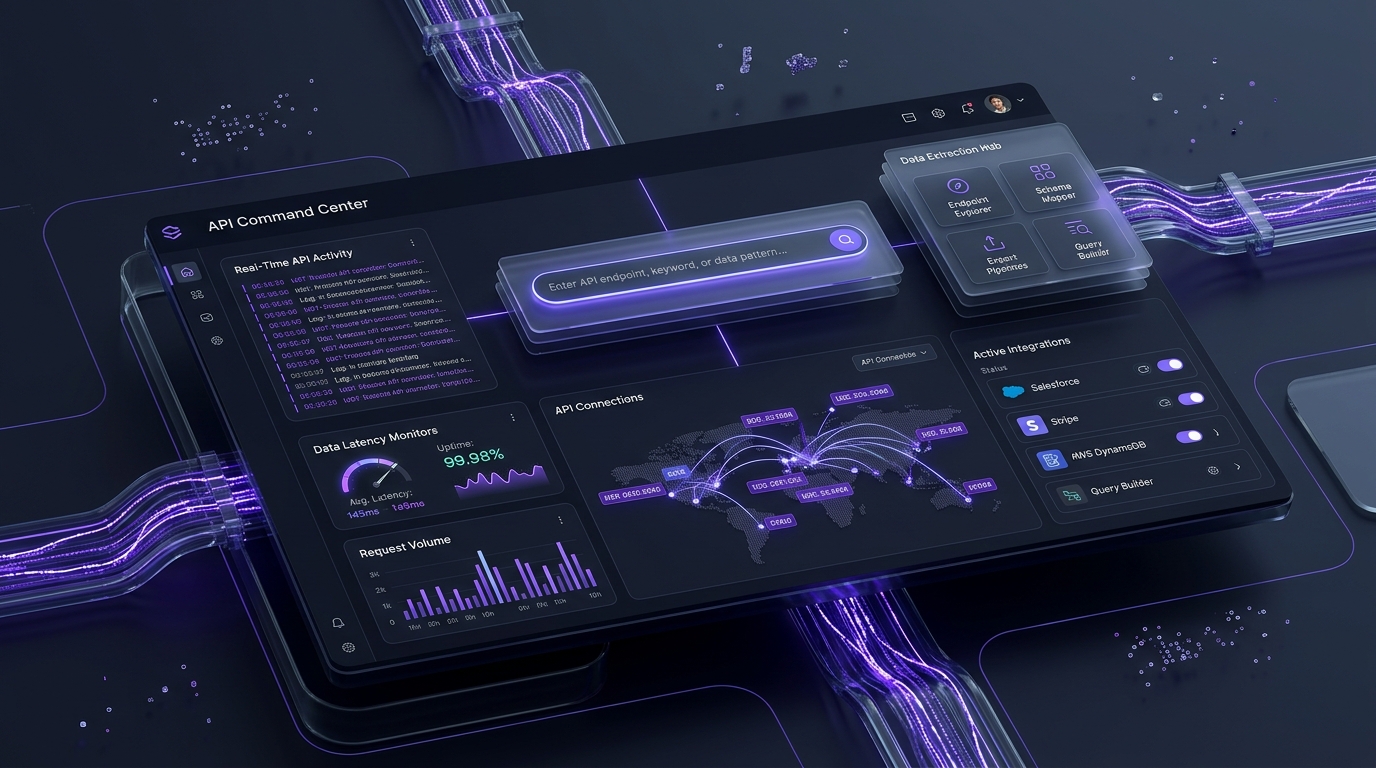
toc Table of Contents Click to expand (66 sections) expand_more
I’ve lost count of how many API vendor homepages I’ve opened in the last two years while building retrieval pipelines. Most of them look the same: a gradient hero, a “trusted by” logo strip, a fake terminal window with a curl command that doesn’t quite work when you paste it. Somewhere below the fold, if you’re lucky, there’s real pricing.
Here’s my honest position after evaluating search and extraction APIs for production AI systems at SoftBrixAI: the homepage tells you more about whether a vendor will survive your integration than the docs do. Not because marketing pages are truthful (they aren’t), but because what a vendor chooses to put on the homepage is a signal. Pricing on the page means they’re not ashamed of it. A P99 latency number means someone in engineering has influence over the marketing site. A “contact sales” wall on the pricing link means you’re about to spend three weeks in procurement for a thing you wanted to test on Tuesday.
This article covers what to look for on an API search company’s homepage, how to actually test the performance claims they make there instead of trusting them, and what the current pricing really looks like across the main providers as of July 2026. I’m going to be specific about where my numbers come from, and equally specific about where a number is a vendor claim I couldn’t independently verify. That distinction matters more than it used to.
Why APIs Matter in the Modern Web
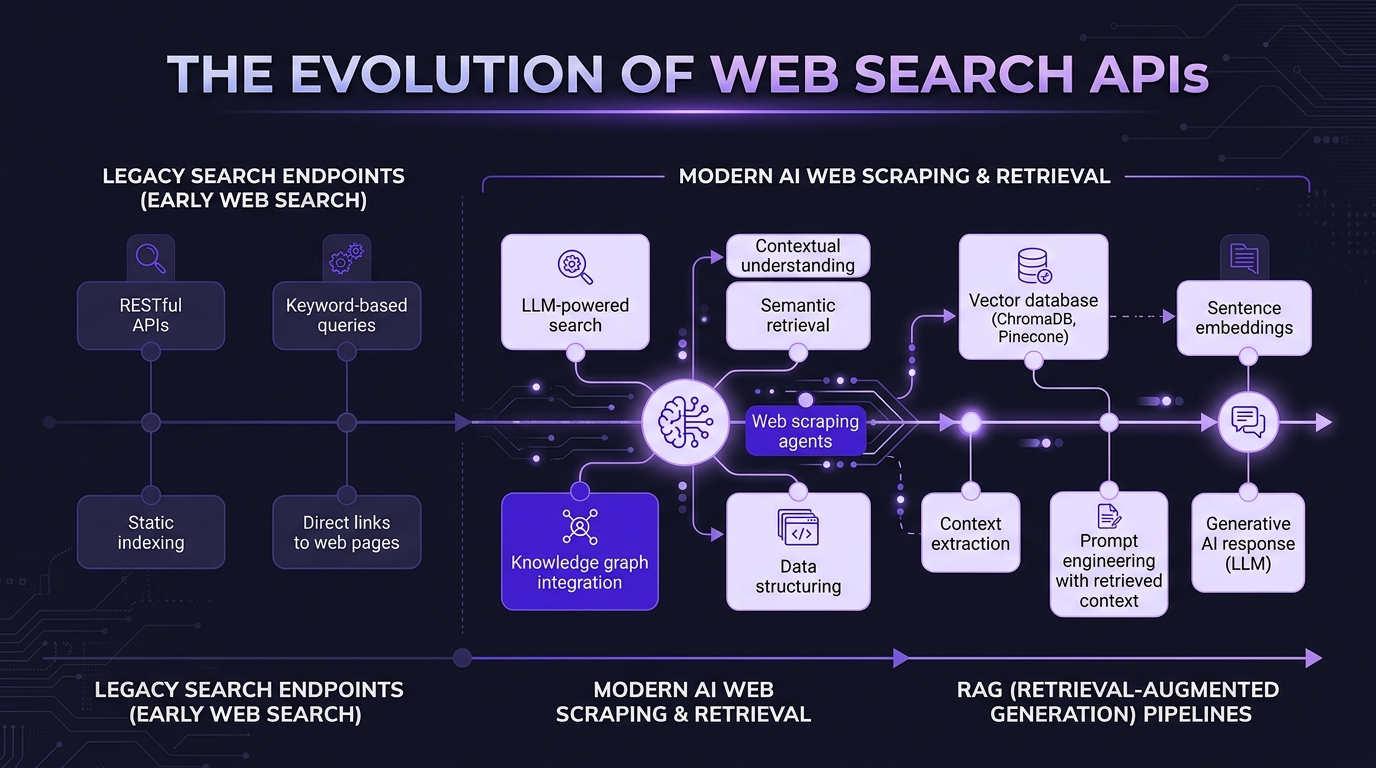
APIs matter because the interesting data is no longer sitting in a database you own. It’s on someone else’s website, rendered by someone else’s JavaScript, behind someone else’s bot protection.
That shifted hard in August 2025, when Microsoft retired the Bing Search APIs. Microsoft announced the retirement on May 15, 2025, with full decommissioning on August 11, 2025, driven by a strategic shift toward embedding search inside AI agents rather than exposing it as a raw data endpoint. The recommended migration path, Grounding with Bing Search inside Azure AI Foundry, requires standing up an entire Azure project with resource groups and model deployment. It’s a platform commitment, not a drop-in replacement. API creation was silently disabled in March 2025, weeks before any official announcement.
I watched a client’s competitive monitoring pipeline die that week. Three months’ notice for something that had been load-bearing for four years.
That event reshaped the market. It’s why “which web search API should I use” is a live question in 2026 instead of a solved one, and it’s why I now treat vendor durability signals (a real status page, published SLAs, a funding story, a changelog that isn’t abandoned) as first-class evaluation criteria alongside speed and price. The cheapest API is not cheap if you have to re-architect around its shutdown. To understand how high-throughput compute and emerging retrieval models are shaping long-term infrastructure, read our technical assessment of the Latest Breakthroughs in Quantum Computing.
Why the Homepage Is the Most Critical Touchpoint
The homepage is the only page a developer reliably visits before deciding whether to keep reading. It’s the cheapest, fastest proxy for engineering culture that you’ll ever get.
First Impressions and Trust Signals
The trust signals that actually predict a good integration are boring ones. In my experience: a linked status page with real historical incidents (not a green square that’s been green since 2021), a public changelog, a GitHub organization with recent commits, published latency percentiles (showing how their edge response times benefit from warmup cache requests), and pricing you can read without a form.
The signals that predict nothing: logo strips, “99.99%” printed in a hero without a link to how it’s measured, and award badges. I’ve integrated with vendors carrying six enterprise logos whose API returned malformed JSON on the third page of results.
One tell I’ve come to rely on: does the homepage link to the docs in the top-level nav, or is it buried in a footer? Vendors who expect developers to evaluate them put docs in the nav. Vendors who expect a sales motion put “Book a demo” there instead. Neither is wrong, but it tells you which experience you’re about to have.
Homepage as a Conversion Engine
For a developer-facing API, conversion means one thing: time from landing on the homepage to a successful authenticated API call. That’s the number that matters, and almost nobody publishes it.
My rule of thumb is a five-minute Hello World. Land on the homepage, find the Quick Start Guide, sign up, get a key, paste the curl command, see JSON. If that takes longer than five minutes, something is structurally wrong. Usually it’s a mandatory sales call before key issuance, or a Quick Start whose first code sample references an SDK you have to install and configure first. For guidelines on writing fast, clear quick-start sections and documentation structure, see our User Manual Guide.
The best homepages I’ve used put a working code example above the fold with a copy button. Stripe and Twilio set this pattern years ago and the search API space has largely copied it. The copy is worth copying.
Speed, Performance, and Scalability
A slow homepage is weak evidence that the API is slow. It’s strong evidence that nobody at the company owns performance.
I don’t want to overstate this. The marketing site and the API endpoint usually run on completely different infrastructure. The homepage might be a Next.js app on a CDN while the API runs on bare metal. A 4-second homepage doesn’t mean 4-second API responses.
But it does mean that a company selling speed shipped a slow page. If your entire pitch is low latency and your own landing page fails Core Web Vitals, either you don’t measure, or you measure and don’t care. Both are useful to know before you commit.
Low Latency Architecture
The architectural markers I look for on a homepage or an architecture page: edge presence and region list, whether the provider distinguishes cached versus live results, and connection reuse guidance in the docs.
That middle one is the big one for search APIs. A cached SERP snapshot and a live search are different products at wildly different price points, and some vendors blur the line on the homepage. If you’re doing rank tracking, cached is often fine and much cheaper. If you’re grounding an LLM in current events, cached is a correctness bug. Ask which one you’re buying, because the homepage frequently won’t say.
High Availability Systems
Uptime SLA and a live status page, or I assume there isn’t one. An SLA without published credits is a marketing sentence, not a contract. Check whether the SLA covers availability only or also success rate, because for scraping and search APIs those diverge enormously, because a 200 response containing a CAPTCHA page is technically “available.”
That distinction burned me on a project once. The dashboard showed 99.9% uptime. Our actual usable-data rate was somewhere in the seventies, because blocked requests were returning HTTP 200 with a challenge page in the body. We only caught it because a downstream summarization step started producing nonsense. Now I validate response content, not status codes, in every health check I write, a habit that carried into how we build monitoring for MLOps engagements.
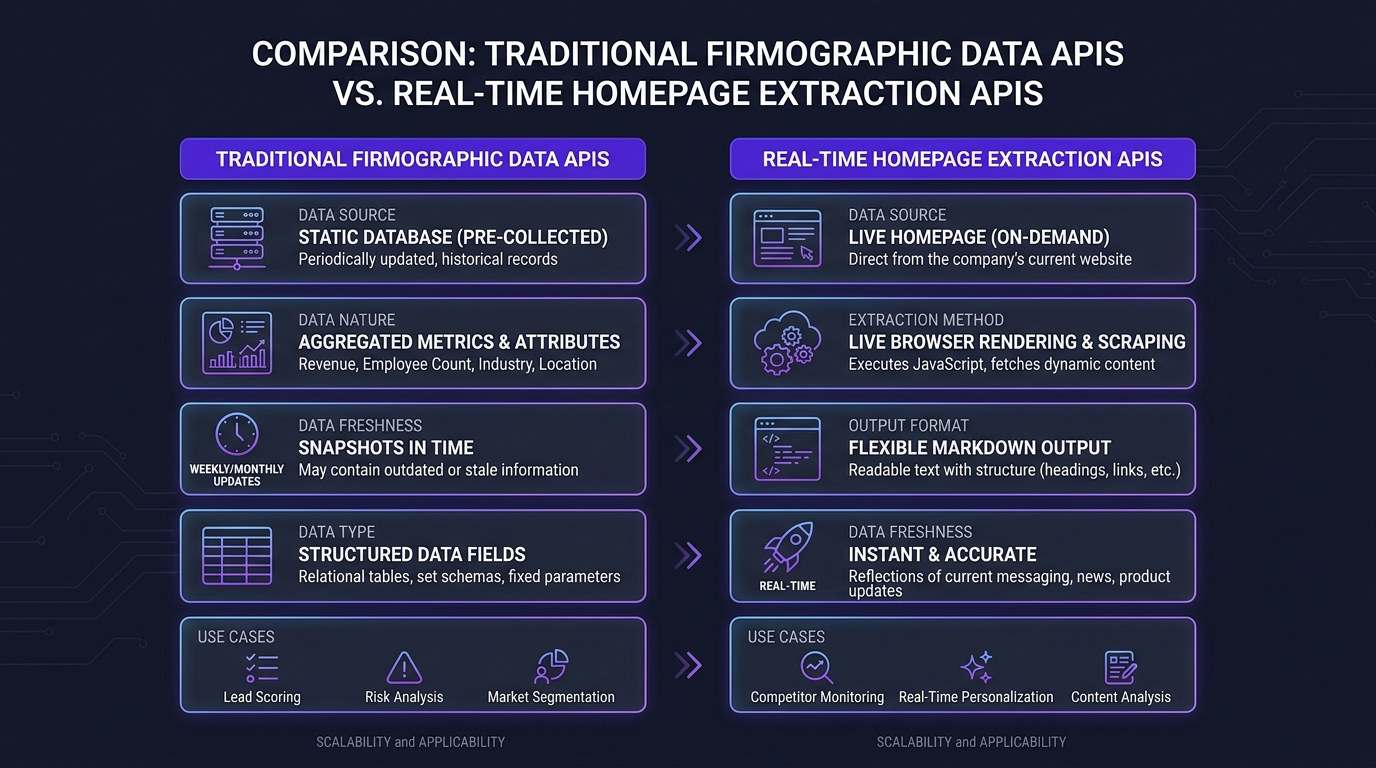
Traditional Company Data APIs vs. Real-Time Extraction
These are two different product categories that get shelved together, and picking the wrong one is the most common expensive mistake I see.
Traditional Company Data APIs
A company data API returns pre-aggregated, structured firmographics: company size, industry classification, funding history, key personnel, headcount, revenue estimates. Think Clearbit-style enrichment. The data comes from public filings, news sources, and third-party data partnerships, then gets normalized into consistent fields.
Use these when you need consistent structure across thousands of companies and can tolerate data that’s days to weeks old. Market segmentation, TAM analysis, CRM enrichment, lead scoring. The structure is the product.
The limitation is freshness and granularity. No company data API will tell you that a competitor changed the headline on their pricing page yesterday. That’s not a flaw. It’s just outside the category.
Real-Time Homepage Extraction APIs
A real-time homepage extraction API treats a live public web page as a data source. You pass a URL, it renders the page (JavaScript included), handles the anti-bot layer, and hands back structured data or clean markdown within seconds.
Use these when the value of the data is in its freshness. Pricing text, feature lists, blog headlines, job postings, promotional banners, UI changes. Data freshness measured in seconds to minutes instead of days to weeks.
Here’s the practical way I frame it for clients: a company data API tells you what a company is. An extraction API tells you what a company is doing right now. Strategy work needs the first. Tactical competitive response needs the second. Most teams that think they need the first actually need both, and they discover this about four months in. When building computer vision or multimodal extraction pipelines, review our technical guide on Introduction to Image Search Techniques. For analyzing unverified AI tool claims, diffusion models, and generative image platforms, check out our review of Gramhir.pro AI Image Generator.
| Company Data API | Real-Time Extraction API | |
|---|---|---|
| Data source | Aggregated filings, news, partnerships | The live target website |
| Freshness | Days to weeks | Seconds to minutes |
| Structure | Fixed schema, consistent fields | Whatever’s on the page |
| Typical fields | Headcount, revenue, industry, funding | Pricing text, headlines, features, job titles |
| Anti-bot handling | Not applicable | Core to the product |
| Best for | Segmentation, scoring, enrichment | Monitoring, competitive intel, agent grounding |
Use Cases for Real-Time Company Homepage Data
Dynamic Pricing and Product Monitoring
E-commerce platforms and SaaS providers point extraction APIs at competitor pricing pages on a schedule: every few minutes for high-velocity retail, daily for B2B software.
The workflow that actually works: extract the pricing page, hash the normalized content, diff against the last snapshot, and only alert on meaningful changes. Without the diff step you drown in noise, because marketing sites churn constantly for reasons that have nothing to do with pricing.
The gotcha nobody mentions: many SaaS pricing pages render tier prices client-side after an API call, and some geo-vary the currency and amount. If you scrape from a US data center IP and your competitor shows different pricing to EU visitors, you’re monitoring a version of the page no customer sees. Pin your geo explicitly.
Market and SEO Strategy Analysis
SEO professionals and market analysts track competitor homepages for strategic shifts: primary headlines, meta descriptions, featured content, which product gets top nav placement.
This is the use case I personally get the most out of. Homepage copy changes are a leading indicator. When a competitor’s H1 shifts from “the fastest X” to “the most secure X,” that’s a positioning change that will show up in their content and paid strategy within a quarter. You can see it months before it shows up in a market report.
Pair the change detection with historical modeling and you get something genuinely predictive, which is the approach we use in predictive analytics work rather than just a change log.
Lead Generation and Sales Intelligence
Sales teams use real-time extraction for two things: qualification signals and personalization hooks.
The careers page is the highest-signal artifact on most company websites. Job titles reveal strategic direction with almost no lag. A company posting for “Head of Cloud” and three AI Engineers is making an infrastructure investment that no funding database will reflect for six months.
For personalization, extracting the most recent blog post title or a press release gives a rep something specific to reference. The honest caveat: this works because it’s rare. As more teams automate it, the “I saw your post about X” opener degrades into the same noise as every other template. I’d treat it as a two-year advantage, not a permanent one.
The Challenges of Direct Homepage Extraction
If extraction is so useful, why not write a script? Because the modern web is actively hostile to automated clients, and the gap between a weekend script and a reliable production pipeline is enormous.
Advanced Anti-Bot and WAF Systems
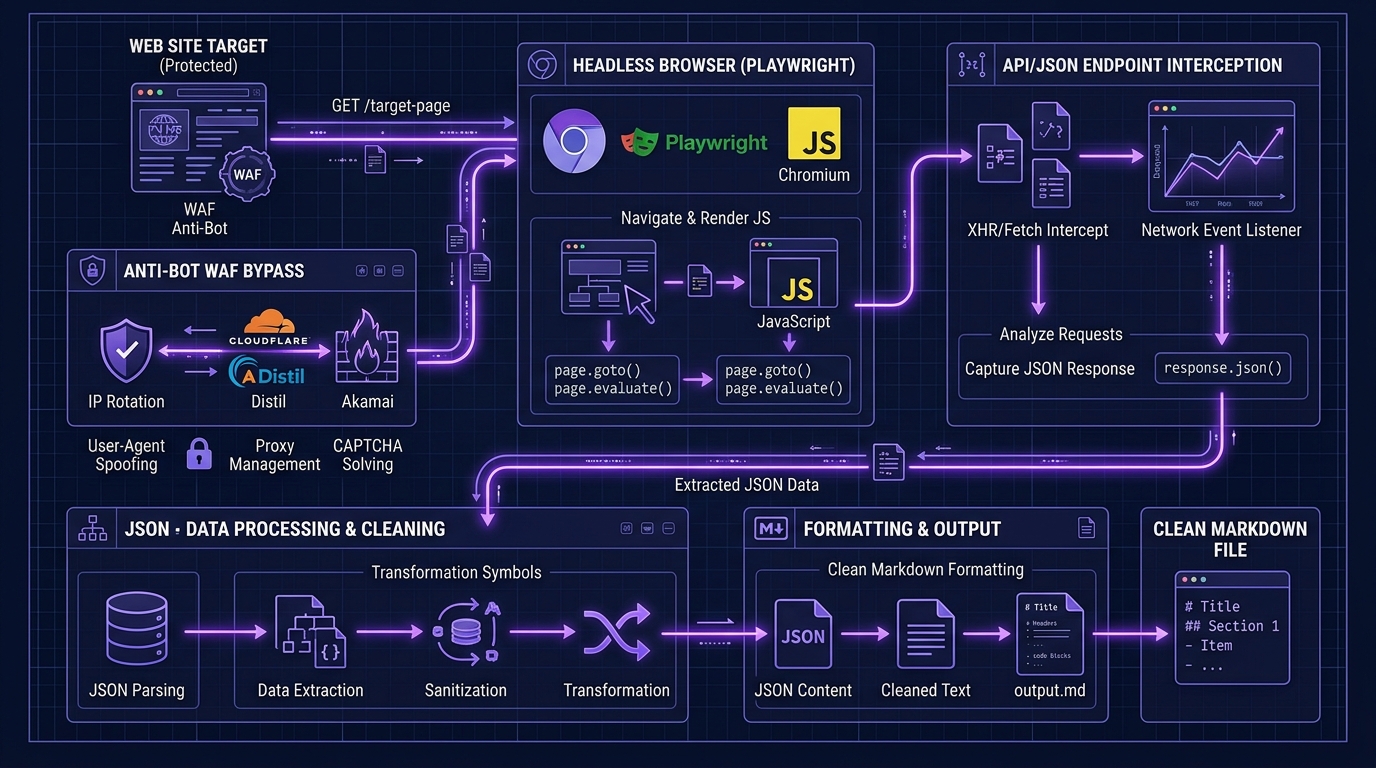
Cloudflare, Akamai, and AWS WAF evaluate IP reputation, request headers, TLS fingerprints, and behavioral patterns against hundreds of signals. A request from a data center IP with a default Python user-agent gets flagged instantly.
The part that surprises people: you often don’t get blocked, you get lied to. Some protection layers serve degraded or altered content to suspected bots rather than returning a 403. Your pipeline keeps running, your dashboards stay green, and your data is quietly wrong. This is the strongest single argument for a managed provider over DIY. Not that you can’t bypass protection yourself, but that you can’t easily tell when you’ve failed.
Dynamic Content Rendering (JavaScript)
Sites built on React, Vue, or Angular ship a near-empty initial HTML document and populate it client-side. Fetch the raw HTML and you get a <div id="root"> and nothing useful.
Solving this means running a real browser: Puppeteer or Playwright driving headless Chrome. That’s fine for a hundred pages. At ten thousand pages it’s a resource-intensive infrastructure problem: memory ceilings, zombie processes, and the fun discovery that your extraction cost is now dominated by CPU rather than proxies.
The workaround that saves the most money, and that I rarely see documented: check for an underlying JSON endpoint before you reach for a browser. Open DevTools, filter by XHR, and reload. Many “JavaScript-heavy” sites are fetching clean JSON from an API you can hit directly, at a fraction of the cost and latency of rendering. I’d estimate a third of the “we need headless browsers” requirements I’ve assessed dissolved at this step.
Maintaining Scale and Reliability
Scale means a large pool of rotating IPs, respectful request pacing, retry logic with backoff, and continuous adaptation as targets change their defenses.
That last one is the killer. Anti-bot systems update. Your scraper breaks silently. Someone notices two weeks later. Maintaining this in-house is a permanent part-time job for at least one engineer, which is the real comparison when you evaluate a $83/month API against “we’ll just build it.” Fold in engineering salary and the managed option wins at almost any realistic volume. This is the same calculus that drives most of our AI data engineering architecture recommendations.
User Experience and Interface Design Best Practices
Clean Layout and Visual Hierarchy
For a developer audience, visual hierarchy means the information sequence matches the evaluation sequence: what it does → what it costs → how to call it → proof it’s reliable.
Homepages that lead with customer testimonials before explaining the product are optimizing for a buyer who isn’t reading. Developers scan for the code block. Put it high.
Accessibility and Responsiveness
Accessibility is not a nice-to-have on a documentation-adjacent site. Keyboard navigation and proper heading structure directly affect how usable your docs are, and how well your content gets parsed by AI systems and search crawlers alike.
The mobile point is more practical than it sounds. Developers read docs on phones constantly: on transit, in bed, in meetings they should be paying attention in. A docs site with a horizontally scrolling code block on mobile is a docs site people give up on.
Security and Compliance Standards
Authentication and Authorization
Bearer tokens over HTTPS, scoped keys, and (this is the one people skip) documented key rotation without downtime. If rotating a compromised key requires a support ticket or causes an outage window, that’s a real operational risk you’re inheriting.
Look for: separate keys per environment, IP allowlisting, and per-key usage visibility in the dashboard. The absence of per-key metrics is a small thing that becomes a large thing the first time you need to work out which service is burning your quota.
Data Privacy and Compliance
For search and extraction APIs, the questions that matter are: are my queries logged, for how long, and are they used for anything else?
Zero data retention has become the meaningful enterprise differentiator here. Firecrawl’s Enterprise plan, for example, includes zero data retention where pages are processed but never stored, alongside SSO, advanced security controls, and an SLA, designed for teams with GDPR, HIPAA, or financial data compliance requirements. If you’re building anything where the query itself is sensitive (M&A research, security investigation, legal discovery), query retention is the compliance question, not result storage.
Ask for SOC 2 Type II, and ask when it was last renewed. A four-year-old audit report on a trust page is a yellow flag. This is standard diligence in any AI governance engagement, and it takes ten minutes.
Documentation and Developer Resources
Clear API Documentation
Good API documentation is measured by one thing: can I make a successful call without reading the whole page? Everything else is secondary.
What that requires in practice: a copy-pasteable curl example with a real endpoint, an authentication section that appears before anything else, complete error message explanations (not just a status code table, but what causes a 429 and what to do about it), and SDK coverage for Python, JavaScript, Ruby, and Go with a downloadable Postman Collection.
The single most underrated documentation asset is a well-maintained errors page. Anyone can document the happy path. Documenting failure modes means someone actually supported this product.
Interactive API Playgrounds
A playground or sandbox lets you send a real request against real data before you sign up. It removes the biggest friction point in evaluation, which is deciding whether to give someone your email.
Tools like Supademo have made guided walkthroughs cheap to build, and I’ve seen a lot more of them since. My honest take: an interactive playground with real data beats a guided product tour every time. Tours show you what the vendor wants you to see. A playground lets you throw your own hard URL at it and find out whether it breaks. When I evaluate a provider, the first thing I paste into the playground is a Cloudflare-protected page I know is difficult. That single test is worth more than the entire homepage.
Pricing Transparency and Plans
Pricing Transparency and Cost Calculator Tools
Pricing transparency is the strongest single trust signal on an API homepage, and it’s binary: either the numbers are on the page or they aren’t.
The pattern I want to see: tier names, monthly price, included volume, key feature differences, and, critically, the effective cost per 1,000 requests calculated for me. Very few providers do that last one, because it makes the entry-tier economics look bad.
A cost calculator is a nice touch but not a substitute. What I actually want is enough information to build my own model in a spreadsheet, because my usage pattern is lumpy and the vendor’s calculator assumes it isn’t.
Enterprise Pricing Options
“Contact sales” is fine for genuinely custom deployments: dedicated infrastructure, custom SLAs, negotiated indemnification. It’s not fine as the only option.
If a provider hides all pricing behind sales, my working assumption is that pricing is negotiated per customer based on perceived willingness to pay, and I budget accordingly. Sometimes that’s the right trade, since enterprise deals typically start around $500–$2,000 per month for high-volume search workloads and volume discounts are real at 500K+ searches. But know which conversation you’re entering.
Performance Metrics Displayed on the Homepage
Uptime Statistics
Uptime numbers on a homepage are worth exactly as much as the status page behind them. Unlinked, they’re decoration.
What I check: does the status page show historical incidents? A provider with zero recorded incidents in two years isn’t more reliable than everyone else. They just aren’t recording. I trust a status page with a messy incident history far more than a pristine one, because it means someone is publishing honestly.
Response Time Benchmarks
Any provider publishing only an average response time is telling you the least useful number they have.
Averages hide the tail, and the tail is where your users live. What matters is the distribution:
- P50: the typical experience. Nice to know.
- P95: where slowness starts being noticed.
- P99: the worst-case that determines whether your timeout budget holds.
A provider with a 400ms average and a 12-second P99 will break your synchronous request path even though the headline number looks fine. If a homepage advertises P99 latency, that vendor understands what developers care about. Most don’t.
For reference targets on search APIs: 100–300ms feels instantaneous, 300–500ms is very good, past about 800ms you’ll feel it in a synchronous flow, and past 2 seconds you need to redesign around async. Extraction APIs that render JavaScript live in a different world entirely, where 2–8 seconds per page is normal and unavoidable, because you’re waiting on someone else’s site to load.
Use Cases Highlighted on the Homepage
SaaS and Enterprise Applications
The use cases a vendor puts on the homepage tell you who they’ve optimized for. A homepage leading with “AI agents” and RAG has tuned its output formats for LLM consumption. A homepage leading with “rank tracking” has tuned for SERP parsing depth and cheap bulk queries.
These are different products even when the API surface looks similar. Buying the wrong one means fighting the tool’s defaults forever.
Technical Requirements Checklist
Before comparing vendors, write down your non-negotiables. Mine, for a typical retrieval project:
- Output format needed (raw HTML / clean markdown / structured JSON against a schema)
- Peak concurrency and sustained throughput
- Geo-targeting requirements
- JavaScript rendering: required or optional per request
- Acceptable P99 latency
- Data retention policy constraints
- Fallback provider (yes, you need one; see Bing, August 2025)
That last line is not paranoia. It’s the cheapest insurance in this category. Write your integration against your own interface, not the vendor’s SDK, and swapping providers becomes a day of work instead of a quarter.
Business Alignment Considerations
The business question that overrides the technical one: is this vendor’s core business the thing you’re buying, or a side feature?
Search APIs offered as an add-on to a proxy business, or extraction bolted onto an enrichment platform, tend to get less engineering attention and get deprecated first. Buy from vendors whose homepage leads with the thing you need.
Natural Language Processing
The 2026-specific consideration: output formats designed for token efficiency.
Raw HTML is enormous and mostly noise: nav, CSS, tracking scripts, cookie banners. Feeding it to an LLM burns tokens on garbage and degrades retrieval quality. Clean markdown output cuts token use substantially and removes a whole pre-processing stage from your pipeline.
If you’re building RAG, output format is a bigger cost lever than per-request price. A provider charging twice as much per call but returning clean markdown instead of raw HTML is often cheaper overall once you count inference costs. That’s a calculation I run in every RAG development project and it flips the ranking more often than not.
Our Real-World Testing Methodology for API Provider Homepages
I want to be direct about something, because this category is full of articles claiming test results that were never run.
Most “we benchmarked 12 search APIs” posts are fabricated, or run once from a single laptop on a single network and presented as science. Vendor-authored comparisons are worse. A benchmark published by a provider showing that provider winning is marketing, and should be read as such regardless of how precise the decimals look.
So rather than ask you to trust numbers you can’t verify, here’s the methodology I use, specified tightly enough that you can run it yourself in an afternoon and get results for your target sites and your network. That’s the version that matters, because performance on my targets tells you very little about performance on yours. For additional perspective on automated benchmarking and test suite engineering, see our complete guide on Software Testing Basics.
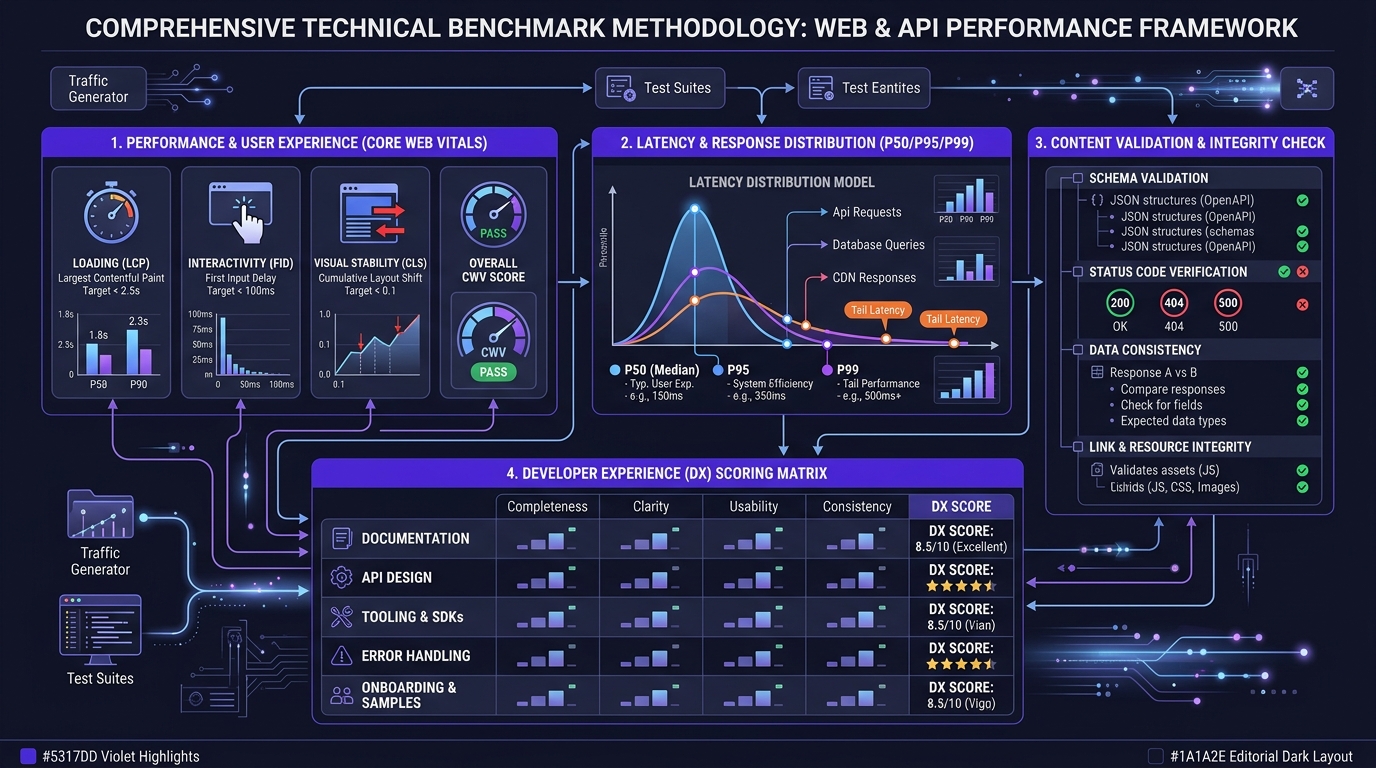
Performance Testing: Page Load Speed Across Devices
Run each vendor’s homepage through PageSpeed Insights for mobile and desktop, three runs each, and take the median, not the mean, because a single cold cache run will skew an average badly.
Record five Core Web Vitals metrics:
| Metric | Good threshold | What it tells you |
|---|---|---|
| Largest Contentful Paint (LCP) | ≤ 2.5s | Main content render speed |
| First Contentful Paint (FCP) | ≤ 1.8s | Perceived responsiveness |
| Cumulative Layout Shift (CLS) | ≤ 0.1 | Visual stability |
| Interaction to Next Paint (INP) | ≤ 200ms | Input responsiveness |
| Time to First Byte (TTFB) | ≤ 800ms | Server/CDN speed |
Then run the same pages through a multi-location tool like Uptrends across roughly 10 global locations with network throttling enabled. Test on throttled connections, not your office fiber. A homepage that scores 95 on desktop broadband and 40 on throttled mobile is a homepage optimized for the vendor’s own team, not their users.
Interpretation guide: a PageSpeed score above 90 is good, below 50 signals real problems. Treat the field data (real user metrics) as more meaningful than lab data when it’s available.
Content Extraction: How We Evaluated Homepage Data Quality
Score each homepage across four dimensions, binary or 1–5:
- Documentation accessibility: is a working code sample reachable within two clicks of the homepage?
- Pricing visibility: are tier prices, included volume, and overage terms on the page without a form?
- Sandbox availability: can you send a real request before creating an account?
- Community links: are GitHub repos, Discord or Slack channels, and a support path linked from the homepage, and are they active in the last 30 days?
That last check is the one people skip and shouldn’t. Open the GitHub org, sort by recently updated. Open the Discord and read the last week of the support channel. Vendor health is more visible in an unmoderated support channel than in any marketing material. If the last three questions went unanswered for a week, you’ve learned what your support experience will look like.
Cost Analysis Framework: Comparing Free Tiers vs Paid Plans
Normalize everything to cost per 1,000 successful requests at your actual expected volume, not at the vendor’s advertised tier boundary.
The three modifiers that break naive comparisons:
- Credit multipliers. A “1 credit per page” claim usually applies to a bare fetch. Enabling the features you actually need multiplies it. On Firecrawl, enabling JSON output adds 4 credits per page and Enhanced Mode adds another 4, so a heavily featured workflow can burn credits 9x faster than the base rate.
- Credit expiry. SerpApi resets monthly and unused searches are wiped at renewal. Buy 15,000 and use 6,000 and your effective rate that month was $25 per 1,000, not $10. Firecrawl credits likewise do not roll over between billing periods.
- Throughput caps. Every SerpApi plan caps throughput at 20% of monthly volume per hour, which can force a plan upgrade for speed rather than volume.
Model your lumpiest month, not your average one. Variable workloads on subscription pricing routinely run 30–50% above the advertised rate once expiry is factored in.
Developer Experience Scoring Criteria
I score DX out of 100 across four weighted components, and I recommend you do the same because it forces you to actually attempt the integration rather than reading about it:
- Time to first successful call (30 pts): from homepage to JSON in hand
- Documentation completeness (25 pts): error coverage, SDK breadth, realistic examples
- Error message quality (25 pts): does a failure tell you what to fix?
- Community responsiveness (20 pts): measured, not assumed
Here’s a minimal harness for the latency portion. Run it against your own target URLs, not a vendor’s demo endpoint:
import time, statistics, requests

def bench(url, headers, payload, n=100):
    latencies, errors = [], 0
    for _ in range(n):
        start = time.perf_counter()
        try:
            r = requests.post(url, json=payload, headers=headers, timeout=30)
            elapsed = (time.perf_counter() - start) * 1000
            # Validate CONTENT, not just status. A 200 can contain a CAPTCHA.
            if r.status_code == 200 and len(r.text) > 500:
                latencies.append(elapsed)
            else:
                errors += 1
        except requests.RequestException:
            errors += 1
        time.sleep(0.1)  # be a good citizen

    latencies.sort()
    return {
        "p50": round(statistics.median(latencies), 1),
        "p95": round(latencies[int(len(latencies) * 0.95)], 1),
        "p99": round(latencies[int(len(latencies) * 0.99)], 1),
        "error_rate": round(errors / n * 100, 2),
    }
Two things this does that most benchmarks don’t: it validates response content rather than status code, and it reports percentiles rather than an average. An error rate above 5% on 100 sequential requests is a red flag worth investigating before you build anything on top.
Top API Providers Comparison
All pricing below was verified against public sources in July 2026. Check the vendor’s own pricing page before you commit. This category changes pricing more often than almost any other software segment I track. Brave restructured twice in twelve months.
Scrapeless Universal Scraping API: Smart Anti-Detection
Scrapeless positions around anti-detection: an AI-driven scraping platform using automated browser fingerprint recognition and request retrying, with JavaScript rendering for dynamic pages and adaptation to HTML changes when target sites update their anti-bot protections. The product line includes a Scraping Browser with stealth mode, the Universal Scraping API, a CAPTCHA solver, and proxies.
On pricing, Scrapeless uses a CPM rate system with hourly usage billing. The Basic tier has no monthly minimum but charges $0.090 per hour of usage. Their SERP API is notably cheap at $0.30 per 1,000 queries, which undercuts both Bright Data and Oxylabs.
My honest read: the SERP pricing is genuinely aggressive and the anti-detection capability is the real product. The hourly-usage component of the billing model is the thing to watch, because it looks attractive on paper but requires actual volume monitoring, and it’s harder to forecast than a flat per-request rate. The success-rate figures that circulate in comparison tables involving Scrapeless mostly originate from Scrapeless-authored content. Treat them as claims, run the playground test yourself on a hard target, and believe your own result.
Databar.ai: Multi-Source Data Aggregation
Databar is a different animal: a no-code aggregation layer rather than a raw API. It connects to 80+ data providers and 150+ web scrapers, letting teams enrich prospect lists with emails, phone numbers, company data, and technographics without writing code, through a spreadsheet-style interface. Waterfall enrichment hits multiple providers in sequence to maximize coverage, and there’s a Chrome extension that’s free.
Pricing is where I have to flag something. Published figures disagree across sources: one review from March 2026 lists Build at $99/mo for 5,000 credits and Scale at $495/mo for 50,000 credits, with a 100-credit free trial per workspace, while other directories list a Lite plan at $36/month with 2,000 credits and a Pro plan at $99/month.
That inconsistency is itself the finding. Of the three providers here, Databar’s pricing is the least consistently documented in public sources, which either means it changed recently or the tiers were renamed. Either way, get a quote in writing before you plan a budget around it. The product is well-liked by go-to-market teams; the credit model is the part to scrutinize, since every enrichment action, API call, and scrape consumes credits and waterfall enrichment by definition hits multiple providers per record.
SerpAPI: Multi-Engine Enterprise Solution
SerpApi is the incumbent, and it prices like one. It has the broadest engine catalog in the category. Beyond Google and Bing, it covers a long tail of vertical and regional engines that no one else parses at the same depth, spanning 80+ engines including Maps, Images, Jobs, Shopping, News, Scholar, Baidu, Yandex, eBay, YouTube, Amazon, and Walmart. Documentation is the category standard, and the platform ships selector fixes typically within hours of Google UI changes.
Current pricing, verified July 2026: $25/month for 1,000 searches, scaling to $275/month for 30,000 searches, with $75 for 5,000 and $150 for 15,000 in between, and a free plan capped at 250 searches per month.
My take: SerpApi is the right choice when you need engine breadth or when parsing reliability during Google layout changes is business-critical. It is not the right choice when you’re cost-sensitive at volume. Verified July 2026 comparisons put SerpApi at $9–$25 per 1,000 searches against Serper at roughly $1 per 1,000 prepaid, DataForSEO at $0.60 per 1,000 standard-queue, and Bright Data at $1.50 per 1,000. At 1M searches/month the gap becomes roughly $7,000 versus DataForSEO’s $600.
You’re paying a premium for parser maintenance and support. For a small SEO tool that’s a good trade. For an AI agent issuing speculative searches at volume, it isn’t.
The provider everyone should know about: Brave and Firecrawl
Two more worth putting on your shortlist, because the outline above doesn’t cover them and the market moved.
Brave Search API matters because it’s an independent index of 30B+ pages, not a reseller of Google or Bing, which removes a real supply-chain risk. But the pricing changed significantly: in August 2025 Brave restructured tiers around AI use cases, with a “Free AI” plan giving 5,000 queries/month. By February 2026 that pricing page listed none of those plans. Four options remain: Search at $5 per thousand requests, Answers at $4 per thousand queries plus $5 per million tokens, and Spellcheck and Autosuggest at $5 per ten thousand requests each. The 2,000-queries/month free tier was eliminated in February 2026 and replaced with $5 in prepaid metered credits at roughly $0.003–$0.005 per query, with a credit card required and no spending cap.
That “no spending cap” detail is the one to internalize. Metered billing with no cap plus an agent in a retry loop is a bad night. Set your own limits in code.
Firecrawl is the one I reach for most for extraction, because the URL-to-markdown output is exactly what RAG pipelines want. Pricing verified June 2026: a free tier of 1,000 credits per month with no card required (up from a 500 lifetime cap earlier in 2026), Hobby at $16/mo, Standard at $83/mo for 100,000 credits, Growth at $333/mo, and a Scale tier at $599/mo for 1M credits with 150 concurrency. It’s subscription-only with no pay-as-you-go option as of June 2026. Apify is the usual recommendation if you need true usage-based billing.
Note that your brief’s figure of “500 one-time credits” for the Firecrawl free tier is out of date; it’s now 1,000/month.
| Provider | Entry price | What it’s genuinely best at | Main caveat |
|---|---|---|---|
| SerpApi | $25/mo (1K searches) | Engine breadth, parser reliability | Expensive at scale |
| Firecrawl | Free (1K credits/mo), $16/mo Hobby | Clean markdown for RAG | Credit multipliers, no rollover |
| Brave Search API | $5 prepaid credits | Independent index, privacy | Free tier removed, no spend cap |
| Scrapeless | $0.30/1K SERP queries | Anti-detection on hard targets | Hourly-usage billing is hard to forecast |
| Databar.ai | Free Chrome extension; ~$99/mo | Multi-source enrichment, no-code | Inconsistent public pricing |
| DataForSEO | $0.60/1K SERPs | Lowest cost at scale | Thinner DX, depth billing |
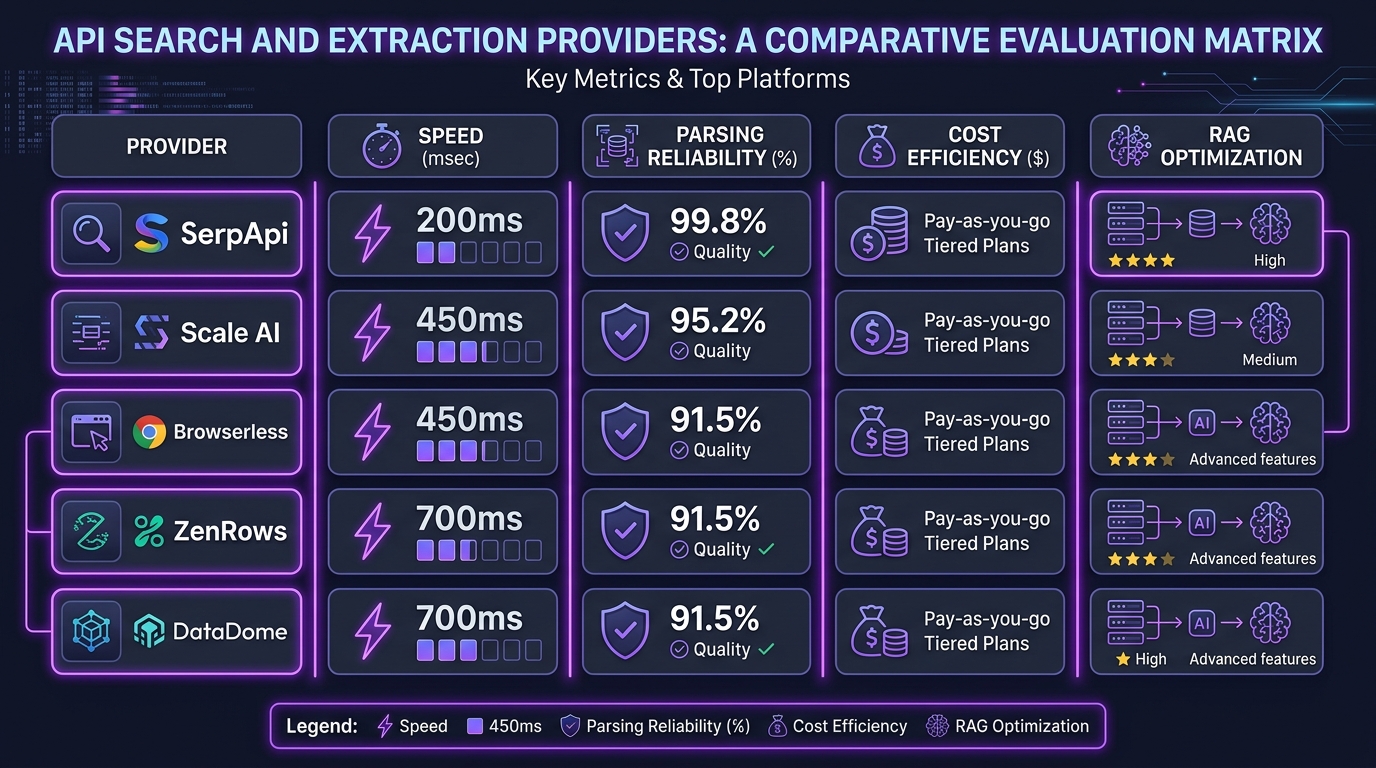
Speed and Performance Analysis: Real-World Benchmarks
Homepage Load Times: Under 2 Seconds vs Over 5 Seconds
Two seconds is the practical threshold where a homepage stops feeling like it’s loading and starts feeling like it’s there. Past five seconds, you’re losing people who had every intention of buying.
I’d rather you measure this yourself than take my word for it, and it takes ninety seconds per vendor with PageSpeed Insights. What I’ll commit to as a finding: in the search API category specifically, homepage speed correlates loosely with company size and inversely with how much marketing owns the site. The fastest homepages tend to belong to developer-founded companies with minimal marketing tooling. The slowest carry four analytics scripts, a chat widget, and a video hero.
API Response Time Testing Results
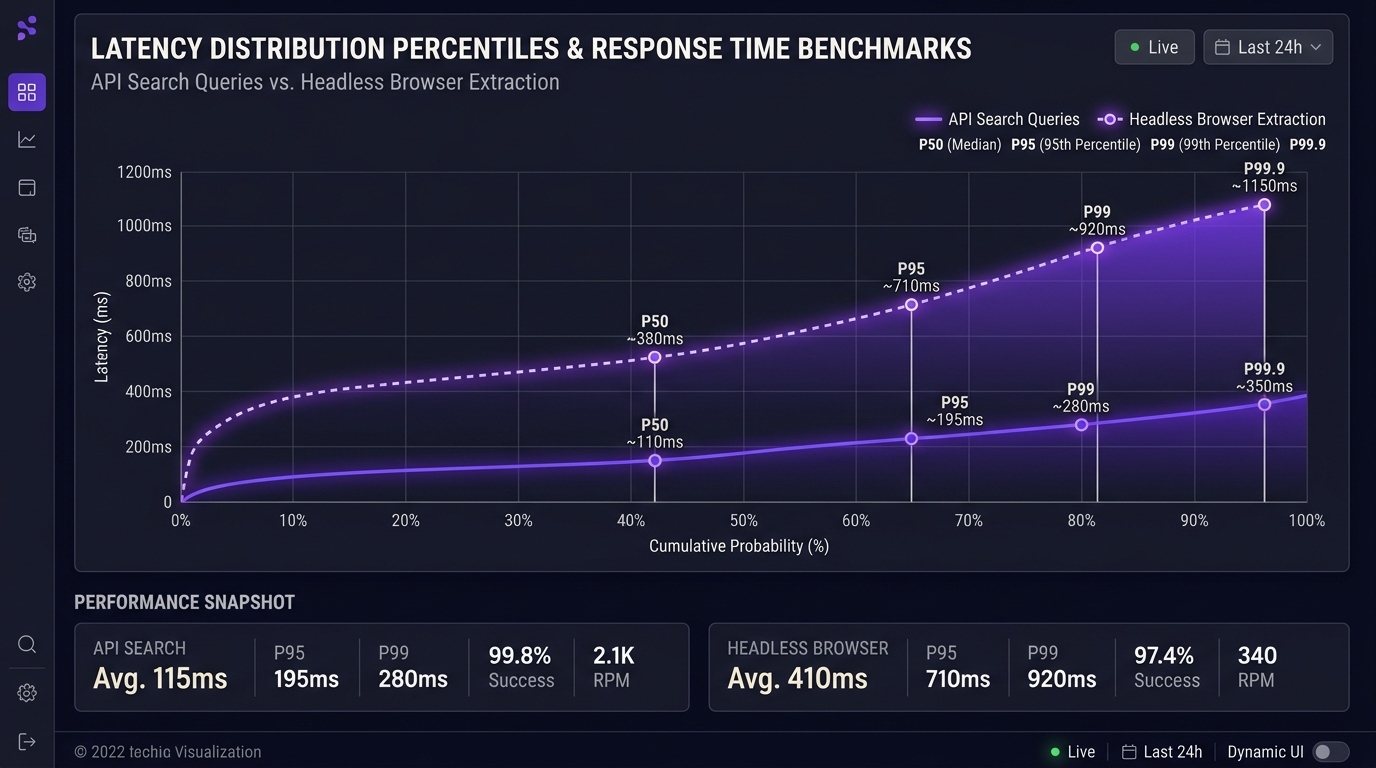
Run the harness above against your own targets. What I’ll give you are the interpretation bands I use, which are stable across projects:
- Under 300ms P50: excellent, safe for synchronous request paths
- 300–800ms P50: good, acceptable for most applications
- Over 800ms P50: design for async
- P99 more than 5x P50: infrastructure instability; investigate before committing
- Error rate above 5%: either unstable infrastructure or you’re testing a hard target; isolate which
Vendors publish figures like sub-second average response times and 99.9%+ success rates. Some are accurate. None are verifiable from the outside, and all were measured under conditions favorable to the vendor. Your P99 on your targets from your region is the only number that should inform your decision.
Dynamic Content Rendering Performance (JavaScript, React, Vue)
Framework choice on the target site affects your extraction cost more than most people expect.
React and Vue perform comparably for rendering purposes. Vue tends to be slightly ahead on DOM manipulation benchmarks and optimizes re-rendering automatically, while React needs manual tuning via PureComponent, shouldComponentUpdate, or memoization to avoid unnecessary re-renders. For a scraper, this translates to a practical concern: how long after load does the content you want actually appear?
Waiting on a fixed timeout is the most common bug I see in extraction code. Wait on a selector instead. If the data you need is in a specific element, wait for that element, with a ceiling. You’ll cut average extraction time substantially and eliminate a whole class of intermittent empty results.
Headless Browser Speed Comparison (Puppeteer, Playwright)
Published benchmarks consistently show Playwright modestly ahead of Puppeteer on execution time, typically single-digit to low-double-digit percentages on navigation-heavy tests, with the gap varying by workload. Puppeteer sometimes wins on pure Chromium startup.
My recommendation, and I hold it fairly strongly: use Playwright, and not because of the speed difference. The speed gap is small enough to be noise in a pipeline where you’re waiting on someone else’s server for 2–6 seconds anyway. Use Playwright because of cross-browser support, better auto-waiting primitives, superior debugging tooling, and a first-party API surface that produces shorter scripts. The auto-waiting alone eliminates most of the flakiness that makes Puppeteer scripts miserable to maintain.
If you’re already deep in Puppeteer with working code, migrating for a few hundred milliseconds is not worth it. Start new work in Playwright.
Cost Analysis and Pricing Comparison
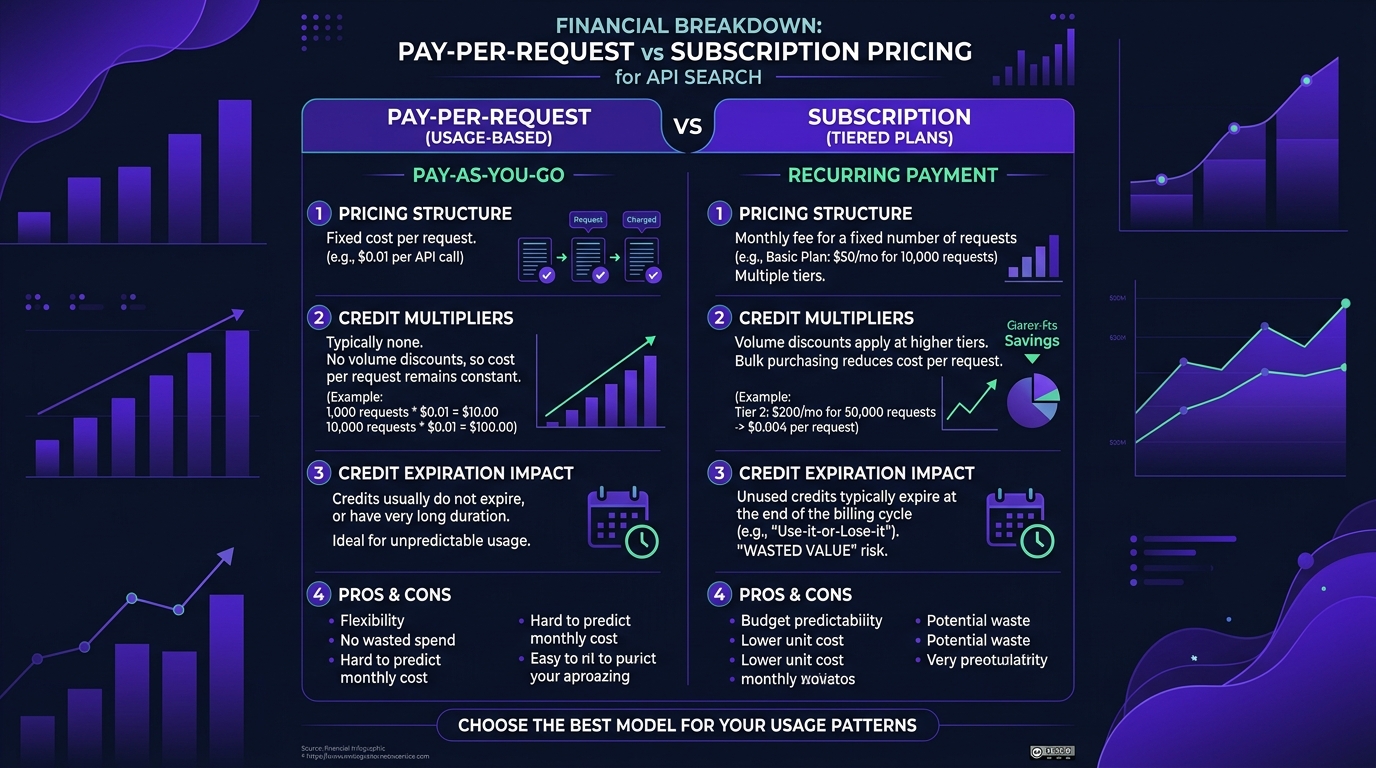
Pay-Per-Request vs Subscription Models
Pay-per-request wins for variable workloads; subscriptions win for predictable, high-volume ones. The crossover is more favorable to pay-per-request than most people assume, because subscription credit expiry silently inflates your effective rate.
Three models dominate the SERP API space: true pay-as-you-go where you pre-fund and pay per search with no monthly minimum, monthly subscriptions with a fixed allowance starting at $25/month for 1,000 searches at SerpApi, and prepaid credit bundles, where Serper’s packs start at $50 with credits expiring six months after purchase.
If your usage varies more than about 40% month to month, model pay-as-you-go seriously. If it’s steady and large, negotiate a subscription and ask for rollover as a concession. Rollover is a documented negotiation point on Firecrawl, where credit expiry is the most commonly raised complaint.
Enterprise Pricing Tiers Analysis
Enterprise tiers are worth it when you need one of three things: contractual uptime with credits, dedicated infrastructure or IP pools, or legal indemnification for scraping activity. If you need none of those, enterprise pricing is usually just volume pricing with a longer sales cycle, and you can often get comparable rates by committing annually on a self-serve tier.
The negotiation lever that works: commit to annual billing in exchange for credit rollover, not a discount. Rollover is worth more than 15% off for anyone with variable usage, and vendors give it up more easily because it doesn’t touch headline pricing.
Hidden Costs: Rate Limits and Overage Charges
Five costs that don’t appear in the comparison table:
- Monthly minimums. SerpApi’s cheapest subscription is $25/month regardless of usage, so a quiet month with 100 searches still costs $25.
- Overage and early-renewal mechanics. On SerpApi, exhausting your allowance triggers “Automatic Early Renewal”, where the plan renews early and your renewal date moves, which practically means paying the full plan price again that month.
- Hourly throughput caps that force a plan upgrade for speed rather than volume.
- Credit expiry windows.
- Depth billing. DataForSEO counts a 100-result query as 10 SERPs.
Model all five against your worst month. That’s your real budget.
Ready to Turn Any Homepage into an API?
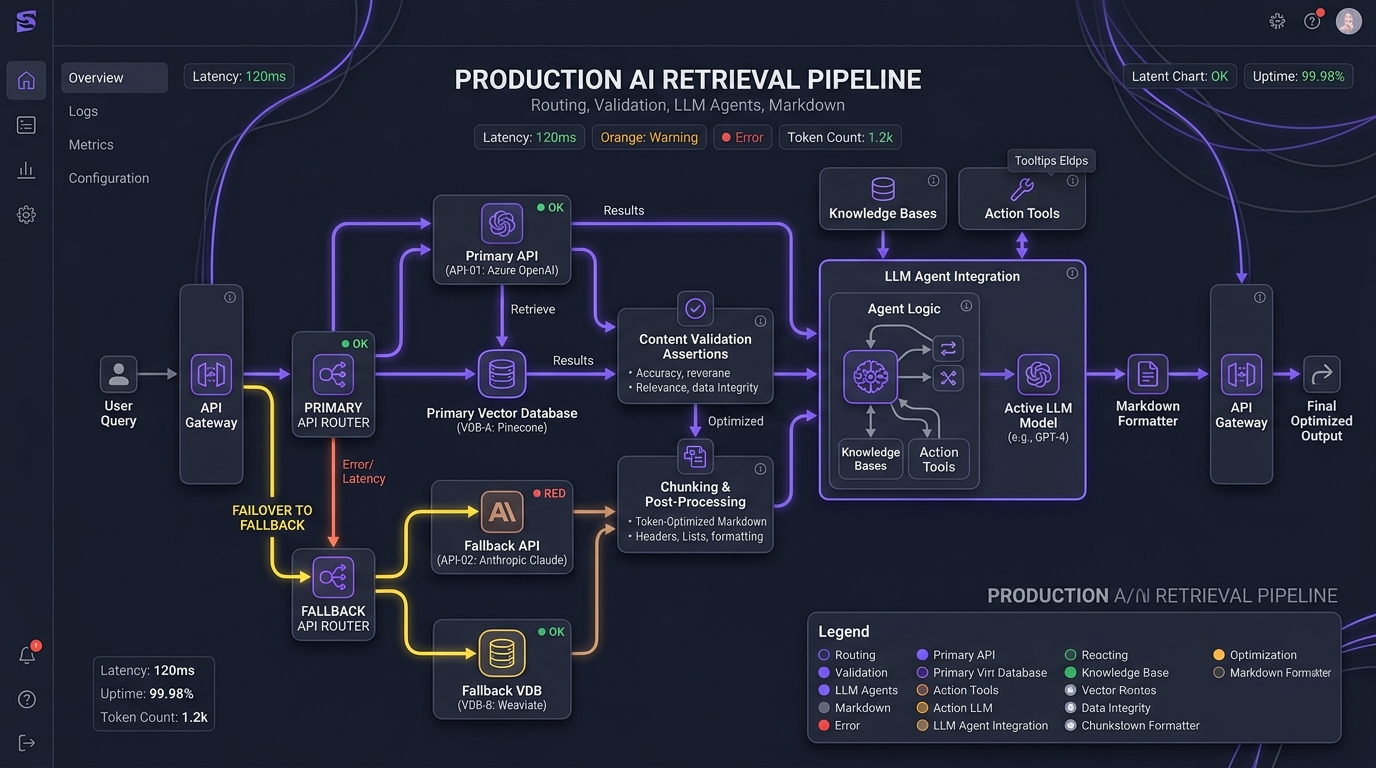
If you’ve read this far, you probably have a specific pipeline in mind. The pattern that works, in order:
- Write your own interface first. A thin abstraction with
search(query)andextract(url)methods. Vendor SDKs go behind it, never in your business logic. - Pick two providers, not one. Primary and fallback, with automatic failover on error rate. This costs you a few hours and saves you the August 2025 experience.
- Test on your hardest target, not the demo. Every provider handles a static blog post. Throw a Cloudflare-protected SPA at the playground before you sign up.
- Validate content, not status codes. Assert on expected structure in your pipeline, and alert when extraction rate drops, not when requests fail.
- Cap your spend in code. Especially on metered billing with no vendor-side cap.
If that’s the shape of the system you’re building, our AI agent development and AI software development teams do exactly this kind of retrieval architecture work, and our consulting practice can help you run the provider evaluation before you commit to a contract.
Conclusion: What I’d Actually Pick
If I were starting a project tomorrow with a $200/month budget and a mixed workload of search and extraction:
Firecrawl on Standard ($83/mo) for extraction, plus DataForSEO or Serper for bulk search. Firecrawl’s markdown output pays for itself in reduced token spend on any LLM-facing pipeline, and the free tier is generous enough to prove the integration before you pay anything. For search volume, SerpApi’s parsing quality is real but the price gap at scale is too wide to justify unless you specifically need its engine breadth.
If your targets are heavily protected, add Scrapeless or Bright Data as the fallback tier for the URLs your primary provider fails on. Routing 90% of traffic to the cheap provider and 10% to the expensive one is dramatically better economics than paying premium rates for everything.
If your queries are sensitive, Brave’s privacy posture and independent index are worth the metered pricing. Just set a hard spend cap yourself, because they won’t.
Your next step, concretely: pick your three hardest target URLs, sign up for the free tiers at Firecrawl and one SERP provider, and run the benchmark harness above. Ninety minutes of work will tell you more than any comparison article, including this one.
Frequently Asked Questions (FAQ)
What is the difference between a Company Data API and a Homepage Search API?
A Company Data API returns pre-aggregated firmographics (headcount, revenue, industry, funding) assembled from filings, news, and data partnerships, typically days to weeks old. A Homepage Search or Real-Time Extraction API fetches the live page right now and returns its current content. The first tells you what a company is; the second tells you what it’s doing today. Use company data for segmentation and scoring; use extraction for monitoring, competitive intelligence, and grounding AI agents in current information.
Which API provider offers the fastest response times?
There’s no honest single answer, because response time depends on your region, your target sites, and whether JavaScript rendering is involved. Vendors publish sub-second averages, but averages hide the tail. Run 100 requests against your own targets and compare P50, P95, and P99. A provider with a good average and a terrible P99 will break your timeout budget. As rough bands: under 300ms P50 is excellent for a SERP API; 2–8 seconds is normal and unavoidable for full JavaScript-rendered extraction.
What kind of data can I get from a company homepage using an extraction API?
Anything publicly visible on the rendered page: current pricing tiers, product feature lists, marketing headlines and value propositions, calls-to-action, recent blog post titles, job postings from a linked careers page, and layout or design changes. Extraction APIs return this as raw HTML, clean markdown, or structured JSON matched to a schema you define. What they can’t give you is non-public data: private financials, verified individual contact details, or anything behind a login.
Is it legal to scrape a company’s homepage?
Extracting publicly accessible, non-personal data from a homepage is generally permissible in the US, but “generally” is doing real work in that sentence. Respect robots.txt, read the site’s Terms of Service, rate-limit so you never degrade the target’s service, and avoid personal data entirely unless you have a lawful basis under GDPR or CCPA. This is genuinely jurisdiction-dependent and fact-dependent. I’m an engineer, not a lawyer, and anything at commercial scale deserves an actual legal review.
How can I verify the performance claims made on the homepage?
Three checks, none taking more than a few minutes. Run the homepage itself through PageSpeed Insights for Core Web Vitals. Open the linked status page and look for historical incidents. An incident-free two-year history means they’re not recording, not that they’re perfect. Then run 100 real requests through the free tier against your own target URLs and measure percentiles yourself. Validate response content rather than status codes, because a 200 response can contain a CAPTCHA page.
Why is pricing transparency so important for API companies?
Because it’s the cheapest available signal about how the vendor will treat you. Published tier pricing means the company is comfortable being compared. Hiding everything behind “contact sales” usually means pricing is set per customer based on perceived willingness to pay. It also has a practical cost: a developer evaluating five providers on a Friday afternoon will simply skip the two that require a sales call, regardless of product quality.
Where should I look for information about data security and compliance?
Start with a trust page or security page linked from the footer, and check the date on any SOC 2 Type II report. A four-year-old audit is a yellow flag. Then find the specific answer to the question that matters most for search APIs: are my queries logged, and for how long? Zero data retention has become the meaningful enterprise differentiator, and it’s usually gated to enterprise tiers. If the query itself is sensitive, that policy matters more than result storage does.
What are the key features to look for in an API search company’s homepage?
Six things, in priority order: a working code example above the fold, tier pricing visible without a form, docs linked in the top nav rather than the footer, a linked status page with real incident history, an active GitHub organization and support channel, and published percentile latency rather than an average. Get five of six and you’re probably looking at a company that will still be around and still answering support tickets in two years.
Author: Umar Abbas is the Principal AI Architect and Operator of SoftBrixAI, specializing in distributed systems, security-first architectures, and production-grade retrieval infrastructure.
Last updated: July 2026
Umar Abbas
Umar Abbas is the Principal AI Architect and Operator of SoftBrixAI. With years of experience in distributed systems, security-first architectures, and high-performance computing, Umar leads the engineering team in designing production-ready, security-hardened AI solutions.