Software Testing Basics: Complete Guide to QA Fundamentals
Master Software Testing Basics with this quick guide! Learn manual & automated testing types, bug tracking, and key concepts to boost your QA skills today.
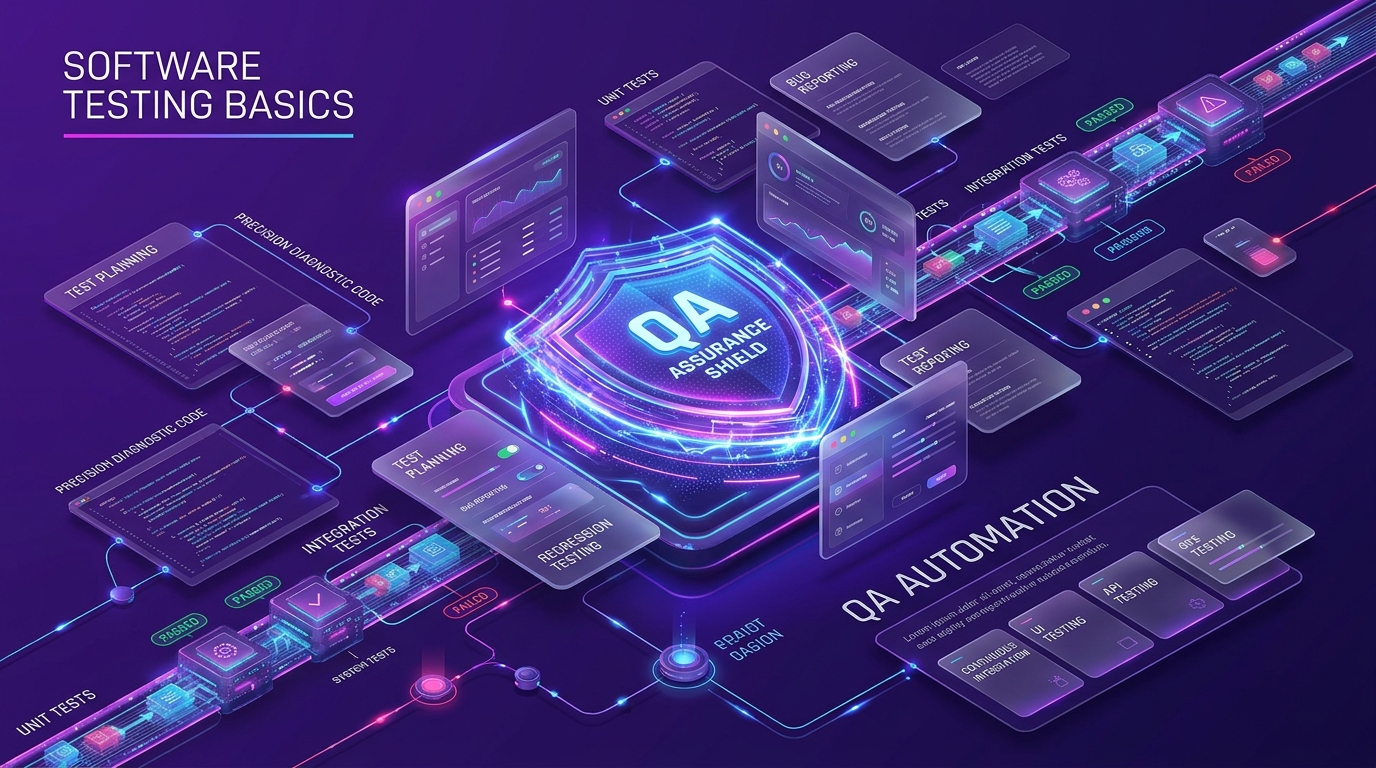
toc Table of Contents Click to expand (120 sections) expand_more
The worst production bug I ever shipped was a one-character change. A >= where I meant >. It passed code review, passed the build, and quietly let 400-odd users skip a payment step for eleven hours before anyone noticed. We had 94% code coverage on that repo. Ninety-four percent, and the bug walked right through the front door.
That’s the part nobody tells you when you’re learning software testing basics: coverage isn’t correctness, and a green pipeline isn’t proof. What testing actually buys you is evidence, enough of it, fast enough, that you can decide whether to ship. That’s it. Everything else in this guide is a technique for getting that evidence cheaper.
I’ve spent the better part of a decade on both sides of this, writing the code and writing the tests that catch it. This guide covers the whole map: what testing is, the terminology that trips people up, the levels and types, the life cycle, tooling I actually use, and the mistakes I made so you don’t have to repeat them. If you’re a beginner, read it top to bottom. If you’re already testing and just want the practical parts, jump to “Building Your First Test Suite” and work backwards.
Introduction to Software Testing
What is Software Testing?
Software testing is the process of evaluating a software application to verify it works as expected against its specified requirements, and to identify defects, errors, and missing functionality before it reaches users.
That’s the software test definition you’ll find in most textbooks, and it’s fine as far as it goes. But here’s how I’d put it to a junior on my team: testing is the act of trying to prove your software wrong. If you go in trying to prove it works, you’ll write tests that confirm what you already believe. If you go in trying to break it, you’ll find the boundary conditions where it actually falls over.
Take an online banking application. Transferring money between accounts looks trivial, debit one, credit the other. But what happens if the network drops between those two writes? What if the user double-taps the button? What if the source account has exactly the transfer amount in it, to the cent? A defect in any one of those paths means incorrect transactions, financial losses, and customers who never trust you again. Testing is how you find out which one of those you got wrong.
Testing doesn’t make software good. It tells you how good the software is. That distinction matters more than it sounds.
History of Software Testing
The first piece of software ever run, Tom Kilburn’s program on the Manchester Baby at the University of Manchester on 21 June 1948, was 17 machine-code instructions that did mathematical calculations. It didn’t work the first time. Testing and software have been inseparable since literally day one.
For decades, though, “testing” meant debugging. You wrote code, it broke, you fixed it. The two activities weren’t distinguished. That changed in the 1980s, when development teams started treating testing as a separate discipline, isolating components, testing them in real-world settings, and folding quality assurance into a structured software development lifecycle (SDLC) rather than bolting it on at the end.
The 1990s and early 2000s brought the shift I think mattered most: test-driven development. Modular programming and object-oriented programming made it practical to write unit tests for small, isolated pieces of logic, and TDD flipped the order, test first, code second. Then the web arrived and dragged usability testing and security testing into the mainstream, because suddenly your software was exposed to anyone with a browser.
Agile methodologies pushed testing from a phase into a continuous activity. Open-source automation tools like Selenium, and later continuous testing platforms, made that continuity affordable (including validating performance automation like warmup cache requests in CI/CD release suites). Which is roughly where we are now, except AI is currently doing to testing what Agile did twenty years ago, and I’ll get to that.
Why is Software Testing Important?
Because software fails, and the failures cost real money and occasionally real lives.
The examples that get cited in every QA course are cited for a reason. The Therac-25 radiation therapy machine, between 1985 and 1987, delivered massive radiation overdoses due to a race condition in its control software, patients died. A software bug contributed to the China Airlines crash in 1994 that killed 264 people. A U.S. bank error mistakenly credited around $920 million to 823 customers. Nissan recalled roughly a million cars over airbag software issues.
More recently, and more familiar to anyone working in tech: in July 2024, a faulty CrowdStrike software update crashed Microsoft Windows systems worldwide. Delta Air Lines alone reported losses in the region of $500 million from the resulting flight cancellations. One update. Insufficient testing on a third-party component running in mission-critical systems.
You don’t need catastrophes to justify testing, though. The everyday case is simpler:
- Cost. A defect caught during requirements definition costs a fraction of one caught in production, the widely-cited industry figure is around $100 versus $15,000, and while the exact multiplier varies by study, the direction never does.
- Velocity. Untested code accumulates technical debt. Teams I’ve worked with that skipped test coverage ended up spending upwards of 40% of their sprint capacity on rework.
- Trust. Late delivery and buggy releases damage brand reputation in ways that don’t show up on a burndown chart.
- Confidence to ship. This is the underrated one. Good testing doesn’t slow releases down. It’s what lets you release on a Friday afternoon without your stomach dropping.
A frequently-cited global developer survey found that around 26% of developers spend more than half their time fixing software bugs rather than building features. That’s not a testing problem in itself, but it’s what happens when defects are found late instead of early.
The Impact of Defects: Why Testing Fundamentals Are Critical
Here’s the thing most people miss about defects: the cost isn’t the fix. The cost is everything the defect touches on its way out.
A single production defect in an enterprise system triggers a chain, an incident channel, an on-call engineer pulled off feature work, a rollback, customer support tickets, a postmortem, and often a rushed hotfix that introduces its own bug. I’ve watched a two-line fix consume 30 person-hours by the time all of that shook out.
Then there’s the interdependency problem. Modern applications aren’t monoliths you can reason about in one sitting. They’re dozens of interdependent components and third-party integrations, each a potential failure point. A defect in one service degrades three others in ways nobody predicted. That’s why testing fundamentals matter so much more now than they did when I started: the blast radius of a single mistake is bigger.
The industries where this is brutal:
| Sector | Failure mode | What it actually costs |
|---|---|---|
| Banking / fintech | Transaction failures at peak hours | Lost revenue plus regulatory penalties |
| Healthcare | Wrong data in patient interactions | Clinical risk, not just financial |
| Retail / e-commerce | Checkout breaks during a promo event | Direct revenue loss and customer churn |
| Aviation / logistics | System crashes during operations | Cascading cancellations, compensation claims |
Enterprise estimates put the annual cost of production defects, delayed releases, and resulting churn at around $5.6M per organization. Whether that number is exactly right for your company matters less than the shape of it: quality debt compounds.
Core Concepts and Terminology
Most beginner confusion isn’t conceptual. It’s vocabulary. People use “bug,” “defect,” and “failure” interchangeably, then get confused when a test plan and a test strategy turn out to be different documents. Let me clear the vocabulary out of the way, because the rest of software testing gets much easier once you can name things precisely.
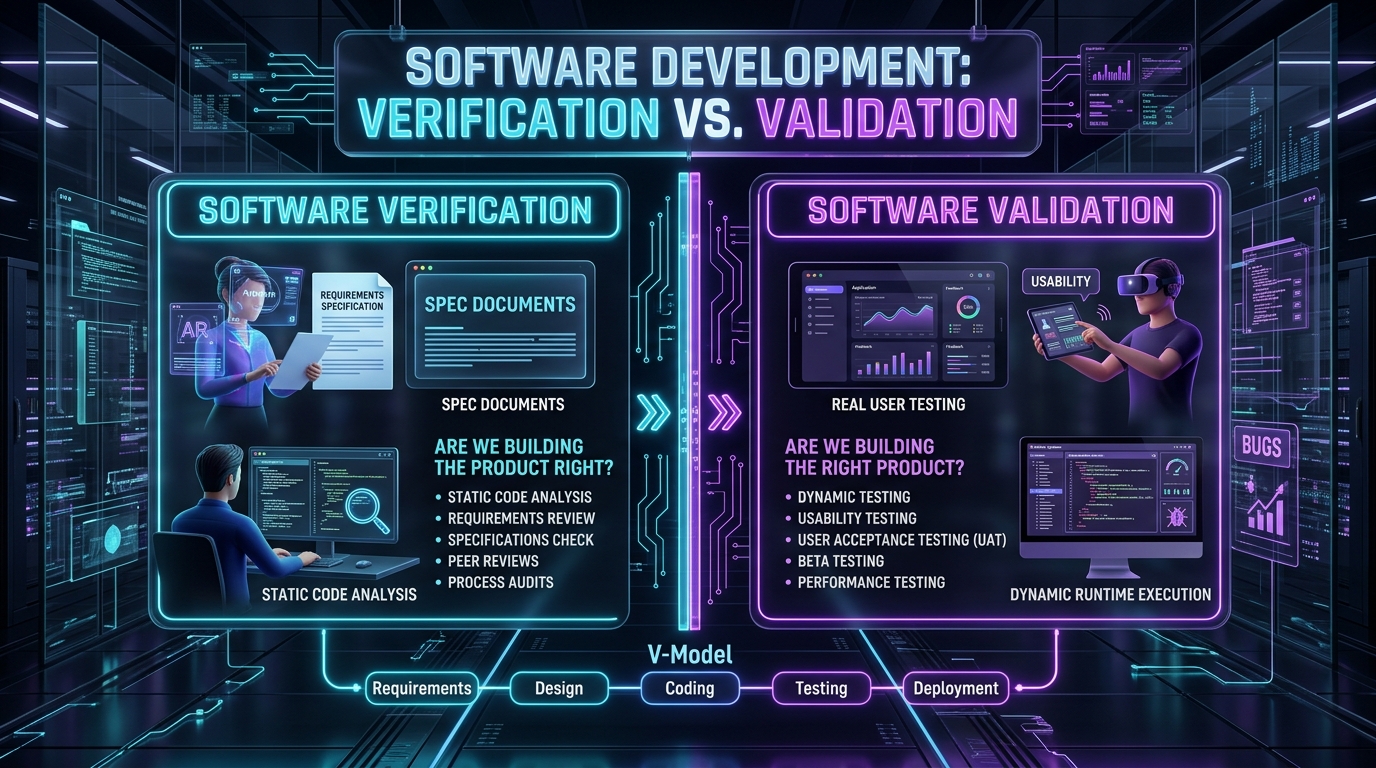
Verification vs. Validation
The shortest version I know:
- Verification asks: are we building the product correctly? Does it match the spec, the design, the requirements document? This is largely static, reviewing documents, walkthroughs, code review, inspections.
- Validation asks: are we building the correct product? Does it actually solve the user’s real-world need? This is dynamic, you run the software and observe it.
You can pass verification and fail validation completely. I’ve shipped a feature that matched the spec line-for-line and was useless, because the spec was wrong. Correctness to spec and usefulness to users are two different tests, and you need both. For structuring user-facing documentation and verifying that user instructions actually work, see our comprehensive User Manual Guide.
Error, Defect, Bug, and Failure
These four words describe four different points on the same timeline:
- Error: a human mistake. A developer misreads a requirement or fat-fingers a comparison operator.
- Defect: the flaw that mistake leaves in the product. A mismatch between what the software does and what the requirement says it should do. This is the underlying issue.
- Bug: the everyday word for a defect. Same thing, less formal. I use “defect” in written reports and “bug” in Slack, and nobody’s ever been confused.
- Failure: what users experience when that defect executes. The payment screen hangs. The report shows the wrong total.
Why does this matter practically? Because you fix defects, but you observe failures. A defect report that only describes the failure (“checkout is broken”) sends a developer hunting. A report that describes the failure and points toward the root issue saves them an hour.
Test Case, Test Scenario, and Test Suite
- Test scenario: a high-level description of what to test. “Verify a user can reset their password.”
- Test case: the specific check: inputs, preconditions, steps, and the expected result. “Given a registered user, when they submit a valid email to /forgot-password, then a reset email is sent within 60 seconds and the token expires in 24 hours.”
- Test suite: a collection of test cases grouped by feature, scenario, or risk. Your regression suite, your smoke suite, your payments suite.
- Test script: the automated implementation of a test case. Code that runs the case without a human.
One scenario usually spawns 5–15 test cases. If a scenario only produces one test case, either the scenario is too narrow or you haven’t thought about failure modes yet.
Test Plan and Test Environment
A test plan is a document defining scope, objectives, resources, schedule, approach, deliverables, and success criteria for a testing effort. It answers what to test, how to test, when to test, and who will test.
Honestly? Most teams I’ve worked with over-invest in this document. A 40-page test plan nobody reads is worse than a one-page one everybody does. What the plan needs to nail down: what’s in scope, what’s explicitly out of scope, what environments you need, and what “done” means. The rest is padding.
A test environment is the hardware, software, network, database, and configuration where you execute tests. This is where more testing effort dies than anywhere else. An unreliable environment produces false results and inconsistent behavior, and once your team stops believing test failures, the entire practice is dead. Make the environment production-like, make it reproducible, and treat drift between local and CI as a bug in itself.
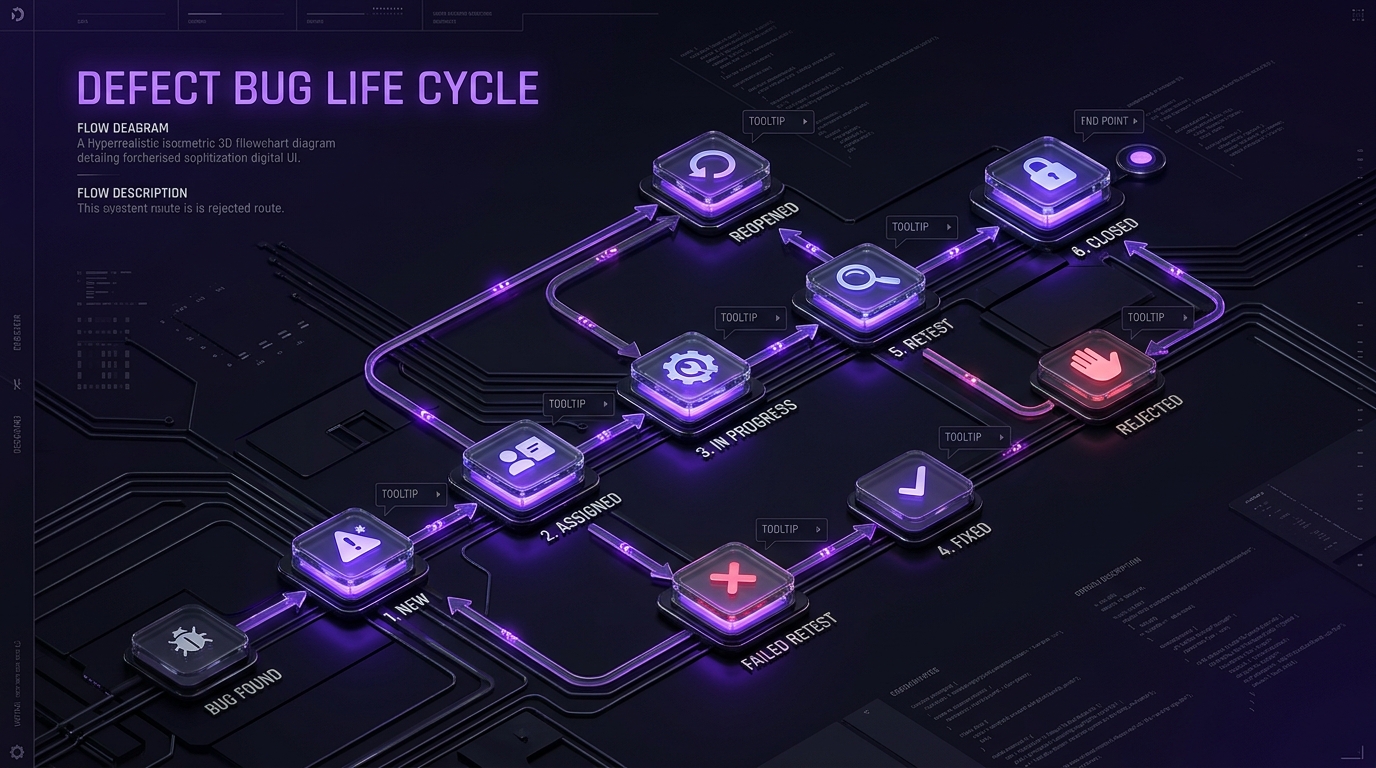
Defect Life Cycle
Every defect moves through states, and having a shared state machine is what stops “is that fixed yet?” from being a daily conversation:
New → Assigned → In Progress → Fixed → Retested → Closed
With two branches everybody forgets: Rejected (not a defect, or works as designed) and Reopened (retest failed, back to Assigned). The Retested step is the one teams skip under pressure, and it’s the one that catches the fix that didn’t actually fix anything.
Traceability Matrix (RTM)
A Requirements Traceability Matrix maps requirements to the test cases that cover them. Simple table: requirement ID, description, linked test case IDs, status.
I resisted RTMs for years, they felt like bureaucracy. Then I ran a release where three requirements had zero test coverage and nobody noticed until UAT. An RTM would have shown that as a blank row in thirty seconds. Now I keep a lightweight one for anything with compliance or contractual requirements attached. It’s the cheapest gap-detection tool in testing.
Test Data
Test data is the inputs your tests run against, and it causes more flaky tests than any other single factor in my experience.
The three rules I follow now, learned the hard way:
- Isolate data per test run. Shared fixtures mean test A’s cleanup breaks test B. Every test creates what it needs and tears it down.
- Never use real customer data. Beyond the privacy regulations, GDPR, HIPAA, PCI-DSS depending on your sector, production data is stale within weeks and breaks the moment your schema evolves.
- Make it realistic anyway. Financial testing needs valid account numbers that pass checksum validation. Retail needs diverse product catalogs. Synthetic data that’s too clean tests nothing.
Principles of Software Testing
There are seven classic principles, and of everything filed under software testing basics, these are the ideas that have held up best across every team I’ve worked on. I’ll give you each one plus what it means when you’re actually working.
1. Testing shows the presence of defects, not their absence. Green tests mean the tests you wrote passed. That’s all. My 94% coverage story is this principle in one sentence.
2. Exhaustive testing is impossible. You can’t test every input against every system state. A form with five fields and ten plausible values each is 100,000 combinations. So you prioritize by risk. Always.
3. Test early. Shift-left isn’t a buzzword, it’s arithmetic. Early feedback means safer fixes and fewer surprises. Some studies put the cost multiplier for production fixes at 100x versus requirements-phase fixes.
4. Defects cluster. The Pareto principle applies ruthlessly. In every codebase I’ve worked on, a small handful of modules generate most of the bugs. Find those modules and test them harder. Your git history tells you exactly where they are, check which files have the most bug-fix commits.
5. Beware the pesticide paradox. Repeating the same tests stops finding new defects, the same way pests develop resistance. Your regression suite decays in usefulness over time unless you keep adding new cases and pruning dead ones.
6. Testing depends on context. A payments workflow and a social app need entirely different rigor. Apply the same testing standard to both and you’ll either overspend on one or underprotect the other.
7. Absence-of-errors is a fallacy. A bug-free feature that solves the wrong problem is still a failure. This is validation vs. verification again, and it’s the one that stings, because you can do everything right technically and still ship something nobody wanted.
If I had to compress all seven: fast feedback, stable tests, risk-based decisions. Everything else follows.
Levels of Software Testing
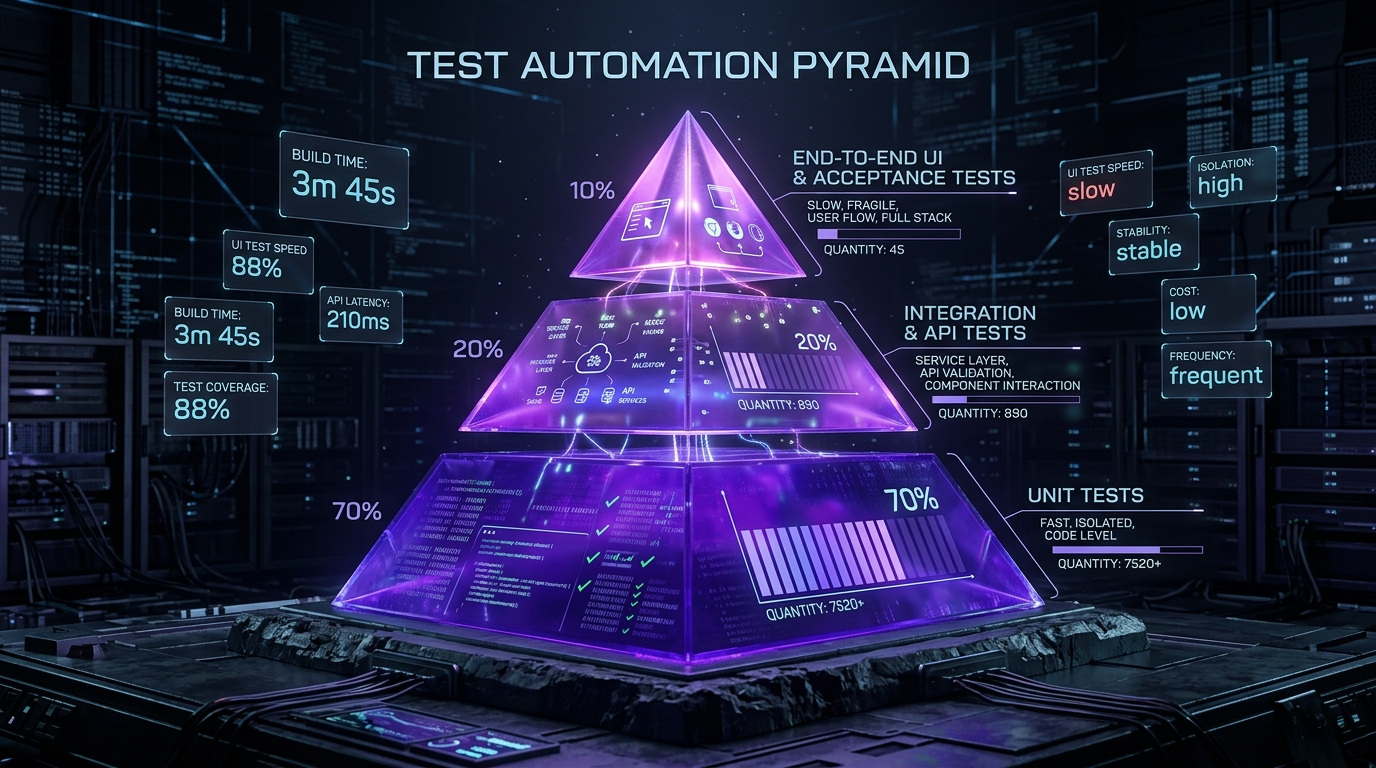
Testing happens at four levels, and each one sits at a different point in the stack. Get the proportions wrong and you end up with a slow, fragile suite that everyone ignores.
Unit Testing
Unit testing verifies the smallest testable components, individual functions, methods, or classes, in isolation from everything else.
This is where the majority of your tests should live. They’re fast (milliseconds), deterministic, and they point straight at the broken line. Good candidates: validation rules, business logic, edge cases, date math, pure functions, anything with branching conditions.
What I test at unit level: the calculation that decides a discount tier. What I don’t: whether the discount shows up on the checkout page. That’s someone else’s level.
Run these on every pull request. If your unit suite takes more than a couple of minutes, something’s wrong, you’ve probably got real network or database calls hiding in there.
Integration Testing
Integration testing checks whether modules, services, and external dependencies interact correctly. Unit tests prove each piece works alone; integration tests prove the interfaces between them agree.
This is where the interesting bugs live. In my experience the most common integration failures are:
- Data mapping mismatches (the API returns
user_id, the client expectsuserId) - Serialization edge cases (nulls, timezones, floats that lose precision)
- Dependency handling, timeouts, retries, what happens when the downstream service returns a 503
- Database interactions that work on one row and fall apart on ten thousand
Integration tests are slower than unit tests but far more stable than end-to-end tests. This is the layer most teams under-invest in, and it’s the layer with the best return.
System Testing
System testing evaluates the complete, integrated application end-to-end against its specified requirements. The whole system, behaving as intended, in a production-like environment.
This covers both functional testing (does it do what the spec says) and non-functional testing (is it fast enough, secure enough, usable enough) under various conditions and different environments. Stress testing, recovery testing, and interface testing all live here.
Acceptance Testing
Acceptance testing validates the entire product against real-world user expectations and business requirements. It’s the last gate before launch, and it’s typically run by end users or stakeholders rather than the QA team, hence user acceptance testing, UAT.
UAT is slower and costlier than any other level, which is exactly why it should be the thinnest layer. If UAT is finding functional bugs, your earlier levels failed. UAT should be finding business mismatches, “this workflow doesn’t match how our warehouse team actually operates.”
Rough proportions I aim for: roughly 70% unit, 20% integration, under 10% system and acceptance combined. Yes, that’s the testing pyramid. It’s a cliché because it works.
Types of Software Testing
Levels tell you where in the stack you’re testing. Types tell you what property you’re testing for. These two axes are independent, which is why people find the taxonomy confusing at first, you can do functional testing at the unit level or the system level.
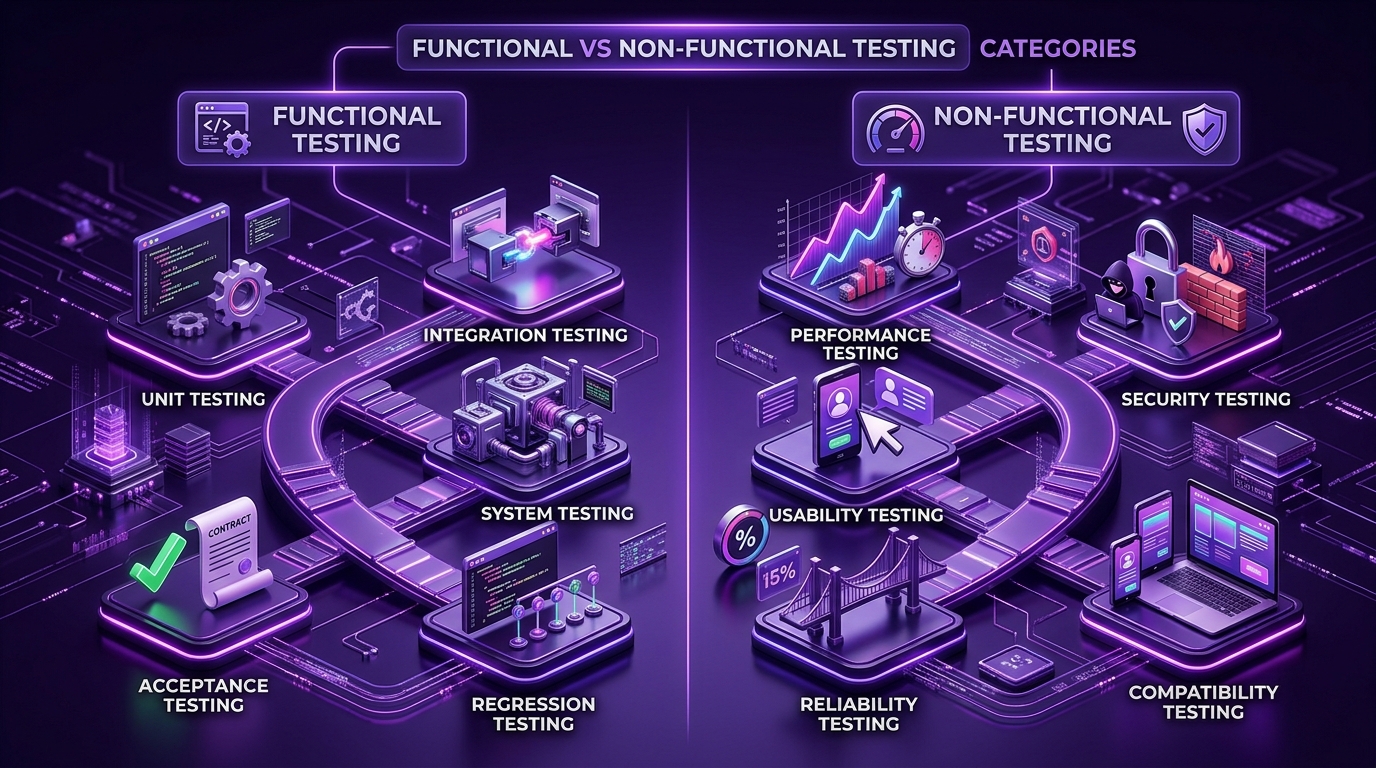
Functional Testing
Functional testing verifies that the software performs its specified operations correctly. User actions produce expected outcomes. Shopping carts calculate the right totals. Search returns relevant results. Login accepts valid credentials and rejects invalid ones.
Unit Testing
At the functional level, unit testing validates that individual functions return correct outputs for given inputs. A calculateTax(amount, region) function returning the right number for each region.
Integration Testing
Verifies that combined modules produce correct functional outcomes, that the order service actually creates a record the inventory service can read.
System Testing
Validates complete functional workflows across the assembled application. Place an order, from browse to confirmation email.
Acceptance Testing
Confirms the functionality meets business specifications and real user needs, judged by the people who’ll use it.
Regression Testing
Regression testing re-runs existing tests after changes, updates, or bug fixes to confirm previously working functionality still works.
This is the single highest-value automated suite you’ll build. Every code change carries a risk of breaking something unrelated, and a comprehensive regression suite is the safety net that makes frequent releases possible. Manual execution of 2,000 regression test cases takes roughly 11–12 person-days. Automated, it’s an overnight job. That gap is the entire business case for test automation.
Smoke Testing
A quick preliminary check that basic functions work and the build is stable enough to test further. Can the app start? Can you log in? Does the homepage return 200?
I run smoke tests as a gate, under five minutes, and if they fail, nobody wastes time on the full suite.
Sanity Testing
A narrow check on specific functionality after a fix, rather than a full regression run. You fixed the currency formatter; sanity testing confirms the currency formatter works and its immediate neighbours didn’t break. Surface level, targeted, fast.
Non-Functional Testing
Non-functional testing evaluates quality attributes, how well the system does what it does, rather than whether it does it.
Performance Testing
Measures latency, throughput, and behavior under load. The sub-types matter and people mix them up:
| Type | What it does | What it tells you |
|---|---|---|
| Load testing | Normal expected traffic | Does it hold up on a Tuesday? |
| Stress testing | Beyond capacity, until failure | Where does it break, and how gracefully? |
| Spike testing | Sudden traffic bursts | Can it survive a viral moment? |
| Scalability testing | Increasing load over time | Does adding resources actually help? |
| Soak testing | Sustained load for hours | Memory leaks, connection pool exhaustion |
The one I insist on: graceful failure. Every system has a breaking point. What matters is whether it degrades or explodes. A queue that backs up is survivable. A cascading timeout that takes down four services isn’t.
Security Testing
Identifies vulnerabilities before attackers do. At the basics level: authentication, access control, input validation, authorization checks, and data protection. Injection flaws, broken access control, and exposed sensitive data still account for the bulk of real-world breaches.
Run automated vulnerability scans on every build and periodic penetration testing on top. Automated scanning finds the known patterns; humans find the logic flaws.
Usability Testing
Evaluates whether users can complete tasks intuitively. This is one of the few areas where automation genuinely can’t replace humans, you’re measuring confusion, and confusion doesn’t throw exceptions.
Watch five real users attempt your core workflow without help. You’ll learn more in an hour than from a month of analytics.
Compatibility Testing
Verifies the application works across browsers, devices, operating systems, and network environments. Chrome, Firefox, Safari, Edge; Windows, macOS, Linux, iOS, Android; desktop, tablet, mobile.
Reliability Testing
Measures whether the system performs consistently over time and recovers from failures. Uptime under sustained load, behavior after a database rollback, recovery from a dropped connection mid-transaction.
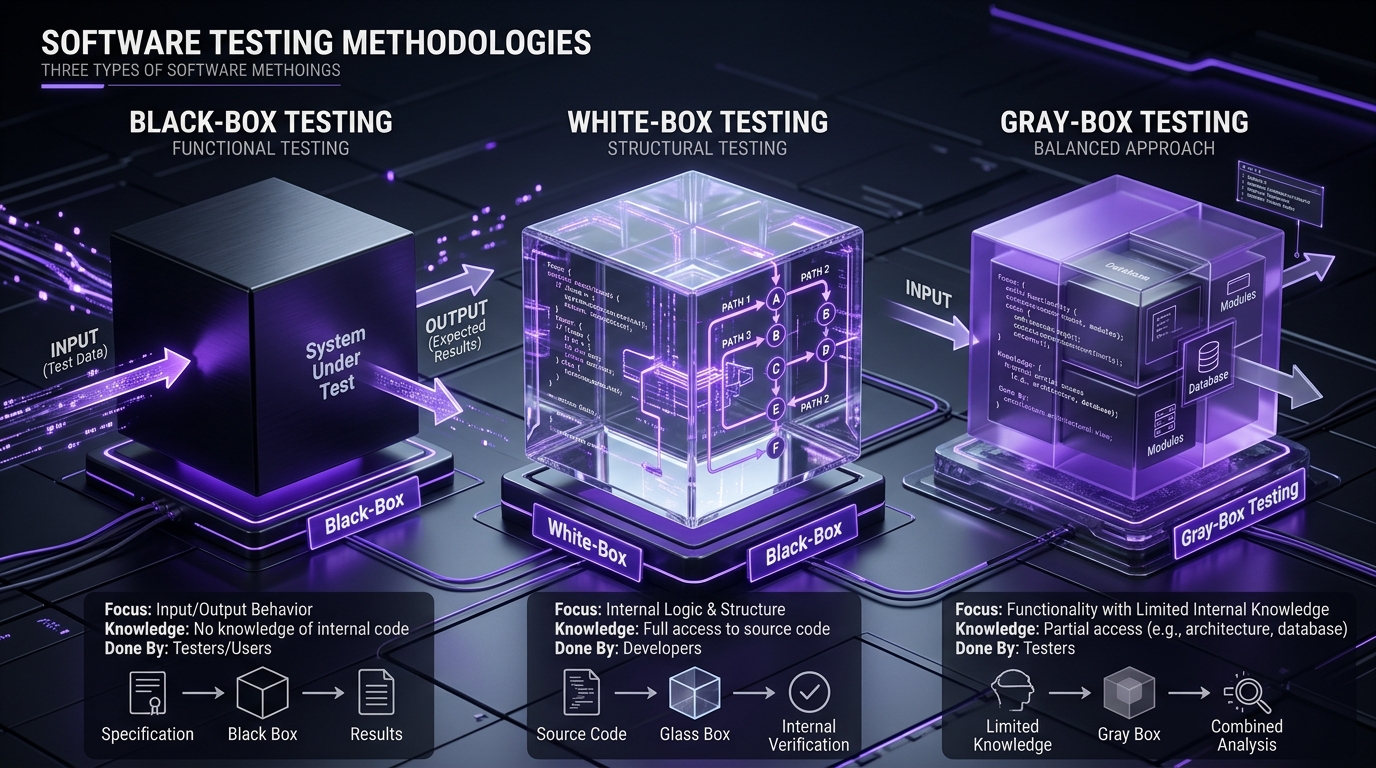
Testing by Visibility: Black-Box, White-Box, and Gray-Box
| Approach | What you can see | Best for | Typical level |
|---|---|---|---|
| Black-box | Nothing internal: inputs and outputs only | User perspective, requirements validation | System, acceptance |
| White-box | Full internal code structure | Code paths, branches, conditions, coverage | Unit, integration |
| Gray-box | Partial knowledge of internal architecture | Integration points, data flows | Integration, API |
Black-box testing is how your users experience the product. White-box testing is how you make sure every branch actually executes. Gray-box is the hybrid approach I use most for API testing, I know the schema and the database structure, but I’m testing through the interface.
None of these is superior. They find different classes of defect, which is the whole point.
Manual Testing
Manual testing is a human executing test cases without automation, clicking buttons, entering text, verifying outputs, and observing application behavior.
It’s slower and less repeatable than automation. It’s also irreplaceable for exploratory testing, usability evaluation, early-stage features with unclear requirements, and any situation where “does this feel right?” is the actual question.
Automation Testing
Automation testing uses scripts and tools to execute predefined test scenarios automatically and report results, without human intervention.
Where it wins: repetitive workflows, regression suites, cross-browser matrices, load generation, and anything that runs on every commit in continuous integration pipelines. Speed, consistency, and freedom from human error.
Where it loses: brand-new features whose behavior changes daily, exploratory work, and anything requiring judgment.
End-to-End Testing
End-to-end testing validates a complete user journey across every layer, UI, API, database, and third-party services.
An insurance claim, for example: web form submission, API validation, database updates, document storage, email notification, fraud check orchestration. Six systems, one test.
E2E tests catch integration gaps that unit and integration tests structurally cannot. They’re also the flakiest, slowest tests you’ll own. My rule: keep E2E minimal and high-value. One or two journeys per critical flow, no more. Everything else pushes down to the API layer, where tools like Keploy can generate repeatable regression runs from real service traffic instead of hand-written scripts.
Exploratory and Ad-Hoc Testing
Exploratory testing is simultaneous learning, test design, and execution, a human tester poking at the system with intent, following hunches rather than a script.
Ad-hoc testing is the unstructured cousin: no documentation, no predefined tests, just informed messing about.
I know this sounds unrigorous. It finds bugs nothing else does. The best QA engineer I ever worked with found a session-fixation vulnerability in twenty minutes of exploratory testing that four automated suites had missed for a year. Give it a timebox, 90 minutes, one feature, take notes, and it stops being chaos and starts being a technique.
Alpha and Beta Testing
Alpha testing happens in-house, by internal teams, in a controlled environment before external release.
Beta testing puts the software in front of real users in their real environment. Informal, unstructured, and the fastest way to surface hidden issues involving device combinations, network conditions, and usage patterns you never imagined.
Beta feedback is noisy. Read it anyway, the signal is in the complaints you hear three times.
Maintenance Testing
Maintenance testing covers everything after release: bug fixes, enhancements, patches, migrations, and dependency upgrades. Mostly it’s regression testing plus impact analysis, what did this change touch, and what needs re-verifying?
This gets neglected because it’s unglamorous. It’s also where most of a product’s lifetime testing effort actually goes.
Manual vs. Automated Testing: Key Differences
The manual-versus-automated framing is a false dichotomy, and treating it as a choice is one of the more expensive mistakes I see teams make. You need both. The question is which work goes where.
| Factor | Manual Testing | Automated Testing |
|---|---|---|
| Speed | Slow, human-paced | Fast, parallel, unattended |
| Setup cost | Low: start immediately | Higher upfront investment |
| Maintenance | None (per run) | Ongoing script updates |
| Consistency | Prone to human error | Fully repeatable |
| Best for | Exploration, usability, new features | Regression, CI/CD, load, cross-browser |
| Worst for | Repetitive regression at scale | Judgment calls, subjective quality |
| Feedback on every commit | Impossible | Standard |
Manual Testing
Use manual testing to explore and discover. Early-stage features, edge case hunting, usability evaluation, business process validation, and anything where the requirements are still moving. Writing automation against a spec that changes weekly is a waste of everyone’s time, I’ve done it, and I threw away two weeks of scripts.
Automated Testing
Use automation to protect and repeat. Stable flows that must never break, regression suites, API contract checks, performance benchmarks, and cross-browser matrices.
The heuristic I use: automate what pays back weekly. If a test will run at least once a week for the next six months, automate it. If it’ll run three times and then the feature changes, do it by hand.
One caveat that took me too long to learn: automation isn’t free after you write it. Every automated test is a small ongoing liability. A suite of 400 tests where 30 are flaky is worse than a suite of 100 that all pass reliably, because flaky tests train your team to ignore red builds.
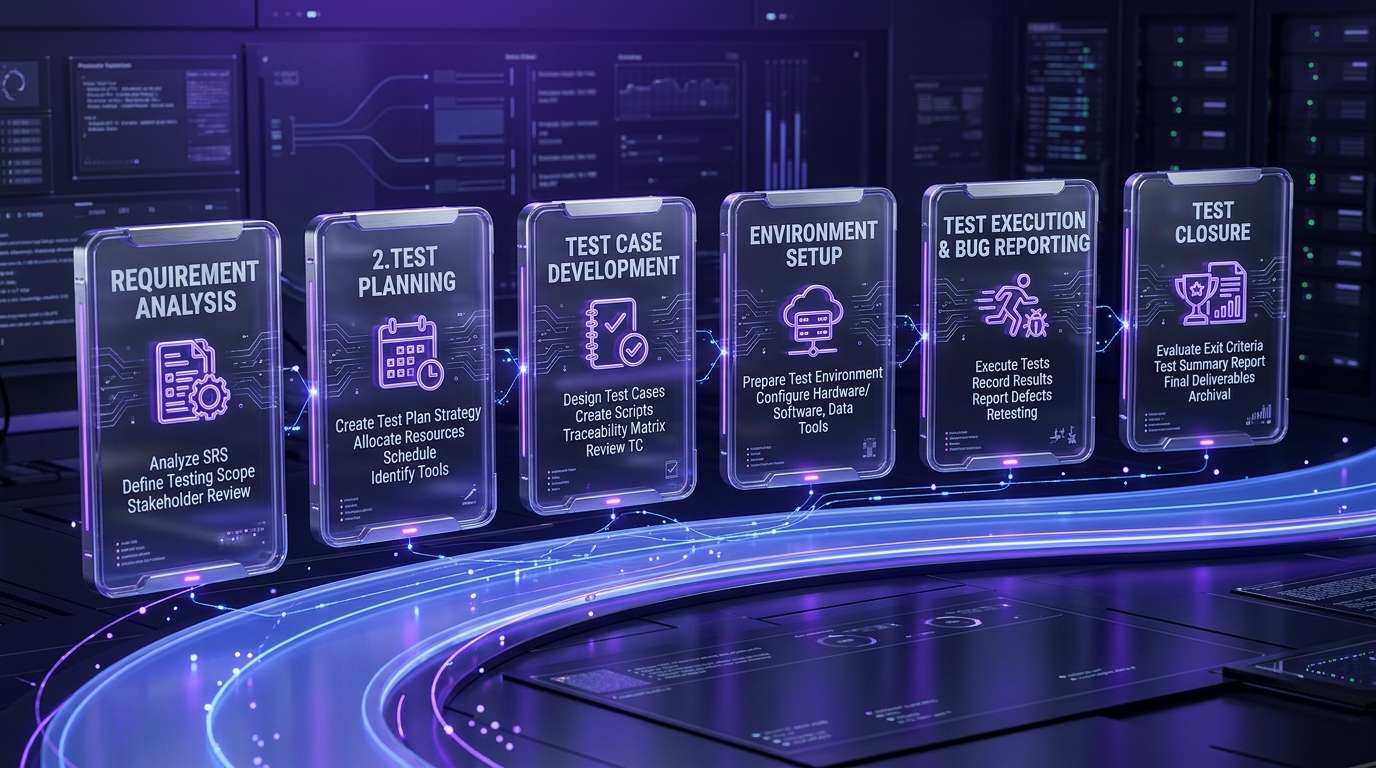
Software Testing Life Cycle (STLC)
The Software Testing Life Cycle is the structured sequence of stages testing work moves through. Without it, testing is chaotic, people test whatever they remember, coverage is accidental, and nobody can tell you what was verified before a release.
Planning
Requirement analysis and test planning. You review functional and non-functional requirements, identify what’s testable, flag ambiguities, define scope and strategy, estimate effort, allocate resources, set timelines, and identify risks.
The most valuable output of this phase isn’t the plan document. It’s the list of questions you ask product managers about ambiguous requirements. Every ambiguity you resolve here is a defect you never have to file later.
Test Design and Preparation
Test case development. You write test scenarios and detailed test cases, define input data and expected results, prepare test data, and get cases reviewed.
Review matters. A second pair of eyes on test cases catches missed edge cases at a fraction of the cost of catching them in execution.
Setup
Test environment setup: hardware, software, network configuration, database state, and access. Plus your dependency strategy, will you hit real services, mocks, sandboxed instances, or recorded-and-replayed traffic?
Decide this before execution, not during. Environment ambiguity mid-cycle is how you lose three days.
Execution and Reporting
Run the designed test cases, compare actual against expected results, log defects with clear evidence and reproduction steps, retest fixes, and run regression on affected areas.
Mix scripted execution with exploratory sessions on new behavior. The scripted runs give you repeatable regression signal; the exploratory time finds what your scripts didn’t anticipate.
Closure
Test cycle closure: metrics, lessons learned, and the test summary report. What was covered, what wasn’t, what’s still open, what should change next sprint.
Also, and teams skip this constantly, update or delete test cases. Every cycle, some cases become obsolete. Leaving them in place is how a suite rots.
How to Write Effective Test Cases
A good test case is unambiguous, independent, and tells you something you didn’t already know. Most bad test cases fail on the third count, they verify the obvious and never fail.
Structure I use:
- Title: specific enough to understand without opening it. “Checkout rejects expired card with clear error” beats “Test checkout.”
- Preconditions: the state the system must be in.
- Test data: exact inputs, not “a valid user.”
- Steps: numbered, minimal, reproducible by someone who’s never seen the feature.
- Expected result: one clear, observable outcome.
- Notes: anything a reader needs that doesn’t fit above.
And cover these six categories for any feature worth testing:
- Positive cases: valid inputs, expected success.
- Negative cases: invalid inputs, correct error behavior.
- Boundary cases: min, max, off-by-one, empty, zero. This is where my
>=bug lived. - Data variation cases: empty fields, special characters, unicode, very large payloads.
- State-based cases: multi-step flows where previous actions matter.
- Regression cases: past issues, to confirm they stay dead.
The test that would have caught my payment bug was a boundary case: user with exactly the threshold amount. Took four minutes to write, once I knew to write it.
Defect Report: What to Include
A vague defect report costs a developer an hour of back-and-forth. A precise one costs them ten minutes. I’ve been on both ends of this and the difference is entirely in the report.
What goes in:
- Specific title: what broke, where. “Payment confirmation email not sent for orders over $1,000” not “email issue.”
- Environment: build version, browser, OS, region, feature flags.
- Minimal steps to reproduce: the shortest path to the failure. Strip out everything that isn’t necessary.
- Expected vs. actual result: both, explicitly.
- Evidence: log snippet, screenshot, request ID, network trace, stack trace.
- Severity and priority: and yes, they’re different. Severity is technical impact; priority is business urgency. A cosmetic bug on the pricing page can be low severity and high priority.
The request ID is the underrated one. If your system logs correlation IDs, put one in every defect report. It turns “I can’t reproduce it” into a log query.
Software Testing Models
Testing models are structured frameworks that define when testing happens relative to development, how much you test, and how much flexibility you get. Your model is usually inherited from how your organization builds software rather than chosen freely, but knowing the trade-offs helps you argue for change.
Waterfall Model
Linear and sequential. Requirements, design, implementation, testing, deployment, each phase completes before the next begins. Testing is a discrete phase near the end.
Works for well-defined projects with stable requirements and regulatory documentation needs. The fatal flaw is late defect detection: you find architectural problems at the point where fixing them is most expensive.
V-Model
The Verification and Validation model pairs each development stage with a corresponding testing stage. Requirements pair with acceptance testing, architecture with system testing, design with integration testing, code with unit testing.
Better than pure Waterfall because test design starts early even if execution doesn’t. Still rigid, it assumes requirements don’t change, which in my experience they always do.
Agile Testing Model
Testing happens continuously within short sprints. Testers collaborate with developers from day one, test cases evolve with the story, and every increment is verified before it’s called done.
This is what most teams I work with actually use, and it’s the right default for product development. It demands skilled testers and tight collaboration, Agile testing fails badly when QA is treated as a downstream gate rather than an embedded function.
Spiral Model
Risk-driven, with repeated cycles (spirals) of planning, risk analysis, designing, building, and evaluating. Each spiral tackles the highest remaining risk.
Suited to large, high-risk, complex systems. Expensive, and it needs genuinely expert management to avoid spiralling, pun intended, indefinitely.
Iterative and Incremental Model
The product is built in small increments, each fully tested, each adding to the last. Continuous improvement and better control, at the cost of continuous planning overhead.
Big Bang Testing Model
All components are integrated and tested together at the end. No structured intermediate testing.
I’ve seen this work exactly once, on a two-person prototype. On anything larger it’s risky and makes isolating issues nearly impossible, when everything fails at once, you can’t tell which component caused it.
RAD (Rapid Application Development) Model
Quick prototyping and rapid iterations with heavy user feedback. Great for fast-paced product environments where getting something in front of users matters more than architectural purity. Poor fit for large, complex systems with hard integration constraints.
| Model | Testing starts | Handles change | Best fit |
|---|---|---|---|
| Waterfall | Late | Poorly | Fixed-scope, regulated projects |
| V-Model | Design phase (planning) | Poorly | Safety-critical, documented systems |
| Agile | Day one | Very well | Product development, evolving scope |
| Spiral | Each cycle | Well | Large, high-risk systems |
| Iterative | Each increment | Well | Long-running builds |
| Big Bang | End only | Not at all | Prototypes, throwaway work |
| RAD | Continuous, informal | Very well | Fast prototyping, small teams |
Common Tools Used in Software Testing
I’m going to be opinionated here, because “here’s a list of 40 tools” helps nobody. These are the categories that matter and the specific tools I’ve either used in production or seen teams succeed with.
Test Management and Tracking Tools
Jira and Azure DevOps for workflow and defect tracking. TestRail, Zephyr, Xray, qTest, or PractiTest for test case management, execution tracking, and reporting.
My honest take: if you’re a small team, Jira plus a well-structured spreadsheet beats a dedicated test management tool for the first year. Buy the tool when the spreadsheet actually hurts, not before.
Automation Testing Tools
Selenium remains the open-source workhorse for web application automation across Java, Python, C#, and JavaScript. Appium for mobile. TestComplete and Katalon Studio on the commercial side.
For unit-level assertions: JUnit and TestNG (Java), Jest and Vitest (JavaScript/TypeScript), pytest (Python), go test (Go).
Performance Testing Tools
k6 is my default now, JavaScript-based, scriptable, and it fits into CI without a fight. JMeter if you need the ecosystem and the GUI. Gatling for Scala shops, Locust for Python, LoadRunner in enterprises that already own it.
Security Testing Tools
OWASP ZAP (free, and genuinely good), Burp Suite for manual security testing, Nessus and Acunetix for broader vulnerability scanning. Run ZAP in your pipeline as a baseline scan, it takes minutes and catches the obvious stuff.
API Testing Tools
Postman for exploration and manual API testing, Insomnia as the lighter alternative, REST Assured and Karate for code-based API test suites, Swagger/OpenAPI and SoapUI for contract and legacy SOAP work.
If I could only keep one testing layer, it’d be this one. API tests are faster than UI tests, more stable, and they catch most of what matters.
Bug Tracking Tools
Jira, Bugzilla, MantisBT, YouTrack, ClickUp. Centralized issue tracking, status monitoring, workflow automation. Pick whatever your engineering team already lives in, a separate defect tracker nobody opens is worse than an imperfect one everybody does.
Continuous Testing Tools
Jenkins, GitHub Actions, GitLab CI, CircleCI, Bamboo. These run your suite on every commit, pull request, or nightly schedule, and they’re what turn a test suite from a checklist into a safety net.
UI Testing Tools
Playwright and Cypress are the two I’d recommend today. Playwright wins on cross-browser support and parallelism; Cypress wins on developer experience and debugging. I’ve migrated a suite from Selenium to Playwright and cut runtime from 38 minutes to just over 9, mostly from proper parallel execution and auto-waiting instead of hard-coded sleeps.
For visual regression: snapshot comparison to catch unintended layout changes. For accessibility: Axe, integrated into your existing framework.
Dependency Control and Mocking Tools
WireMock and MockServer for service mocking. Testcontainers for ephemeral real dependencies (spin up a real Postgres in Docker for the test, throw it away after). Pact for contract testing between services.
Testcontainers changed how I write integration tests. Testing against a real database in a disposable container is dramatically more trustworthy than mocking your data layer and hoping the mock matches reality.
Reporting and Analytics Tools
Allure and ReportPortal for test analytics, plus whatever your CI produces natively. What you want out of these: flake rate over time, time-to-feedback, and which tests fail most often. Raw pass/fail counts tell you almost nothing.
A note on tool selection generally: pick for stability and debugging time, not feature lists. A tool that produces clear failure output saves more engineering hours than one with twice the features and cryptic errors.
Testing in Agile and DevOps Environments
Agile and DevOps changed testing from an activity into a property of the pipeline. In a two-week sprint with continuous deployment, there is no “testing phase”, there’s only whether quality validation happens fast enough to keep up.
The practical consequences:
- Testing shifts left. QA is involved at requirements definition, writing testable acceptance criteria before coding begins. Ambiguities and missing scenarios get caught when they’re free to fix.
- Testing also shifts right. Monitoring, observability, synthetic monitoring, and canary deployments extend quality validation into production, where real user behavior lives.
- Testability becomes an architectural requirement. If your system can’t be tested without spinning up eleven services, that’s a design defect, not a QA problem.
- Quality stops being QA’s job. Developers write and run tests before committing. QA does strategy, exploratory work, and the hard automation.
Continuous Testing in CI/CD Pipelines
The structure that works, in order of execution:
| Gate | What runs | Budget | Triggers on |
|---|---|---|---|
| Commit | Unit tests, linting | Under 3 minutes | Every push |
| PR | Unit + integration + smoke | Under 10 minutes | Every pull request |
| Merge | Full regression suite | Under 30 minutes | Merge to main |
| Pre-deploy | Critical E2E, security scan | Under 15 minutes | Deployment pipeline |
| Post-deploy | Deployment verification tests | Under 5 minutes | Production release |
The numbers matter more than the structure. Feedback that arrives in under 10 minutes gets acted on immediately. Feedback that arrives in 45 minutes arrives after the developer has context-switched, and the debugging cost roughly triples.
How to Keep Tests Reliable in CI/CD
Flaky tests are the single biggest threat to a testing practice. Not missing coverage, flakiness. Because a suite that fails randomly trains everyone to hit “re-run” without reading the output, and at that point your tests are theatre.
The five causes, in the order I encounter them:
- Shared test data. Two tests fighting over the same record. Fix: isolate data per test run, reset state between runs.
- Timing and async issues. Hard-coded waits, race conditions, unfinished background jobs. Fix: wait for conditions, never for durations.
- Live third-party dependencies. An external sandbox that’s down 2% of the time makes your suite 2% flaky. Fix: mock, sandbox, or record-and-replay.
- Environment drift. Passes locally, fails in CI. Different Node version, different timezone, different locale. Fix: containerize, pin versions, run CI config locally.
- Fragile UI selectors.
div > div > span:nth-child(3). Fix: dedicateddata-testidattributes, and keep E2E minimal.
Treat flakiness as urgent technical debt. My rule: any test that fails twice without a code change gets quarantined the same day and fixed or deleted within the week. Random CI noise is more expensive than missing coverage, because it destroys the thing that makes tests useful, trust.
Building Your First Test Suite
If you’ve read this far and you’re wondering where to actually start, this is the section. I’ve onboarded enough people onto testing to know that the failure mode isn’t ignorance, it’s paralysis. The topic is huge, so people try to test everything, get overwhelmed, and test nothing.
Don’t do that. Build something small and trustworthy first.
Step 1: Pick One High-Impact Flow
One flow. Not one feature area, one flow. Signup. Password reset. Checkout. Payment confirmation. Onboarding.
Pick the one where a failure would generate a support ticket within an hour. That’s your high-impact flow.
Step 2: Write 8–12 Test Cases
Eight to twelve, covering positive, negative, boundary, and data variation cases. Not fifty. Twelve.
For a password reset flow, that looks like: valid email sends reset link; unknown email returns generic success (no user enumeration); expired token rejected; already-used token rejected; token for deleted account rejected; malformed token rejected; new password below minimum length rejected; new password same as old rejected; rate limiting after N attempts; reset invalidates existing sessions; email arrives within 60 seconds; link works on mobile.
That’s twelve, and it covers the real risk surface of a flow most teams test with two cases.
Step 3: Run It Manually First
Before you write a single line of automation, run all twelve by hand.
I skip this step at my peril and I’ve paid for it repeatedly. Manual runs surface unclear requirements and messy edge behavior before you encode them into scripts. Twice I’ve automated a test that asserted the wrong expected result because I never actually watched the flow run.
You’ll also discover which of your twelve cases are worth automating and which were dumb ideas.
Step 4: Automate What Pays Back Weekly
Now automate. Start at the API and database layer, not the UI, API tests are faster to write, faster to run, and far less brittle.
Keep exactly one or two end-to-end checks for the journey that must never break. The rest lives lower in the stack.
Step 5: Make It CI-Ready
Wire it into your pipeline. Stabilize the test data (isolate per run, reset state). Control dependencies (mock or sandbox anything external). Get the whole thing running green on every pull request.
Then, and only then, expand. Add the next flow. Add regression cases as bugs get fixed. Grow it steadily rather than in one heroic burst that nobody maintains afterwards.
Better testing isn’t more tests. It’s better signals from fewer, more reliable tests.
Test Design and Strategy Fundamentals
Test strategy is the layer above test planning. Planning says what you’ll do this cycle; strategy says how your organization approaches quality across cycles, methodologies, risk priorities, tooling standards, and what “good enough to ship” means for different classes of change.
The core design techniques, all of which reduce the number of test cases you need without reducing coverage:
- Equivalence partitioning. Group inputs into classes that should behave identically. Ages 0–17, 18–64, 65+, you need three test cases, not sixty-five.
- Boundary value analysis. Test the edges of each partition, plus one either side. 17, 18, 64, 65. This finds off-by-one errors, which are the most common defect class in existence.
- Decision table testing. For logic with multiple conditions, map every combination of inputs to expected outputs. Forces you to notice the combinations nobody specified.
- State transition testing. For anything with a lifecycle, orders, subscriptions, defects, test the valid transitions and, crucially, the invalid ones.
- Pairwise testing. When you have many parameters, testing every pair of values catches the large majority of combinatorial defects at a fraction of the cost of exhaustive testing.
On top of that: risk-based prioritization. Score each area by business criticality and technical complexity. Payment flows and authentication get exhaustive validation; the admin interface for internal users gets lighter coverage. A simple priority matrix beats intuition, because intuition over-tests the code you wrote recently and under-tests the code you’re scared of.
For teams building on top of standard enterprise processes, Order-to-Cash, Procure-to-Pay, Hire-to-Retire, composable test libraries built from proven patterns save enormous design time. You adapt the pattern to your implementation instead of designing from a blank page.
Building Scalable Test Automation Frameworks
A framework is the scaffolding that makes individual tests cheap to write. Without one, test 200 costs the same as test 1. With a good one, test 200 costs a tenth as much.
Traditional framework builds take months before the first meaningful test runs: architecture planning, page object models, utility libraries, naming conventions, reporting mechanisms, CI integration. That upfront investment delays automation value by quarters, which is why so many automation initiatives die before they prove anything.
What a framework needs, minimum:
- Abstraction layers. Tests describe intent; helpers handle mechanics. When a button moves, you update one page object, not 200 tests.
- Modular, reusable components. Build once, reuse everywhere. Login shouldn’t be reimplemented in forty tests.
- Test independence. Every test runs in any order, alone or in parallel, without depending on another test’s side effects. Interdependent tests become maintenance nightmares that cascade on a single failure.
- Parallel execution. This is the difference between a 4-hour suite and a 15-minute one. Running 2,000 scenarios sequentially versus across 100 concurrent sessions is the difference between overnight and about an hour and a half.
- Clear reporting. Failures need to be diagnosable from the report alone, without a local reproduction.
- Designed for maintainability. In legacy frameworks, teams routinely spend 80% of automation capacity maintaining existing tests rather than expanding coverage. If your maintenance ratio looks like that, the framework is the problem, not the testers.
Modern platforms with AI-powered self-healing address the maintenance problem directly, when a selector breaks because a button moved, the tool identifies the element by multiple simultaneous strategies (DOM structure, visual analysis, contextual data) rather than failing outright. Vendors report self-healing accuracy figures in the 90%+ range and substantial maintenance reduction. Treat those numbers as directional rather than gospel, but the mechanism is sound and I’ve seen it materially cut flake rates on UI suites.
If you’re weighing whether to build a framework in-house or adopt a platform, it’s worth getting an outside read on the trade-offs, the team at SoftbrixAI does AI consulting work on exactly this kind of build-versus-buy question, and an honest assessment beforehand is cheaper than a framework you abandon in month five. For practical test harness examples, latency benchmarking, and evaluating third-party API performance claims, read our detailed analysis on the Best API Search Company’s Homepage in 2026.
Test Data Management and Generation
I said earlier that test data causes more flaky tests than anything else. It also causes more delay than anything else, because creating realistic data by hand is enormously time-consuming and nobody budgets for it.
The problem in three parts:
- Realism. Tests need data that mirrors production conditions. Financial testing needs valid account numbers. Healthcare needs compliant patient record structures. Retail needs diverse product catalogs with edge cases, long names, missing images, zero stock.
- Privacy. You cannot use actual customer information in testing environments. GDPR, HIPAA, and PCI-DSS all say so, and the penalties are real.
- Staleness. Hand-crafted data goes stale as schemas evolve. A fixture written eighteen months ago silently stops representing anything real.
What works:
Synthetic data generation. Generate realistic, contextually appropriate data on demand rather than maintaining static fixtures. Modern tooling lets you describe what you need in plain language, “100 customer records with diverse demographics, valid US addresses, and purchase histories spanning two years”, and get usable data back. If you’re building this capability into a larger platform, proper AI data engineering foundations make the difference between synthetic data that’s genuinely representative and data that just looks plausible.
Data-driven testing. Parameterize your tests. Instead of hardcoding values, drive identical scenarios from CSV files, APIs, or databases. One test scenario becomes hundreds of variations without hundreds of scripts.
Masking production data. Where you genuinely need production-shaped data, mask the sensitive fields rather than copying wholesale.
Setup and teardown automation. Every test creates what it needs and cleans up after itself. This is the single change that most improves suite reliability, and it’s usually a day’s work.
Version control your test data sets. Same as code. When a test starts failing, you want to know whether the code changed or the data did.
Testing for Accessibility and Compliance
Accessibility testing verifies that your application is usable by people with disabilities. In the US it’s also a legal requirement under the ADA and Section 508, with WCAG 2.1 as the technical standard.
I’ll be direct: most teams treat this as a compliance checkbox and then discover, usually via a demand letter, that it isn’t one. Beyond the legal exposure, roughly 1.3 billion people globally live with a significant disability. That’s addressable market you’re excluding.
Automated accessibility scanning catches the common violations cheaply, missing alt text, insufficient color contrast, keyboard navigation gaps, missing ARIA labels. Tools like Axe integrate directly into Playwright, Cypress, or your existing framework, and adding a scan to your existing UI tests takes about an hour.
What automation can’t catch, and needs manual verification:
- Screen reader compatibility, does the announced content actually make sense in sequence?
- Keyboard navigation flow, can you complete the whole journey without a mouse, and is focus order logical?
- Semantic HTML structure, is the heading hierarchy meaningful, or just visually correct?
- Whether error messages are actually understandable when read aloud
On the regulatory side, compliance testing validates adherence to industry rules, HIPAA for healthcare, SOC 2 and PCI-DSS for financial systems, FDA regulations for medical device software. The shift I’d advocate: move from annual manual audits to continuous compliance testing with standardized validation scenarios and automated audit trails. Continuous evidence of control effectiveness beats an annual scramble, and it’s far less disruptive.
If you’re deploying machine learning models into regulated workflows, the compliance surface widens considerably, model behavior, data lineage, and decision explainability all become testable requirements. That’s the domain of AI governance consulting, and it’s genuinely different from traditional software compliance because the system’s behavior isn’t fully specified by its code.
Testing Enterprise Business Applications
Testing SAP, Salesforce, Oracle, Dynamics 365, Workday, or Epic EHR is a different discipline from testing an application you wrote yourself, and I’ve watched teams apply web-app testing habits to enterprise platforms with predictable results.
What makes it different:
- Vendor-driven change. Quarterly updates arrive whether you’re ready or not. Coded automation breaks with every platform release, and you have a fixed window to validate before it’s forced on you.
- Extensive customization. Your SAP is not anyone else’s SAP. Generic test suites cover a fraction of what you actually run.
- Cross-system processes. A single business process may cross a dozen systems. Order-to-Cash touches CRM, ERP, warehouse management, shipping, and billing.
- Downtime cost. Business-critical enterprise processes can cost millions per hour when they fail. There’s no soft-launching a broken payroll run.
What works:
Pre-built automation libraries for standard business processes give you proven test patterns to adapt rather than building from zero. Production-like environments with realistic data volumes matter more here than in web applications, enterprise systems behave differently at scale, and a test environment with 500 records tells you nothing about behavior with 5 million.
And validate at every layer, not just the UI. Integration validation and database verification catch the failures that a green screen-flow test happily misses, the order looked confirmed, but the record never reached the warehouse system.
Cross-Browser and Cross-Device Testing
Your users are on Chrome 120 on Windows 11, Firefox 121 on macOS 14, Safari 17 on iOS 17, and a surprising number on browsers you’d have bet were extinct. They expect identical experiences regardless.
Maintaining physical device labs for this is a losing game, I know, I helped run one. Every browser and OS combination needs configuration management, and they update monthly. We spent more time maintaining the lab than testing on it.
Cloud-based testing platforms, BrowserStack, LambdaTest, Sauce Labs: give you instant access to real browsers and real devices without physical infrastructure. This is one of the few areas where I’d say the buy decision is obvious.
What to actually test across the matrix:
- Core journeys only. Don’t run your full suite on 40 configurations. Run your critical flows on the browsers your analytics say matter, and smoke tests on the long tail.
- Responsive design. Test across screen sizes from about 320px (small mobile) up to 2560px (large desktop). Layouts reorganize, images scale, navigation collapses, each transition is a break point.
- Visual regression. Automated screenshots at a given application state, compared pixel-by-pixel against a baseline, catch rendering differences that functional tests structurally cannot. Layout breaks and styling inconsistencies don’t throw errors; they just look wrong.
One practical tip the docs don’t emphasize: pull your actual browser/OS distribution from analytics before building the matrix. I’ve seen teams spend weeks supporting a browser used by 0.3% of their traffic while ignoring a mobile Safari bug affecting 22%.
Test Reporting, Analytics, and Root Cause Analysis
Test execution generates enormous amounts of data, results, execution times, failure patterns, coverage metrics, environment configurations. Raw test output has limited value. Intelligent analysis of it is where the leverage sits.
Traditional test reports list failed scenarios and dump a stack trace. Then a human spends hours reproducing the failure locally, reviewing logs, inspecting UI states, and tracing execution. For simple issues. That’s the debugging economics most teams accept without questioning.
What good failure evidence looks like: captured automatically at the moment of failure:
- Screenshots of the failure state
- Network request logs, including API errors
- DOM snapshots and element states
- Console output and server-side logs for the same request ID
- Performance metrics, to catch slowdowns rather than hard failures
With that captured, most failures are diagnosable from the report without any local reproduction.
The next step up is automated categorization. Common failure patterns are detectable: element not found (usually needs a test update), timeout errors (often performance degradation), authentication failures (credential or environment issues), assertion mismatches (potentially a genuine defect). Triaging failures into genuine defect, environmental issue, or automation health problem before a human looks at them saves enormous time, in my experience roughly half of red builds aren’t product bugs at all.
The metrics I actually watch, in priority order:
| Metric | What it tells you | Warning sign |
|---|---|---|
| Flake rate | Suite trustworthiness | Above 2% and rising |
| Time to feedback | Developer experience | PR feedback over 10 minutes |
| Defects found before vs. after release | Testing effectiveness | Ratio worsening quarter over quarter |
| Failure category mix | Where effort is going | Majority environmental |
| Scenario coverage of critical flows | Real risk coverage | Any critical flow at zero |
Notice code coverage isn’t in that list. It’s useful for finding unexecuted code paths, that’s a real signal, but as a headline quality metric it’s actively misleading. My 94%-coverage payment bug is exhibit A. Track it, don’t target it.
Teams doing this at scale are increasingly applying predictive analytics to their test history, identifying which code changes carry the highest defect risk and focusing validation there rather than running everything every time. When you’ve got years of failure data, that data can tell you where to look next.
Common Testing Challenges and Solutions
Everything above assumes conditions that rarely exist. Here’s what actually gets in the way, and what I’ve seen work.
Incomplete or Changing Requirements
Ambiguous requirements produce inaccurate test cases, and changing ones invalidate work already done. This is the number one source of wasted QA effort I’ve encountered.
What works: Requirement walkthroughs with product before test design starts, half an hour of questions saves days. Push testable acceptance criteria into the story itself. Freeze the critical requirements even when peripheral ones stay fluid. And write your test cases so that a changed requirement invalidates one case, not thirty.
Lack of Test Coverage
Teams test the happy path thoroughly and the failure paths barely at all. I’ve reviewed suites with 200 tests where every single one used valid input.
What works: Review test cases specifically for gaps in negative and boundary categories. Map coverage against requirements with an RTM. Ask “what’s the worst input a user could send here?” for every field.
Tight Deadlines and Limited Resources
Fast release cycles, few testers, shrinking timelines. This one never goes away.
What works: Automate the repetitive tests to cut manual load. Prioritize test cases by risk so that if you only run 40%, it’s the right 40%. Use cloud testing platforms for parallel execution instead of waiting for sequential runs. And be explicit with stakeholders about what isn’t being tested, an honest coverage gap that leadership accepted beats a silent one.
Unstable Test Environments
Flaky environments produce unreliable results, and unreliable results destroy trust in the whole practice.
What works: Standardize environment configuration as code. Automate provisioning with containers, Docker and Testcontainers make this genuinely straightforward now. Keep staging separate and production-like. Add environment monitoring so you know the environment is broken before your tests tell you in a confusing way.
Lack of Real Devices or Browsers
Emulators miss real-world failures. Real hardware behaves differently, memory constraints, actual network conditions, OS-level quirks.
What works: Cloud-based device labs. BrowserStack, LambdaTest, or similar. Test critical flows on real devices and OS versions that match your actual traffic distribution.
Poor Quality Test Data
Incorrect or unrealistic data produces inaccurate outcomes and false confidence.
What works: Generate synthetic data modeled on real-user behavior. Mask sensitive production data where you need production shapes. Version-control your test data sets. Automate test data provisioning so nobody’s manually setting up records at 11pm before a release.
Flaky or Unreliable Automated Tests
Dynamic elements, timing issues, and fragile selectors produce tests that fail randomly.
What works: Modularize and reuse automation components rather than duplicating logic. Push tests down from UI to API where possible. Use AI-powered automation tools that self-heal broken selectors. And quarantine aggressively, a quarantined test you fix next week is better than a flaky test in the main suite this week.
Communication Gaps Between QA, Dev, and Product Teams
Misalignment causes delays, duplicated work, and defects that nobody owns.
What works: Daily or weekly syncs with shared dashboards. Defect tracking and requirement discussion in tools everyone actually opens. Get QA into refinement sessions, the earlier a tester asks “what happens if this fails?”, the cheaper the answer.
Increasing Complexity of Modern Applications
Distributed systems, cloud-native apps, microservices, and dozens of third-party integrations. The number of failure points scales faster than team size.
What works: API-first testing rather than UI-heavy suites. Contract testing between services with Pact. Observability, traces, structured logs, metrics, so that when something fails in production you can actually see where. In polyglot microservices environments, contract tests are the only thing that reliably catches breaking changes before deployment.
Difficulty Maintaining Test Documentation
Outdated test cases and stale documents create confusion and false confidence.
What works: A centralized repository with clear ownership per area. Version control for test documentation, same as code. Review and prune every cycle at closure. Some teams are now using retrieval systems over their test documentation so that engineers can query “what do we currently test for refunds?” and get an accurate answer, RAG development applied to internal QA knowledge is one of the more practical uses of that technology I’ve seen, precisely because test documentation is exactly the kind of sprawling, fast-changing corpus that nobody reads end to end.
Software Testing Best Practices
Once you’ve got the software testing basics down, these are the practices I’d defend in an argument. Not all of them will suit your context, principle six says as much, but each one has earned its place through repeated evidence.
Shift-Left and Shift-Right Testing for Continuous Quality
Shift-left moves testing earlier: requirements review, testable acceptance criteria, unit tests written alongside code. Shift-right extends it later: monitoring, observability, canary deployments, synthetic monitoring, and real-user data feeding back into test cases.
Doing both is what produces continuous quality rather than a testing phase with two open ends. The most useful new test cases I’ve written in the last two years came from production incident postmortems.
Adopt AI-Powered Test Automation
AI tooling now generates test cases from requirements, predicts high-risk areas from commit history, detects flaky tests statistically, optimizes coverage, auto-fixes broken selectors, and handles visual verification (similar to automated computer vision in Image Search Techniques). Complex system verification challenges also apply to non-deterministic architectures like quantum processors; see our analysis on Latest Breakthroughs in Quantum Computing.
My honest assessment: the self-healing and flake detection capabilities are genuinely useful today and I’d adopt them now. AI-generated test cases are a decent first draft that still needs a human to catch the cases the model didn’t think to consider, which, ironically, are the interesting ones. Teams building this into their own products rather than buying it off the shelf are effectively doing AI software development work, and it should be resourced like a product build, not a tooling side project.
Prioritize API Testing Over UI Testing
If you take one recommendation from this article, take this one. API tests are faster to write, faster to run, more stable, and catch a higher proportion of real defects than UI tests. Test business logic at the API layer, and reserve UI tests for verifying that the interface correctly wires up to that logic.
I’d rather have 300 API tests and 15 UI tests than the reverse. It isn’t close.
Build a Strong Test Automation Framework
Modular scripts, clear abstraction, reusable components, CI/CD support, and clear reporting. The framework is the multiplier on every test you write afterwards.
Test on Real Devices, Browsers and Environments
Emulators approximate. Real devices and real network conditions surface the failures that reach users. Cloud device labs make this affordable enough that there’s no excuse.
Use Risk-Based Testing to Focus on What Matters
Exhaustive testing is impossible, so allocate effort by potential damage. Score by business criticality and technical complexity. Payment and authentication flows get everything; the internal admin panel gets smoke tests.
Strengthen Security Testing with DevSecOps
Automated vulnerability scanning on every build, secure code review, OWASP compliance checks in the pipeline, and periodic penetration testing. Security testing that happens once a year before an audit is security theatre.
Leverage Observability for Production-Level Testing
Traces, structured logs, and metrics turn production into a testing environment. Synthetic monitoring runs your critical journeys against production continuously. Real user behavior data tells you which paths actually need coverage, usually not the ones you’d guess.
For teams running machine learning in production, this extends into model monitoring: drift detection, performance degradation, and prediction quality over time. That’s MLOps territory, and it’s testing by any reasonable definition, you’re continuously validating that a system still behaves correctly under changing conditions.
Keep Testing Documentation Updated
Test cases, traceability matrix, test data sets, environment configuration. Assign ownership. Review at cycle closure. Delete what’s dead.
Encourage Collaboration Across QA, Dev and DevOps
Shared ownership of quality, unified CI/CD pipelines, faster feedback loops, and a culture where “who broke the build” is a diagnostic question rather than an accusation.
The Future of Software Testing
The AI-enabled testing market was valued at roughly USD 856.7 million in 2024 and around USD 1,010.9 million in 2025, with projections reaching approximately USD 3,824.0 million by 2032, a CAGR near 20.9%. Take specific market projections with appropriate skepticism, but the direction is unambiguous: testing is being rebuilt around AI faster than any other part of the SDLC.
Here’s what I think actually matters over the next few years.
Low-Code and No-Code Testing
Codeless platforms let non-technical users, business analysts, subject matter experts, domain specialists, create and run tests without programming knowledge. This addresses a real bottleneck: automation expertise is scarce and expensive, with SDET hiring costs frequently exceeding $150K, and testing velocity is gated on it.
My caveat, from watching several of these rollouts: codeless tools reduce the cost of writing tests, not the cost of designing them. A business analyst who doesn’t understand boundary conditions writes bad tests faster. Pair the tooling with actual test design training.
IoT and Edge Testing
Connected devices and edge computing introduce testing problems that don’t exist in web applications: intermittent connectivity, constrained hardware, offline-first behavior, firmware updates that can’t be rolled back easily, and physical environments you can’t fully replicate. Simulating diverse environments and network conditions becomes a core testing capability rather than an edge case.
5G and Ultralow Latency Testing
Autonomous vehicles, remote healthcare, and real-time industrial control depend on latency guarantees, not just correctness. Testing has to verify timing behavior under real network conditions, and “it worked on a good connection” is not a passing result when the failure mode is a surgical robot lagging.
AI-Driven Predictive and Self-Healing Systems
Self-healing automation that detects and automatically fixes broken selectors is already in production and working. Predictive testing, anticipating potential failures from code change patterns, historical defect data, and complexity metrics, is earlier but promising.
The combination points somewhere interesting: test suites that automatically prioritize themselves based on what changed and what historically broke.
Generative AI in Testing
Generative models create dynamic test cases from requirements, generate realistic synthetic test data, produce test scenarios from natural language descriptions, and analyze failures to suggest remediation.
What I’ve found useful in practice: generating the tedious variations (fifty product records with edge-case attributes), drafting test cases from an acceptance criteria list, and explaining an unfamiliar failure. What I don’t trust it with: deciding what’s worth testing. That judgment is still the job.
The next step is agentic, systems that autonomously generate, run, triage, and update entire test suites with humans supervising rather than authoring. That’s a meaningful architectural shift, and building it well is genuinely hard AI agent development work rather than a prompt wrapped around an existing framework.
AI-Native vs AI-Added Approaches
This distinction is going to matter when you’re evaluating tools, so learn it now.
AI-added tools retrofit intelligence onto legacy architectures. The underlying framework is unchanged since inception, still manual scripting, still brittle selectors, with an AI layer bolted on top. Improvements are real but bounded by the architecture underneath.
AI-native platforms are built around AI from the ground up: natural language processing to understand test intent, computer vision plus DOM analysis for element identification, and multiple simultaneous identification strategies rather than a single brittle selector.
The performance gap between the two is architectural, not incremental. When you’re evaluating vendors, ask what the product looked like in 2019. If it looked broadly the same minus the AI features, you’re looking at AI-added.
Conclusion
If you strip everything in this guide back to what actually changes outcomes, it’s this:
Test at the right levels. Most tests should be fast unit tests. A solid layer of integration and API tests above that. A thin cap of end-to-end tests on the journeys that must never break. Get the proportions wrong and you’ll have a slow, flaky suite nobody trusts.
Control your dependencies and your data. Flakiness kills testing practices faster than missing coverage does. Isolate data, mock or sandbox external services, containerize your environments.
Prioritize by risk, not by comfort. You cannot test everything. Test the things that would hurt most if they broke.
Start small and grow it. One high-impact flow, 8–12 test cases, run manually first, then automate what pays back weekly, then wire it into CI. Expand from something that works rather than designing something perfect that never ships.
If you’re starting from zero, here’s what I’d do this week: pick your highest-risk user flow, write twelve test cases covering positive, negative, and boundary conditions, run them by hand, and automate the API-level ones. That’s maybe two days of work, and it will catch more real defects than the next three months of hoping.
Getting the software testing basics right isn’t about buying tools or mastering a framework. It’s about building a small suite you actually trust, then growing it deliberately. Everything else, the AI tooling, the frameworks, the platforms, is a multiplier on that foundation. Multiply zero and you still get zero.
Frequently Asked Questions (FAQs)
How Do I Choose Between Manual Testing and Automated Testing?
Ask how often the test will run. If it’ll run at least weekly for the next six months, automate it, regression suites, API contract checks, cross-browser matrices. If it’s a one-off, or the feature’s behavior is still changing weekly, do it manually.
The other filter is whether the test requires judgment. Usability, exploratory work, and “does this feel broken?” questions can’t be automated meaningfully. Repetitive verification of stable behavior absolutely should be. Most healthy teams run both continuously rather than choosing.
Do Software Testers Need Programming Knowledge?
For manual and exploratory testing, no, domain knowledge and analytical thinking matter more. For automation, yes, and increasingly so.
That said, the bar is lower than people assume. You need enough programming to write and read test scripts, understand APIs, query a database, and read a stack trace. That’s a few months of focused learning, not a computer science degree. Start with Python or JavaScript, learn one testing framework properly, and build from there. Codeless tools are lowering this bar further, though understanding what’s happening underneath still separates good testers from button-pushers.
What Should I Learn to Start with Software Testing?
In order: the vocabulary (defect vs. failure, verification vs. validation, test case vs. test suite), how to write clear test cases, how to write a defect report a developer can act on, the four test levels, and the main testing types.
Then pick up one automation tool, Playwright or Cypress for UI, Postman then REST Assured or pytest for API, and build a small suite for a real application. Reading about testing fundamentals gets you maybe 20% of the way. Actually testing something and finding a real bug gets you the rest.
Do I Need End-To-End Tests for Everything?
No, and trying is one of the more common expensive mistakes I see. E2E tests are slow, flaky, and hard to debug. A suite dominated by them will take hours to run and fail randomly, and your team will start ignoring it.
Keep one or two E2E tests per critical user journey, the flows where a failure means immediate revenue loss or support tickets. Push everything else down to API and integration level, where tests are faster, more stable, and point directly at what broke.
Why Do Tests Pass Locally But Fail in CI?
Almost always environment drift or timing. The usual suspects: different runtime versions between your machine and the CI image, timezone or locale differences, shared test data that another job is mutating, hard-coded waits that are long enough on your fast laptop and too short on a loaded CI runner, and network access differences.
Fix it by containerizing your test environment so local and CI run identical images, pinning dependency versions, isolating test data per run, and replacing every fixed sleep with a wait-for-condition. If you can’t reproduce a CI failure locally, that gap between environments is itself the bug.
How Many Test Cases Are Enough?
Wrong question, but I’ll answer the version behind it. There’s no target number, and chasing a coverage percentage produces tests that exist to raise a number rather than find defects.
The honest measure: are your high-risk flows covered across positive, negative, boundary, and state-based cases, and do your tests catch real defects before release? If bugs keep reaching production in an area, that area needs more cases regardless of its coverage percentage. If a suite has never failed for a real reason in six months, it’s probably testing the wrong things.
What is the role of AI in modern software testing?
Today, three things reliably: self-healing automation that repairs broken element selectors when the UI changes, statistical flake detection, and generating test data and first-draft test cases from requirements. Those are production-ready and worth adopting.
Emerging, and less proven: predictive risk analysis that identifies which code changes need the most validation, autonomous root cause analysis of failures, and agentic systems that maintain suites with minimal human authoring. AI has substantially reduced the cost of testing work. It hasn’t replaced the judgment about what’s worth testing, and I don’t expect it to soon.
What are the basics of software testing?
The software testing basics come down to five things: understanding what testing is (evaluating software against requirements to find defects), knowing the core terminology (error, defect, failure, test case, test suite, verification, validation), knowing the four levels (unit, integration, system, acceptance), knowing the main types (functional, non-functional, black-box, white-box), and understanding the STLC as a repeatable process.
Once you have those, the practical skills are writing clear test cases, reporting defects precisely, and knowing when to automate versus test by hand.
What is the software testing life cycle (STLC)?
The STLC is the structured sequence testing work follows: planning and requirement analysis, test design and preparation, environment setup, execution and reporting, and closure.
Each stage has defined entry and exit criteria. Planning defines scope and strategy; design produces test cases and data; setup prepares the environment and dependencies; execution runs tests and logs defects; closure produces metrics, lessons learned, and updated test artifacts. It runs alongside the SDLC rather than after it, in Agile, a compressed version of the whole cycle happens every sprint.
What are the different types of software testing?
The two broad categories are functional testing (does it do what it’s supposed to) and non-functional testing (how well does it do it).
Functional covers unit, integration, system, acceptance, regression, smoke, and sanity testing. Non-functional covers performance, load, stress, security, usability, compatibility, and reliability testing. Cutting across both, you have visibility-based classifications, black-box, white-box, and gray-box, plus execution approaches like manual, automation, exploratory, and end-to-end testing. Most real projects use a mix from every category.
What are the key software testing models?
Waterfall (sequential, testing at the end), V-Model (each development stage paired with a testing stage), Agile (continuous testing within sprints), Spiral (risk-driven repeated cycles), Iterative and Incremental (build and test in increments), Big Bang (integrate and test everything at the end), and RAD (rapid prototyping with continuous informal testing).
For most product teams today, Agile is the right default. V-Model still makes sense for safety-critical and heavily regulated systems where documentation and traceability are contractual requirements.
What are the main challenges in software testing?
The recurring ones: incomplete or shifting requirements, insufficient coverage of negative and boundary cases, tight deadlines with limited testers, unstable test environments, poor-quality test data, flaky automated tests, communication gaps between QA and development, and the growing complexity of distributed systems.
If I had to name the one that does the most damage, it’s flakiness. Unreliable tests destroy trust in the entire practice, and once the team stops reading test failures, everything else you’ve built stops working.
Why is software testing important for businesses?
Because defects that reach production cost far more than defects caught early, the commonly cited multiplier is around 100x between requirements-phase and production fixes, and because failures damage things that don’t show up on a budget line.
The July 2024 CrowdStrike incident cost Delta Air Lines around $500 million from a single faulty update. Most businesses won’t face that scale, but the pattern holds: lost revenue during outages, regulatory penalties in regulated sectors, customer churn, and brand damage. Testing also enables speed, teams with reliable automated suites release more frequently and more confidently than teams without them. That’s the argument that actually lands with executives: testing isn’t a tax on velocity, it’s what makes velocity safe.
References and Further Reading
- ISTQB Certified Tester Foundation Level Syllabus, the standard reference for testing terminology, levels, and principles
- IEEE 829 / ISO/IEC/IEEE 29119 Software Testing Standards, formal standards for test documentation and processes
- OWASP Web Security Testing Guide, the authoritative reference for security testing methodology
- W3C Web Content Accessibility Guidelines (WCAG) 2.1, the technical standard behind accessibility compliance
- Playwright Documentation, official docs for modern cross-browser automation
- Google Testing Blog, practical engineering writing on testing at scale
Umar Abbas
Umar Abbas is the Principal AI Architect and Operator of SoftBrixAI. With years of experience in distributed systems, security-first architectures, and high-performance computing, Umar leads the engineering team in designing production-ready, security-hardened AI solutions.