Most people know exactly one way to search an image: type a few words into Google Images and scroll. That covers maybe a fifth of what is possible.
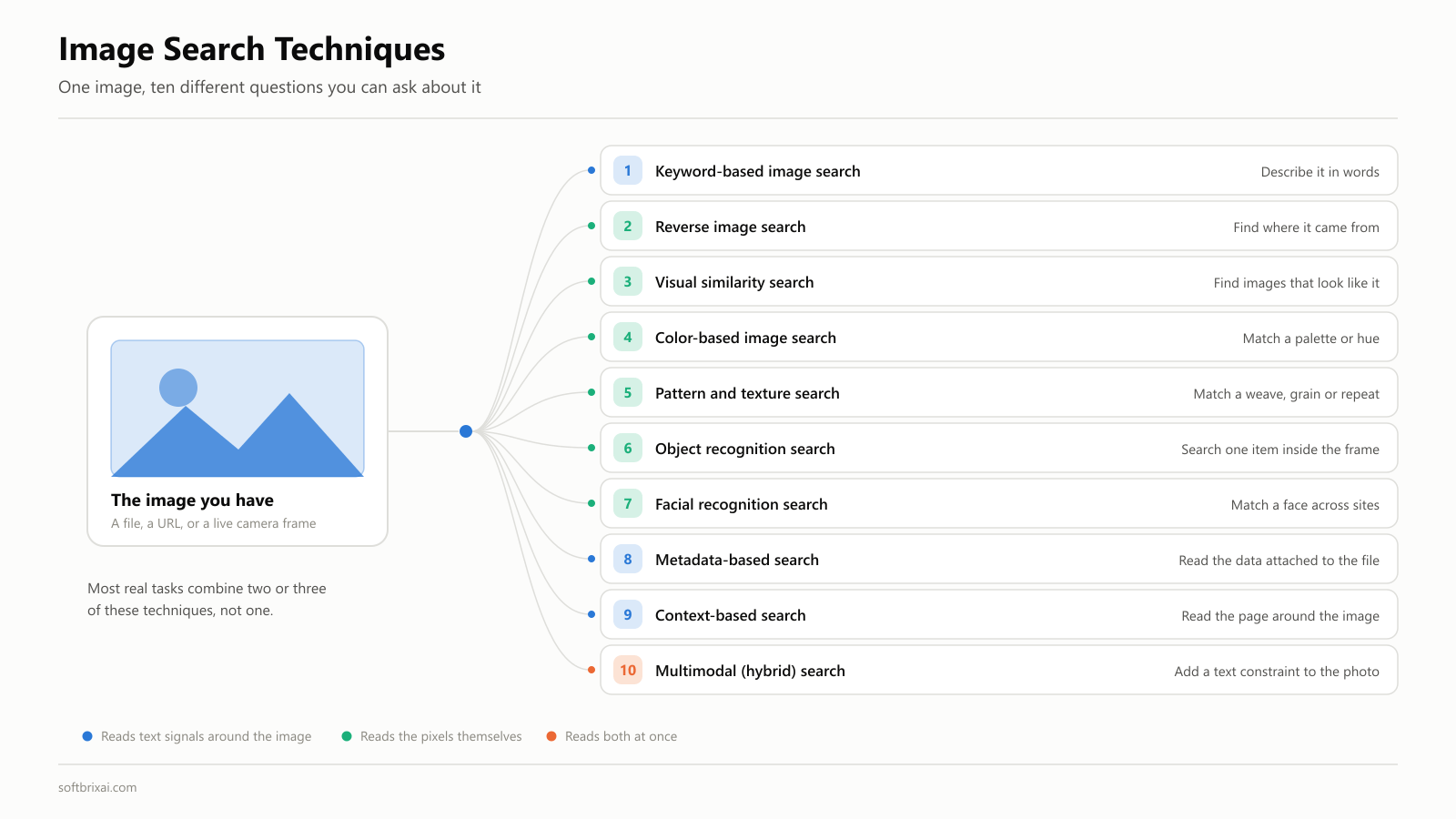
There are ten distinct image search techniques in general use, and each one answers a different question. Reverse image search tells you where a photo came from. Visual similarity search finds things that look like it. Object detection isolates one item inside a busy photo. Multimodal search lets you upload a photo and add “in navy, under $50” in the same query.
This guide covers all ten. For each technique you get how it works, an example, the best use case, and the limitation nobody mentions. Then the tools, the step-by-step methods for desktop and phone, the machine learning that runs underneath, and how to optimize your own images so other people can find them.
Key Takeaways
- Image search has ten working techniques, not one. Keyword-based image search, reverse image search, visual similarity search, color, pattern, object recognition, facial recognition, metadata, context, and multimodal search each solve a different problem.
- Visual search is now mainstream: Google reported Lens growing 65 percent year over year and passing 100 billion visual searches in 2025, a fifth of them shopping-related.
- Reverse image search and visual similarity search are not the same thing. One finds the same image, the other finds different images that look alike.
- Since May 2026 you can ask Search whether an image was made with AI, using SynthID and C2PA Content Credentials inside Lens, AI Mode and Circle to Search.
- No single tool wins. Google Images for breadth, TinEye for exact-match provenance, Yandex Images for faces, Bing Visual Search for objects, Pinterest for ideas.
- Content-based image retrieval is not a peer of consumer image search. It is the engine underneath it, and it earns its keep in medical imaging, satellite analysis and legal IP work, where there is no usable metadata at all.
- If you are building visual search rather than using it, build versus buy is a data decision, not a model decision. Retrieval quality is set before a model touches your images.
What Is Image Search?
Image search is the process of finding images using text, another image, or both together. Modern systems go well past matching your words against a caption. They analyze the picture itself.
Two families sit underneath everything in this guide.
Keyword-based image search matches your text query against the metadata attached to an image: the file name, the alt tags, the caption, and the text around it on the page. It is fast, and it fails whenever that metadata is thin, wrong or missing.
Content-based image retrieval, usually shortened to CBIR, searches the pixels. It extracts color histograms, texture patterns, shape descriptors and spatial relationships directly from the image, then compares those against everything in the index. CBIR is what allows users to upload a photo of something they cannot name and still find it.
Everything else is a variation on those two, or a blend of both.
That distinction matters more each year, because image search has become a business function rather than a convenience. In eCommerce it drives product discovery for shoppers who have a photo and no vocabulary. In journalism it is the first step in fact-checking a viral image. In UGC moderation systems it is how platforms catch a banned image being re-uploaded with a crop and a color shift. In digital marketing it is how brands find out who is using their creative without asking.
The scale is not small. Google has said Lens is used for visual search in the tens of billions, and that 20 percent of those searches are shopping-related. The exact figure needs a caveat, which is below.
The money follows the behavior, though the analyst numbers deserve a caveat too. Published visual search market estimates for 2024 range from roughly $3.5 billion to $41.7 billion depending on whether the analyst counts the underlying recognition technology or the commerce flowing through it. Data Bridge puts 2024 at $41.72 billion growing to $151.6 billion by 2032. Treat any single figure here as directional, not precise, because the definitions are not comparable.
A note on the numbers
Google has said Lens runs nearly 20 billion visual searches every month. Seven months later at I/O 2025, Sundar Pichai gave Lens growth as 65 percent year over year, with more than 100 billion visual searches in that year. Those two do not reconcile: 20 billion a month is roughly 240 billion a year, well above the annual number. They come from separate announcements with separate framings, and Google has published no reconciliation. Both work as scale indicators. Neither is a precise measurement, and any article quoting them as one figure has not checked.
The 10 Image Search Techniques
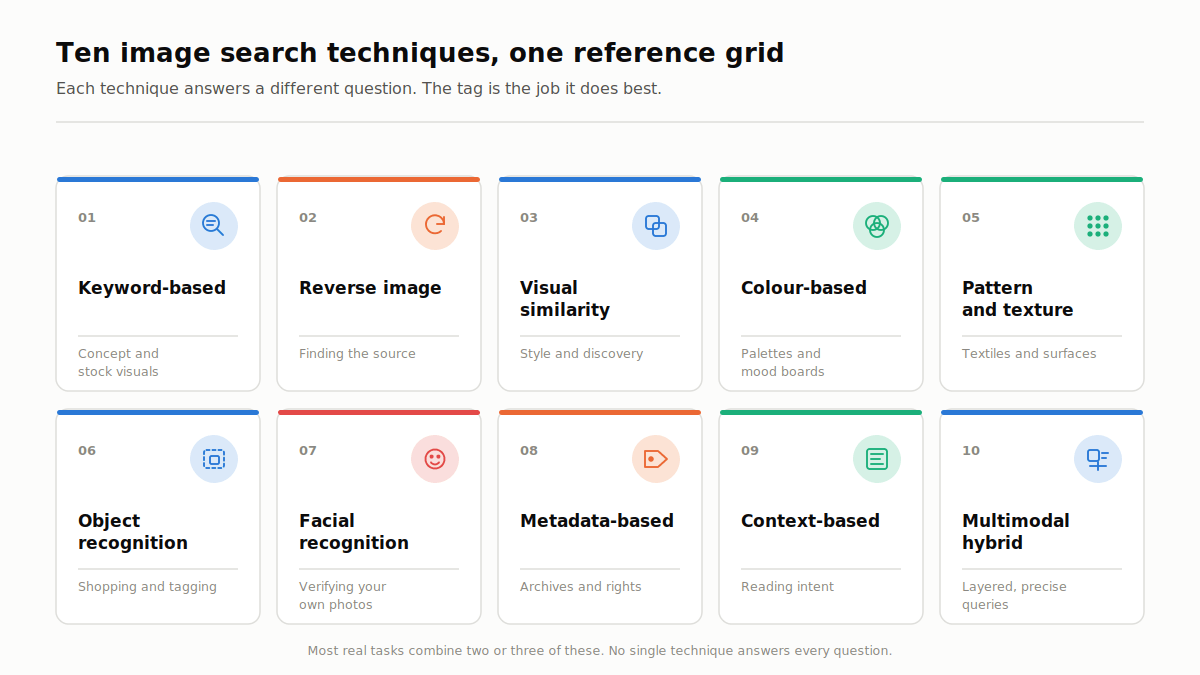
Here is the full set, with the job each one does and where it breaks down. Detail on each follows the table.
| # | Technique | Best for | Example query | Main limitation |
|---|---|---|---|---|
| 1 | Keyword-based image search | Concept and stock visuals | ”minimalist office desk setup with laptop” | Only as good as the metadata behind the image |
| 2 | Reverse image search | Finding the source, spotting copies | Upload a viral photo | Finds the same image, not similar ones |
| 3 | Visual similarity search | Style matching, discovery | Upload a living room photo | Returns loosely related results |
| 4 | Color-based image search | Brand palettes, mood boards | ”blue gradient background” | Ignores subject and shape |
| 5 | Pattern and texture search | Textiles, wallpaper, graphic design | ”geometric wallpaper pattern” | Niche indexes, thin coverage |
| 6 | Object recognition search | Shopping, inventory tagging | Photo of a desk lamp | Struggles with cluttered scenes |
| 7 | Facial recognition search | Verifying your own photos, catfish checks | Match a face across sites | Consent, privacy and legal limits |
| 8 | Metadata-based image search | Archives, source tracking | Images tagged “Paris 2024” | Useless once metadata is stripped |
| 9 | Context-based image search | Reading intent behind a photo | Same photo, two different sites | Needs surrounding text to work |
| 10 | Multimodal (hybrid) search | Precise, layered queries | Backpack photo plus “navy, under $50” | Support varies by platform |
1. Keyword-Based Image Search
This is the technique everyone already uses. You type words into a search engine such as Google Images or Bing, and it returns images based on the text signals attached to them.
How it works. The engine matches your query against stored metadata: file names, alt tags, captions, surrounding paragraph text, and structured data. No pixel analysis is required, which is why results appear instantly.
Example. “Sunset mountains” returns landscape photography. “Business icons vector” returns flat illustration sets.
Advanced tip. Long-tail queries beat short ones by a wide margin. Search “minimalist office desk setup with laptop” rather than “desk”. Add color, material, style and use case. The structure that works is subject, then context, then style: “men’s leather jacket studio lighting editorial”.
Best use cases. Blog and content production, concept visuals, stock photography, anything where you want a type of image rather than one specific file.
Limitation. If an image sits on a page with no alt text and a file name like IMG_5847.jpg, keyword-based image search cannot find it, no matter how good the photo is. That gap is exactly why image SEO still pays.
Search operators and filters that narrow a keyword search
Operators do the work the filter menus cannot. They run in the ordinary Google search box and carry through to the Images tab, and they turn a vague query into a narrow one on a single line.
| Operator | What it does | Example |
|---|---|---|
site: | restricts results to one domain | sunset photography site:unsplash.com |
filetype: | restricts to one file format | tropical beach filetype:jpg |
imagesize: | restricts to exact pixel dimensions | mountain landscape imagesize:1920x1080 |
"exact phrase" | forces the phrase in captions and surrounding text | "golden hour photography" |
OR | matches either term | labrador OR golden retriever puppy |
-term | excludes a term | snake -cartoon |
They combine, which is where the real narrowing happens. logo filetype:png -stock site:.edu is a far more specific request than anything the filter menus expose on their own.
The usage rights filter. In Google Images, open Tools, then Usage Rights, then Creative Commons Licenses. Be precise about what that does: it surfaces images whose host pages declare a license. It is a filter on what a page claims, not a legal clearance. The declaration can be wrong, out of date, or made by somebody who never held the rights in the first place. Verify the license at the source before you use anything, which is the copyright practice covered further down this guide.
One-click multi-engine search. This guide tells you to check at least two engines, and doing that by hand means uploading the same file four times. Browser extensions exist that fire one image at Google, Bing, Yandex and TinEye simultaneously from a single right-click, and that is the practical way to follow the two-engine rule at any volume. Which specific extensions are published and maintained changes often enough that it is worth checking current listings and reviews in your own browser’s store rather than trusting a recommendation in any article, this one included.
2. Reverse Image Search
Reverse image search flips the query. Instead of describing what you want, you upload an image or paste an image URL, and the engine tells you where that image already exists online.
How it works. The system builds a compact fingerprint of your image, often a perceptual hash for exact-match work, then compares it against fingerprints in its index. Because the fingerprint survives cropping, resizing and recoloring, near-duplicate image detection still succeeds on edited copies.
What it can do. Find exact matches. Detect edited, cropped or resized versions. Identify the earliest known appearance. Track where an image is being used.
Why it matters. This is the core skill in fact-checking. A journalist receives a dramatic photo of a disaster. A reverse image search shows the same photo published four years earlier in a different country. That takes about thirty seconds and settles the question.
Pro tip. Run the same image through TinEye and Google Images. The indexes are different, so a result missing from one often appears in the other.
Limitation. Reverse image search finds the same image. It will not find a different photo of the same handbag. For that you want the next technique.
3. Visual Similarity Search
Visual similarity search asks a different question. Not “is this the same image” but “does this look like this image”.
How it works. A deep learning model converts each image into a vector of numbers that represents its meaning, then finds other vectors that sit close by. Layout, texture, composition, color balance and subject all feed into that vector. Two photos of the same sofa in different rooms land near each other. A sofa and a coffee mug do not.
Example. Upload a photo of a mid-century living room and you get similar interiors, matching furniture styles and shoppable alternatives, none of which are the original file.
Industries that rely on it. Fashion, interior design, eCommerce product discovery, creative agencies, and any digital asset management system sitting on a large untagged library.
Why it is powerful. It surfaces things you could not have named. That is the entire value proposition for product discovery: the customer never has to learn your catalog vocabulary.
Limitation. Similarity is a judgment call made by a model. Results drift. You will get items that share a mood but miss the specific detail you cared about.
4. Color-Based Image Search
Color-based search filters or ranks images by dominant color, gradient or tone rather than subject.
How it works. The system computes a color histogram for each image, a distribution of pixel values across color space, and matches on that distribution. It is one of the oldest content-based image retrieval methods and still one of the cheapest to run at scale.
Example. Search “blue gradient background” and then filter results to a single hue. TinEye has a dedicated color search that accepts a hex value. Pinterest and Shutterstock both expose color filters.
Who uses it. Designers building mood boards, brand managers enforcing a palette, advertisers matching campaign creative across formats.
Real use case. A company wants every marketing visual to sit inside its brand palette. Color search across the asset library finds the ones that do not, in minutes rather than by eye.
Limitation. Color search ignores shape, subject and context completely. A red car and a red apple are neighbors.
5. Pattern and Texture-Based Search
This technique finds repeating structures: weaves, grains, tiles, geometric motifs and surface textures.
How it works. Texture pattern recognition models describe local structure using descriptors such as local binary patterns, then match on that description rather than on objects. Nothing here needs to know what the image depicts.
Common uses. Textile and fashion design, wallpaper and tile catalogs, graphic design asset libraries, and industrial quality inspection where a defect is a break in an expected pattern.
Example. Searching “geometric wallpaper pattern” returns layouts with comparable rhythm and repeat, not just images that happen to be tagged geometric.
Limitation. The specialist indexes are small. Outside design-focused platforms, coverage is thin.
6. Object Recognition Search
Object detection finds and labels individual items inside an image, then lets you search for just one of them.
How it works. A model trained on millions of labeled examples localizes objects and draws boundaries around each one. Saliency map object detection helps the system decide which item you probably meant. You then search that region alone rather than the whole frame.
Example. Photograph a full living room, tap the single lamp, and search only for the lamp. Before object localization, that search returned “living rooms”.
Real-world use. Online shopping and product discovery, inventory tagging, retail shelf auditing, and security systems watching for specific items.
Where it already runs. Major retailer apps ship their own in-app camera search that runs against their own catalog and nothing else, and that narrower index is an advantage rather than a compromise when you already know where you intend to buy.
Limitation. Accuracy is very uneven by category. Consumer products, plants and landmarks are handled well. Specialized machine parts, technical diagrams and handwriting are not, because the model only sees what its training data taught it to see.
7. Facial Recognition Search
Facial recognition detects faces, converts each one into a facial embedding, and matches that embedding against indexed faces.
How it works. The system maps the geometry of a face, encodes it as a vector, and runs a similarity comparison. Yandex Images and Lenso AI are noticeably stronger at this than Google, which deliberately restricts face matching in its consumer products.
Legitimate applications. Checking whether your own photos have been reused on a profile you did not create. Confirming a dating profile picture is not stolen before you meet someone. Journalists verifying a source. Media verification and identity checks inside consented systems.
Limitation, and it is a serious one. Accuracy varies significantly across demographics, a documented training-data problem rather than a setting you can change. Face search on strangers also carries real legal exposure, since several US states and the EU regulate biometric processing directly. Treat any match as a lead that needs corroboration, never as an identification.
8. Metadata-Based Image Search
Every image can carry hidden data: file name, capture date, camera model, GPS coordinates, copyright fields, IPTC tags and captions.
How it works. Search engines and asset systems read that metadata and index it as text. Semantic image annotation, whether added by a human or generated by a model, extends the same idea.
Example. A photo tagged “Paris Eiffel Tower 2024” surfaces for that query even when no visual analysis runs at all.
Why it matters. Metadata drives archival search, rights management and source tracking. Google supports IPTC photo metadata and structured data for exactly this reason, and licensing fields can qualify an image for a licensable badge in Google Images.
Limitation. Most social platforms strip metadata on upload. Once EXIF is gone, this technique has nothing to work with, which is also why metadata alone is weak evidence in verification work.
9. Context-Based Image Search
Context-based search reads what surrounds an image rather than the image itself.
How it works. The engine analyzes the page text, headings, the caption, the site’s overall topic and how other pages link to it. Cross-modal image text retrieval formalizes this: text and images are mapped into a shared space so each can be searched with the other.
Example. The same laptop photo on a technology blog is classified as editorial content. On a retail page with a price and a buy button, it is classified as a product image. Same pixels, different result.
Benefit. Context resolves ambiguity that visual features cannot. It is also the stage where a technically weaker match outranks a stronger one, purely because it sits on a better page with a descriptive caption.
Limitation. No surrounding text means no signal. Images in bare galleries and image-only pages lose here.
10. Multimodal (Hybrid) Image Search
Multimodal search combines an image with text, and increasingly with voice, in a single query.
How it works. The image and the text are encoded into the same vector space, then fused before ranking. That multimodal fusion image reranking step is what lets the system understand the difference between what you have and what you want.
Example. Upload a backpack photo and add “navy blue, under $50”. Upload a jacket and add “in desert colors with long sleeves”. One query, not three searches and a lot of scrolling.
Where it stands in 2026. This has moved from a feature to the default. At I/O in May 2026, Google introduced the biggest upgrade to its search box in over 25 years, one that accepts text, images, files, videos or Chrome tabs as inputs, and confirmed that AI Mode had passed one billion monthly users with queries more than doubling every quarter.
Limitation. Support is inconsistent across platforms, and results still degrade when the text refinement contradicts something obvious in the image.
Content-Based Image Retrieval in Specialist Fields
CBIR is the engine under techniques 2 through 6, not a peer of them, which is why it does not appear as an eleventh item in the table above. But it deserves its own section, because the specialist deployments look nothing like consumer image search and they are where the technique earns its keep commercially.
Medical imaging. Radiologists search archives for prior cases that resemble the scan in front of them, matching lesion shape, texture and density rather than any text label. The value is decision support: five comparable prior cases beat a keyword search across report text, because the report was written by someone who had already decided what they were looking at.
Satellite and remote sensing. Analysts search vast image libraries for terrain patterns, crop signatures, construction footprints or flood extents. Nothing here is tagged, and no human could tag it at that volume, so pixel-level retrieval is the only option.
Legal IP and trademark search. Trademark offices and brand protection teams run similarity search across logo databases to find marks that are confusingly similar rather than identical. The relevant legal test is visual similarity, which maps onto the technology almost exactly.
Forensics and digital evidence. Investigators match objects, vehicles, tattoos and scene features across large seized image sets, then use hash-based near-duplicate detection to group copies of the same file.
What all four share is the absence of usable metadata. When there are no alt tags, no captions and no filenames worth reading, content-based image retrieval is not a nice enhancement. It is the only thing that works. That is also the honest test for whether your own project needs it.
How to Search an Image: Step by Step
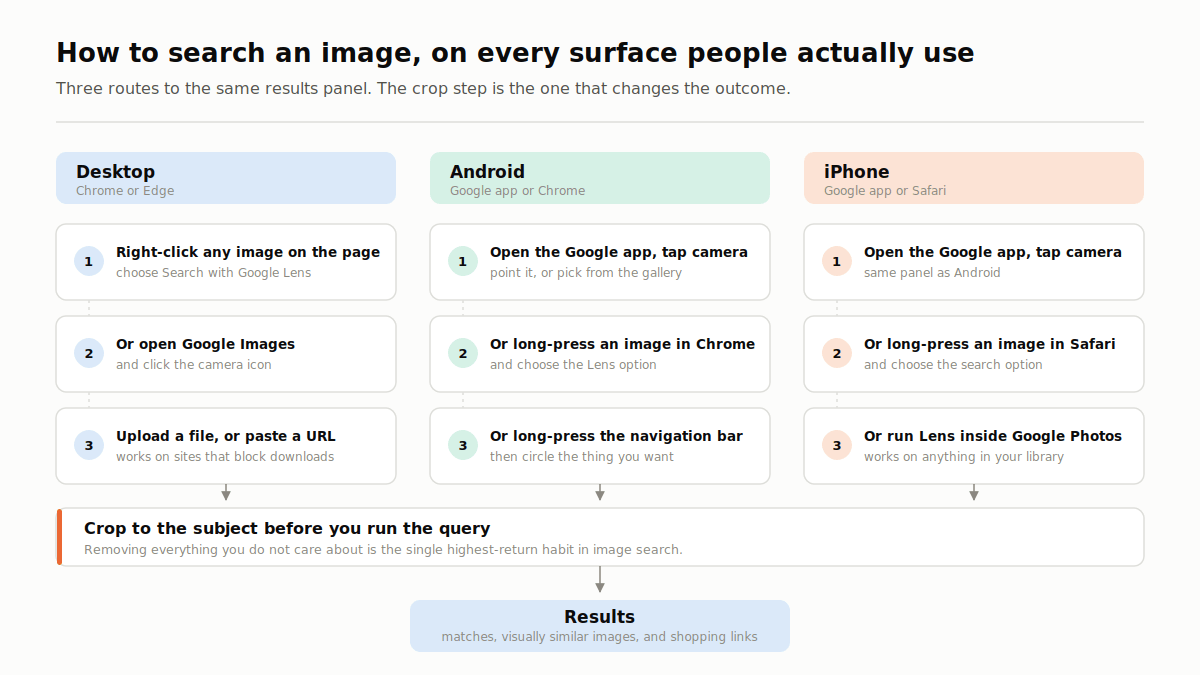
The techniques above are useless if you do not know where the buttons are. Here is how to search an image on every surface people actually use.
On desktop, in Chrome or Edge. Right-click any image on a page and choose “Search with Google Lens”. The results panel opens beside the page. To search a file from your computer, open Google Images, click the camera icon, then upload an image or drag it into the box.
By URL. Copy the image address, click the camera icon, and paste it into the URL field. This is the fastest route when the image is on a site that blocks downloads.
On Android. Open the Google app and tap the camera icon, or long-press any image in Chrome and pick the Lens option. Circle to Search also works: long-press the home button or navigation bar, then circle the thing you want.
On iPhone. Use the Google app’s camera icon, or long-press an image in Safari and choose the search option. Google Photos also runs Lens on any photo already in your library.
With a live camera. Point the camera at an object, a plant, a landmark or a sign. This is where object detection and translation both shine, and it is how most visual search sessions now start.
Crop before you search. This is the single highest-return habit in this guide, and it costs about three seconds. Searching a cropped region almost always beats searching a cluttered full frame, because you remove everything the model would otherwise treat as signal. Every tool above lets you drag the crop handles before running the query.
Searching image archives and academic databases
Consumer engines are the wrong tool for scholarly and archival work, because the material is often not indexed by Google at all. Different rules apply.
Use controlled vocabularies rather than natural language. The Getty Art & Architecture Thesaurus gives you the accepted term for an object or style, and the Union List of Artist Names does the same for creators, so you search “daguerreotypes” rather than “old photos”. The Library of Congress Subject Headings serve the same function across general collections.
Then use the operators these databases actually support. Boolean AND, OR and NOT still work where they have been abandoned in consumer search. Wildcards catch variant endings, so photograph* returns photograph, photographs and photography in one query. Quotation marks force exact phrases.
The framing that helps most: a consumer image search is an arrow, aimed at one specific thing. Archive search is a net, cast to bring back a defined set that you then narrow. Start deliberately broad with a controlled term, then filter by date, collection, medium and rights.
Worth knowing where to look: JSTOR for scholarly images, the Library of Congress and Europeana for public domain material, Wikimedia Commons for openly licensed files, and your own institution’s library guides, which usually list subscription databases you already have access to.
Reverse Image Search Techniques That Work in 2026
Anyone can upload a photo. These are the reverse image search techniques that change the outcome.
Sort by oldest to find the original
When an image is circulating and several accounts claim credit, chronology settles it. TinEye lets you sort results by oldest first, which usually surfaces the earliest indexed appearance in seconds. That single option is the reason TinEye stays in a verification toolkit even though its index is narrower than Google’s. TinEye currently searches over 85.5 billion images.
Search across at least two engines
Every engine indexes a different slice of the web. Google Images is broadest. TinEye is built for exact-match and edited-copy detection. Yandex Images is strongest on faces and on Eastern European sources. Bing Visual Search often surfaces retail pages the others miss. If a result matters legally, professionally or financially, check two engines minimum before you conclude anything.
Check whether the image was made with AI
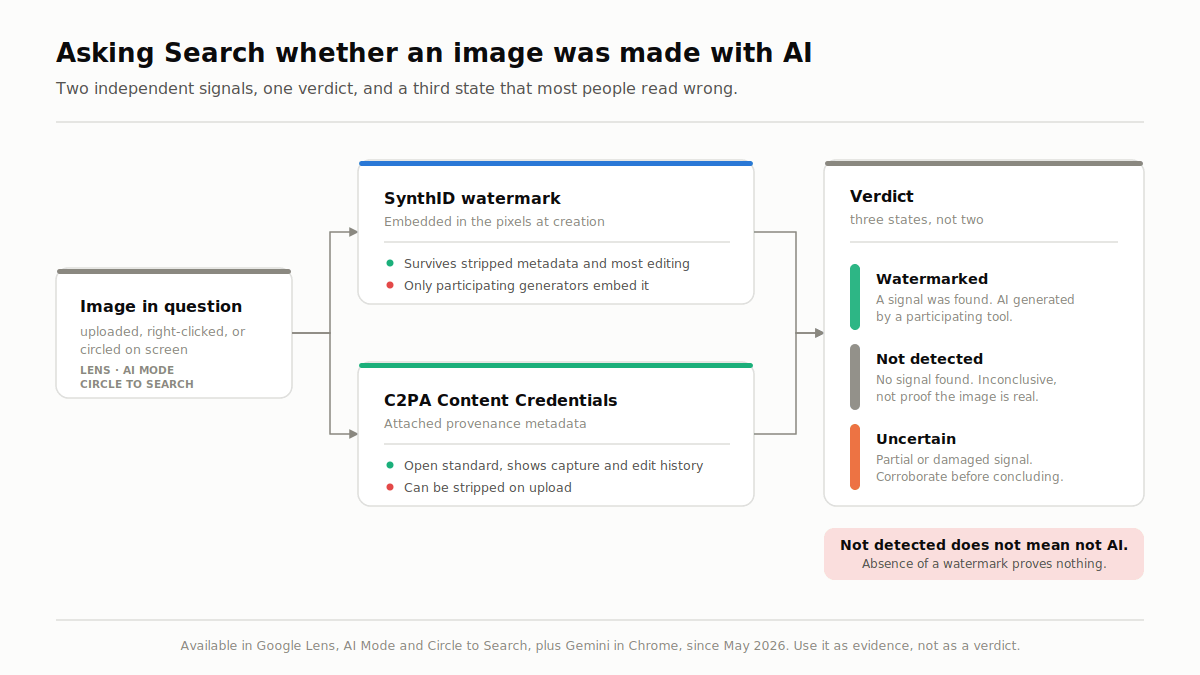
This is new, and it is the biggest change to reverse image search in years. Since May 2026 you can ask Search directly whether an image was AI generated, using features including Lens, AI Mode and Circle to Search, plus Gemini in Chrome. The check reads SynthID, Google’s watermark, which is embedded at the point of creation and survives stripped metadata and most editing. Google also added verification for C2PA Content Credentials, the open provenance standard, which tells you whether a file is an unaltered original from a camera or has been modified, and by which tools.
Two things follow from that. First, AI detection is now a step inside image search rather than a separate tool you go and find. Second, absence of a watermark proves nothing, because only participating generators embed one. Use it as evidence, not as a verdict.
Verify context, not just authenticity
An image can be entirely real and still be misleading. A genuine 2015 photograph recirculated as breaking news is the most common form of visual misinformation, and it is far more common than a sophisticated fake. So check when and where the image first appeared, read the original caption rather than the one you were shown, and confirm that the location details in the photo match the claim.
The catfish and stolen-content workflow
If you think your photos are being used by someone else, or that someone is using stolen photos on you, run this sequence. Crop to the face or the distinctive object. Search Google Lens first for breadth. Search TinEye second, sorted by oldest, to find the earliest version. Search Yandex Images third, because it handles faces the others will not. If the same photo belongs to a stock library or an unrelated public account, you have your answer. Document the URLs and timestamps before you send a copyright notice, because pages disappear.
Three tests you can run on your own images
Everything above can be checked, and it should be, because your images and your industry are not the ones any writer tested against. Nothing below reports our results. These are protocols, written so that you get an answer specific to you.
- Same image, four engines. Take one image you own and can identify with certainty, then run it unedited through Google Lens, TinEye, Bing Visual Search and Yandex Images. Record total results and genuine appearances of your file as two separate numbers. The engine returning the most results is frequently not the one returning the most correct ones, which is the whole argument for cross-engine verification.
- Full frame versus cropped. Search one busy photograph whole, then crop tightly to a single identifiable product and search again. Compare the first ten results each time. This is the direct test of the crop-first habit above, and if it changes nothing your full frame was already clean enough.
- Watermark durability. Generate an image in a tool that embeds SynthID, ask Search whether it was AI generated, then crop it, shift the colors, re-save it in another format and ask again. Run the control as well: try the same check on a generator that embeds nothing, so the intuition sticks.
Two caveats, and they decide whether any of this is worth anything. Log the raw counts before you interpret them, because interpretation is where bias enters, and index sizes move constantly, so a count taken today will not reproduce next month and a single image is a data point rather than a finding.
How Image Search Works Behind the Scenes
Everything above rests on the same pipeline. Understanding it explains most of the odd behavior you will see, and it is the part that matters if you are building rather than using.
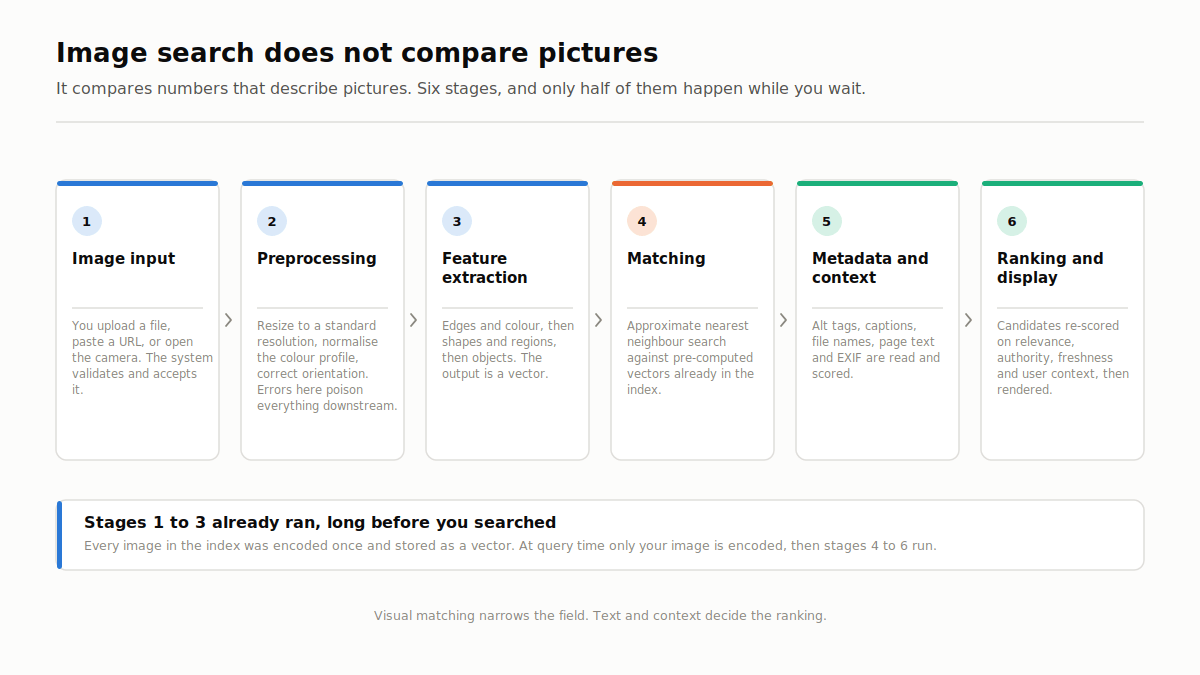
Image search does not compare pictures. It compares numbers that describe pictures.
| Stage | What happens |
|---|---|
| 1. Image input | You upload a file, paste a URL, or open the camera. The system validates and accepts it. |
| 2. Preprocessing | Resize to a standard resolution, normalize the color profile, correct orientation. Errors here poison everything downstream. |
| 3. Feature extraction | Low-level features such as edges and color, mid-level shapes and regions, high-level objects. Output is a vector. |
| 4. Matching | Approximate nearest neighbor search against pre-computed vectors in the index. |
| 5. Metadata and context | Alt tags, captions, file names, page text and EXIF are read and scored. |
| 6. Ranking and display | Candidates re-scored on relevance, authority, freshness and user context, then rendered. |
Feature detection with SIFT and SURF
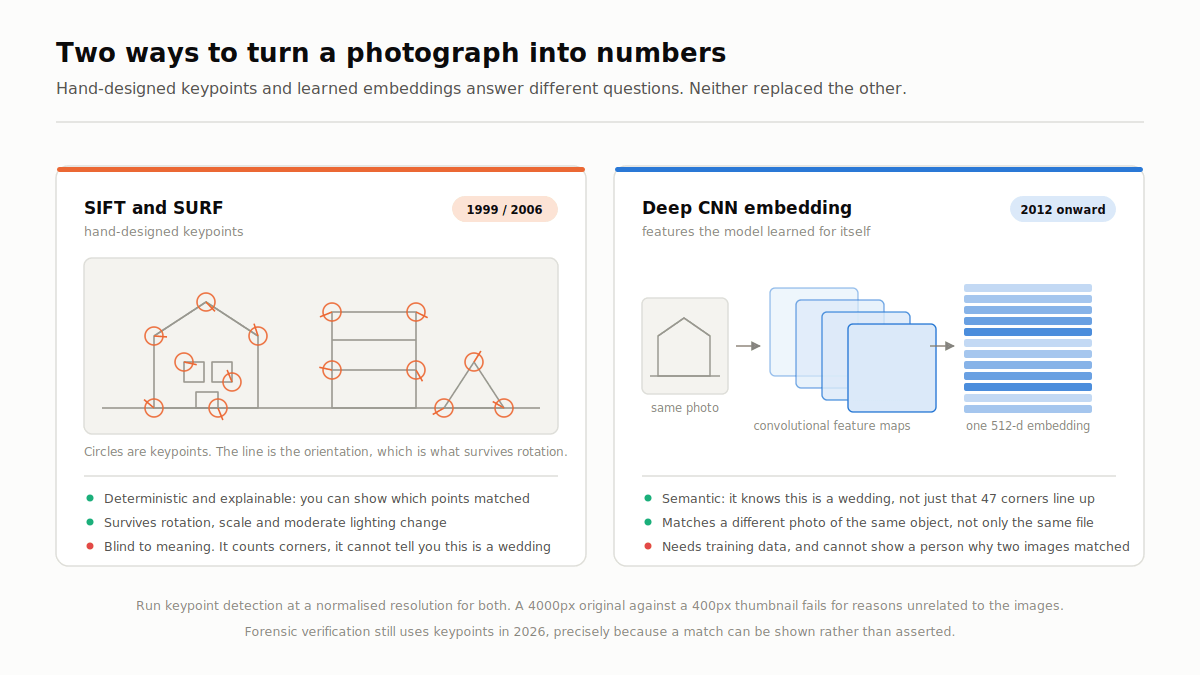
The classic image algorithms find keypoints: corners, junctions and high-contrast patterns that stay recognizable under change.
SIFT, Scale-Invariant Feature Transform, describes each keypoint with a 128-dimension vector. SURF, Speeded-Up Robust Features, does the same job faster with a more compact descriptor. ORB is the common open-source alternative. Bag-of-visual-words representations and spatial pyramid matching kernels were the standard way to turn those keypoints into something searchable at scale.
These methods are deterministic, cheap and explainable. If two hundred keypoints line up geometrically, the images match, and you can show a person exactly why. That is why feature detection still owns forensic verification and near-duplicate image detection, even in 2026.
One practical note that documentation rarely mentions: run keypoint detection at a normalized resolution for both images. Matching a 4000px original against a 400px thumbnail fails for reasons that have nothing to do with the images being different.
Deep learning models
Convolutional neural networks changed the economics from around 2012. A CNN learns its own features instead of using hand-designed ones. Architectures such as ResNet made deeper networks trainable and pushed accuracy on complex recognition well past classic methods. Deep convolutional neural features handle semantics: they can tell you this is a wedding, not just that two images share forty-seven keypoints.
Vision Transformers came next. They split an image into patches and process the sequence with transformer attention, the same family of models behind large language models, which is why they handle context and relationships better. Give an older CNN a photo of a person on a beach with a racket and you get three labels. Give it to a modern multimodal model and you get a description of the scene.
The ceiling is always training data. A general-purpose model dropped onto medical or industrial imagery performs badly, and no amount of index tuning fixes that. Region-based image segmentation features and active learning for visual relevance are the usual routes out, but both need domain data.
Vector embeddings and cosine similarity
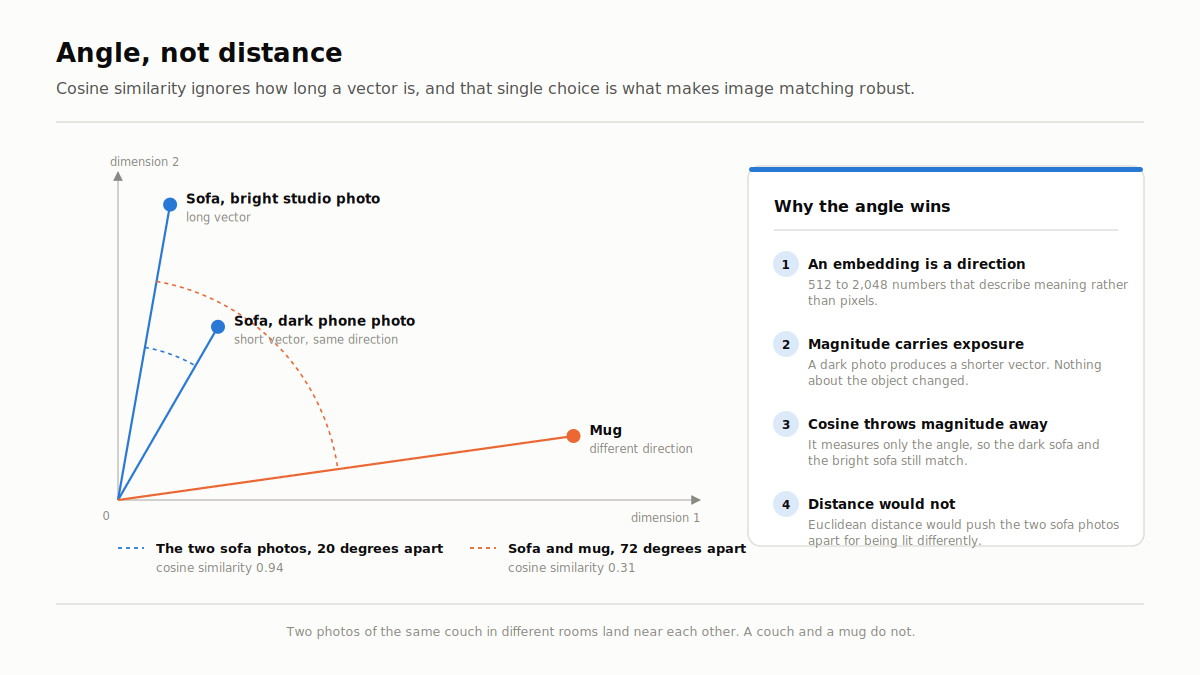
An embedding is the numerical fingerprint, typically 512 to 2,048 numbers representing meaning rather than pixels. Two photos of the same couch in different rooms produce vectors that sit close together.
Closeness is measured with cosine similarity, the angle between two vectors, ignoring magnitude. Ignoring magnitude is the whole trick. A dark, underexposed photo of a sofa still matches a brightly lit one, because direction holds even when intensity does not.
Image indexing and matching at scale
Every image in the index is processed once, converted to an embedding, and stored in a vector database. That is the expensive part, and it happens long before anyone searches.
At query time, an approximate nearest neighbor algorithm finds the closest vectors. Approximate is doing real work in that sentence: exact nearest-neighbor search across billions of vectors is computationally brutal, so scalable indexing for visual databases trades a sliver of accuracy for a very large speed gain. In practice you never notice the difference.
Then comes reranking. Query expansion for visual search widens the candidate set, relevance feedback in image retrieval uses signals from what people click, and metadata and page authority decide final order. Visual matching narrows the field. Text and context decide the ranking.
If you are building this rather than using it, that pipeline is the whole project, and the hard part is almost always the data. Our AI data engineering and RAG development teams work on exactly these retrieval problems, and the technologies page covers the stack in more depth. For serving and cost, see our guides on MLOps consulting and GPU cost optimization on Kubernetes.
Best Image Search Tools Compared
Each platform uses different algorithms and, more importantly, a different index. That is why the same image returns different answers on each one. Almost everything below is free, and the cost column is really a list of what you eventually pay for: continuous monitoring alerts, high-volume API access, licensable results, and enterprise face matching. Most people never reach that line.
| Tool | Best for | Key strength | Weakness | Cost |
|---|---|---|---|---|
| Google Images and Lens | General use, objects, shopping | Largest index, strongest object detection, multimodal queries | Weaker at exact-match provenance | Free |
| TinEye | Reverse image search | Finds crops, resizes and recolors; sort by oldest | Smaller index, no semantic similarity | Free and paid tiers |
| Lenso AI | Similar and duplicate images | AI recognition plus continuous monitoring alerts | Newer, smaller index | Paid tiers |
| Bing Visual Search | Identifying objects | Strong visual lookup, good retail coverage | Smaller index than Google | Free |
| Finding similar ideas | Best for design, decor and fashion discovery | Not for verification | Free | |
| Yandex Images | Face and landmark matching | Strongest public face matching | Thinner coverage of US sites | Free |
| Shutterstock | Licensed stock images | Returns only licensable results | Paid | Paid |
One tool people keep reaching for is missing from that table on purpose. A language model can describe what is in a picture, and with browsing enabled it can search text about it, but it maintains no fingerprint index of the web’s images, so it cannot tell you where a specific file appears.
Google Images for everyday image searches
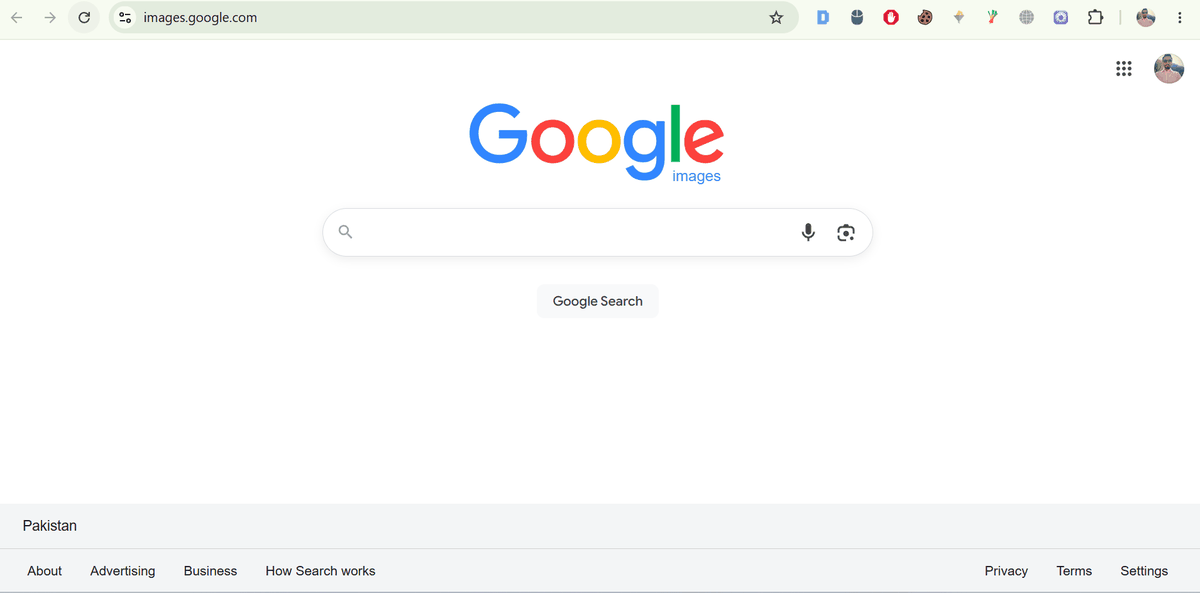
Google Images and Lens. The workflow step worth changing: use multisearch, adding your text refinement inside the same query rather than searching first and filtering after. The non-obvious behavior is that Lens resolves a subject before it searches, so a full frame holding two strong objects will quietly pick one of them for you.
TinEye for tracking an image online
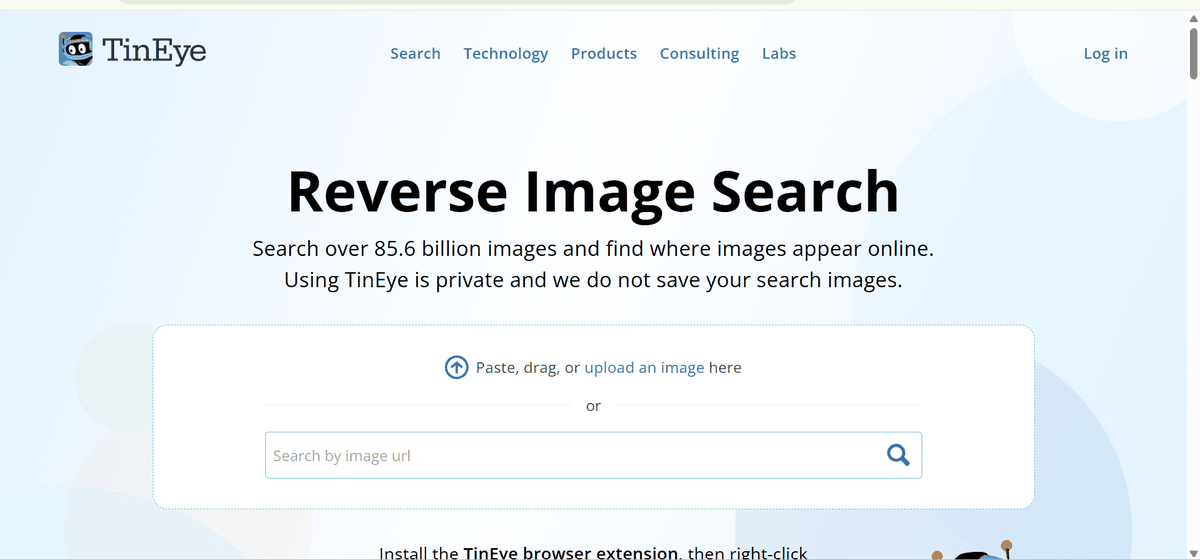
TinEye indexes over 85.5 billion images and sorts by oldest, the one control that settles who published first. It attempts no semantic similarity, so asking what beats TinEye is the wrong question: Lens has the larger index, Yandex handles faces better, and verification workflows keep all three. Install the browser extension and the whole thing becomes a right-click.
Lenso AI for similar and duplicate images

Lenso AI earns its place for one feature: alerts. Register an image once and it tells you when that image appears somewhere new, which is the only version of this that scales past a handful of assets. The limitation has a cause. A newer crawler has seen less of the web, so treat a silent alert as incomplete rather than as an all-clear.
Bing Visual Search for identifying objects
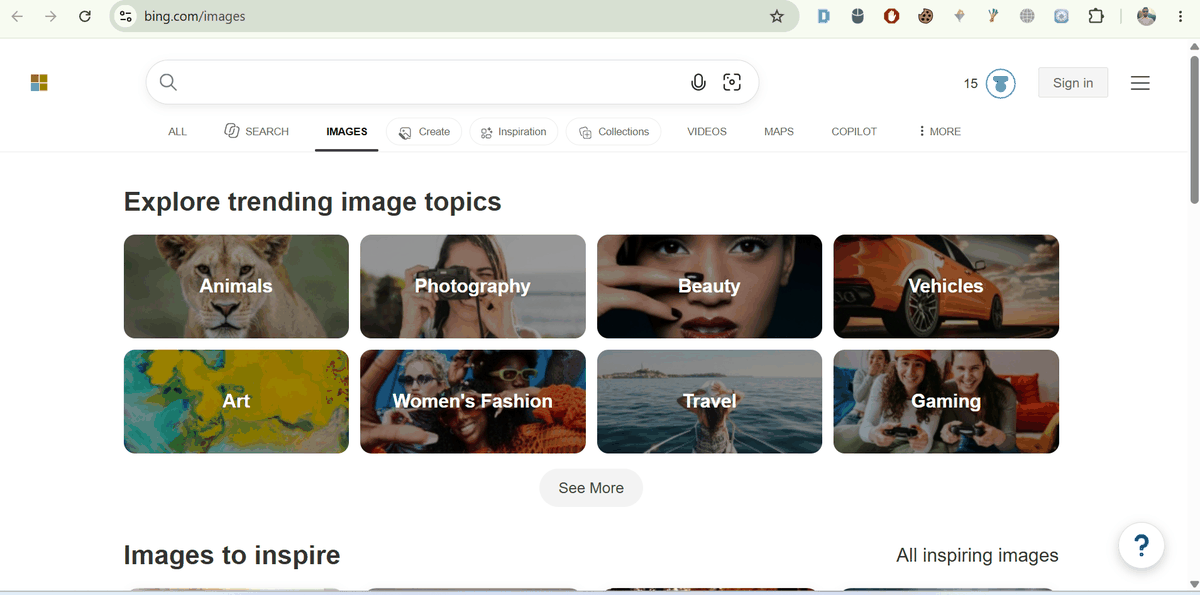
Bing Visual Search is built into Edge, and its retail coverage is considerably better than its overall index size suggests. Use it as the second engine when Google comes back empty, which happens more often than people expect. It works as a second opinion because Microsoft’s crawl priorities differ, not because the underlying recognition is better.
Pinterest for finding similar ideas

Pinterest is the exception in this table. It is not searching the web, it is searching a curated corpus of things people chose to save, which is exactly why it is strong on interiors, fashion and food and useless for provenance. Point Lens at a room and you get comparable ideas plus shoppable products, never the original file.
Yandex Images for face and landmark search
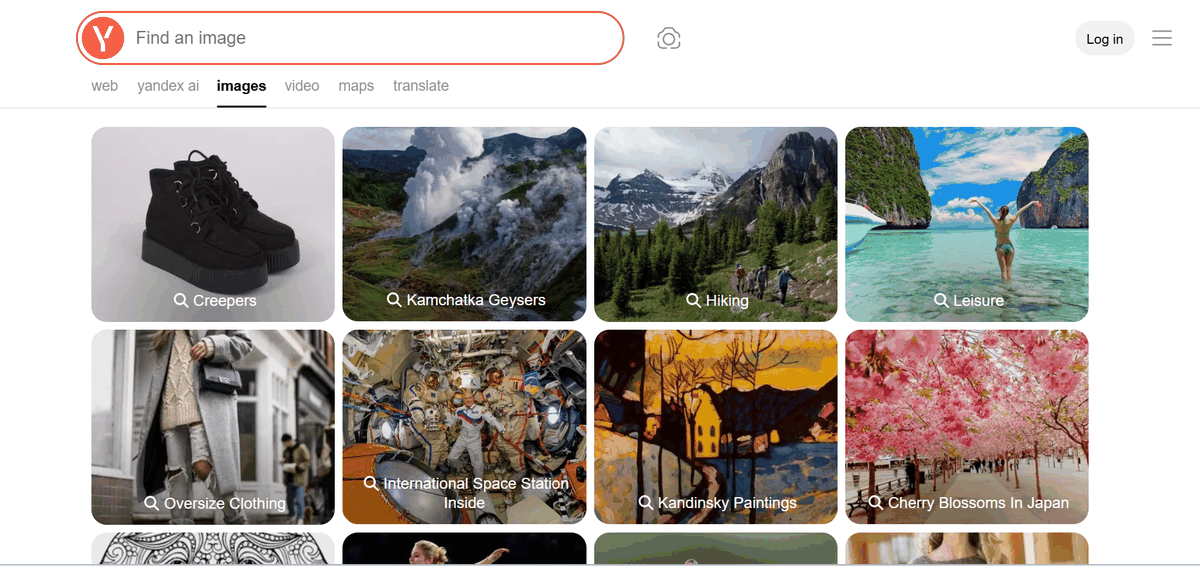
Yandex Images finds people from cropped, low-resolution photos where every other free engine returns nothing, which is why investigators keep it open. The limitation has a reason worth knowing: its crawl is weighted toward Eastern European and Russian sources, so thin US coverage is a sampling gap rather than a ranking failure. Cross-reference with it, never lead with it.
Shutterstock for licensed stock images

Shutterstock reverse search is narrow on purpose. Every result is licensable, which turns the usual problem, loving an image you have no rights to, into a non-event. Drag in a reference photo and it returns visually similar assets you can actually pay for. Contributor tools flag unauthorized use too, which matters when you are on the other side of that transaction.
Where to find images you can actually use
Unsplash and Pexels for modern photography under permissive terms. Openverse to search openly licensed work across many sources at once. Wikimedia Commons for encyclopedic and historical subjects. The Library of Congress for US public domain archives. NASA’s image library for space and earth science. Check the license on each individual file, because terms vary within every one of these.
Build vs Buy: Visual Search APIs
If you have read this far and you are thinking about adding visual search to a product rather than using someone else’s, this is the decision that matters. You have three routes.
Buy an API. The fastest path, and correct for most teams.
- Google Cloud Vision API handles label detection, object localization, OCR, logo detection and web detection, which is effectively reverse image search as a service. Web detection is the underrated one, since it returns pages containing matching images. Start with a service account, enable the Vision API, and send a base64 image or a Cloud Storage URI. Pricing is per thousand images with a free monthly tier.
- Amazon Rekognition is strongest where you need moderation and face operations in the same pipeline as detection. Custom Labels lets you train on your own categories without an ML team. It fits naturally if your infrastructure already sits in AWS.
- Clarifai is the most flexible on custom models and visual similarity search specifically, with a workflow builder and its own vector search. Good middle ground when off-the-shelf labels are too generic but you do not want to train from scratch.
Build on open source. OpenCV for classic feature detection such as SIFT, SURF and ORB, a pre-trained vision model for embeddings, and a vector database for retrieval. You get full control and no per-call cost, and you take on hosting, GPU spend and evaluation. This is right when the domain is specialized enough that general APIs fail, which is common in medical, industrial and satellite work.
Hybrid, which is what most production systems actually are. Use an API for generic labeling and OCR, and your own embedding model plus vector index for the similarity search that differentiates you.
The choice usually comes down to three questions. Does a general model perform well enough on your specific images? Do your data, privacy or regulatory constraints allow sending images to a third party? And is your volume high enough that per-call pricing beats running your own inference? If the answer to the first is no, you are building whether you wanted to or not.
The failure mode we see most often is teams treating this as a model selection problem. It is a data problem. Retrieval quality is set by how your images are labeled, deduplicated and evaluated long before a model touches them. If you want that scoped properly before you commit to a route, our AI consulting team does exactly this kind of assessment, and our AI data engineering work covers the pipeline underneath it.
When to Use Each Technique
| Your goal | Technique | Tool to start with |
|---|---|---|
| Find a concept or stock visual | Keyword-based image search | Google Images |
| Find where a photo came from | Reverse image search | TinEye, sorted by oldest |
| Find products that look like this | Visual similarity search | Google Lens or Pinterest |
| Buy the exact item in a photo | Object recognition plus multimodal | Google Lens |
| Check if your photos are being misused | Reverse image search plus facial recognition | TinEye, then Yandex Images |
| Monitor an image continuously | Reverse image search with alerts | Lenso AI |
| Match a brand palette | Color-based image search | TinEye color search |
| Source a legally usable image | Keyword search inside a licensed library | Shutterstock |
| Check if an image is AI generated | Provenance verification | Google Lens, AI Mode, Circle to Search |
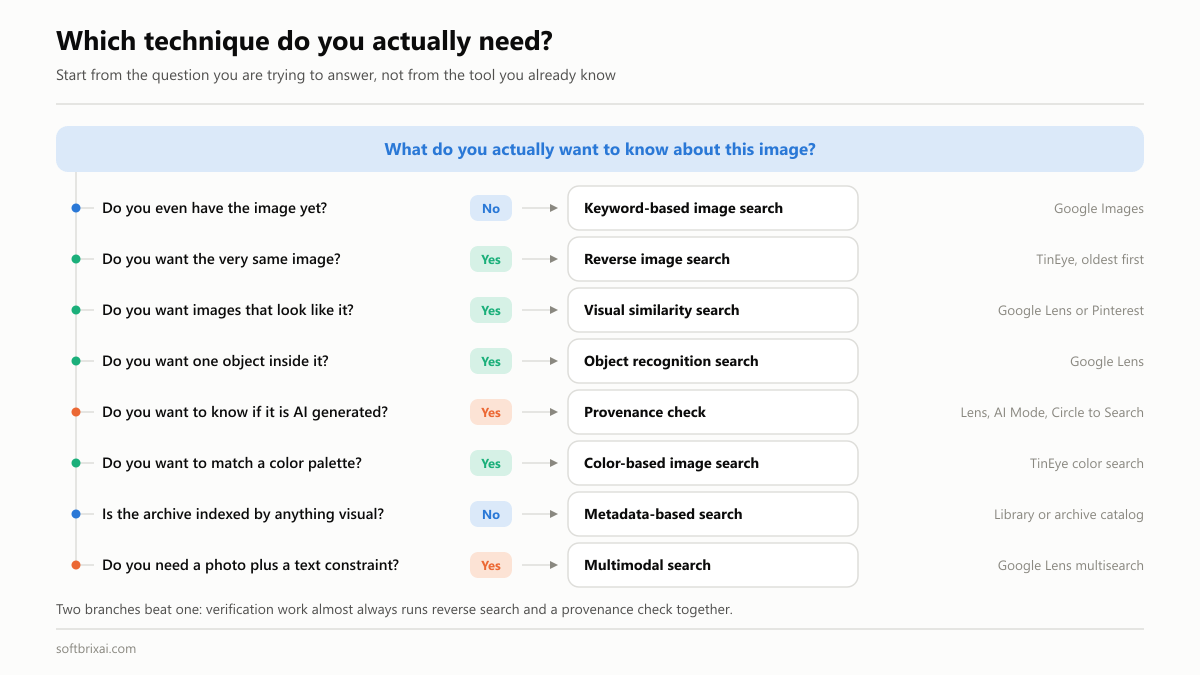
The useful habit is layering. Upload to Google Lens for breadth, verify the source on TinEye, then explore alternatives on Pinterest. Three searches, ninety seconds, and a far more complete picture than any single tool gives you.
Best Practices, and the Common Mistakes They Fix
Small changes in technique change results more than switching tools does. Each practice below is paired with the mistake it prevents, because in image search they are the same list read from opposite ends.
1. Start with the highest-quality version you have. Image algorithms analyze edges, textures and patterns, so a blurry or heavily compressed file gives the feature extractor less to work with. Upload the original rather than a screenshot of it, and never upscale first, because upscaling invents detail that was never there. The mistake this fixes: searching with low-quality or cropped-down images and blaming the engine for the poor matches.
2. Be specific with keywords. “Bag” returns noise. “Red leather handbag with gold chain strap” returns candidates. Include color, material, shape, style and use case, in roughly that order. The mistake this fixes: vague two-word queries, which are a coin flip on any index this large.
3. Combine techniques and cross-check engines. Reverse image search for provenance, visual similarity search for alternatives, keyword-based image search for concepts. Then run the important ones through a second engine, because every platform indexes a different slice of the web. The mistake this fixes: over-relying on one tool, then concluding an image does not exist online when one index simply has not seen it.
4. Use the filters. Filters are the most ignored feature in every one of these tools: size, usage rights, color, file type, date range, domain and page language. Thirty seconds of filtering beats scrolling four hundred results. The mistake this fixes: manually scanning result pages for something a filter would have isolated instantly.
5. Reach for operators when the filters run out. Filter menus cover size, color, type and rights. Operators cover everything the menus do not: one domain, one file format, one exact phrase, one excluded term, one pixel dimension. The full set is in search operators and filters above. The mistake this fixes: treating the filter menu as the ceiling of what you can narrow, then scrolling instead of querying.
6. Respect copyright and licensing. Finding an image is not permission to use it. Check the license at the source rather than in a search result, honor attribution terms, and keep a record of what you checked and when. The mistake this fixes: downloading from search results and discovering the terms later, usually in a demand letter. Enforcement is automated now, and “I found it in search” has never worked as a defense.
7. Test on the surface your audience uses. Most visual searches begin on a phone camera. If you are checking whether your own images are findable, check on mobile, because desktop results are not what your customers are seeing. The mistake this fixes: optimizing against a desktop SERP that most of your visual traffic never touches.
Image SEO: How to Rank Your Own Images
Everything so far has been about finding images. This section is the other half of the topic: making sure other people can find yours. Google’s own image SEO guidance is the reference here, and the fundamentals have not changed much even as AI search has.
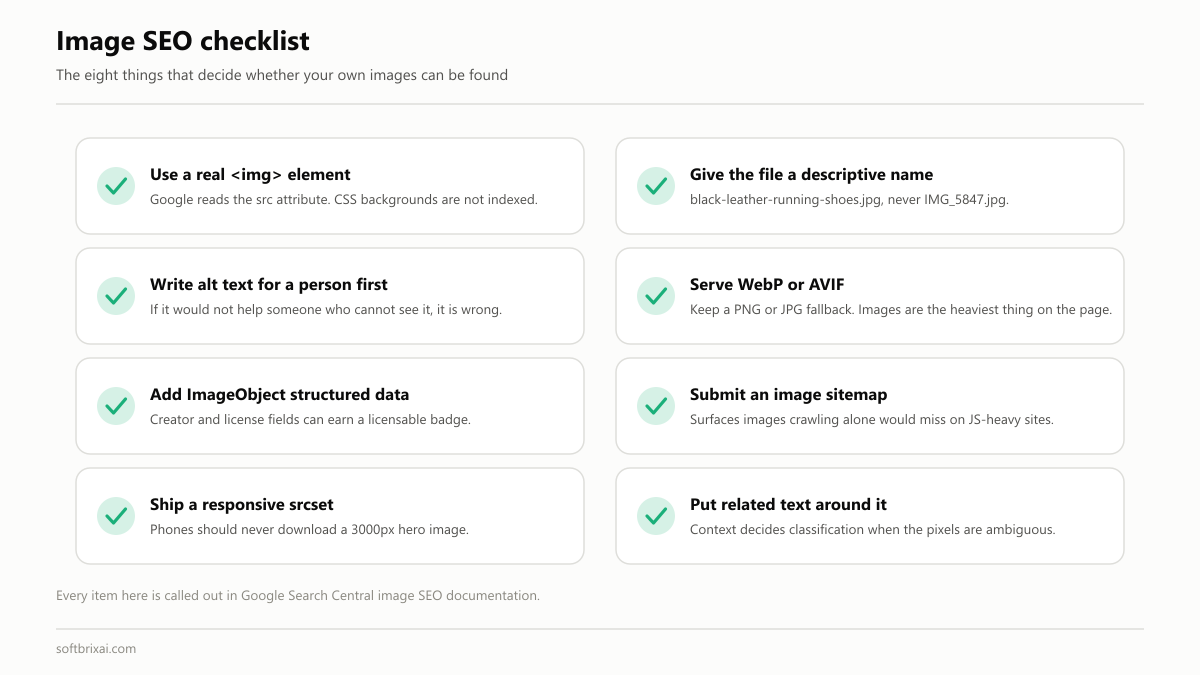
Use standard HTML image elements. Google finds images in the src attribute of an <img> element, including inside a <picture> element, and it does not index CSS background images. If a visual matters for search, it needs to be a real image element.
Give files meaningful names. IMG_5847.jpg tells a search engine nothing. black-leather-running-shoes-women.jpg tells it everything. Use hyphens, keep it short, describe what is in the frame.
Write real alt tags. Alt text serves screen readers first and search engines second, and writing it properly for accessibility happens to produce exactly what search engines want. “Black leather running shoes with white sole” beats “shoes” and destroys “image1”. Do not keyword-stuff it. If reading it aloud to someone who cannot see the image would be unhelpful, it is wrong.
Compress and serve modern formats. Serve WebP or AVIF where you can, since the savings over JPEG at equivalent quality are substantial. Images are almost always the heaviest thing on a page, and page speed affects both rankings and conversion.
Add structured data. Schema.org ImageObject markup tells search engines what an image is, who created it and what license applies. Google supports both structured data and IPTC photo metadata for this, and licensing information can qualify an image for a licensable badge in Google Images. Add it on every page the image appears on, not just one.
Submit an image sitemap. An image sitemap gives Google URLs for images it might not otherwise discover, which matters on JavaScript-heavy sites and large catalogs.
Make images responsive. Use srcset or the <picture> element so phones get phone-sized files. Shipping a 3000px hero image to a mobile connection is the most common performance mistake on the web.
Put related text around the image. Context-based image search is real. A product photo inside a paragraph about that product gets classified correctly. The same photo floating in a bare gallery does not.
Keep visuals consistent. Consistent style and treatment reads as professional to people, and it helps visual similarity models cluster your assets together, which lifts discoverability across your whole catalog rather than one lucky image.
Practical Applications of Image Search
| Industry | The problem | Technique used | What it changes |
|---|---|---|---|
| eCommerce and product discovery | Shoppers know what they want and cannot name it | Object recognition, then visual similarity, then multimodal refinement | Removes the naming step entirely. 20 percent of Lens searches are shopping-related, matched against a Shopping Graph of more than 45 billion product listings |
| Journalism and fact-checking | A viral image arrives with no verifiable origin | Reverse image search plus SynthID and C2PA provenance checks | Turns an open source question into a thirty-second check, and dates the image before the claim spreads further |
| Marketing and brand protection | Logos and campaign assets circulate without permission | Reverse image search with continuous monitoring alerts | Moves enforcement from occasional manual spot checks to something that runs in the background |
| Graphic design | Concepts may already exist and palettes drift | Color and pattern search plus a similarity check | Catches accidental near-duplicates before publication and keeps a library inside its brand palette |
| Education and research | Sources need verifying and imagery needs clearing | Reverse image search plus metadata and archive search | Confirms provenance and surfaces public domain material that keyword search alone misses |
| Security and law enforcement | Identifying people, objects and scenes across large evidence sets | Facial recognition, object recognition and hash matching | Produces leads far faster than manual review, with the accuracy caveats below |
| UGC moderation | Banned images are re-uploaded with a crop, a flip or a color shift | Perceptual hash matching and near-duplicate detection, with classifiers for novel cases | Catches repeat uploads automatically, so human review is spent on genuinely new material |
| Social media tracking | Content is reposted and collaborations go unverified | Reverse image search run across platforms | Shows where owned content travels and whether paid placements actually ran |
Two rows need more than a table cell. Security and law enforcement is the highest-stakes application on that list and the one with the most serious caveats. Accuracy varies significantly across demographics, the regulatory position differs by state and by country, and the systems produce leads rather than conclusions. Anything treated as an identification on the strength of a match alone has skipped the step that matters.
UGC moderation works because two techniques run together rather than one. Hashing catches the repeats cheaply and deterministically, which is most of the volume. Classifiers catch the novel cases hashing cannot see, because a first upload has no prior hash to match. Run either alone and you get the failure mode of that one: hashing misses everything new, classifiers are too expensive and too uncertain to run across everything.
Future of Image Search Techniques
Multimodal becomes the default, not a feature. Google’s redesigned search box already accepts text, images, files, videos and browser tabs as inputs in a single query. The separate “search by image” surface is disappearing into a general query box that happens to accept pictures.
Provenance ships with the result. Asking whether an image was made with AI is now part of Search rather than a third-party tool. SynthID has now marked more than 100 billion images and videos, up from about 10 billion a year earlier, and Gemini’s verification feature has been used roughly 50 million times since it launched in November 2025. With OpenAI, ElevenLabs and Kakao adopting the same watermark, provenance checks are moving toward an industry norm rather than a Google feature.
Recognition moves on-device. Local inference cuts latency, works offline and keeps camera data on the phone. For mobile visual search this is the most consequential change coming, and it is a privacy improvement as much as a performance one.
Cameras become the interface. Smart glasses and AR overlays turn image search from something you open into something that is always running. Google announced Android XR eyewear in both audio and display forms at I/O 2026, with the first devices due in late 2026.
Agentic visual shopping. The step after identifying a product is completing the task around it: comparing prices, tracking a restock, or booking the thing you photographed. Google is already extending agentic capabilities across Search in exactly that direction.
Conclusion
Image search techniques are not one skill. They are ten, and the difference between a frustrating search and a fast one is almost always picking the right one for the job.
If you take three habits from this guide, take these. Crop before you search, because it improves every technique. Use two engines whenever the answer matters, because indexes differ. And when you find an image you want to use, check the license at the source before you download it.
If you publish images, spend an afternoon on the basics: descriptive file names, real alt tags, WebP or AVIF at sensible sizes, and ImageObject structured data on your product and article images. That outperforms most clever tactics.
And if you are building visual similarity search into a product rather than using someone else’s, start with embeddings and cosine similarity, use a pre-trained model before you consider training your own, and plan for the hard part to be your data rather than your model. It always is. If that is the project in front of you, our AI consulting team can scope it with you.
Pick one image you care about and run it through Google Lens and TinEye right now. What comes back will tell you more about your own situation than another thousand words here.
Frequently Asked Questions
What are image search techniques and how do they work?
Image search techniques are the different methods for finding images using text, another image, or both. They work by analyzing either the metadata attached to an image, such as file names, alt tags and captions, or the visual content itself through computer vision. Content-based methods extract features like color, texture and shape, convert them into vector embeddings, and compare those numerically against an index.
How does reverse image search differ from keyword-based image search?
Keyword-based image search starts with words and returns images that match them. Reverse image search starts with an image and returns the pages where that image appears. In the first you describe what you are looking for. In the second you show it.
How does visual similarity search differ from reverse image search?
Reverse image search looks for the same image, including crops, resizes and recolors. Visual similarity search looks for different images that share composition, palette, subject or style. If you want the source of a photo, use reverse search. If you want more like this, use similarity search.
How can I verify if an image is real or fake?
Reverse search it across at least two engines and sort by oldest to find the earliest appearance. Check whether the image predates the event it supposedly shows, since recycled photos are far more common than sophisticated fakes. Then ask Search whether it was made with AI, which reads SynthID watermarks and C2PA Content Credentials. Treat a missing watermark as inconclusive rather than as proof.
Can I search for a person by photo?
Technically yes, though Google restricts face matching in its consumer products. Yandex Images and Lenso AI are the tools that will attempt it. Accuracy varies significantly across demographics, and biometric searching of other people is regulated in several US states and across the EU. The defensible use is checking your own images, or images where you are the person with a legitimate interest.
Am I being catfished? How do I check with reverse image search?
Crop to the face, then run the photo through Google Lens, TinEye sorted by oldest, and Yandex Images. If the same picture belongs to a stock library, an influencer account, or a person with a different name, you have your answer. Save the URLs before you confront anyone, because profiles get deleted quickly.
Should I build or buy a visual search system?
Buy an API if a general model performs well enough on your images, your data can legally leave your infrastructure, and your volume does not make per-call pricing painful. Google Cloud Vision, Amazon Rekognition and Clarifai all cover the common cases. Build on open source when your domain is specialized enough that general models fail, which is normal in medical, industrial and satellite work. Most production systems end up hybrid: an API for generic labeling and OCR, an in-house embedding model and vector index for the similarity search that differentiates the product. The decision is usually set by your data quality rather than by model choice.
What is content-based image retrieval used for?
Content-based image retrieval, or CBIR, searches the pixels rather than the text attached to an image. It matters most where usable metadata does not exist: medical imaging, where radiologists find comparable prior scans by lesion shape and texture; satellite and remote sensing, where nothing is tagged and the volume defeats human labeling; trademark and legal IP work, where the legal test is visual similarity itself; and forensics, where objects and scene features are matched across large seized image sets. If your own images have no reliable alt tags, captions or filenames, CBIR is not an enhancement. It is the only thing that will work.
References
- Google: Lens shopping and visual search usage
- Google: A new era for AI Search, I/O 2026
- Google: 100 things we announced at I/O 2026
- Google Search Central: Image SEO best practices
- Google Search Central: Image metadata and licensing structured data
- Google DeepMind: SynthID
- C2PA Content Credentials specification
- TinEye reverse image search
- Google Cloud Vision API documentation
- Amazon Rekognition
- Getty Art & Architecture Thesaurus
- Data Bridge: global visual search market