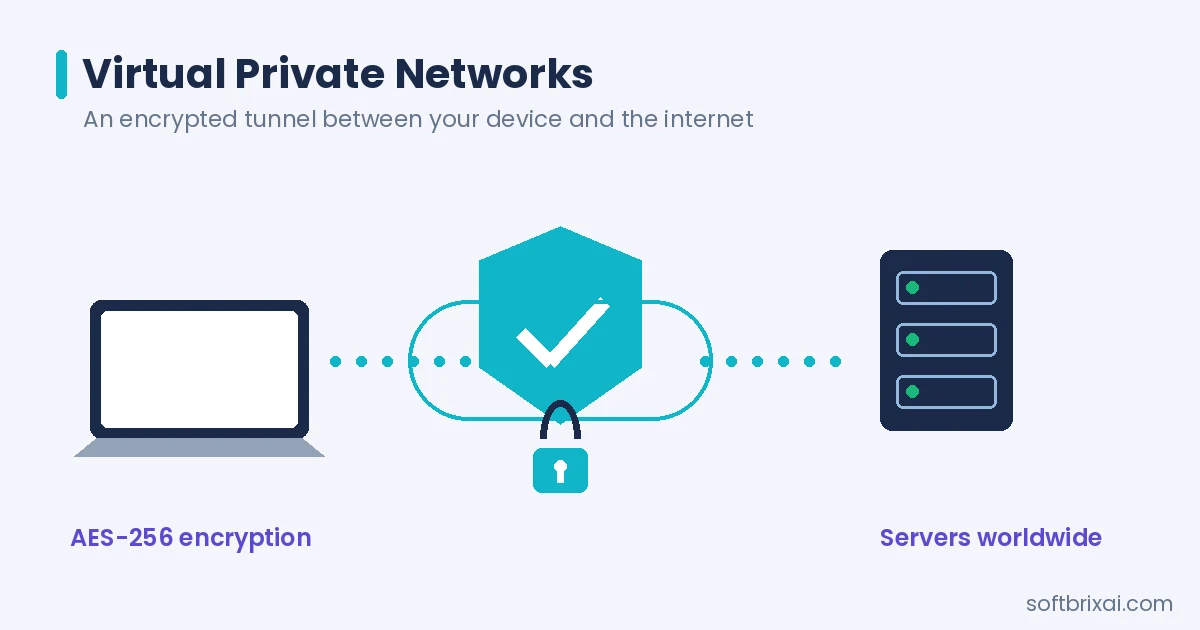
A virtual private network (VPN) is an encrypted connection over the Internet from a device to a network that protects data transmission and enables secure remote work. VPNs create private tunnels through public infrastructure, encrypting traffic between endpoints so unauthorized parties cannot intercept sensitive information. The technology serves both organizations seeking secure remote access and individuals protecting their online privacy.
VPNs deliver three core benefits: data confidentiality through encryption, identity protection through IP address masking, and access to restricted content through geographic location spoofing. Organizations use VPNs to connect remote employees to corporate resources, link branch offices across distances, and secure communications over public networks. Individual users rely on VPNs to protect personal data on public Wi-Fi, bypass censorship, and reduce tracking by internet service providers.
The main components of a VPN include the client software installed on user devices, the VPN server or gateway that terminates connections, tunneling protocols that encapsulate data packets, encryption algorithms that scramble transmitted information, and authentication mechanisms that verify user identities before granting access. These elements work together to establish secure virtual private networking sessions across untrusted networks.
This guide covers how VPNs work, the main types and protocols, security features, business and personal use cases, how to choose and set one up, the drawbacks, and where the technology is heading.
What is a VPN?
A VPN is an overlay network that uses network virtualization to extend a private network across a public network like the Internet through encryption and tunneling protocols. The VPN meaning centers on creating a secure, encrypted connection that mimics a private network even when data travels across public infrastructure. Organizations use VPNs to give off-site users secure access to office networks, while individuals use VPN services to encrypt traffic and protect their online activities.
VPN Meaning and Key Takeaways
The VPN full form is Virtual Private Network. A VPN definition encompasses three essential characteristics: virtual (the network exists as software overlaid on physical infrastructure), private (traffic is encrypted and isolated from other network traffic), and network (multiple devices or sites connect through the system).
Key takeaways about what is a virtual private network include:
- A VPN creates an encrypted tunnel between a device and a VPN server, preventing eavesdropping on transmitted data.
- The VPN network masks the user’s actual IP address, replacing it with the VPN server’s address.
- VPN technology works across operating systems including Windows, macOS, Linux, Android, and iOS.
- Virtual private network services range from free consumer apps to enterprise-grade business VPN solutions.
- The VPN acronym stands for Virtual Private Network, though the term is commonly used as both noun and verb.
The definition of VPN connection emphasizes the secure link established between client and server. A VPN server acts as the intermediary that receives encrypted traffic, decrypts it, and forwards requests to destination websites or resources. This architecture means destination sites see the VPN server’s IP address rather than the user’s actual address.
A personal virtual private network protects individual users, while business VPN deployments serve organizational security needs.
History of VPNs
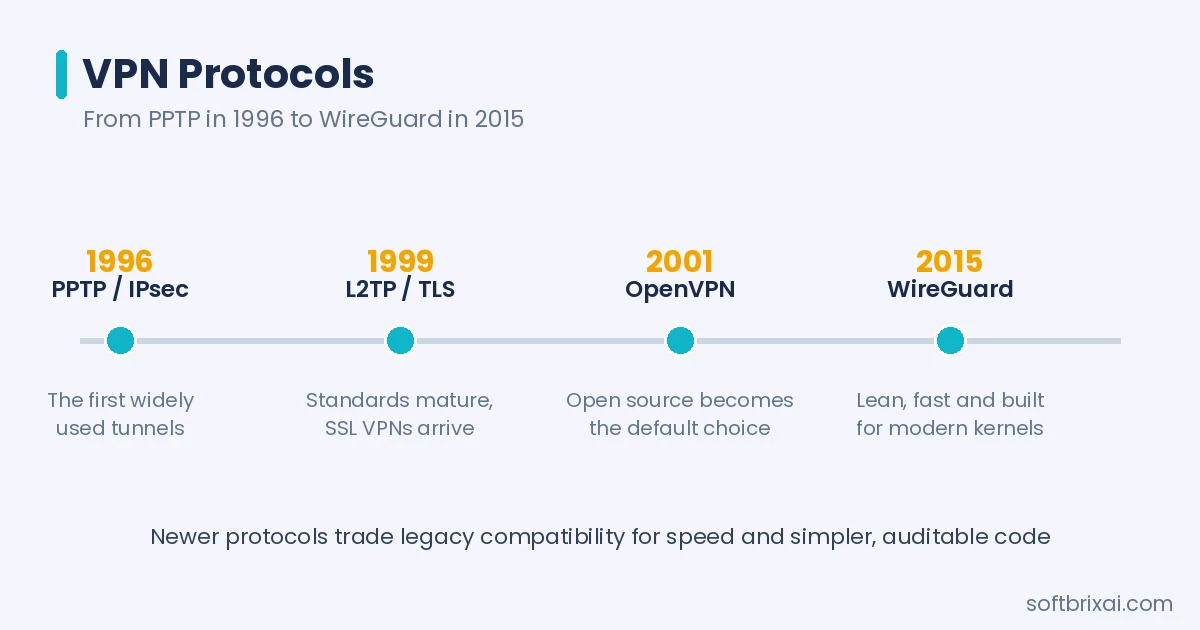
VPN technology emerged in the 1990s as organizations sought methods to connect remote offices and employees securely over public networks. The first VPN protocols addressed the need for secure point-to-point connections across the Internet. Point-to-Point Tunneling Protocol (PPTP) appeared in 1996, developed by Microsoft and other technology companies to create secure tunnels between Windows systems.
IPsec (Internet Protocol Security) was developed by the Internet Engineering Task Force (IETF) in 1996 and became the standards-based foundation for later VPN implementations, providing encryption, integrity verification, and authentication.
Layer 2 Tunneling Protocol (L2TP) emerged in 1999, combining Cisco’s Layer 2 Forwarding with Microsoft’s PPTP. L2TP handles tunneling and relies on IPsec for encryption. TLS/SSL protocols and OpenSSH found VPN applications the same year.
OpenVPN arrived in 2001 as an open-source, TLS-based protocol. Its flexibility, strong security, and cross-platform support made it a default choice for enterprise and consumer VPNs alike.
Microsoft introduced SSTP in 2007, tunneling traffic through SSL/TLS channels so VPN connections pass easily through firewalls.
WireGuard emerged in 2015 as a modern, lightweight protocol built for speed and simplicity, and its integration into the Linux kernel in 2020 accelerated adoption.
Cisco developed Dynamic Multipoint VPN (DMVPN) to simplify large-scale deployments, enabling dynamic mesh topologies without static configuration of every tunnel endpoint.
The evolution of virtual private networking reflects broader changes in network security, from perimeter-based models to zero trust network architectures. Modern VPN implementations increasingly integrate with cloud services, identity providers, and endpoint security platforms.
How Does a VPN Work?
A VPN works by establishing an encrypted connection between a client device and a VPN server, then routing network traffic through this secure tunnel. The process involves three core mechanisms: encryption, tunneling, and authentication. Understanding how does a virtual private network work requires examining each component.
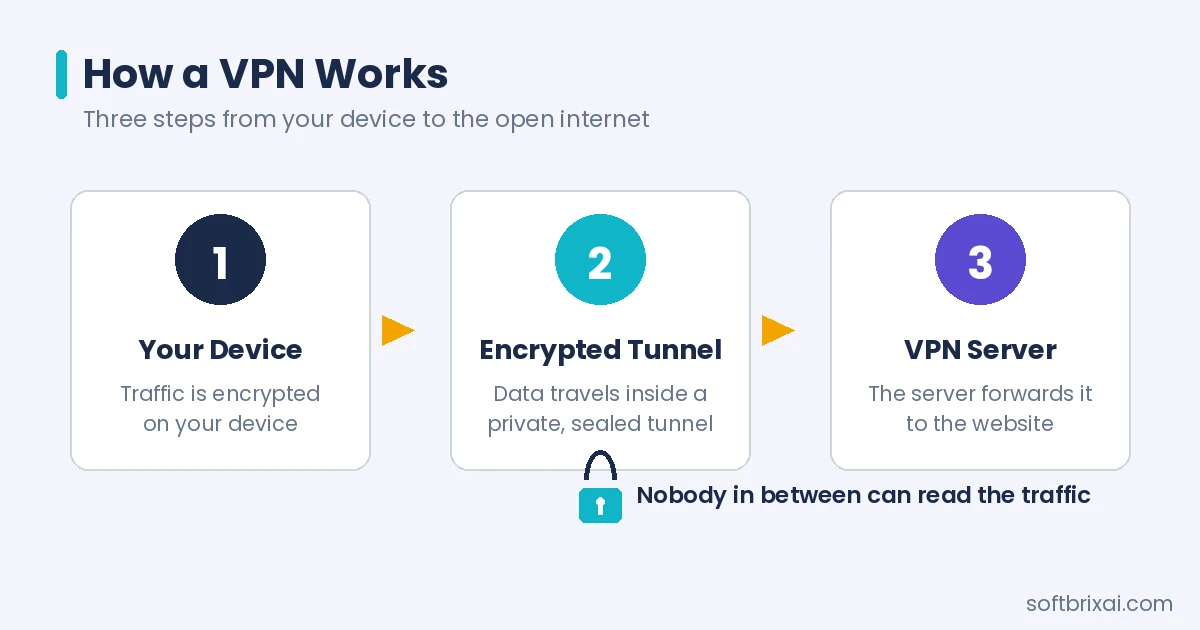
The VPN client software on the user’s device initiates a connection to the VPN server. During connection establishment, the client and server negotiate encryption parameters and authenticate each other. Once the tunnel is active, all designated traffic passes through the encrypted connection. The VPN server decrypts incoming traffic and forwards it to destination websites or resources, then encrypts responses and returns them through the tunnel.
Encryption
Encryption transforms readable data into an unreadable format that only authorized parties can decrypt.
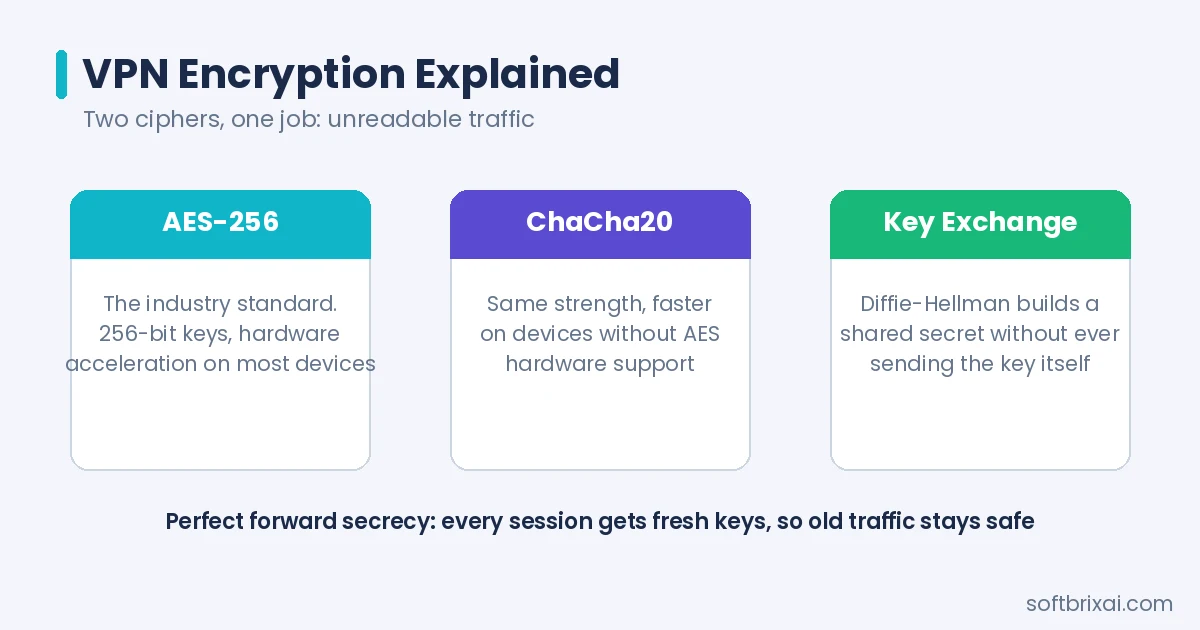
VPN encryption standards protect data confidentiality by scrambling packet contents before transmission. Even if attackers intercept encrypted traffic, they cannot read the contents without the decryption keys.
VPN protocols use various encryption algorithms. Advanced Encryption Standard (AES) with 256-bit keys provides strong encryption suitable for sensitive data. ChaCha20 offers similar security with better performance on devices lacking hardware AES acceleration. The encryption algorithm selection affects both security and speed.
Key exchange mechanisms establish shared secrets between VPN clients and servers. Diffie-Hellman key exchange allows two parties to create a shared key over an insecure channel without transmitting the key itself. Elliptic Curve Diffie-Hellman provides equivalent security with smaller key sizes.
Perfect forward secrecy ensures that compromising long-term keys does not compromise past session keys. Each VPN session generates unique encryption keys, so historical traffic remains protected even if current keys are exposed. OpenVPN and WireGuard support perfect forward secrecy.
Tunneling
Tunneling encapsulates one network protocol within another, creating a virtual path through an intervening network. VPN tunneling protocols wrap original data packets inside outer packets that traverse the public Internet. At the tunnel endpoint, outer packets are removed and inner packets continue to their destination.
The tunneling process involves encapsulation at the sender and de-encapsulation at the receiver. The VPN client adds tunnel headers to outgoing packets, which include routing information for the VPN server. The server strips tunnel headers and forwards original packets to their destinations.
Tunneling protocols differ in their encapsulation methods, overhead, and compatibility. IPsec tunnels operate at the network layer, encapsulating IP packets. SSL/TLS tunnels operate at higher layers and often traverse firewalls more easily. WireGuard uses UDP-based encapsulation for efficiency.
Authentication
Authentication verifies the identity of parties establishing VPN connections. VPN systems authenticate both users and devices before granting network access. Strong authentication prevents unauthorized access even if attackers obtain VPN server addresses.
Multi-Factor Authentication (MFA) combines multiple verification methods: something the user knows (password), something the user has (security token or smartphone), and something the user is (biometric data). MFA tools such as Duo Security integrate with most enterprise VPN systems.
Certificate-based authentication uses digital certificates to verify endpoint identities. The VPN server validates client certificates before establishing tunnels. This approach suits site-to-site VPN connections where dedicated equipment authenticates automatically.
Pre-shared keys provide simpler authentication for site-to-site VPNs. Both endpoints configure the same secret key, which they use to authenticate during tunnel establishment. Pre-shared keys require secure distribution and periodic rotation.
Types of VPNs
VPN types fall into two primary classification schemes: deployment method and tunneling technology. Deployment-based types describe how VPNs are used and structured. Protocol-based types describe the underlying tunneling technology. Understanding different types of VPN helps organizations and individuals select appropriate solutions.
Based on Usage (Deployment)
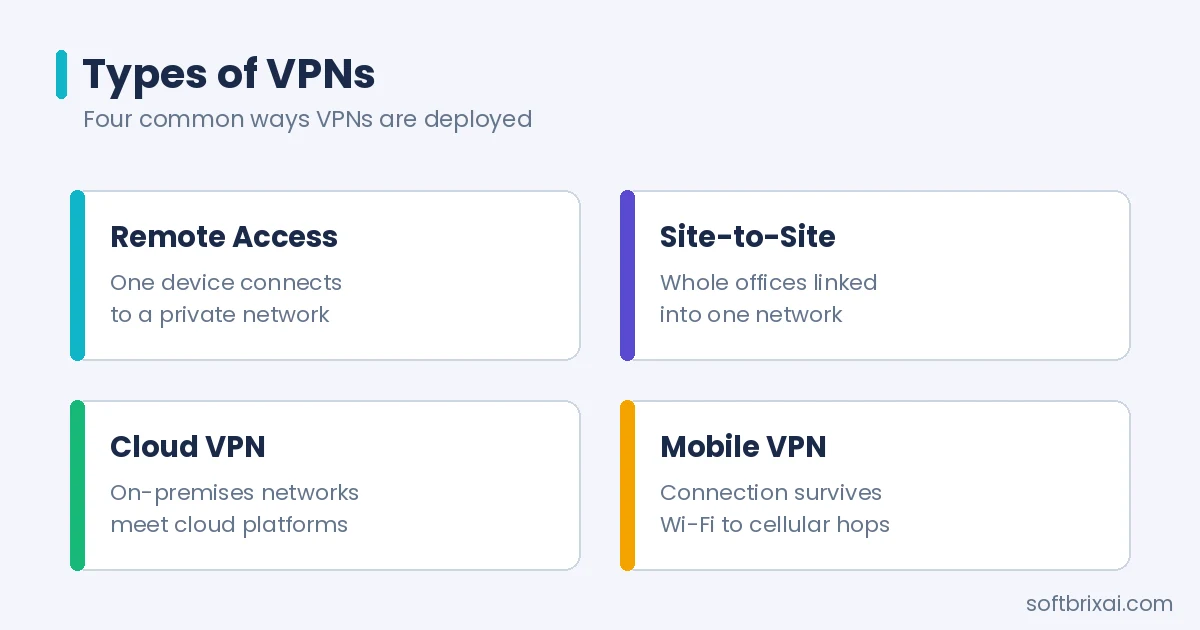
Deployment-based types describe how a VPN is structured and used: connecting individual users, whole networks, or cloud resources.
Remote Access VPN
A remote access VPN connects individual devices to a private network over the Internet. Remote users establish VPN tunnels from laptops, tablets, or smartphones to access corporate resources. The VPN client authenticates the user and establishes an encrypted connection to the VPN gateway.
Enterprise products such as Cisco Secure Client provide remote access with always-on connections and multi-factor authentication integration.
Remote access VPNs support telecommuting, business travel, and remote work scenarios. Employees access file servers, applications, and intranet resources as if physically present in the office. The VPN concentrator handles multiple simultaneous connections, scaling to support large remote workforces.
Site-to-Site VPN
A site-to-site VPN connects two or more networks across the Internet. Organizations use site-to-site VPNs to link branch offices to headquarters, connect data centers, or extend network reach to partner organizations. Dedicated VPN gateways at each location establish and maintain tunnels.
Site-to-site VPNs operate transparently to end users. Devices on connected networks communicate as if on the same local network. The VPN gateways handle encryption and tunneling automatically. Meraki Auto VPN simplifies site-to-site connectivity for organizations using Cisco Meraki networking equipment.
Intranet site-to-site VPNs connect sites belonging to the same organization. Extranet site-to-site VPNs connect sites belonging to different organizations, such as business partners or suppliers. Both types use the same underlying technology but differ in trust relationships and access controls.
Cloud VPN
A cloud VPN connects on-premises networks to cloud infrastructure or connects cloud resources across regions. Organizations use cloud VPNs to extend private network connectivity to Amazon Web Services (AWS), Microsoft Azure, and other cloud platforms. The virtual private network technology operates between customer gateways and cloud provider gateways.
Cloud VPNs support hybrid cloud architectures where applications span on-premises data centers and cloud environments. Traffic between environments flows through encrypted tunnels, maintaining security across the extended network. Cloud providers offer managed VPN gateways that simplify configuration and maintenance.
SSL VPN
An SSL VPN uses Transport Layer Security (TLS) or Secure Sockets Layer (SSL) protocols to create secure connections. SSL VPNs typically operate through web browsers, requiring no dedicated client software. Users authenticate through a web portal and access authorized resources through the encrypted session.
SSL VPNs excel at providing clientless access to web applications and file shares. The VPN gateway proxies connections between users and internal resources, enforcing access policies. SSL VPNs traverse firewalls and network address translation more easily than some other VPN types.
Double VPN
A double VPN routes traffic through two VPN servers in sequence. The first server encrypts traffic and forwards it to the second server, which applies additional encryption before forwarding to destinations. Double VPN cascades provide additional privacy by separating knowledge of user identity from browsing activity.
Multi-hop relay chains complicate traffic analysis because observers see only the connection between servers, not the original user. However, double VPNs increase latency and reduce throughput compared to single-server connections. The additional privacy benefits justify the performance tradeoff for users with heightened security requirements.
Mobile VPN
A mobile VPN maintains persistent connections as devices move between networks. Mobile virtual private network technology handles IP address changes when devices switch between Wi-Fi and cellular networks without dropping VPN sessions. Applications remain connected during network transitions.
Mobile VPNs serve field workers, public safety personnel, and others who require continuous connectivity while moving. Law enforcement officers access criminal databases and dispatch systems through mobile VPNs. Healthcare workers use mobile VPNs to access patient records while moving between facilities.
DMVPN
Dynamic Multipoint VPN (DMVPN) enables scalable mesh VPN topologies. The technology uses a hub-and-spoke initial configuration where spokes connect to hubs. Spokes then establish direct tunnels to other spokes on demand, creating dynamic mesh connectivity without routing all traffic through hubs.
DMVPN reduces latency and hub load for site-to-site communications. Cisco developed DMVPN for enterprise networks requiring flexible, scalable VPN connectivity. The technology supports IPsec encryption and integrates with routing protocols for automatic tunnel establishment.
EVPN
Ethernet VPN (EVPN) carries OSI layer 2 Ethernet traffic as a virtual private network using wide area network protocols. EVPN technologies include Ethernet over Multiprotocol Label Switching (MPLS) and Ethernet over Virtual Extensible LAN. The technology extends layer 2 connectivity across geographically distributed networks.
EVPN supports multipoint-to-multipoint connectivity, making it suitable for data center interconnect and service provider networks. The protocol provides flexibility for carrying various traffic types while maintaining network segmentation and security.
MPLS VPN
Multiprotocol Label Switching (MPLS) VPNs use label-based routing to direct traffic through provider networks. MPLS labels identify established paths between endpoints rather than relying on network addresses. The technology encapsulates packets of various network protocols.
Provider-provisioned MPLS VPNs isolate customer traffic within virtual segments of provider infrastructure. The contents of each segment remain private relative to other segments. MPLS VPNs often include quality-of-service controls for prioritizing traffic.
VPLS
Virtual Private LAN Service (VPLS) provides Ethernet-based multipoint-to-multipoint communication over IP or MPLS networks. VPLS allows geographically dispersed sites to share an Ethernet broadcast domain by connecting sites through pseudowires. The technology supports any-to-any connectivity unlike point-to-point alternatives.
VPLS overcomes limitations of traditional VPNs that do not support broadcast domains. Layer 2 protocols and broadcast-dependent applications function across VPLS-connected sites. The technology suits organizations requiring LAN-like connectivity across wide area networks.
Based on Protocols (Tunneling Technology)
Protocol-based VPN classification describes the underlying tunneling technology. Different protocols offer varying security, performance, and compatibility characteristics. The section on VPN protocols examines each tunneling technology in detail.
VPN Protocols
VPN protocols define how virtual private networks establish connections, encrypt data, and authenticate parties. Protocol selection affects security, speed, compatibility, and ease of configuration. Understanding VPN protocols helps users evaluate VPN services and configure connections appropriately.
IPsec (1996)
Internet Protocol Security (IPsec) is a standards-based security protocol developed by the Internet Engineering Task Force. IPsec provides encryption, integrity verification, and authentication for IP communications. The protocol operates at the network layer, securing all traffic between endpoints.
IPsec uses encapsulation to protect IP packets. The original packet is encrypted and wrapped inside an IPsec packet for transmission. At the tunnel endpoint, the original packet is decrypted and forwarded to its destination. Network hardware accelerators often support IPsec, making it efficient for high-throughput scenarios.
IPsec tunnels are established through Internet Key Exchange (IKE) protocols. IKE version 1 tunnels can operate alone or combine with Layer 2 Tunneling Protocol (L2TP) for flexible authentication. IKE version 2, developed by Microsoft and Cisco, supports native Extensible Authentication Protocol authentication and seamless tunnel restoration during IP address changes.
TLS/SSL (1999)
Transport Layer Security (TLS) and its predecessor Secure Sockets Layer (SSL) can tunnel entire network traffic or secure individual connections. TLS-based VPNs operate at higher protocol layers than IPsec, often traversing firewalls and network address translation more easily.
OpenVPN and SoftEther VPN use TLS for tunneling. The protocols establish TLS sessions between clients and servers, then route network traffic through the encrypted channels. TLS VPNs can connect from locations where standard HTTPS traffic is supported without additional configuration.
OpenSSH (1999)
OpenSSH provides VPN tunneling capabilities distinct from port forwarding. The technology secures remote connections to networks, inter-network links, and remote systems. OpenSSH servers support limited numbers of concurrent tunnels.
SSH-based virtual private networks suit scenarios requiring secure remote access to machines or networks. The technology does not support personal authentication for the VPN feature itself. SSH is more commonly used for remote machine access than site-to-site VPN connections.
OpenVPN (2001)
OpenVPN is a free, open-source VPN protocol based on TLS. The protocol supports perfect forward secrecy and modern cipher suites including AES, Serpent, and TwoFish. OpenVPN Inc. maintains and develops the protocol.
OpenVPN operates over UDP or TCP, providing flexibility for different network environments. The protocol works across platforms including Windows, macOS, Linux, Android, and iOS. OpenVPN configuration files enable custom setups for specific requirements.
SSTP (2007)
Secure Socket Tunneling Protocol (SSTP) transports Point-to-Point Protocol traffic through SSL/TLS channels. Microsoft introduced SSTP in Windows Server 2008 and Windows Vista Service Pack 1. The protocol provides firewall-friendly VPN connectivity on Windows systems.
SSTP uses TCP port 443, the same port as HTTPS traffic. This port choice allows SSTP to traverse firewalls that block other VPN protocols. SSTP primarily serves Windows environments, with limited support on other platforms.
WireGuard (2015)
WireGuard is a modern VPN protocol designed for simplicity and performance. The protocol uses Curve25519 for key exchange and ChaCha20-Poly1305 for encryption and authentication. WireGuard supports pre-shared symmetric keys between clients and servers.
WireGuard kernel optimizations provide efficient operation on Linux systems. The protocol was integrated into Linux and Android kernels in 2020, accelerating adoption. WireGuard’s minimal codebase simplifies security auditing compared to more complex protocols.
IKEv2/IPsec
Internet Key Exchange version 2 (IKEv2) combined with IPsec provides a robust VPN solution. IKEv2 handles tunnel establishment and key exchange while IPsec provides encryption and authentication. The combination offers strong security with good performance.
IKEv2/IPsec supports mobility features that maintain connections during network changes. The protocol reconnects quickly after temporary disconnections, suiting mobile VPN scenarios. Major platforms including Windows, macOS, iOS, and Android support IKEv2/IPsec natively.
L2TP/IPsec
Layer 2 Tunneling Protocol combined with IPsec provides VPN functionality with broad platform support. L2TP handles tunneling while IPsec provides encryption. The combination appears in many operating systems as a built-in VPN option.
L2TP/IPsec offers adequate security when properly configured. The protocol lacks some advanced features of newer alternatives but provides reliable connectivity across diverse platforms. Pre-shared keys or certificates authenticate tunnel endpoints.
PPTP
Point-to-Point Tunneling Protocol (PPTP) was among the first VPN protocols, developed by Microsoft and other vendors. The protocol provides basic tunneling but has known security weaknesses. PPTP encryption can be broken with sufficient computing resources.
Modern security standards consider PPTP obsolete for protecting sensitive data. The protocol may suit low-security applications where compatibility with legacy systems is required. Most VPN providers have discontinued PPTP support.
SoftEther
SoftEther VPN is an open-source, multi-protocol VPN implementation developed at the University of Tsukuba, Japan. The software supports SSL-VPN, L2TP/IPsec, OpenVPN, and its own protocol. SoftEther provides firewall penetration capabilities and operates on multiple platforms.
SoftEther’s multi-protocol support allows clients to connect using various VPN technologies. The software suits organizations requiring flexible VPN deployments with diverse client requirements. SoftEther can function as both VPN client and server.
Security and Privacy
VPN security and privacy features protect user data and identity during network communications. Understanding what VPNs protect and their limitations helps users set appropriate expectations. VPNs enhance security but do not provide complete anonymity.
Split Tunneling
Split tunneling allows users to access distinct security domains simultaneously through the same or different network connections.
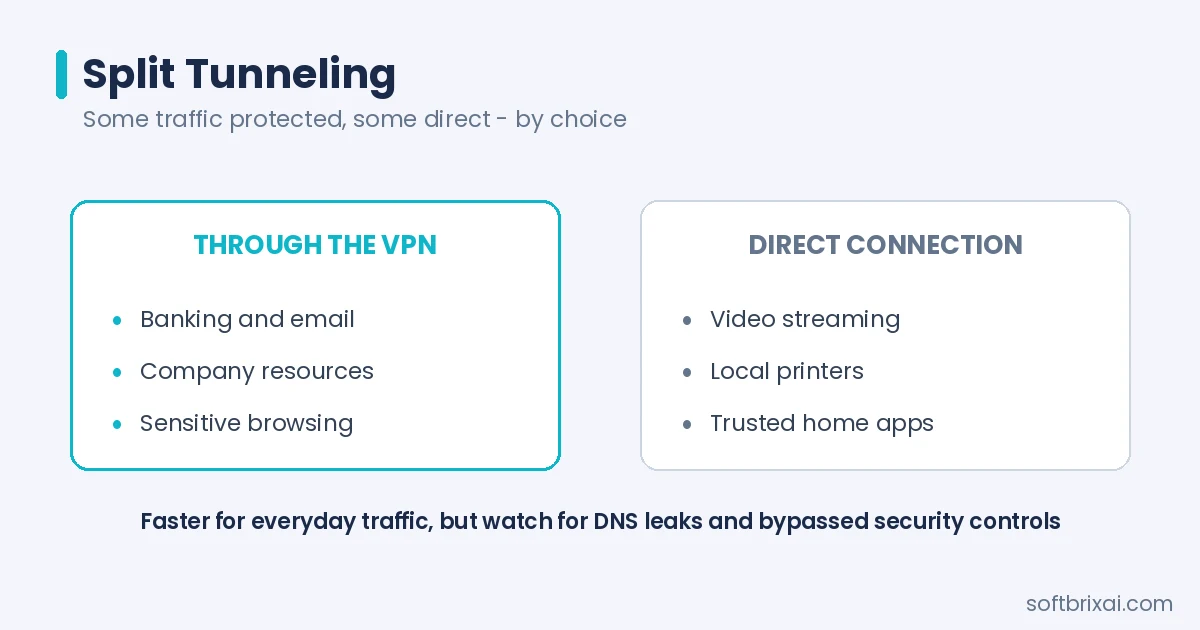
The configuration routes some traffic through the VPN tunnel while other traffic uses direct connections. Split tunneling typically involves simultaneous use of local network interfaces and VPN client software.
Advantages of split tunneling include reduced VPN bottlenecks, conserved bandwidth, and elimination of repeated connect-disconnect cycles. Internet traffic that does not require VPN protection bypasses the tunnel, preserving VPN capacity for sensitive communications.
Disadvantages include potential DNS leaks and bypass of gateway-level security controls. Split tunneling alternatives address these concerns through more granular traffic routing policies. Organizations should evaluate split tunneling risks against performance benefits.
What Does a VPN Hide?
A VPN hides the user’s IP address from destination websites and services. Sites see the VPN server’s IP address instead of the user’s actual address. This IP address masking prevents sites from identifying users by their network location.
VPNs hide browsing activity from internet service providers. ISPs see encrypted traffic to the VPN server but cannot observe which websites users visit or what data they exchange. This protection reduces ISP tracking and potential data collection.
VPNs do not hide all information. Destination websites may identify users through cookies, browser fingerprints, logged-in accounts, and other tracking methods. VPNs do not prevent malware, phishing, or other attacks that operate at the application layer.
How Secure Are VPNs?
VPNs provide strong security when properly configured with modern protocols and encryption. The security depends on protocol selection, implementation quality, and provider trustworthiness. Well-implemented VPNs protect against eavesdropping, man-in-the-middle attacks, and data tampering.
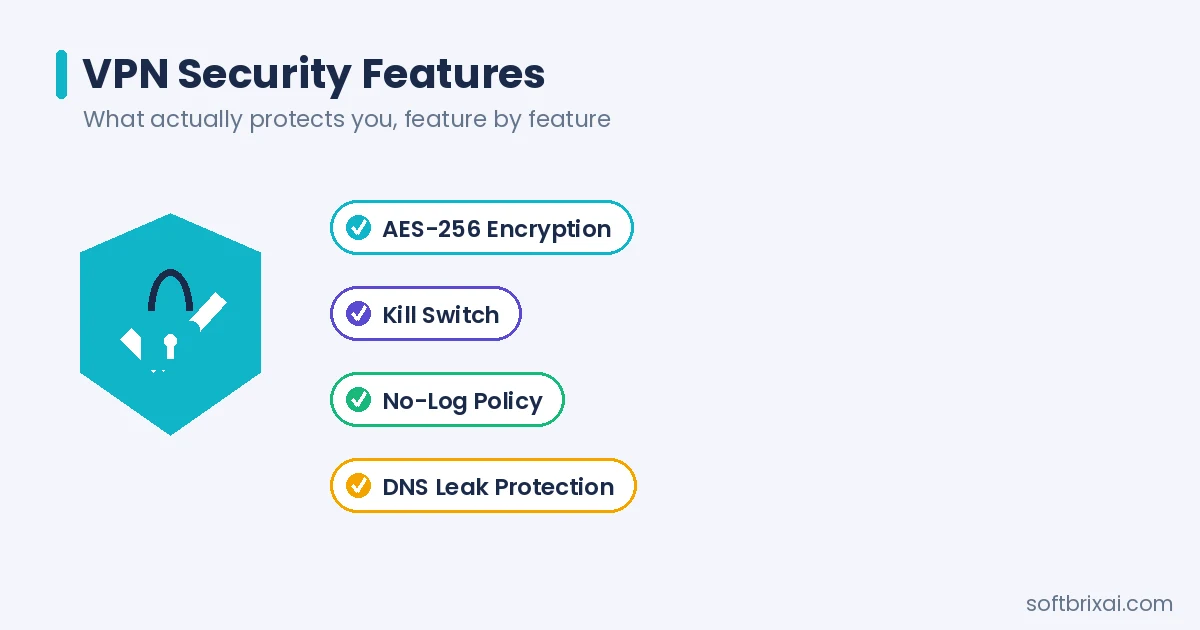
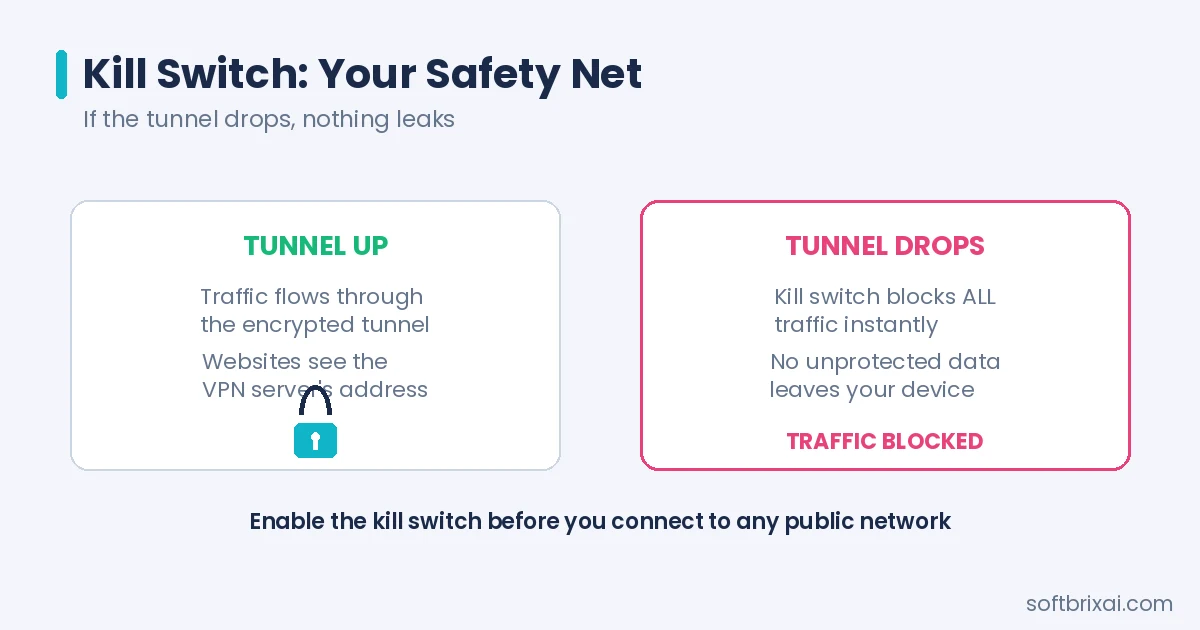
VPN encryption standards including AES-256 and ChaCha20 provide robust protection against brute-force attacks. Authentication mechanisms prevent unauthorized access to VPN services. Kill switch fail-safes prevent traffic leakage if VPN connections drop unexpectedly.
VPN security has limits. The VPN provider can observe traffic at the server before encryption to destinations. Jurisdiction-agnostic routing and RAM-only server deployments reduce provider visibility. No-log VPN providers commit to not recording user activity, though verification requires trust.
Benefits and Advantages of VPNs
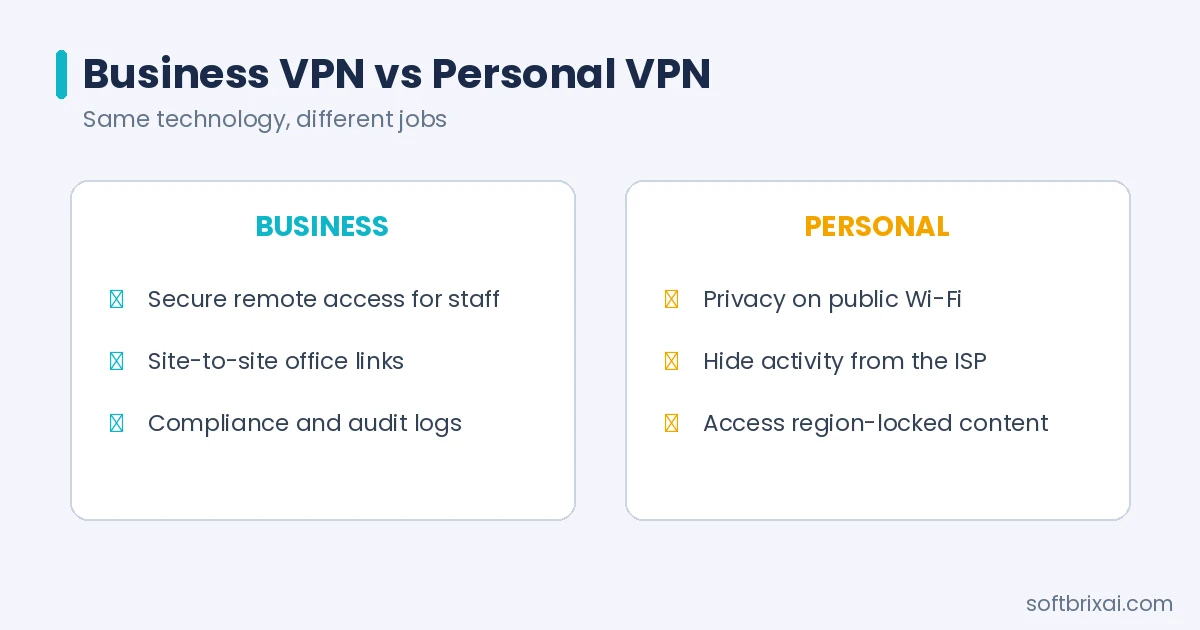
VPN benefits differ between business and personal use. Organizations gain secure remote access, site connectivity, and compliance capabilities. Individuals gain privacy protection, content access, and security on public networks.
Business VPN Benefits
Business VPN solutions provide secure remote access for distributed workforces. Employees connect to corporate resources from any location without exposing internal systems to direct Internet access. VPN authentication ensures only authorized users gain network access.
Business VPNs enable secure site-to-site connectivity between offices, data centers, and cloud environments. Organizations extend private network reach without dedicated leased lines. Encrypted tunnels protect inter-site traffic from interception.
VPNs support regulatory compliance by protecting sensitive data in transit. Healthcare, financial services, and other regulated industries use VPNs to meet data protection requirements. Audit logs and access controls demonstrate security measures.
Business VPNs also integrate with endpoint security and identity management systems, so devices are checked against security requirements before they connect.
Personal VPN Benefits
Personal VPNs protect individual privacy by encrypting traffic and masking IP addresses. Users on public Wi-Fi networks gain protection against eavesdropping. Home users prevent ISP tracking of browsing activity.
VPNs for streaming enable access to location-based content libraries. Users connect to servers in different countries to access region-restricted streaming services. VPN for gaming reduces latency in some scenarios and protects against DDoS attacks.
VPN for public Wi-Fi provides essential security on hotel, airport, and coffee shop networks. Encrypted connections prevent credential theft and session hijacking. Auto-connect features ensure VPN protection activates automatically on untrusted networks.
Use Cases
VPN use cases span organizational and individual requirements. Business applications focus on secure connectivity and access control. Personal applications emphasize privacy, content access, and security on untrusted networks.
Business VPN Use Cases
Organizations deploy VPNs for various operational requirements. The technology supports remote work, branch connectivity, and secure communications across distributed infrastructure.
Secure Remote Access
Secure remote access enables employees to work from home, client sites, or during travel. VPN connections authenticate users and devices before granting network access. Access controls limit which resources each user can reach.
Modern remote access solutions combine VPN connectivity with endpoint protection and identity verification, so devices must meet security requirements before connecting and administrators keep visibility over remote activity.
Secure Site-to-Site Connectivity
Site-to-site VPNs connect offices, data centers, and cloud environments into unified networks. Branch offices access headquarters resources through encrypted tunnels. Data centers replicate data across sites through protected connections.
Meraki Auto VPN simplifies site-to-site configuration for organizations using Cisco Meraki equipment. The technology automatically establishes mesh connectivity between Meraki devices. Network administrators configure site connectivity through centralized management interfaces.
Personal VPN Use Cases
Individuals use VPNs for privacy protection, content access, and security. Personal VPN services provide tools for controlling online visibility and protecting data.
Secure Personal Data
VPNs encrypt personal data transmitted over public networks. Banking, shopping, and email communications pass through encrypted tunnels. Credentials and financial information remain protected from interception.
VPN for remote work protects sensitive business communications when employees work outside office networks. The same VPN protection that secures corporate data also protects personal information.
Stream or Access Location-Based Content
VPN for streaming bypasses geographic restrictions on content libraries. Users access streaming services as if located in supported countries. The practice raises terms-of-service considerations but remains technically feasible.
VPN server locations determine which content libraries users can access. Providers offering servers in many countries enable broader content access. Streaming performance depends on server capacity and network conditions.
Avoid Censorship or Surveillance
VPNs circumvent network censorship in restrictive environments. Encrypted tunnels prevent network operators from identifying and blocking specific content. Obfuscated protocol handshakes disguise VPN traffic as ordinary HTTPS.
Stealth VPN obfuscation techniques help users in environments that actively block VPN connections. The technology requires providers offering specialized servers and protocols. Users should understand legal risks in jurisdictions restricting VPN use.
Reduce ISP and Third-Party Tracking
VPNs prevent ISPs from observing browsing activity. Encrypted traffic to VPN servers reveals only connection metadata, not content. This protection reduces ISP data collection for advertising or other purposes.
Third-party trackers may still identify users through cookies, fingerprints, and account logins. VPNs complement but do not replace browser privacy tools. DNS leak mitigation prevents DNS queries from revealing browsing activity.
Mask Geographic Location
IP address masking hides users’ actual locations from websites. Users appear to browse from VPN server locations rather than their physical locations. This masking supports privacy and enables access to location-restricted services.
Dedicated IP rotations provide stable addresses that avoid shared IP reputation issues. Some services block known VPN IP ranges, making dedicated addresses valuable for consistent access. Providers offer dedicated IP options for business and power users.
Features of VPNs
VPN features vary between business and personal solutions. Business VPNs emphasize access control, management, and integration capabilities. Personal VPNs focus on privacy features, ease of use, and content access.
Business VPN Features
Enterprise VPN solutions provide administrative controls, security integration, and scalability. Organizations require features supporting compliance, visibility, and centralized management.
Authentication and Access Control
Business VPNs implement strong authentication through MFA, certificates, and integration with identity providers. Duo Security provides MFA capabilities that verify user identity beyond passwords. Access control policies determine which resources each user can reach.
Role-based access control assigns permissions based on user roles. The approach simplifies administration while maintaining security. Integration with directory services enables automatic provisioning and deprovisioning.
Cloud-Based Gateways
Cloud-based VPN gateways extend connectivity to cloud infrastructure. Organizations connect on-premises networks to AWS, Azure, and other cloud platforms through managed gateways. Containerized VPN gateways support modern DevOps workflows.
Cloud gateways scale automatically to handle connection demand. Managed services reduce administrative overhead compared to self-hosted VPN infrastructure. Integration with cloud identity services provides consistent authentication across environments.
Personal VPN Features
Consumer VPN services offer features supporting privacy, security, and usability. Feature availability varies by provider and subscription tier.
IP Address Masking
IP address masking replaces users’ actual addresses with VPN server addresses. Websites and services see the server address rather than the user’s address. This feature protects location privacy and enables content access.
Data Encryption
Data encryption protects traffic between client devices and VPN servers. Modern encryption algorithms including AES-256 and ChaCha20 provide strong protection. Encryption standards should meet current security requirements.
Kill Switch
Kill switch fail-safes prevent traffic leakage if VPN connections drop. The feature blocks all network traffic until VPN protection resumes. Kill switches protect against accidental exposure during connection interruptions.
Two-Factor Authentication
Two-factor authentication adds verification beyond passwords. Users provide a second factor such as a code from an authenticator app. MFA integration with Duo Security and similar services strengthens account protection.
Split Tunneling
Split tunneling routes selected traffic through VPN tunnels while other traffic connects directly. Users preserve bandwidth for non-sensitive activities. Configuration options vary by VPN client and provider.
Auto-Connect
Auto-connect features establish VPN connections automatically under defined conditions. The feature activates VPN protection when devices connect to untrusted networks. Users avoid forgetting to enable VPN protection manually.
Obfuscated Servers
Obfuscated servers disguise VPN traffic as ordinary HTTPS. The technique helps users in environments that block VPN connections. Stealth VPN obfuscation requires specialized server configurations.
Double VPN (Multi-Hop)
Double VPN routes traffic through multiple servers for additional privacy. Double VPN cascades separate knowledge of user identity from browsing activity. The feature increases latency but enhances privacy protection.
Onion over VPN
Onion over VPN combines VPN protection with Tor network routing. Traffic passes through VPN servers before entering the Tor network. The combination provides multiple privacy layers for users requiring enhanced anonymity.
Threat Protection
Threat protection features block malicious websites, malware, and phishing attempts. Some VPN services include DNS filtering and ad blocking. Threat protection complements VPN encryption with additional security layers.
How to Choose the Right VPN for Your Needs
Selecting a VPN requires evaluating requirements, comparing options, and verifying capabilities. Business and personal users have different priorities when choosing VPN solutions.
Business VPN Selection Process
Organizations should assess their specific requirements before selecting a business VPN solution. The selection process involves several key steps.
Define connectivity requirements including number of users, sites, and expected traffic volumes. Identify resources that remote users need to access. Determine performance requirements for latency-sensitive applications.
Evaluate authentication and access control capabilities. The solution should integrate with existing identity infrastructure. MFA support through Duo Security or similar providers strengthens security. Role-based access controls should align with organizational policies.
Assess management and visibility features. Centralized management simplifies administration across distributed deployments. Logging and reporting capabilities support compliance requirements. Integration with endpoint security platforms ensures comprehensive protection.
Consider scalability and future requirements. The solution should accommodate growth in users and sites. Cloud integration capabilities support hybrid infrastructure. Containerized VPN gateways enable modern deployment approaches.
Personal VPN Selection Process
Individual users should evaluate VPN services against their specific needs. The selection process involves several considerations.
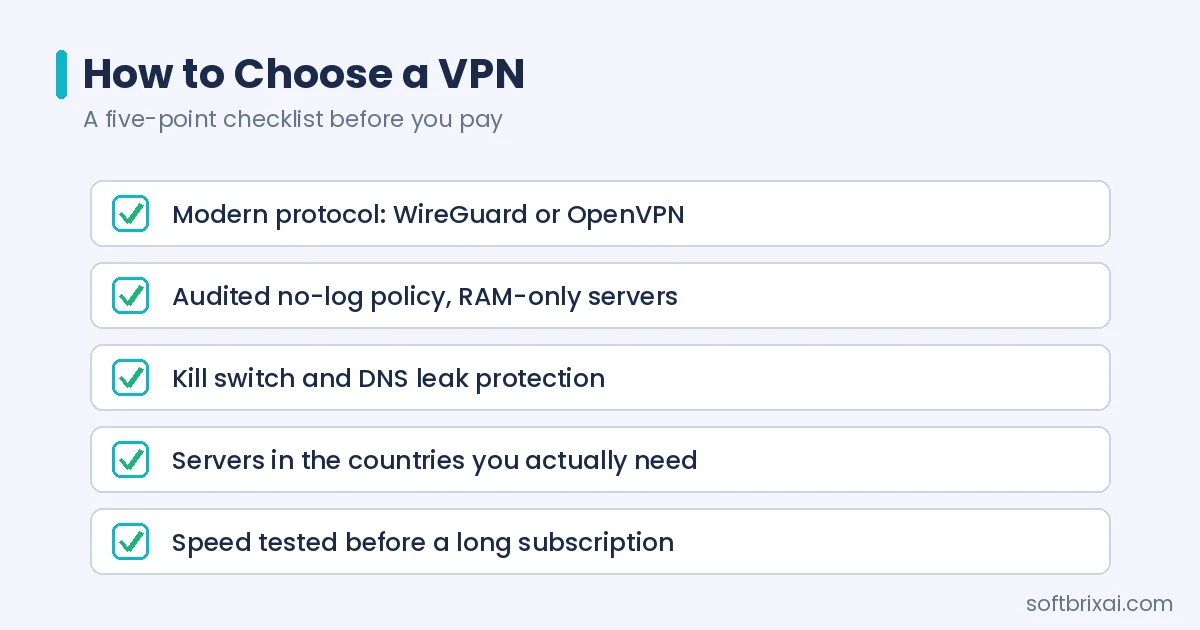
Determine primary use cases: privacy protection, content access, public Wi-Fi security, or censorship circumvention. Different use cases prioritize different features. VPN for streaming requires servers in relevant countries. VPN for gaming prioritizes low latency.
Evaluate privacy policies and logging practices. No-log VPN providers commit to not recording user activity. Jurisdiction matters for privacy protection. RAM-only server deployments reduce data retention risks.
Assess server network coverage and performance. VPN server locations determine content access capabilities. Fast VPN speeds require adequate server capacity and peering arrangements. Test performance before committing to subscriptions.
Review security features including protocols, encryption, and kill switch functionality. Modern protocols like WireGuard and OpenVPN provide strong security. Kill switch fail-safes prevent traffic leakage. DNS leak mitigation protects browsing privacy.
Consider pricing and value. VPN subscription plans vary in cost and features. Free VPN apps often have limitations and privacy concerns. Affordable VPN services balance cost against feature requirements.
How to Set Up a VPN Step-by-Step
VPN setup procedures differ between business and personal implementations. Organizations configure enterprise solutions while individuals install consumer applications.
Business VPN Setup Process
Business VPN deployment requires planning and configuration across multiple components. The setup process follows these steps.
Assess infrastructure and plan the deployment. Identify VPN gateway locations and capacity requirements. Plan IP address allocation and routing. Determine authentication integration points.
Configure VPN gateways and establish tunnels. Deploy VPN concentrators or cloud gateways at appropriate locations. Configure site-to-site tunnels between offices and data centers. Establish remote access server configurations.
Integrate authentication systems. Connect VPN infrastructure to directory services and MFA providers. Configure Duo Security or equivalent MFA integration. Set up certificate authorities for device authentication.
Configure client software and distribute to users. Deploy Cisco Secure Client or equivalent VPN clients. Configure connection profiles and policies. Provide user training on VPN usage.
Test and monitor the deployment. Verify connectivity from various locations and devices. Test failover and redundancy capabilities. Configure monitoring and alerting for VPN infrastructure.
Personal VPN Setup Process
Personal VPN setup involves installing client software and configuring connections. The process varies by provider and platform.
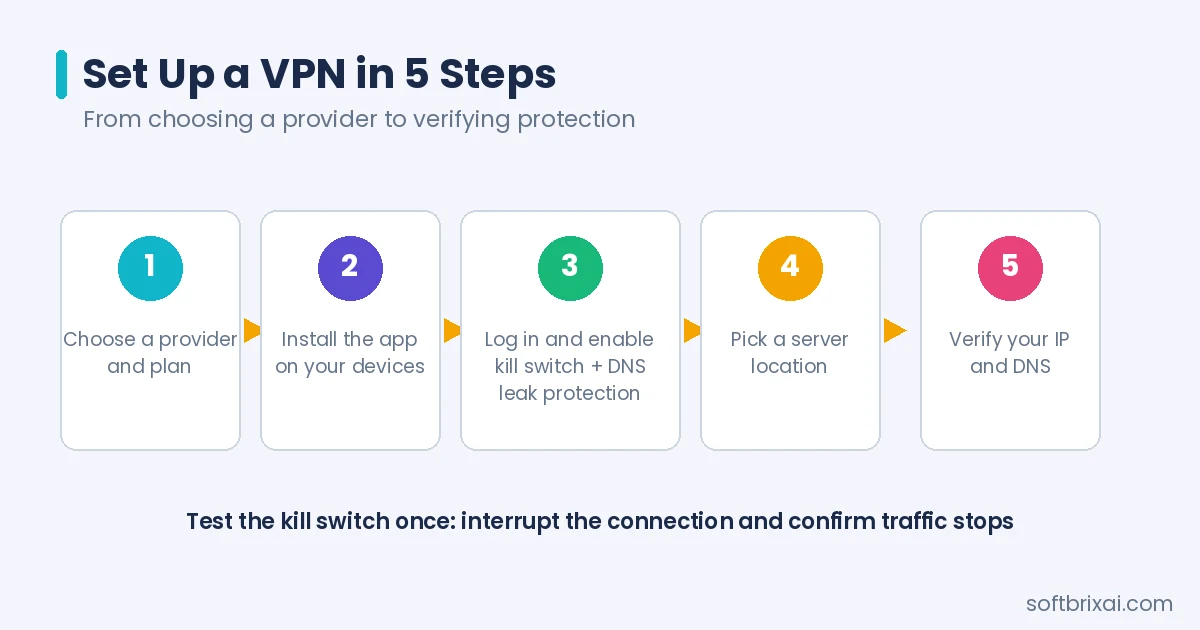
Select a VPN provider and subscription plan. Evaluate options based on requirements identified during selection. Create an account and obtain credentials.
Download and install the VPN application. VPN for Android and iOS installs from app stores. Desktop applications install from provider websites. Browser extensions provide VPN for Chrome and other browsers.
Log in and configure preferences. Enter account credentials to authenticate. Configure auto-connect settings for trusted networks. Enable kill switch and DNS leak protection.
Connect to appropriate servers. Select server locations based on content access or performance needs. Test connection speed and stability. Configure split tunneling if needed for specific applications.
Verify VPN protection is active. Check IP address through browser-based tools. Confirm DNS queries use VPN servers. Test kill switch functionality by interrupting VPN connection.
Drawbacks of Using VPNs
VPNs have limitations and drawbacks users should understand. Performance impacts, trust requirements, and complexity affect VPN suitability for different scenarios.
Speed and Performance Impact
VPNs can slow internet connections due to encryption overhead and routing through remote servers. Speed reduction varies based on protocol, server distance, and network conditions. WireGuard kernel optimizations reduce overhead compared to older protocols.
Users should select nearby servers for better performance. Server capacity affects speed during peak usage. Fast VPN speeds require providers with adequate infrastructure investment.
Free VPN Risks
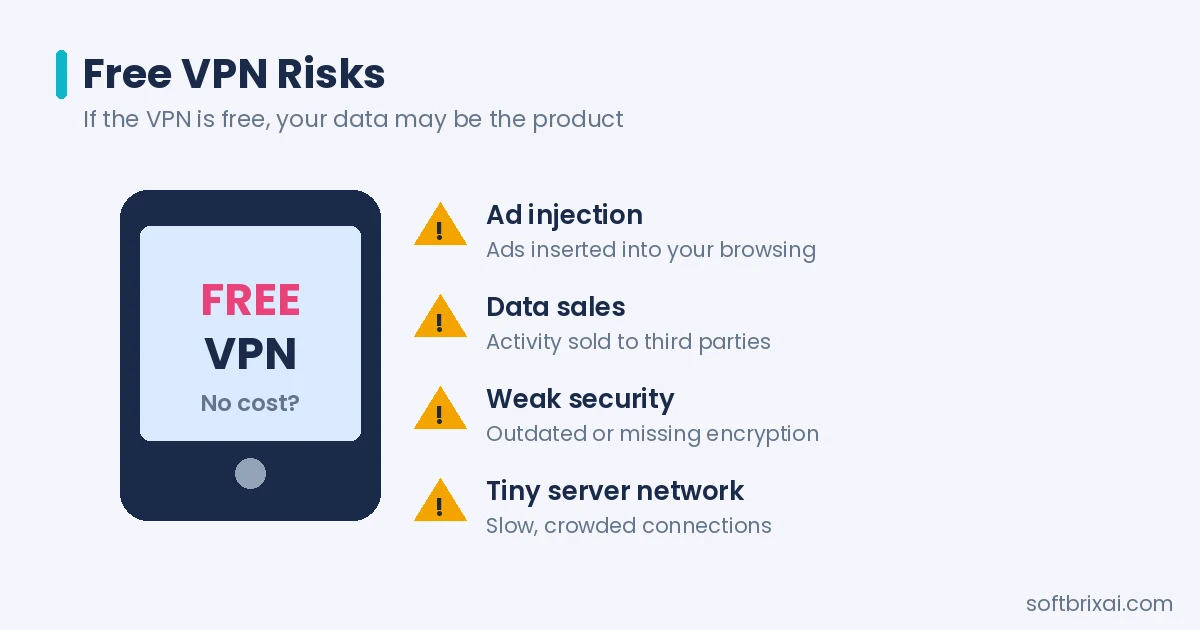
Free VPN services present privacy and security risks. Many free providers monetize user data through advertising or data sales. Some free VPNs inject ads or track browsing activity.
Free VPN apps may have limited server networks and slower speeds. Security features may be absent or poorly implemented. Users should evaluate free VPN providers carefully and consider paid alternatives for sensitive activities.
Comparing VPNs with Other Security Technologies
VPNs relate to other network security and connectivity technologies. Understanding differences helps organizations select appropriate solutions for specific requirements.
VPN vs. SD-WAN
VPNs and Software-Defined Wide Area Networks (SD-WAN) serve different primary purposes. VPNs focus on secure connectivity through encrypted tunnels. SD-WAN optimizes traffic routing across multiple network paths.
SD-WAN VPN integrations combine both capabilities. Organizations use SD-WAN for performance optimization and VPN for security. The technologies complement each other in modern network architectures.
VPN vs. VPS vs. VPC
VPNs, Virtual Private Servers (VPS), and Virtual Private Clouds (VPC) provide different services. VPNs create encrypted connections between devices and networks. VPS provides virtualized server instances. VPC offers isolated cloud network environments.
VPN technology secures communications while VPS and VPC provide computing and networking infrastructure. Organizations may use all three technologies for different purposes.
VPN vs. Proxy
VPNs and proxies both mask IP addresses but differ in scope.
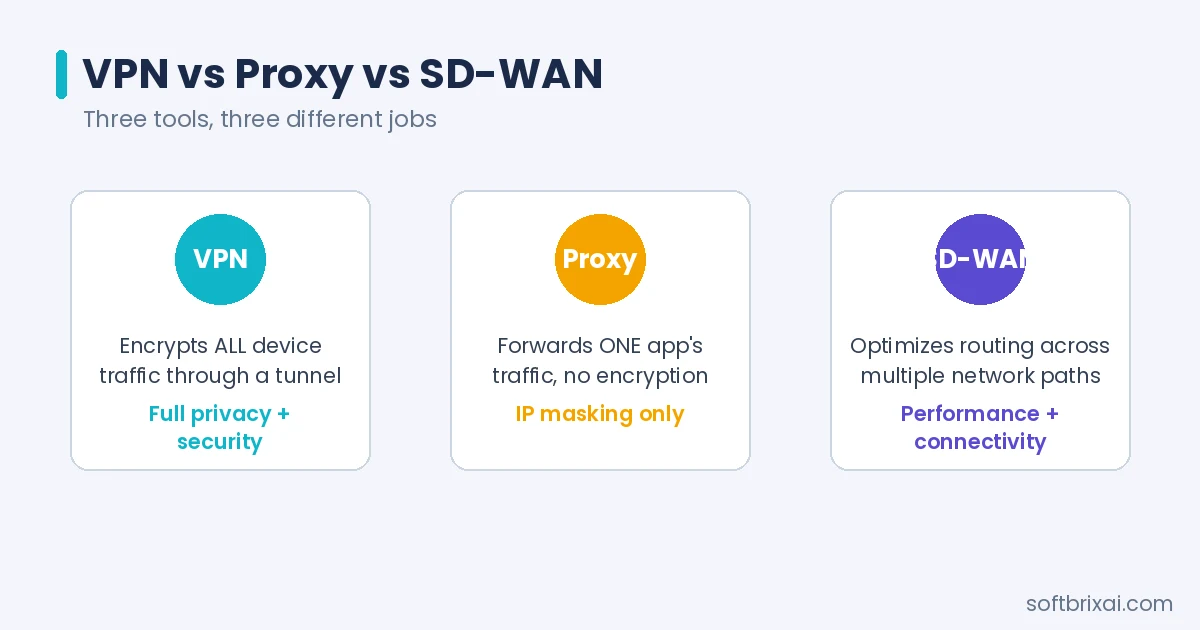
VPNs encrypt all device traffic through encrypted tunnels. Proxies forward specific application traffic without encryption.
VPN privacy protection extends to all applications and protocols. Proxy services typically protect only configured applications. VPNs provide stronger security through encryption.
VPN Alternatives for Secure Remote Access
Several technologies provide alternatives to traditional VPNs for secure remote access. Zero Trust Network Access (ZTNA) provides application-specific access without full network connectivity. Software-defined perimeter approaches verify identity and context before granting access.
Secure Access Service Edge (SASE) combines network security and connectivity in cloud-delivered services. These alternatives address limitations of traditional VPNs for modern distributed environments.
Future Trends
VPN technology continues evolving to address changing security requirements and network architectures. Several trends shape the future of virtual private networking.
Alignment with Zero Trust Networking
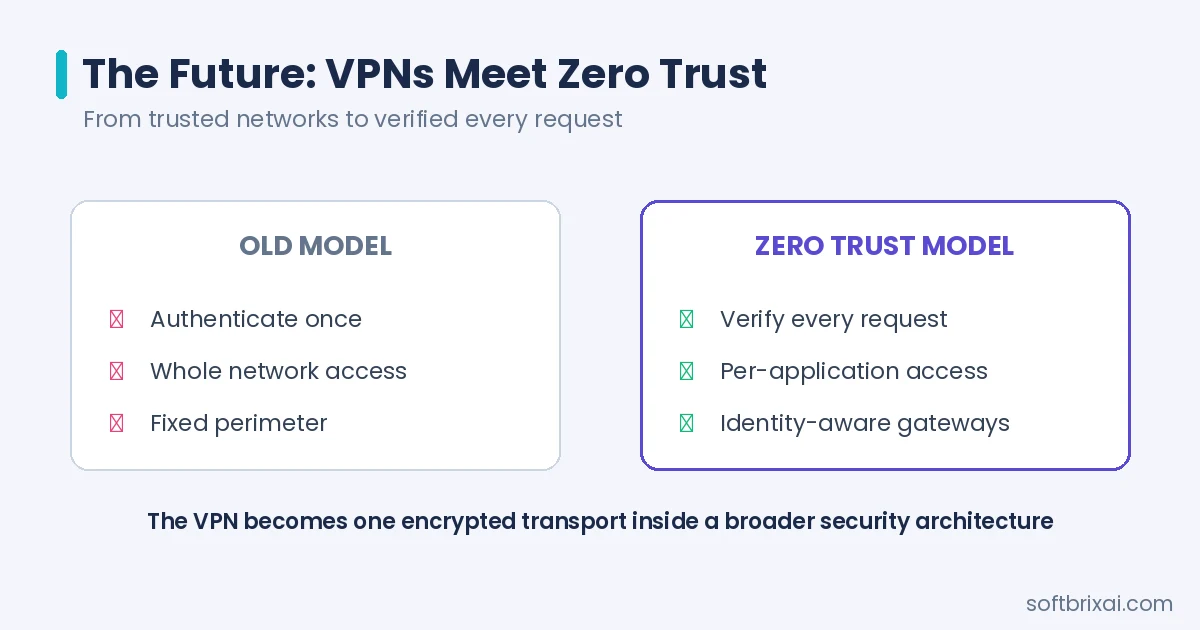
Zero Trust Network architectures verify every access request regardless of location. Traditional VPNs grant network access after authentication, implicitly trusting connected users. Zero trust approaches verify identity and context for each resource request.
VPNs increasingly integrate with zero trust frameworks. Cisco Zero Trust Network solutions combine VPN connectivity with continuous verification. The approach maintains VPN benefits while addressing implicit trust limitations.
Integration with Cloud-Native Security Models
Cloud-native security models protect applications and data wherever they run, rather than guarding a fixed network perimeter. As organizations move workloads into containers, Kubernetes clusters, and serverless platforms, VPN gateways are increasingly deployed as cloud-native services that scale with demand instead of fixed hardware appliances.
In practice, VPN connectivity is provisioned through infrastructure as code, authenticated through cloud identity providers, and monitored alongside the rest of the cloud stack. Site-to-site tunnels connect VPCs and on-premises networks with minimal manual configuration, while remote access shifts toward identity-aware gateways that grant per-application access. The VPN does not disappear in this model. It becomes one encrypted transport inside a broader, software-defined security architecture.
Frequently Asked Questions (FAQs)
What does a VPN do?
A VPN encrypts your internet connection and routes it through a server in a location you choose. To define VPN in practical terms: it hides your IP address, protects data on public Wi-Fi, and lets you appear to browse from another country. VPN stands for Virtual Private Network, and the technology serves both purposes at once, privacy from trackers and ISPs, and secure access to a home or office network from anywhere. It does not make you invisible, but it removes the easiest ways you are watched.
Is a VPN secure?
A VPN is secure when it uses a modern protocol such as WireGuard or OpenVPN with AES-256 or ChaCha20 encryption. The encrypted path between your device and the server is called a VPN tunnel, and it blocks eavesdropping on public networks. Extra features strengthen it further: kill switches cut your connection if the tunnel drops, so nothing leaks unprotected. Security still depends on the provider, because the provider runs the servers. A trustworthy no-log provider is far safer than an unknown free app.
What are the types of VPNs?
The main types are remote access VPNs, which connect one device to a private network, and site-to-site VPNs, which link whole networks together. Cloud VPNs extend those connections to AWS or Azure, SSL VPNs work through a browser, and double VPNs route traffic through two servers. VPNs are also grouped by protocol, including IPsec, OpenVPN, WireGuard, IKEv2, and L2TP/IPsec. Businesses mostly use remote access and site-to-site deployments, while individuals use commercial VPN services built on the same technology.
Is using a VPN legal?
VPNs are legal in most countries, including the United States, Canada, the United Kingdom, and most of Europe, where businesses rely on them daily for remote work. Some countries restrict or ban them, including China, Russia, Iran, and North Korea, where only government-approved services may be allowed. Using a VPN does not make illegal activity legal: downloading pirated content or committing fraud remains unlawful with or without one. Check local rules before traveling, and remember that a VPN can still breach a streaming service’s terms of use.
Does a VPN make you completely anonymous?
No. A VPN hides your IP address and encrypts your traffic, which blocks ISPs, advertisers, and public Wi-Fi snoops from following you easily. It does not hide your identity from websites you log into, and cookies, browser fingerprinting, and payment details can still identify you. Your VPN provider can also see your connection metadata, which is why its logging policy matters. Treat a VPN as strong privacy protection, not total anonymity. For higher anonymity, people combine a VPN with the Tor network, accepting much slower speeds.
Can you be tracked while using a VPN?
Yes, in several ways. Websites track you through accounts, cookies, and browser fingerprints even when your IP address is masked. If the VPN connection drops without a kill switch, your real address can leak, and poorly configured apps may leak DNS requests outside the tunnel. Malware on your device also bypasses VPN protection entirely. A well-configured VPN from a no-log provider removes the most common tracking routes, your ISP and your IP address, but it cannot erase every identifier tied to your behavior online.
How much does a VPN cost?
Personal VPNs typically cost between 3 and 13 US dollars per month. Long plans are cheapest: two-year deals from leading providers often average 2 to 4 dollars monthly, while month-to-month plans sit at the top of the range. The best vpn service for most people balances an audited no-log policy, fast WireGuard speeds, and price rather than chasing the lowest number. Business VPN pricing is usually per user per month and rises with management features. Free VPNs exist, but many pay their bills with ads or user data.
Does a VPN slow down your internet?
Usually, a little. Encryption and the extra trip through a VPN server add overhead, so a small speed loss is normal. With a fast protocol like WireGuard and a nearby, uncrowded server, the drop is often modest and hard to notice in browsing or streaming. Distant or overloaded servers can cut speeds sharply, and double VPN configurations add more latency. If speed matters, choose a nearby server, use split tunneling for trusted apps, and test the service before committing to a long plan.
Conclusion: The Enduring Value of VPNs
Virtual private networks remain the standard way to extend a private network across the public internet. The core recipe has not changed since the 1990s: encrypt the traffic, tunnel it through a controlled server, and authenticate everyone who connects. What has changed is everything around it, from WireGuard’s lean design to cloud gateways and zero trust access models.
Choosing well matters more than choosing quickly. Match the VPN type to the job, insist on modern protocols and a kill switch, and treat provider trust as part of the security model, because the provider sits in the middle of every connection. For businesses, that means tested failover and identity integration. For individuals, it means an audited no-log policy and servers where they are actually needed.
Used with clear expectations, a VPN is neither a magic cloak nor an outdated relic. It is a practical layer of protection that secures data in transit, restores a measure of privacy, and connects people and offices across any distance. That enduring value is why, three decades on, virtual private networks still sit at the center of network security.